code input
2.4.0

完全可自定義,可編輯的語法高光textareas可以以任何HTML形式放置。 [查看演示]
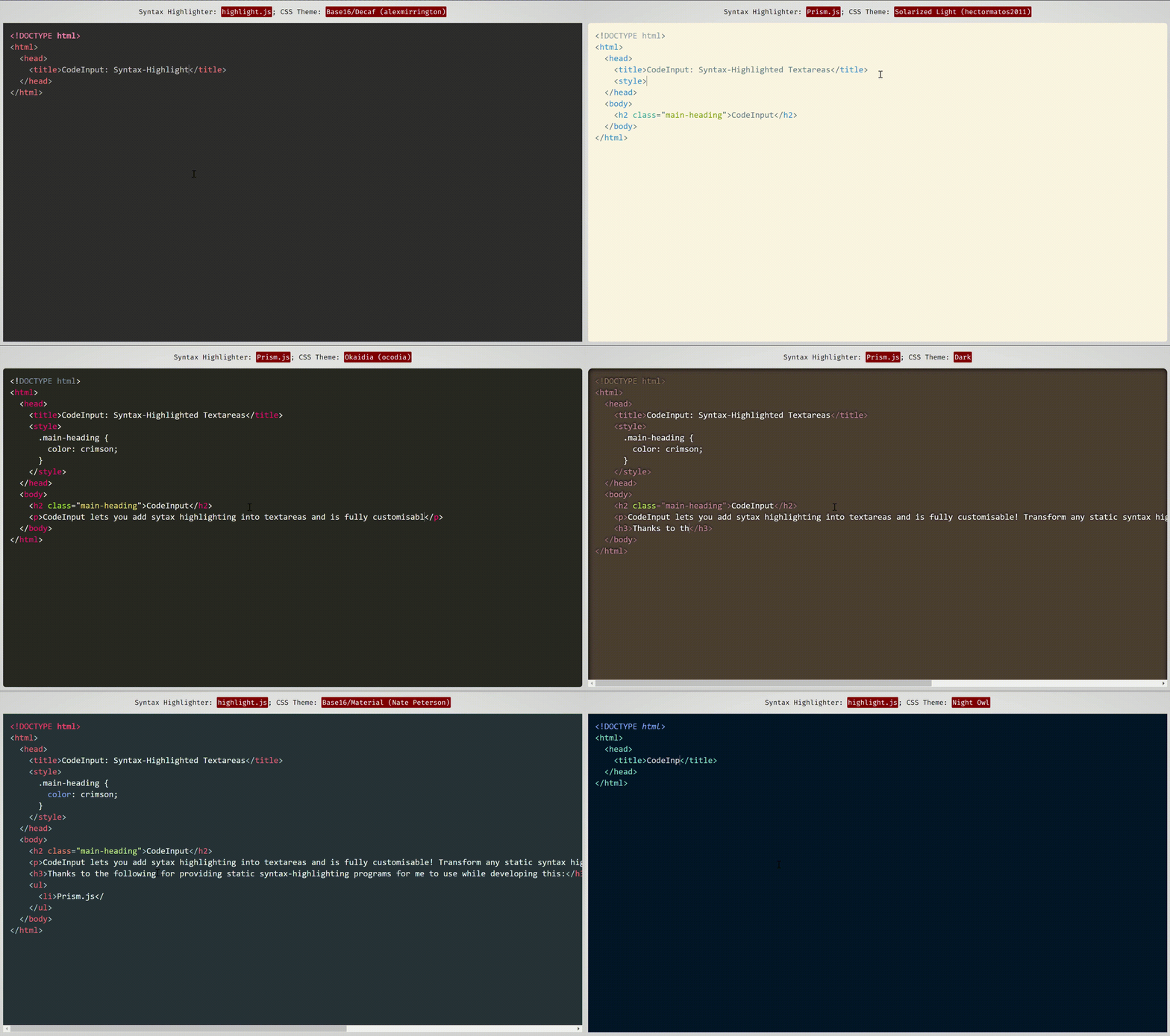 該演示使用了Prism.js和imhimlight.js的主題,這是兩個語法高光程序,它們可以很好地與代碼輸入相吻合併具有兼容性。
前端JavaScript庫,帶有:
code-input使您可以使用HTML自定義元素將任何普通的JavaScript語法主題和程序轉換為可自定義的語法高光的TextAreas 。它使用Vanilla CSS將textarea疊加在pre code塊上,然後處理凹痕,滾動並用JavaScript修復任何結果錯誤。要查看它在幕後的工作方式(不是如何使用此庫),請參閱我寫的這篇CSS-Tricks文章。
與其他前端代碼編輯項目不同, code-input工作方式的簡單性意味著它是高度自定義的。由於它不是功能齊全的編輯器,因此您可以選擇要包含的功能,並使用您喜歡的語法高光算法和主題。
<code-input>元素像<textarea>一樣工作,因此使用html5表單和使用name , value和placeholder符屬性,諸如onchange ,form form reposets的事件,命名幾個...(demo)的事件來支持。
code-input還積累了來自開源貢獻的可選插件中的許多功能,使您可以選擇所需的任何功能。如果您想要的功能不存在,請打開問題 /貢獻!
code-input (以4個簡單步驟)入門code-input還支持打字稿(單擊)您可以按照下面的說明進行操作,或使用此處可用於亮點的啟動代碼,並在此處用於prism.js。
code-input設計既易於使用又可自定義。這是如何使用它來創建語法高光的textareas:
code-inputcode-input輸入的CSS和JS文件。非密碼文件對於在開發過程中使用很有用。 <!--In the <head>-->
< script src =" path/to/code-input.min.js " > </ script >
< link rel =" stylesheet " href =" path/to/code-input.min.css " > <!--In the <head>-->
< script src =" https://cdn.jsdelivr.net/gh/WebCoder49/[email protected]/code-input.min.js " > </ script >
< link rel =" stylesheet " href =" https://cdn.jsdelivr.net/gh/WebCoder49/[email protected]/code-input.min.css " >下一步是設置一個template ,將code-input到您的語法 - 刺激器。如果您使用prism.js或亮點。 JS,則可以使用內置模板,也可以創建自己的模板。在這些示例中,我將模板註冊為"syntax-highlighted" ,但是只要您保持一致,就可以使用任何模板名稱。
亮點:JS:
codeInput . registerTemplate ( "syntax-highlighted" , codeInput . templates . hljs ( hljs , [ ] /* Array of plugins (see below) */ ) ) ;Prism.js:
codeInput . registerTemplate ( "syntax-highlighted" , codeInput . templates . prism ( Prism , [ ] /* Array of plugins (see below) */ ) ) ;風俗:
 codeInput . registerTemplate ( "syntax-highlighted" , new codeInput . Template (
  function ( result_element ) { /* Highlight function - with `pre code` code element */
    /* Highlight code in result_element - code is already escaped so it doesn't become HTML */
  } ,

  true , /* Optional - Is the `pre` element styled as well as the `code` element?
         * Changing this to false uses the code element as the scrollable one rather
         * than the pre element */

  true , /* Optional - This is used for editing code - setting this to true sets the `code`
         * element's class to `language-<the code-input's lang attribute>` */

  false /* Optional - Setting this to true passes the `<code-input>` element as a second
         * argument to the highlight function to be used for getting data- attribute values
         * and using the DOM for the code-input */ ,

  [ ] // Array of plugins (see below)
) ) ;插件允許您在模板中添加額外的功能,例如自動凹痕或對亮點的支持。使用它們,僅:
code-input的JS文件,並在註冊模板之前。 < script src =" code-input.js " > </ script >
<!--...-->
< script src =" plugins/autodetect.js " > </ script >
< script src =" plugins/indent.js " > </ script >
<!--...-->
< script >
codeInput . registerTemplate ( "syntax-highlighted" ,
codeInput . templates . hljs (
hljs ,
[
new codeInput . plugins . Autodetect ( ) ,
new codeInput . plugins . Indent ( true , 2 ) // 2 spaces indentation
]
)
) ;
</ script >
配x 不幸的是,即使這種配置具有邏輯性,將同一類型的多個類型的多個插件當前可能會導致錯誤和未定義的行為。這是第118期,將盡快解決 - 如果您想提供幫助並獲得歡迎的時間,但它也位於維護者的待辦事項列表中。
要查看插件及其功能的完整列表,請參閱插件/readme.md。
現在您已經註冊了模板,可以在HTML中使用自定義<code-input>元素。如果您註冊了多個模板,則需要將模板名稱添加為template屬性。使用pre code元素,使用language屬性將添加language-{value}類現在,您可以使用HTML屬性和事件以及CSS樣式,使您的元素隨心所欲地簡單或交互,好像它是textarea元素一樣!
< code-input language =" HTML " > </ code-input >或者
< code-input language =" HTML " placeholder =" Type code here " template =" syntax-highlighted " onchange =" console.log('Your code is', this.value) " > < href='https://github.com/WebCoder49/code-input' > code-input</a > </ code-input >
配x 目前,您需要為code-input元素的CSS設置--padding屬性,而不是padding屬性。所有其他屬性都應正常工作。
如果您有任何功能,則想將其添加到code-input ,即插件或核心功能,或者發現任何錯誤,請打開問題或叉子並提交拉動請求!對這個開源項目的所有貢獻將不勝感激。您可以在我們的CONTRIBUTING.md文件中查看更多信息。
| ...到目前為止已經貢獻了拉的請求。 |
| (來源:cons.rocks) |






