code input
2.4.0

完全可自定义,可编辑的语法高光textareas可以以任何HTML形式放置。 [查看演示]
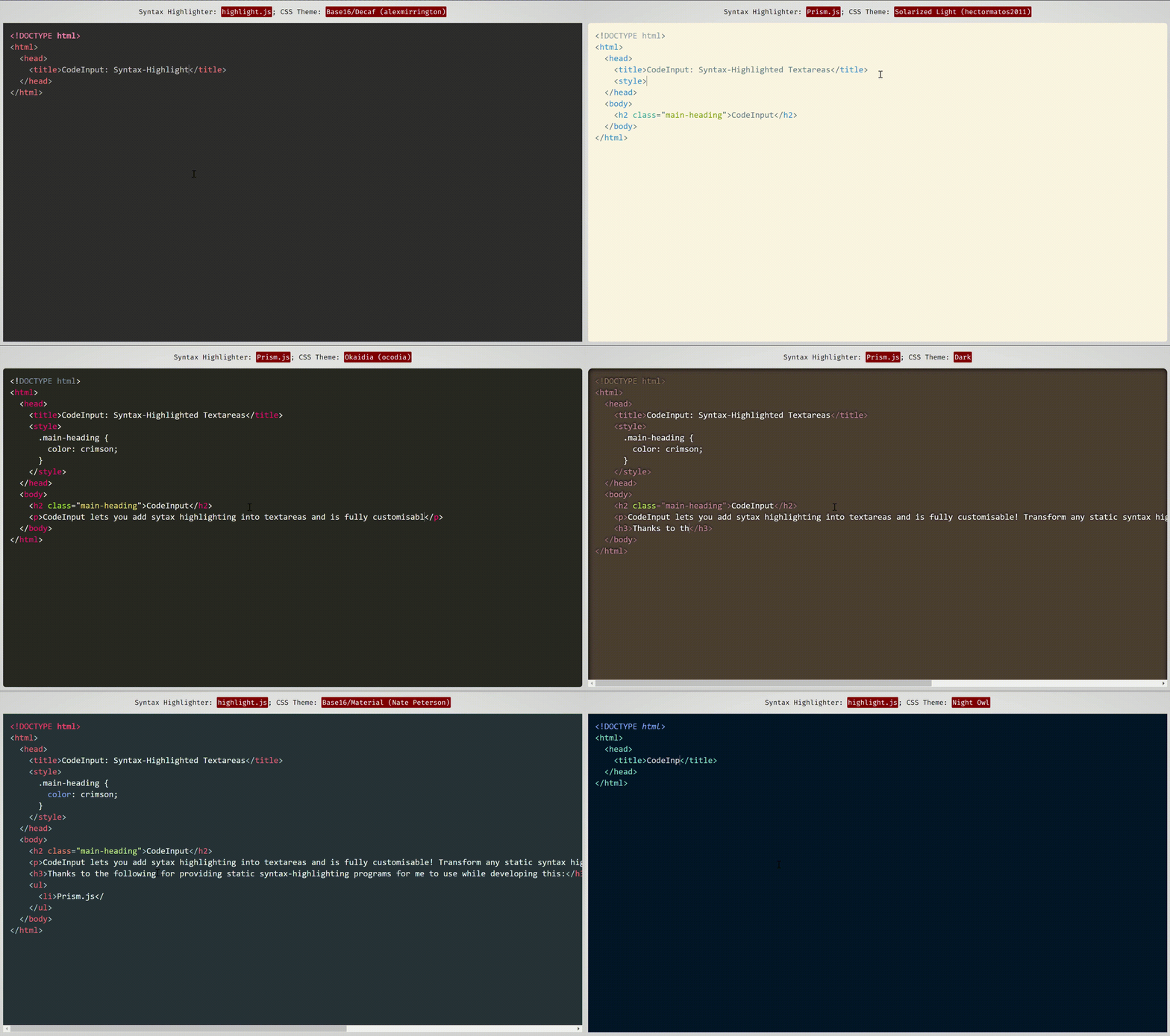 该演示使用了Prism.js和imhimlight.js的主题,这是两个语法高光程序,它们可以很好地与代码输入相吻合并具有兼容性。
前端JavaScript库,带有:
code-input使您可以使用HTML自定义元素将任何普通的JavaScript语法主题和程序转换为可自定义的语法高光的TextAreas 。它使用Vanilla CSS将textarea叠加在pre code块上,然后处理凹痕,滚动并用JavaScript修复任何结果错误。要查看它在幕后的工作方式(不是如何使用此库),请参阅我写的这篇CSS-Tricks文章。
与其他前端代码编辑项目不同, code-input工作方式的简单性意味着它是高度自定义的。由于它不是功能齐全的编辑器,因此您可以选择要包含的功能,并使用您喜欢的语法高光算法和主题。
<code-input>元素像<textarea>一样工作,因此使用html5表单和使用name , value和placeholder符属性,诸如onchange ,form form reposets的事件,命名几个...(demo)的事件来支持。
code-input还积累了来自开源贡献的可选插件中的许多功能,使您可以选择所需的任何功能。如果您想要的功能不存在,请打开问题 /贡献!
code-input (以4个简单步骤)入门code-input还支持打字稿(单击)您可以按照下面的说明进行操作,或使用此处可用于亮点的启动代码,并在此处用于prism.js。
code-input设计既易于使用又可自定义。这是如何使用它来创建语法高光的textareas:
code-inputcode-input输入的CSS和JS文件。非密码文件对于在开发过程中使用很有用。 <!--In the <head>-->
< script src =" path/to/code-input.min.js " > </ script >
< link rel =" stylesheet " href =" path/to/code-input.min.css " > <!--In the <head>-->
< script src =" https://cdn.jsdelivr.net/gh/WebCoder49/[email protected]/code-input.min.js " > </ script >
< link rel =" stylesheet " href =" https://cdn.jsdelivr.net/gh/WebCoder49/[email protected]/code-input.min.css " >下一步是设置一个template ,将code-input到您的语法 - 刺激器。如果您使用prism.js或亮点。JS,则可以使用内置模板,也可以创建自己的模板。在这些示例中,我将模板注册为"syntax-highlighted" ,但是只要您保持一致,就可以使用任何模板名称。
亮点:JS:
codeInput . registerTemplate ( "syntax-highlighted" , codeInput . templates . hljs ( hljs , [ ] /* Array of plugins (see below) */ ) ) ;Prism.js:
codeInput . registerTemplate ( "syntax-highlighted" , codeInput . templates . prism ( Prism , [ ] /* Array of plugins (see below) */ ) ) ;风俗:
 codeInput . registerTemplate ( "syntax-highlighted" , new codeInput . Template (
  function ( result_element ) { /* Highlight function - with `pre code` code element */
    /* Highlight code in result_element - code is already escaped so it doesn't become HTML */
  } ,

  true , /* Optional - Is the `pre` element styled as well as the `code` element?
         * Changing this to false uses the code element as the scrollable one rather
         * than the pre element */

  true , /* Optional - This is used for editing code - setting this to true sets the `code`
         * element's class to `language-<the code-input's lang attribute>` */

  false /* Optional - Setting this to true passes the `<code-input>` element as a second
         * argument to the highlight function to be used for getting data- attribute values
         * and using the DOM for the code-input */ ,

  [ ] // Array of plugins (see below)
) ) ;插件允许您在模板中添加额外的功能,例如自动凹痕或对亮点的支持。使用它们,仅:
code-input的JS文件,并在注册模板之前。 < script src =" code-input.js " > </ script >
<!--...-->
< script src =" plugins/autodetect.js " > </ script >
< script src =" plugins/indent.js " > </ script >
<!--...-->
< script >
codeInput . registerTemplate ( "syntax-highlighted" ,
codeInput . templates . hljs (
hljs ,
[
new codeInput . plugins . Autodetect ( ) ,
new codeInput . plugins . Indent ( true , 2 ) // 2 spaces indentation
]
)
) ;
</ script >
配x 不幸的是,即使这种配置具有逻辑性,将同一类型的多个类型的多个插件当前可能会导致错误和未定义的行为。这是第118期,将尽快解决 - 如果您想提供帮助并获得欢迎的时间,但它也位于维护者的待办事项列表中。
要查看插件及其功能的完整列表,请参阅插件/readme.md。
现在您已经注册了模板,可以在HTML中使用自定义<code-input>元素。如果您注册了多个模板,则需要将模板名称添加为template属性。使用pre code元素,使用language属性将添加language-{value}类现在,您可以使用HTML属性和事件以及CSS样式,使您的元素随心所欲地简单或交互,好像它是textarea元素一样!
< code-input language =" HTML " > </ code-input >或者
< code-input language =" HTML " placeholder =" Type code here " template =" syntax-highlighted " onchange =" console.log('Your code is', this.value) " > < href='https://github.com/WebCoder49/code-input' > code-input</a > </ code-input >
配x 目前,您需要为code-input元素的CSS设置--padding属性,而不是padding属性。所有其他属性都应正常工作。
如果您有任何功能,则想将其添加到code-input ,即插件或核心功能,或者发现任何错误,请打开问题或叉子并提交拉动请求!对这个开源项目的所有贡献将不胜感激。您可以在我们的CONTRIBUTING.md文件中查看更多信息。
| ...到目前为止已经贡献了拉的请求。 |
| (来源:cons.rocks) |






