react native element textinput
Release 2.2.0

一個反應本地文本輸入,tagSinput和自動完成組件易於自定義iOS和Android。
npm install react - native - element - textinput -- save或者
yarn add react - native - element - textinput 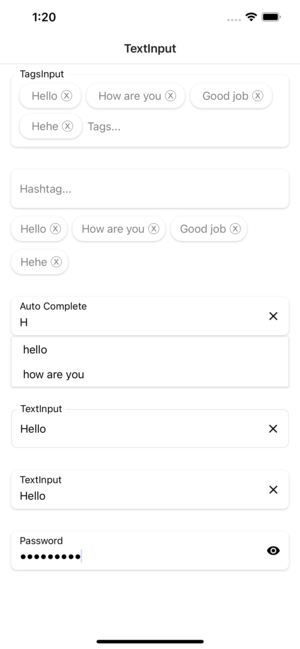
| 道具 | 參數 | Isrequire | 預設 |
|---|---|---|---|
| 模式 | 默認或數字或密碼 | 不 | 開關模式文本輸入 |
| 風格 | ViewStyle | 不 | 容器視圖的造型 |
| 標籤 | 細繩 | 不 | 文本輸入標籤 |
| 標籤風格 | 文本風格 | 不 | 標籤文字樣式 |
| 佔位符 | 文本風格 | 不 | 佔位符文字的樣式 |
| 輸入風格 | 文本風格 | 不 | 輸入視圖的樣式 |
| Texterror | 細繩 | 不 | 文本錯誤 |
| TexterrorStyle | 文本風格 | 不 | 文字錯誤的樣式 |
| Showicon | 布爾 | 不 | 顯示或隱藏圖標清晰的文字 |
| 圖示 | 成像派 | 不 | 圖標清晰文本的樣式 |
| 焦點 | 細繩 | 不 | 當聚焦到文本輸入時顏色 |
| fontfomily | 細繩 | 不 | 自定義字體樣式 |
| RenderLefticon | ()=> jsx.element | 不 | 自定義左圖textInput |
| Renderrighticon | ()=> jsx.element | 不 | 自定義textInput的正確圖標 |
| 道具 | 參數 | Isrequire | 預設 |
|---|---|---|---|
| 風格 | ViewStyle | 不 | 容器視圖的造型 |
| 標籤 | 細繩 | 不 | 文本輸入標籤 |
| 標籤風格 | 文本風格 | 不 | 標籤文字樣式 |
| 佔位符 | 文本風格 | 不 | 佔位符文字的樣式 |
| 輸入風格 | 文本風格 | 不 | 輸入視圖的樣式 |
| Texterror | 細繩 | 不 | 文本錯誤 |
| TexterrorStyle | 文本風格 | 不 | 文字錯誤的樣式 |
| Showicon | 布爾 | 不 | 顯示或隱藏圖標清晰的文字 |
| 圖示 | 成像派 | 不 | 圖標清晰文本的樣式 |
| 焦點 | 細繩 | 不 | 當聚焦到文本輸入時顏色 |
| fontfomily | 細繩 | 不 | 自定義字體樣式 |
| RenderLefticon | ()=> jsx.element | 不 | 自定義左圖textInput |
| Renderrighticon | ()=> jsx.element | 不 | 自定義textInput的正確圖標 |
| 數據 | 細繩[] | 不 | 數據是一個普通的陣列 |
| Hashtagstyle | ViewStyle | 不 | HashTash容器視圖的造型 |
| hashtagtextstyle | 文本風格 | 不 | 標籤文本的造型 |
| onChangeValue | (string [])=> void | 不 | 提交值時調用的回調 |
| Renderhashtagitem | (item,unselect?:()=> void)=> jsx.element | 不 | 從數據中獲取項目並將其渲染到所選的列表中 |
| 道具 | 參數 | Isrequire | 預設 |
|---|---|---|---|
| 風格 | ViewStyle | 不 | 容器視圖的造型 |
| 標籤 | 細繩 | 不 | 文本輸入標籤 |
| 標籤風格 | 文本風格 | 不 | 標籤文字樣式 |
| 佔位符 | 文本風格 | 不 | 佔位符文字的樣式 |
| 輸入風格 | 文本風格 | 不 | 輸入視圖的樣式 |
| Texterror | 細繩 | 不 | 文本錯誤 |
| TexterrorStyle | 文本風格 | 不 | 文字錯誤的樣式 |
| Showicon | 布爾 | 不 | 顯示或隱藏圖標清晰的文字 |
| 圖示 | 成像派 | 不 | 圖標清晰文本的樣式 |
| 焦點 | 細繩 | 不 | 當聚焦到文本輸入時顏色 |
| fontfomily | 細繩 | 不 | 自定義字體樣式 |
| RenderLefticon | ()=> jsx.element | 不 | 自定義左圖textInput |
| Renderrighticon | ()=> jsx.element | 不 | 自定義textInput的正確圖標 |
| 數據 | 細繩[] | 不 | 數據是一個普通的陣列 |
| 標籤 | ViewStyle | 不 | HashTash容器視圖的造型 |
| tagstextstyle | 文本風格 | 不 | 標籤文本的造型 |
| onChangeValue | (string [])=> void | 不 | 提交值時調用的回調 |
| Rendertagsitem | (item,unselect?:()=> void)=> jsx.element | 不 | 從數據中獲取項目並將其渲染到所選的列表中 |
| 道具 | 參數 | Isrequire | 預設 |
|---|---|---|---|
| 數據 | 細繩[] | 不 | 數據是一個普通的陣列 |
| 風格 | ViewStyle | 不 | 容器視圖的造型 |
| 標籤 | 細繩 | 不 | 文本輸入標籤 |
| 標籤風格 | 文本風格 | 不 | 標籤文字樣式 |
| 佔位符 | 文本風格 | 不 | 佔位符文字的樣式 |
| 輸入風格 | 文本風格 | 不 | 輸入視圖的樣式 |
| Texterror | 細繩 | 不 | 文本錯誤 |
| TexterrorStyle | 文本風格 | 不 | 文字錯誤的樣式 |
| Showicon | 布爾 | 不 | 顯示或隱藏圖標清晰的文字 |
| 圖示 | 成像派 | 不 | 圖標清晰文本的樣式 |
| 焦點 | 細繩 | 不 | 當聚焦到文本輸入時顏色 |
| fontfomily | 細繩 | 不 | 自定義字體樣式 |
| RenderLefticon | ()=> jsx.element | 不 | 自定義左圖textInput |
| Renderrighticon | ()=> jsx.element | 不 | 自定義textInput的正確圖標 |
| Renderitem | (item:string)=> jsx.element | 不 | 從數據中獲取項目並將其歸功於列表 |
  import React , { useState } from 'react' ;
  import { StyleSheet , View } from 'react-native' ;
  import { TextInput } from 'react-native-element-textinput' ;

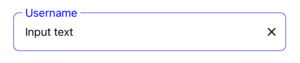
  const TextInputComponent = ( ) => {
    const [ value , setValue ] = useState ( '' ) ;

    return (
      < View style = { styles . container } >
        < TextInput
          value = { value }
          style = { styles . input }
          inputStyle = { styles . inputStyle }
          labelStyle = { styles . labelStyle }
          placeholderStyle = { styles . placeholderStyle }
          textErrorStyle = { styles . textErrorStyle }
          label = "TextInput"
          placeholder = "Placeholder"
          placeholderTextColor = "gray"
          focusColor = "blue"
          onChangeText = { text => {
            setValue ( text ) ;
          } }
        />
      </ View >
    ) ;
  } ;

  export default TextInputComponent ;

  const styles = StyleSheet . create ( {
    container : {
      padding : 16 ,
    } ,
    input : {
      height : 55 ,
      paddingHorizontal : 12 ,
      borderRadius : 8 ,
      borderWidth : 0.5 ,
      borderColor : '#DDDDDD' ,
    } ,
    inputStyle : { fontSize : 16 } ,
    labelStyle : {
      fontSize : 14 ,
      position : 'absolute' ,
      top : - 10 ,
      backgroundColor : 'white' ,
      paddingHorizontal : 4 ,
      marginLeft : - 4 ,
    } ,
    placeholderStyle : { fontSize : 16 } ,
    textErrorStyle : { fontSize : 16 } ,
  } ) ;
  import React , { useState } from 'react' ;
  import { StyleSheet , View } from 'react-native' ;
  import { TextInput } from 'react-native-element-textinput' ;

  const TextInputComponent = ( ) => {
    const [ value , setValue ] = useState ( '' ) ;

    return (
      < View style = { styles . container } >
        < TextInput
          value = { value }
          style = { styles . input }
          inputStyle = { styles . inputStyle }
          labelStyle = { styles . labelStyle }
          placeholderStyle = { styles . placeholderStyle }
          textErrorStyle = { styles . textErrorStyle }
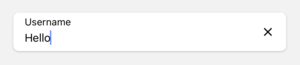
          label = "TextInput"
          placeholder = "Placeholder"
          placeholderTextColor = "gray"
          onChangeText = { text => {
            setValue ( text ) ;
          } }
        />
      </ View >
    ) ;
  } ;

  export default TextInputComponent ;

  const styles = StyleSheet . create ( {
    container : {
      padding : 16 ,
    } ,
    input : {
      height : 55 ,
      paddingHorizontal : 12 ,
      borderRadius : 8 ,
      backgroundColor : 'white' ,
      shadowColor : '#000' ,
      shadowOffset : {
        width : 0 ,
        height : 1 ,
      } ,
      shadowOpacity : 0.2 ,
      shadowRadius : 1.41 ,
      elevation : 2 ,
    } ,
    inputStyle : { fontSize : 16 } ,
    labelStyle : { fontSize : 14 } ,
    placeholderStyle : { fontSize : 16 } ,
    textErrorStyle : { fontSize : 16 } ,
  } ) ;
  import React , { useState } from 'react' ;
  import { StyleSheet , View } from 'react-native' ;
  import { TextInput } from 'react-native-element-textinput' ;

  const TextInputComponent = ( ) => {
    const [ value , setValue ] = useState ( '' ) ;

    return (
      < View style = { styles . container } >
        < TextInput
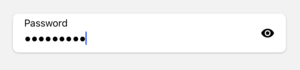
          mode = "password"
          value = { value }
          style = { styles . input }
          inputStyle = { styles . inputStyle }
          labelStyle = { styles . labelStyle }
          placeholderStyle = { styles . placeholderStyle }
          textErrorStyle = { styles . textErrorStyle }
          label = "Password"
          placeholder = "Placeholder"
          placeholderTextColor = "gray"
          onChangeText = { text => {
            setValue ( text ) ;
          } }
        />
      </ View >
    ) ;
  } ;

  export default TextInputComponent ;

  const styles = StyleSheet . create ( {
    container : {
      padding : 16 ,
    } ,
    input : {
      height : 55 ,
      paddingHorizontal : 12 ,
      borderRadius : 8 ,
      backgroundColor : 'white' ,
      shadowColor : '#000' ,
      shadowOffset : {
        width : 0 ,
        height : 1 ,
      } ,
      shadowOpacity : 0.2 ,
      shadowRadius : 1.41 ,
      elevation : 2 ,
    } ,
    inputStyle : { fontSize : 16 } ,
    labelStyle : { fontSize : 14 } ,
    placeholderStyle : { fontSize : 16 } ,
    textErrorStyle : { fontSize : 16 } ,
  } ) ;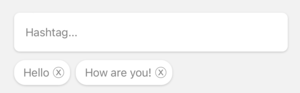
  import React , { useState } from 'react' ;
  import { StyleSheet , View } from 'react-native' ;
  import { HashtagInput } from 'react-native-element-textinput' ;

  const TextInputComponent = ( ) => {
    const [ value , setValue ] = useState < string [ ] > ( [ ] ) ;

    return (
      < View style = { styles . container } >
        < HashtagInput
          data = { value }
          style = { styles . input }
          inputStyle = { styles . inputStyle }
          labelStyle = { styles . labelStyle }
          placeholderStyle = { styles . placeholderStyle }
          textErrorStyle = { styles . textErrorStyle }
          hashtagStyle = { styles . hashtagStyle }
          hashtagTextStyle = { styles . hashtagTextStyle }
          placeholder = "Hashtag..."
          placeholderTextColor = "gray"
          onChangeValue = { value => {
            setValue ( value ) ;
          } }
        />
      </ View >
    ) ;
  } ;

  export default TextInputComponent ;

  const styles = StyleSheet . create ( {
    container : {
      padding : 16 ,
    } ,
    input : {
      height : 55 ,
      paddingHorizontal : 12 ,
      borderRadius : 8 ,
      backgroundColor : 'white' ,
      shadowColor : '#000' ,
      shadowOffset : {
        width : 0 ,
        height : 1 ,
      } ,
      shadowOpacity : 0.2 ,
      shadowRadius : 1.41 ,
      elevation : 2 ,
    } ,
    inputStyle : { fontSize : 16 } ,
    labelStyle : { fontSize : 14 } ,
    placeholderStyle : { fontSize : 16 } ,
    textErrorStyle : { fontSize : 16 } ,
    hashtagStyle : {
      borderWidth : 0 ,
      borderRadius : 16 ,
      padding : 8 ,
      backgroundColor : 'white' ,
      shadowColor : '#000' ,
      shadowOffset : {
        width : 0 ,
        height : 1 ,
      } ,
      shadowOpacity : 0.2 ,
      shadowRadius : 1.41 ,
      elevation : 2 ,
    } ,
    hashtagTextStyle : {
      fontSize : 16 ,
    } ,
  } ) ;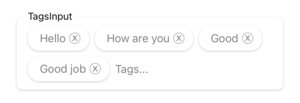
  import React , { useState } from 'react' ;
  import { StyleSheet , View } from 'react-native' ;
  import { TagsInput } from 'react-native-element-textinput' ;

  const TextInputComponent = ( ) => {
    const [ value , setValue ] = useState ( [ ] ) ;

    return (
      < View style = { styles . container } >
        < TagsInput
          data = { value }
          style = { styles . input }
          inputStyle = { styles . inputStyle }
          labelStyle = { styles . labelStyle }
          placeholderStyle = { styles . placeholderStyle }
          textErrorStyle = { styles . textErrorStyle }
          tagsStyle = { styles . tagsStyle }
          tagsTextStyle = { styles . tagsTextStyle }
          label = "TagsInput"
          placeholder = "Tags..."
          placeholderTextColor = "gray"
          onChangeValue = { value => {
            setValue ( value ) ;
          } }
        />
      </ View >
    ) ;
  } ;

  export default TextInputComponent ;

  const styles = StyleSheet . create ( {
    container : {
      padding : 16 ,
    } ,
    input : {
      paddingHorizontal : 12 ,
      borderRadius : 8 ,
      backgroundColor : 'white' ,
      shadowColor : '#000' ,
      shadowOffset : {
        width : 0 ,
        height : 1 ,
      } ,
      shadowOpacity : 0.2 ,
      shadowRadius : 1.41 ,
      elevation : 2 ,
    } ,
    inputStyle : {
      fontSize : 16 ,
      minWidth : 80 ,
    } ,
    labelStyle : {
      fontSize : 14 ,
      position : 'absolute' ,
      top : - 10 ,
      backgroundColor : 'white' ,
      paddingHorizontal : 4 ,
      marginLeft : - 4 ,
    } ,
    placeholderStyle : { fontSize : 16 } ,
    textErrorStyle : { fontSize : 16 } ,
    tagsStyle : {
      borderWidth : 0 ,
      borderRadius : 16 ,
      padding : 8 ,
      backgroundColor : 'white' ,
      shadowColor : '#000' ,
      shadowOffset : {
        width : 0 ,
        height : 1 ,
      } ,
      shadowOpacity : 0.2 ,
      shadowRadius : 1.41 ,
      elevation : 2 ,
    } ,
    tagsTextStyle : {
      fontSize : 16 ,
    } ,
  } ) ;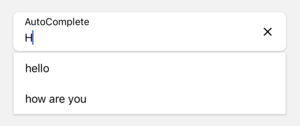
  import React , { useState } from 'react' ;
  import { StyleSheet , View } from 'react-native' ;
  import { AutoComplete } from 'react-native-element-textinput' ;

  const TextInputComponent = ( ) => {
    const [ value , setValue ] = useState ( '' ) ;

    return (
      < View style = { styles . container } >
        < AutoComplete
          value = { value }
          data = { [ 'hello' , 'how are you' , 'complete' ] }
          style = { styles . input }
          inputStyle = { styles . inputStyle }
          labelStyle = { styles . labelStyle }
          placeholderStyle = { styles . placeholderStyle }
          textErrorStyle = { styles . textErrorStyle }
          label = "Auto Complete"
          placeholder = "Placeholder..."
          placeholderTextColor = "gray"
          onChangeText = { e => {
            setValue ( e ) ;
          } }
        />
      </ View >
    ) ;
  } ;

  export default TextInputComponent ;

  const styles = StyleSheet . create ( {
    container : {
      padding : 16 ,
    } ,
    input : {
      height : 55 ,
      paddingHorizontal : 12 ,
      borderRadius : 8 ,
      backgroundColor : 'white' ,
      shadowColor : '#000' ,
      shadowOffset : {
        width : 0 ,
        height : 1 ,
      } ,
      shadowOpacity : 0.2 ,
      shadowRadius : 1.41 ,
      elevation : 2 ,
    } ,
    inputStyle : { fontSize : 16 } ,
    labelStyle : { fontSize : 14 } ,
    placeholderStyle : { fontSize : 16 } ,
    textErrorStyle : { fontSize : 16 } ,
} ) ;