react native element textinput
Release 2.2.0

Komponen TextInput, TagSInput, dan AutoComplete yang reaksi-asli mudah dikustomisasi untuk iOS dan Android.
npm install react - native - element - textinput -- saveatau
yarn add react - native - element - textinput 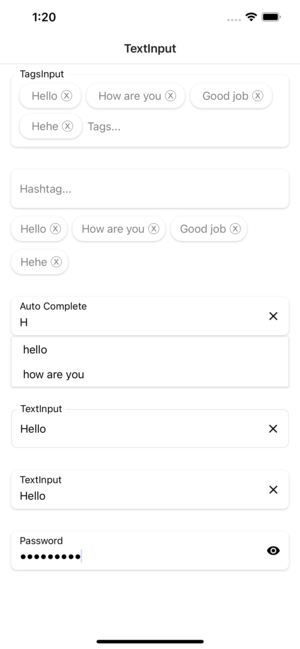
| Alat peraga | Params | Isrequire | bawaan |
|---|---|---|---|
| mode | default atau numerik atau kata sandi | TIDAK | Sakelar mode TextInput |
| gaya | View style | TIDAK | Styling for Container View |
| label | Rangkaian | TIDAK | Label untuk TextInput |
| LabelStyle | TextStyle | TIDAK | Styling for Label Text |
| placeholderStyle | TextStyle | TIDAK | Styling for Placeholderstyle Text |
| InputStyle | TextStyle | TIDAK | Styling for Input View |
| Texterror | Rangkaian | TIDAK | Kesalahan teks |
| Texterrorstyle | TextStyle | TIDAK | Styling untuk kesalahan teks |
| showicon | Boolean | TIDAK | Tampilkan atau Sembunyikan Ikon Teks Hapus |
| Iconstyle | Imagestyle | TIDAK | Styling for Icon Clear Text |
| focusccolor | Rangkaian | TIDAK | Warna saat fokus ke TextInput |
| FontFamily | Rangkaian | TIDAK | Kustomisasi Gaya Font |
| renderlefticon | () => Jsx.element | TIDAK | Kustomisasi ikon kiri untuk TextInput |
| Renderrighticon | () => Jsx.element | TIDAK | Kustomisasi ikon kanan untuk TextInput |
| Alat peraga | Params | Isrequire | bawaan |
|---|---|---|---|
| gaya | View style | TIDAK | Styling for Container View |
| label | Rangkaian | TIDAK | Label untuk TextInput |
| LabelStyle | TextStyle | TIDAK | Styling for Label Text |
| placeholderStyle | TextStyle | TIDAK | Styling for Placeholderstyle Text |
| InputStyle | TextStyle | TIDAK | Styling for Input View |
| Texterror | Rangkaian | TIDAK | Kesalahan teks |
| Texterrorstyle | TextStyle | TIDAK | Styling untuk kesalahan teks |
| showicon | Boolean | TIDAK | Tampilkan atau Sembunyikan Ikon Teks Hapus |
| Iconstyle | Imagestyle | TIDAK | Styling for Icon Clear Text |
| focusccolor | Rangkaian | TIDAK | Warna saat fokus ke TextInput |
| FontFamily | Rangkaian | TIDAK | Kustomisasi Gaya Font |
| renderlefticon | () => Jsx.element | TIDAK | Kustomisasi ikon kiri untuk TextInput |
| Renderrighticon | () => Jsx.element | TIDAK | Kustomisasi ikon kanan untuk TextInput |
| data | Rangkaian[] | TIDAK | Data adalah array biasa |
| Hashtagstyle | View style | TIDAK | Gaya untuk tampilan kontainer hashtash |
| HashtagTextStyle | TextStyle | TIDAK | Gaya untuk teks tagar |
| Onchangevalue | (string []) => void | TIDAK | Panggilan balik yang dipanggil saat mengirimkan nilai |
| renderhashtagitem | (item, unselect?: () => void) => jsx.element | TIDAK | Mengambil item dari data dan memasukkannya ke dalam daftar yang dipilih |
| Alat peraga | Params | Isrequire | bawaan |
|---|---|---|---|
| gaya | View style | TIDAK | Styling for Container View |
| label | Rangkaian | TIDAK | Label untuk TextInput |
| LabelStyle | TextStyle | TIDAK | Styling for Label Text |
| placeholderStyle | TextStyle | TIDAK | Styling for Placeholderstyle Text |
| InputStyle | TextStyle | TIDAK | Styling for Input View |
| Texterror | Rangkaian | TIDAK | Kesalahan teks |
| Texterrorstyle | TextStyle | TIDAK | Styling untuk kesalahan teks |
| showicon | Boolean | TIDAK | Tampilkan atau Sembunyikan Ikon Teks Hapus |
| Iconstyle | Imagestyle | TIDAK | Styling for Icon Clear Text |
| focusccolor | Rangkaian | TIDAK | Warna saat fokus ke TextInput |
| FontFamily | Rangkaian | TIDAK | Kustomisasi Gaya Font |
| renderlefticon | () => Jsx.element | TIDAK | Kustomisasi ikon kiri untuk TextInput |
| Renderrighticon | () => Jsx.element | TIDAK | Kustomisasi ikon kanan untuk TextInput |
| data | Rangkaian[] | TIDAK | Data adalah array biasa |
| Tagsstyle | View style | TIDAK | Gaya untuk tampilan kontainer hashtash |
| TagStextStyle | TextStyle | TIDAK | Gaya untuk teks tagar |
| Onchangevalue | (string []) => void | TIDAK | Panggilan balik yang dipanggil saat mengirimkan nilai |
| RenderTagSitem | (item, unselect?: () => void) => jsx.element | TIDAK | Mengambil item dari data dan memasukkannya ke dalam daftar yang dipilih |
| Alat peraga | Params | Isrequire | bawaan |
|---|---|---|---|
| data | Rangkaian[] | TIDAK | Data adalah array biasa |
| gaya | View style | TIDAK | Styling for Container View |
| label | Rangkaian | TIDAK | Label untuk TextInput |
| LabelStyle | TextStyle | TIDAK | Styling for Label Text |
| placeholderStyle | TextStyle | TIDAK | Styling for Placeholderstyle Text |
| InputStyle | TextStyle | TIDAK | Styling for Input View |
| Texterror | Rangkaian | TIDAK | Kesalahan teks |
| Texterrorstyle | TextStyle | TIDAK | Styling untuk kesalahan teks |
| showicon | Boolean | TIDAK | Tampilkan atau Sembunyikan Ikon Teks Hapus |
| Iconstyle | Imagestyle | TIDAK | Styling for Icon Clear Text |
| focusccolor | Rangkaian | TIDAK | Warna saat fokus ke TextInput |
| FontFamily | Rangkaian | TIDAK | Kustomisasi Gaya Font |
| renderlefticon | () => Jsx.element | TIDAK | Kustomisasi ikon kiri untuk TextInput |
| Renderrighticon | () => Jsx.element | TIDAK | Kustomisasi ikon kanan untuk TextInput |
| renderitem | (item: string) => jsx.element | TIDAK | Mengambil item dari data dan memasukkannya ke dalam daftar |
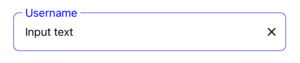
  import React , { useState } from 'react' ;
  import { StyleSheet , View } from 'react-native' ;
  import { TextInput } from 'react-native-element-textinput' ;

  const TextInputComponent = ( ) => {
    const [ value , setValue ] = useState ( '' ) ;

    return (
      < View style = { styles . container } >
        < TextInput
          value = { value }
          style = { styles . input }
          inputStyle = { styles . inputStyle }
          labelStyle = { styles . labelStyle }
          placeholderStyle = { styles . placeholderStyle }
          textErrorStyle = { styles . textErrorStyle }
          label = "TextInput"
          placeholder = "Placeholder"
          placeholderTextColor = "gray"
          focusColor = "blue"
          onChangeText = { text => {
            setValue ( text ) ;
          } }
        />
      </ View >
    ) ;
  } ;

  export default TextInputComponent ;

  const styles = StyleSheet . create ( {
    container : {
      padding : 16 ,
    } ,
    input : {
      height : 55 ,
      paddingHorizontal : 12 ,
      borderRadius : 8 ,
      borderWidth : 0.5 ,
      borderColor : '#DDDDDD' ,
    } ,
    inputStyle : { fontSize : 16 } ,
    labelStyle : {
      fontSize : 14 ,
      position : 'absolute' ,
      top : - 10 ,
      backgroundColor : 'white' ,
      paddingHorizontal : 4 ,
      marginLeft : - 4 ,
    } ,
    placeholderStyle : { fontSize : 16 } ,
    textErrorStyle : { fontSize : 16 } ,
  } ) ;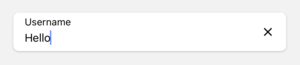
  import React , { useState } from 'react' ;
  import { StyleSheet , View } from 'react-native' ;
  import { TextInput } from 'react-native-element-textinput' ;

  const TextInputComponent = ( ) => {
    const [ value , setValue ] = useState ( '' ) ;

    return (
      < View style = { styles . container } >
        < TextInput
          value = { value }
          style = { styles . input }
          inputStyle = { styles . inputStyle }
          labelStyle = { styles . labelStyle }
          placeholderStyle = { styles . placeholderStyle }
          textErrorStyle = { styles . textErrorStyle }
          label = "TextInput"
          placeholder = "Placeholder"
          placeholderTextColor = "gray"
          onChangeText = { text => {
            setValue ( text ) ;
          } }
        />
      </ View >
    ) ;
  } ;

  export default TextInputComponent ;

  const styles = StyleSheet . create ( {
    container : {
      padding : 16 ,
    } ,
    input : {
      height : 55 ,
      paddingHorizontal : 12 ,
      borderRadius : 8 ,
      backgroundColor : 'white' ,
      shadowColor : '#000' ,
      shadowOffset : {
        width : 0 ,
        height : 1 ,
      } ,
      shadowOpacity : 0.2 ,
      shadowRadius : 1.41 ,
      elevation : 2 ,
    } ,
    inputStyle : { fontSize : 16 } ,
    labelStyle : { fontSize : 14 } ,
    placeholderStyle : { fontSize : 16 } ,
    textErrorStyle : { fontSize : 16 } ,
  } ) ;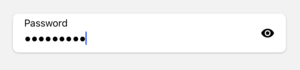
  import React , { useState } from 'react' ;
  import { StyleSheet , View } from 'react-native' ;
  import { TextInput } from 'react-native-element-textinput' ;

  const TextInputComponent = ( ) => {
    const [ value , setValue ] = useState ( '' ) ;

    return (
      < View style = { styles . container } >
        < TextInput
          mode = "password"
          value = { value }
          style = { styles . input }
          inputStyle = { styles . inputStyle }
          labelStyle = { styles . labelStyle }
          placeholderStyle = { styles . placeholderStyle }
          textErrorStyle = { styles . textErrorStyle }
          label = "Password"
          placeholder = "Placeholder"
          placeholderTextColor = "gray"
          onChangeText = { text => {
            setValue ( text ) ;
          } }
        />
      </ View >
    ) ;
  } ;

  export default TextInputComponent ;

  const styles = StyleSheet . create ( {
    container : {
      padding : 16 ,
    } ,
    input : {
      height : 55 ,
      paddingHorizontal : 12 ,
      borderRadius : 8 ,
      backgroundColor : 'white' ,
      shadowColor : '#000' ,
      shadowOffset : {
        width : 0 ,
        height : 1 ,
      } ,
      shadowOpacity : 0.2 ,
      shadowRadius : 1.41 ,
      elevation : 2 ,
    } ,
    inputStyle : { fontSize : 16 } ,
    labelStyle : { fontSize : 14 } ,
    placeholderStyle : { fontSize : 16 } ,
    textErrorStyle : { fontSize : 16 } ,
  } ) ;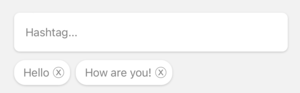
  import React , { useState } from 'react' ;
  import { StyleSheet , View } from 'react-native' ;
  import { HashtagInput } from 'react-native-element-textinput' ;

  const TextInputComponent = ( ) => {
    const [ value , setValue ] = useState < string [ ] > ( [ ] ) ;

    return (
      < View style = { styles . container } >
        < HashtagInput
          data = { value }
          style = { styles . input }
          inputStyle = { styles . inputStyle }
          labelStyle = { styles . labelStyle }
          placeholderStyle = { styles . placeholderStyle }
          textErrorStyle = { styles . textErrorStyle }
          hashtagStyle = { styles . hashtagStyle }
          hashtagTextStyle = { styles . hashtagTextStyle }
          placeholder = "Hashtag..."
          placeholderTextColor = "gray"
          onChangeValue = { value => {
            setValue ( value ) ;
          } }
        />
      </ View >
    ) ;
  } ;

  export default TextInputComponent ;

  const styles = StyleSheet . create ( {
    container : {
      padding : 16 ,
    } ,
    input : {
      height : 55 ,
      paddingHorizontal : 12 ,
      borderRadius : 8 ,
      backgroundColor : 'white' ,
      shadowColor : '#000' ,
      shadowOffset : {
        width : 0 ,
        height : 1 ,
      } ,
      shadowOpacity : 0.2 ,
      shadowRadius : 1.41 ,
      elevation : 2 ,
    } ,
    inputStyle : { fontSize : 16 } ,
    labelStyle : { fontSize : 14 } ,
    placeholderStyle : { fontSize : 16 } ,
    textErrorStyle : { fontSize : 16 } ,
    hashtagStyle : {
      borderWidth : 0 ,
      borderRadius : 16 ,
      padding : 8 ,
      backgroundColor : 'white' ,
      shadowColor : '#000' ,
      shadowOffset : {
        width : 0 ,
        height : 1 ,
      } ,
      shadowOpacity : 0.2 ,
      shadowRadius : 1.41 ,
      elevation : 2 ,
    } ,
    hashtagTextStyle : {
      fontSize : 16 ,
    } ,
  } ) ;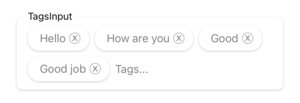
  import React , { useState } from 'react' ;
  import { StyleSheet , View } from 'react-native' ;
  import { TagsInput } from 'react-native-element-textinput' ;

  const TextInputComponent = ( ) => {
    const [ value , setValue ] = useState ( [ ] ) ;

    return (
      < View style = { styles . container } >
        < TagsInput
          data = { value }
          style = { styles . input }
          inputStyle = { styles . inputStyle }
          labelStyle = { styles . labelStyle }
          placeholderStyle = { styles . placeholderStyle }
          textErrorStyle = { styles . textErrorStyle }
          tagsStyle = { styles . tagsStyle }
          tagsTextStyle = { styles . tagsTextStyle }
          label = "TagsInput"
          placeholder = "Tags..."
          placeholderTextColor = "gray"
          onChangeValue = { value => {
            setValue ( value ) ;
          } }
        />
      </ View >
    ) ;
  } ;

  export default TextInputComponent ;

  const styles = StyleSheet . create ( {
    container : {
      padding : 16 ,
    } ,
    input : {
      paddingHorizontal : 12 ,
      borderRadius : 8 ,
      backgroundColor : 'white' ,
      shadowColor : '#000' ,
      shadowOffset : {
        width : 0 ,
        height : 1 ,
      } ,
      shadowOpacity : 0.2 ,
      shadowRadius : 1.41 ,
      elevation : 2 ,
    } ,
    inputStyle : {
      fontSize : 16 ,
      minWidth : 80 ,
    } ,
    labelStyle : {
      fontSize : 14 ,
      position : 'absolute' ,
      top : - 10 ,
      backgroundColor : 'white' ,
      paddingHorizontal : 4 ,
      marginLeft : - 4 ,
    } ,
    placeholderStyle : { fontSize : 16 } ,
    textErrorStyle : { fontSize : 16 } ,
    tagsStyle : {
      borderWidth : 0 ,
      borderRadius : 16 ,
      padding : 8 ,
      backgroundColor : 'white' ,
      shadowColor : '#000' ,
      shadowOffset : {
        width : 0 ,
        height : 1 ,
      } ,
      shadowOpacity : 0.2 ,
      shadowRadius : 1.41 ,
      elevation : 2 ,
    } ,
    tagsTextStyle : {
      fontSize : 16 ,
    } ,
  } ) ;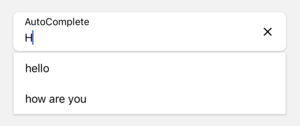
  import React , { useState } from 'react' ;
  import { StyleSheet , View } from 'react-native' ;
  import { AutoComplete } from 'react-native-element-textinput' ;

  const TextInputComponent = ( ) => {
    const [ value , setValue ] = useState ( '' ) ;

    return (
      < View style = { styles . container } >
        < AutoComplete
          value = { value }
          data = { [ 'hello' , 'how are you' , 'complete' ] }
          style = { styles . input }
          inputStyle = { styles . inputStyle }
          labelStyle = { styles . labelStyle }
          placeholderStyle = { styles . placeholderStyle }
          textErrorStyle = { styles . textErrorStyle }
          label = "Auto Complete"
          placeholder = "Placeholder..."
          placeholderTextColor = "gray"
          onChangeText = { e => {
            setValue ( e ) ;
          } }
        />
      </ View >
    ) ;
  } ;

  export default TextInputComponent ;

  const styles = StyleSheet . create ( {
    container : {
      padding : 16 ,
    } ,
    input : {
      height : 55 ,
      paddingHorizontal : 12 ,
      borderRadius : 8 ,
      backgroundColor : 'white' ,
      shadowColor : '#000' ,
      shadowOffset : {
        width : 0 ,
        height : 1 ,
      } ,
      shadowOpacity : 0.2 ,
      shadowRadius : 1.41 ,
      elevation : 2 ,
    } ,
    inputStyle : { fontSize : 16 } ,
    labelStyle : { fontSize : 14 } ,
    placeholderStyle : { fontSize : 16 } ,
    textErrorStyle : { fontSize : 16 } ,
} ) ;