RemoteDebug
Version 3.0.5

Arduino的庫通過Web App或Telnet客戶端通過WiFi進行調試,並帶有Serial Monitor之類的打印命令。

默認情況下,Arduino僅通過串行端口具有調試可能性。這有一些缺點:
使用ESP8266(NodeMCU)或ESP32,我們現在擁有網絡連接(WiFi),可實時流式傳輸調試信息。
該庫非常適合物聯網項目,家庭自動化,移動機器人(可以用電纜進行調試?)或其他WiFi項目。
實際上,該圖書館誕生的是需要調試家庭自動化的物聯網項目。在這個項目中,有一個中央模塊和三個輔助模塊,而這些模塊彼此遠遠不夠。在房子的屋頂下很難到達。要調試這個項目,可以通過USB Cable伴隨傳統方式來伴隨消息交換。
MIP_ESP8266_LIBRARY和我的ESP32 WiFi機器人是使用RemotedeBug的項目的示例。在以下查看:MIP_ESP8266_LIBRARY和ESPLORER_V1
通過客戶緩衝, RemotedeBug改進了(上次發送<= 10ms),以避免在ESP32和ESP8266板上的WiFi網絡延遲
注意:如果您的項目不使用wifi,則可以使用我的另一個庫,即Serialdebug庫,此庫可與任何Arduino板一起使用。
註釋II: RemotedeBug Library現在僅用於Espressif Boards,例如ESP32和ESP8266,如果需要另一個WiFi板,請添加有關此問題的問題,我們將看看是否有可能使您的董事會成為端口。
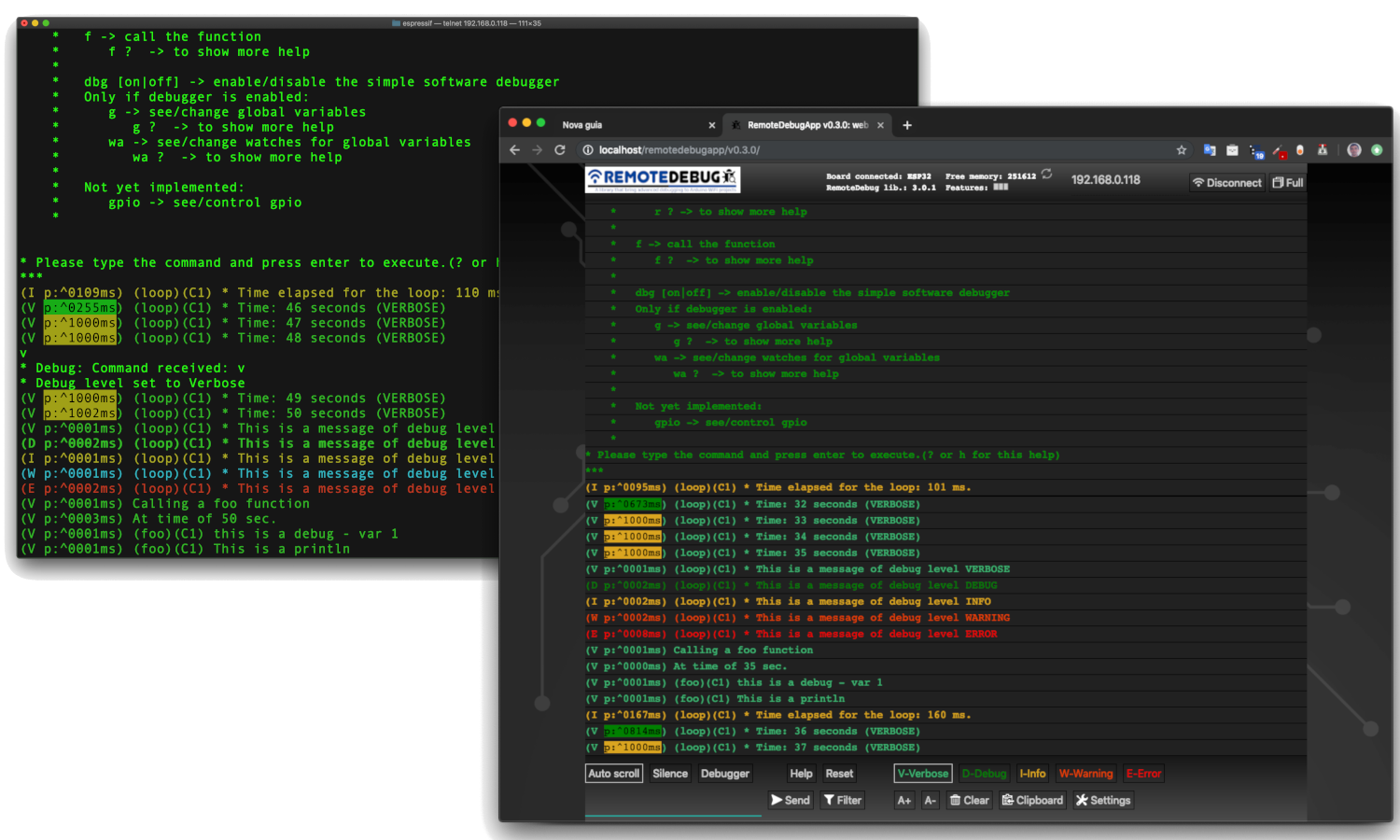
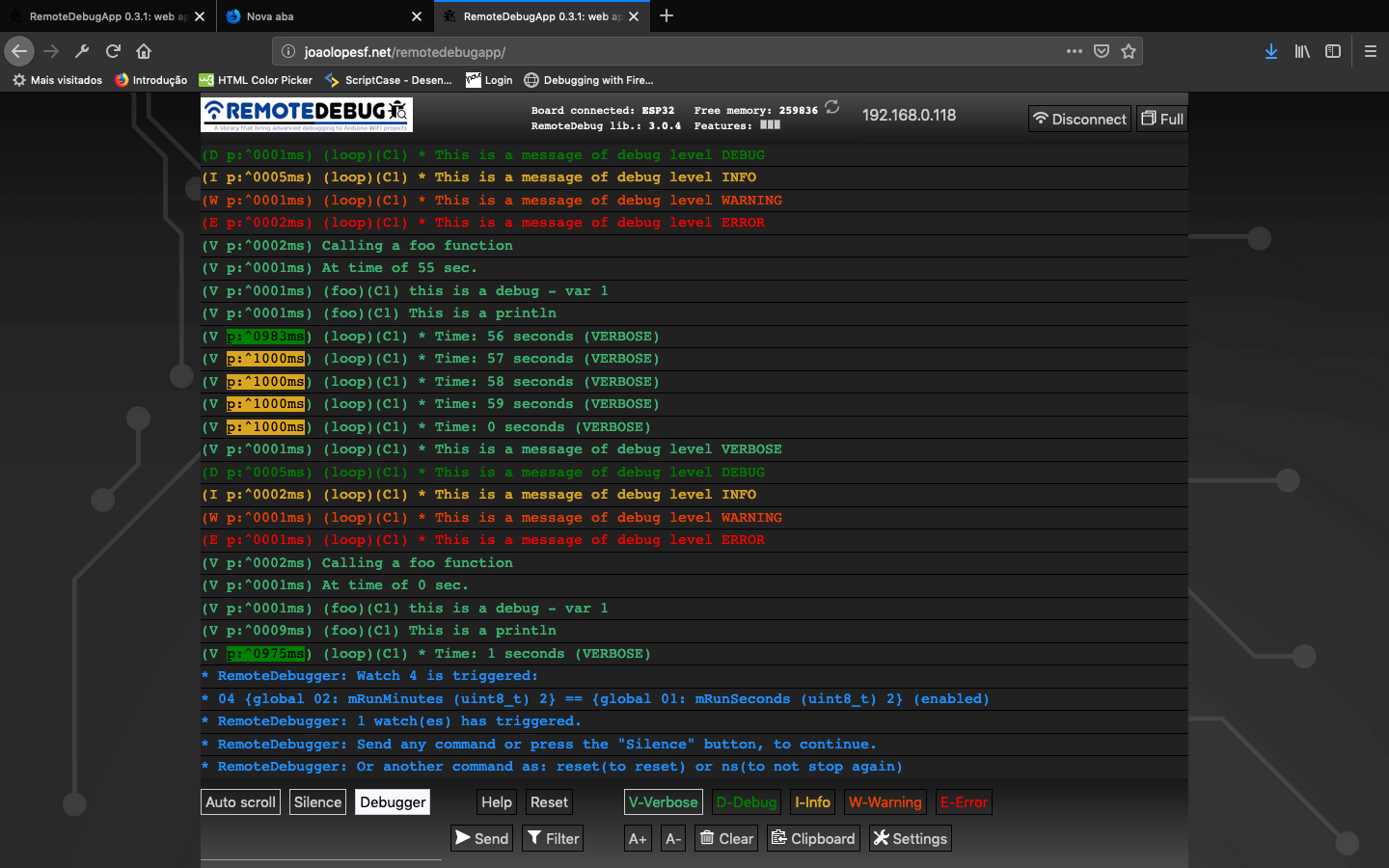
圖像:在remotedebugapp(Web應用程序)中
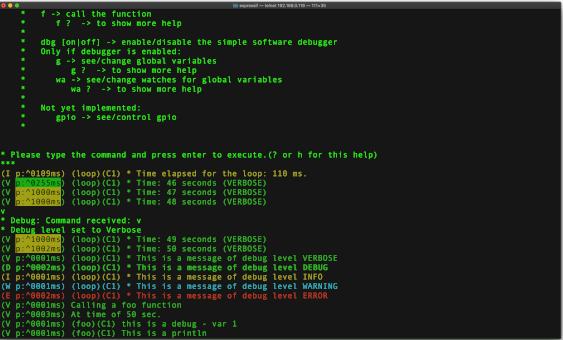
圖片:在Telnet客戶端
YouTube(RemotedeBug V2):
YouTube(與remotedeBug的3個Telnet連接)V1:
通過在GitHub上創建帳戶來為該圖書館的開發做出貢獻。
請給星星,如果您覺得這個庫有用,這也會幫助另一個人,也會發現它。
請添加問題或建議。
remotedebugapp beta
現在還有另一個存儲庫RemotedeBugapp,它用於Internet中的Web應用程序本地副本。在Web Server中發布後,它已使用Web應用程序的Last版本進行更新:http://joaolopesf.net/remotedebugapp。下載它,供互聯網離線時使用。由於它是本地副本,因此該應用將定期檢查新版本。
用於在Web瀏覽器中調試的HTML5 Web應用程序,而是使用Web套接字來交流的Telnet Client。
現在,RemotedeBug V3也具有Web插座服務器,以支持RemotedeBugApp連接。
RemotedeBugapp在Beta中,如果您有任何問題或建議,請添加有關此問題的問題。
telnet連接仍然存在,或任何需要的連接,或脫機使用。
版本2.1.1
版本2.0.0
現在, RemotedeBug可以具有與SerialDebug庫相同的簡單軟件調試器。這是這樣做的,安裝了另一個庫, compedebugger the remotedebugger作為對遠程攝影的添加。為了支持此插件,遠程登錄的更改是最少的,只需幾個回調即可為不需要調試器的項目添加額外的開銷。要獲得更多信息,請訪問remotedebugger github存儲庫。
現在, RemotedeBug擁有一個新的顏色系統,使用更多顏色,如Serialdebugapp所做的那樣
注意:由於remotedebug庫,遷移到Arduino 1.5格式,並帶有文件夾“ SRC”,請刪除並重新安裝庫,以避免重複remotedebug源文件。
版本1.5。 *
在1.5.0版本中,我們有debug*和rdebug*宏(請參見下文),它們自動將調用的函數名稱和核心ID(核心ID僅適用於ESP32)
SerialDebug比serial.print命令:
是否通過USB電纜進行調試,serial.print Command Allways已處理,浪費CPU時間在微控制器上。換句話說,調試命令被處理,某人是否在串行中連接。
使用RemotedeBug ,僅當存在通過telnet或Web應用程序連接調試的任何人時,才能處理所有調試輸出。
隨著資源調試級別,顯示消息的捲將減少更高的級別。例如,僅處理所有消息,如果級別是最低的,則詳細信息,
將RemotedeBug被用來減少CPU和內存中的開銷,並包括客戶端緩衝功能。
在開發過程中,我們可以放置很多調試消息...
但是使用remotedebug ,我們可以在每個水平上提出一個水平。
對於所有消息(級別始終(debuga)或錯誤(Debuge),僅處理並顯示該消息,如果調試級別等於或高於IT級別
按照優先級順序, RemotedeBug具有6個調試級別:
總是顯示:
錯誤:關鍵錯誤
總是:重要消息
另一個級別(顯示級別是相等還是更高的實際級別):
警告:錯誤條件但不是關鍵
信息:信息消息
調試:額外信息
冗長:比平常的信息更多
因此,我們可以將級別更改為冗長,以查看所有消息。或調試僅查看調試或更高級別等。
減少項目可以生成的大量消息,以幫助調試非常好。
RemotedeBug有一個轉換器,可以幫助您遷移您的Arduino代碼,從Serial.Prints到此庫。
remotedebugconverter
即使您想手動執行此操作,也很簡單。請參閱上面的主題。
一個簡單的調試:
debugV ( " * Run time: %02u:%02u:%02u (VERBOSE) " , mRunHours , mRunMinutes , mRunSeconds );可以在串行顯示器中生成此輸出:
    (V p:3065 loop C1) * Run time: 00:41:23 (VERBOSE)

    Where:  V: is the level
            p: is a profiler time, elased, between this and previous debug
            loop: is a function name, that executed this debug
            C1: is a core that executed this debug (and a function of this) (only for ESP32)
            The remaining is the message formatted (printf)
對於ESP32,每個調試中的核心ID對於優化器多核編程非常好。
例如:
顯示幫助( ? )
更改調試級別( V , D , I , W , E ),以更少或更多的消息。
請參閱內存( M )
重置董事會(重置)
請參閱下面有關remotedebug命令。
您可以添加自己的命令,請參見示例
如果您的項目已安裝了RemotedeBugger ,請有一個新命令,例如調用函數,請參閱/更改變量,...
現在, RemotedeBug (版本> = 2.0.0),具有基於SerialDebug庫代碼的簡單軟件調試器。
這是另一個庫,它充當了remotedebug的插件。
請提供更多信息: RemotedeBugger
 For release your device, just uncomment DEBUG_DISABLED in your project
Done this, and no more debug processing.
And better for DEBUG_DISABLED, __RemoteDebug__ have ZERO overhead,
due is nothing of this is compiled.
作為Serialdebug,現在remotedebug(v3)具有一個應用程序,即remotedebugapp,可以在Web瀏覽器中調試。
該應用程序是一個HTM5 Web應用程序,其Websocket可以通信到Arduino Board。
為此,RemotedeBug V3具有Web套接字服務器(可以禁用)。它使用了ArduinoweBockockets庫的本地副本,因為它在Arduino Library Manager中沒有。
作為Web服務器上的大型網頁,Arduino的解決方案將其保存在存儲中,例如Spiffs。但是,沒有自動在以這種方式保存的數據中自動更新新版本,因此該數據對項目有益,但對庫不利。
因此,該應用程序未存儲並由板提供,而是該應用程序在Web中:http://joaolopesf.net/remotedebugapp注意:這不是使用ssl(https),在arduino上的fuse web服務器套接字,而不是支持SSL(WSS)。但是,一頁加載後,所有流量都在本地網絡中,沒有在Internet上公開數據。
RemotedeBugapp是現代的HTML5,需要現代瀏覽器才能工作。 Internet Explorer 11和Safari 10是不支持的示例。但是,您可以使用Athosher,例如Chrome,Edge,Firefox。
Web應用程序在Beta中,請添加問題,有關問題或建議。
現在還有另一個存儲庫RemotedeBugapp,它用於Internet中的Web應用程序本地副本。在Web Server中發布後,它已使用Web應用程序的Last版本進行更新:http://joaolopesf.net/remotedebugapp。下載它,供互聯網離線時使用。由於它是本地副本,因此該應用程序將定期檢查新版本,因為您可以下載新版本。
telnet仍然有效,對於此期間或Web應用程序上的失敗。
Telnet是遠程連接到服務器的標準方法,並在所有操作系統(Windows,Mac,Linux ...)上受支持。
MacOSX和Linux具有本機telnet客戶端。
對於Windows,典型的Telnet客戶端是Putty :Putty。
有一個好的手機工具:手指,請在您的移動商店中找到它。它顯示本地網絡(WiFi)中的所有設備,顯示端口已打開並可以執行telnet客戶端(外部應用)
RemotedeBug設置了telnet服務器,該服務器正在收聽任何想要連接的Telnet客戶端。連接後,將記錄流傳輸到Telnet客戶端。
RemotedeBug非常易於使用,在幾行初始化代碼之後,您可以使用眾所周知的“打印”命令將日誌記錄流傳輸到遠程客戶端。
RemotedeBug支持基於調試級別的日誌記錄過濾:
僅顯示實際調試級別:
注意:這些級別是按照最少的 - >最小值的順序。
或始終顯示(不取決於實際調試級別):
注意:所有調試都已處理,並且僅在具有客戶端連接時顯示。
Telnet客戶端或Web應用程序可以通過鍵入一些簡單的命令來設置調試級別。
RemotedeBug包括一個簡單的探測器。可以通過連接的客戶端(Telnet或Web應用程序)或Arduino代碼本身啟用它。
啟用後,它顯示了2個調試語句之間的時間,並根據經過的時間使用不同的顏色。
一個典型的示例是在函數之前和之後插入記錄,然後您可以看到在功能中花費了多少。
RemotedeBug旨在提供最小的開銷(是否連接),並且僅連接了客戶端(Telnet或Web應用程序),則僅提供處理調試。
RemotedeBug支持可以在客戶端(Telnet或Web應用程序)中輸入的自定義命令。這些觸發了Arduino代碼中的自定義函數的執行。例如,這可以用於根據客戶的要求發送狀態。
當前版本的RemotedeBug尚未包含任何加密身份驗證,僅純文本,僅用於開發,而不用於生產/發布。
如果可能的話,將來版本將包括一種安全的認證方法和進一步測試以支持生產環境。
 - An app to RemoteDebug like SerialDebug have.
- Http page to begin/stop the telnet server or websocket server.
- Authentication as telnet support (kerberos, etc.) to support production environment
只需下載或克隆此存儲庫即可。
或對於Arduino IDE,您可以使用庫管理器安裝和更新庫。
有關安裝幫助,請單擊此:
對於另一個IDE或不使用Arduino IDE的庫管理器,我建議您使用GitHub桌面應用程序克隆,它有助於保持更新。
請打開示例文件夾中的項目,以查看其工作。
# include " RemoteDebug.h " // https://github.com/JoaoLopesF/RemoteDebugremotedebug調試;
在WiFi初始化之後的設置功能中
 // Initialize the server (telnet or web socket) of RemoteDebug

Debug.begin(HOST_NAME);

// OR

Debug.begin(HOST_NAME, startingDebugLevel);

// Options

Debug.setResetCmdEnabled( true ); // Enable the reset command

// Debug.showProfiler(true); // To show profiler - time between messages of Debug
注意:要啟用remotedeBugger的調試器,請訪問此github存儲庫: remotedebugger
在循環功能的尾部
 // Remote debug over WiFi

Debug.handle();

// Or

debugHandle (); // Equal to SerialDebug
在您的任何地方代碼:
# ifndef DEBUG_DISABLED
if (Debug.isActive(Debug.<level>)) {
    Debug. printf ( " bla bla bla: %d %s " , number, str); // OR
    Debug. printf ( " bla bla bla: %d %s " , number, str. c_str ()); // Note: if type is String need c_str() // OR
    Debug. println ( " bla bla bla 2 ln " );
    Debug. printf ( " float: %f n " , value); // Not works in ESP8266 :-(
    // Note: to show floats with printf (ESP8266 only),
    // you can use my ArduinoUtil library -> https://github.com/JoaoLopesF/ArduinoUtil
    Debug. printf ( " float: %s n " , Util. formatFloat (value, 0 , 5 ). c_str ());
}
# endif
注意:使用ISACTIVE,您需要通過debug_disable預編譯條件包圍代碼,以避免將其編譯為生產/發布
或短路(等於serialdebug)(如果只有一次調試,則優先):
 debugA ( " This is a any (always showed) - var %d " , var);
debugV ( " This is a verbose - var %d " , var);
debugD ( " This is a debug - var %d " , var);
debugI ( " This is a information - var %d " , var);
debugW ( " This is a warning - var %d " , var);
debugE ( " This is a error - var %d " , var);

debugV ( " This is a println " );
或者如果您的項目使用多個序列命令來生成單個調試消息,例如:
Serial.print( " a = " );
Serial.print(a);
Serial.print( " b = " );
Serial.print(b);
Serial.print( " c = " );
Serial.println(c);
可以使用rdebug*宏:
 rdebugV ( " a = " );
rdebugV (a);
rdebugV ( " b = " );
rdebugV (b);
rdebugV ( " c = " );
rdebugVln (c);
注意:將來,我建議您將其遷移到一個調試命令:
debugV (a = %d b = %d c = %d " , a, b, c);使用調試級別的一個示例:(假設數據有很多字符)
 if (Debug.isActive(Debug.VERBOSE)) { // Debug message long
    Debug. printf ( " routine: data received: %s n " , data. c_str ()); // Note: if type is String need c_str()
} else if (Debug.isActive(Debug.DEBUG)) { // Debug message short
    Debug. printf ( " routine: data received: %s ... n " , data. substring ( 0 , 20 ). c_str ()); // %.20s not working :-|
}
從版本1.5.0開始,調試宏(調試*和rdebug*)自動將稱為宏的功能名稱和核心ID(僅用於ESP32的核心ID)。
所以:
 void foo () {

    uint8_t var = 1 ;
    debugV ( " this is a debug - var %u " , var);
}
 It will show in client (telnet or web app):

    (V p:^0000ms) (foo)(C1) this is a debug - var 1

Where:

    V -> verbose
    p -> profiler time
    (foo) -> this is a function name that calls the debug macro
    (C1) -> It is running it Core 1 (only for ESP32)
啟用串行啟用的使用調試的示例
 Useful to see messages if setup or
in cause the ESP8266/ESP32 is rebooting (client connection stop before received all messages)
Only for this purposes I suggest it
 // Setup after Debug.begin

Debug.setSerialEnabled( true ); // All messages too send to serial too, and can be see in serial monitor
為了減少開銷,如果不活動,則remotedeBug是斷開客戶端(telnet或Web應用程序)的連接。
 - Please press enter or any key if you need keep the connection
- The default is 5 minutes (You can change it in RemoteDebug.h)
- You can use mDNS to register each node with different name, it helps to connect without know the IP.
請不要忘記使用debug.Sactive子句(如果不使用debug宏)
---> This is very important to reduce overheads and work of debug levels
請參閱基本或高級的樣本,以了解如何使用
在高級樣本中,我使用了Wifimanager庫,Arduinoota和MDN,請查看。
- Ajustment on debugA macro, thanks @jetpax and @cmidgley to add this issue.
 - All public configurations (#defines) have moved to RemoteDebugCfg.h, to facilitate changes for anybody.
- Changed examples, with warnings on change any #define in project,
  with workarounds if it not work. (thanks to @22MarioZ for added this issue)
- Adjustments if web socket is disabled
- Adjustments in examples, added one for debugger
 - Adjustments in silente mode
- Commands from RemoteDebugApp now is treated
- Adjusts to RemoteDebugger support connection by web sockets
 - If not disabled, add a web socket server to comunicate with RemoteDebugApp (HTML5 web app)
- The standard telnet still working, to debug with internet offline
- Ajustment on debugA macro, thanks @jetpax to add this issue
- Add empty rprint* macros, if debug is disabled
 - Create option DEBUG_DISABLE_AUTO_FUNC
- Create macros to be used for code converter: rprint and rprintln
  RemoteDebug now have an code converters to help migrate codes
 - Create precompiler DEBUG_DISABLED to compile for production/release,
  equal that have in SerialDebug
- Adjustments in examples
 - Adjustments for the debugger: it still disable until dbg command, equal to SerialDebug
- The callback will to be called before print debug messages now
- And only if debugger is enabled in RemoteDebugger (command dbg)
-  Changed handle debugger logic
 - Added support to RemoteDebug addon library: the RemoteDebugger, an simple software debugger, based on SerialDebug
- New color system
 - Bug -> sometimes the command is process twice
- Workaround -> check time
- New macros to compatibility with SerialDebug (can use RemoteDebug or SerialDebug) thanks to @phrxmd
- Fixed bug for MAX_TIME_INACTIVE, thanks to @achuchev to add this issue
- Adjustments based on pull request from @jeroenst (to allow serial output with telnet password and setPassword method)
 - Serial output is now not allowed if telnet password is enabled
- Few adjustments
- Few adjustment in write logic
- Serial output adjustments (due bug in password logic)
- Correct rdebug macro (thanks @stritti)
- New silent mode (command s)
 - Auto function name and ESP32 core id for rdebug* macros
- begin method have a option for port number
- Few adjustments
- Added new rdebug?ln to put auto new line
 - Simple text password request feature (disabled by default)

    Notes:
      It is very simple feature, only text, no cryptography,
      and the password is echoed in screen (I not discovery yet how disable it)

      telnet use advanced authentication (kerberos, etc.)
      Such as now RemoteDebug is not for production (releases),
      this kind of authentication will not be done now.
- Adjustments in precompiler macros
 - Bug in write with latest ESP8266 SDK
- Port number can be modified in project Arduino (.ino file)
-  Few adjustments as ESP32 includes
 - Adjustments, as avoid ESP32 include errors
- Telnet port of server can be modified by project
  Just put it in your .ino, before the include:
- Shortcuts and client buffering to avoid mysterious delay of ESP networking
- Adjustments and now runs in Esp32 too.
 - Adjustments and improvements from Beta versions.

  New features:

    - Filter
    - Colors
    - Support to Windows telnet client
- First Beta
 - Sometimes (rarely) the connection over telnet becomes very slow.
  Especially right after uploading firmware.
  Reset command in telnet connection or turn off/on can be resolve it.
  But I need find why it occurs
 First thanks a lot for Igrr for bring to us the Arduino ESP8266 and to Espressif to Arduino ESP32

Thanks to Links2004 for a good web server socket, used for web app connection.

For the logo: thanks to a freepik and pngtree sites for free icons that have in logo

Resources:

  - Example of TelnetServer code in http://www.rudiswiki.de/wiki9/WiFiTelnetServer
  - arduinoWebSockets library in https://github.com/Links2004/arduinoWebSockets
從2019-03-03開始訪問此文件:







