inspect4py
Inspect4py 0.0.8:

庫允許用戶檢查軟件項目文件夾(即目錄及其子目錄),並提取所有最相關的信息,例如類,方法和參數文檔,類(及其方法),功能,等等。
給定一個帶代碼的文件夾, inspect4py將:
inspect4py將返回Library作為其主要類型)所有元數據都被提取為JSON文件。
Inspect4Py目前僅適用於Python 3項目。
inspect4py添加了受GraphCodebert啟發的每個功能的捕獲數據流圖的功能:GitHub&Paper。給出了插圖:
| 原始碼 | 列表輸出 | NetworkX圖像 |
|---|---|---|
DEF MAX(A,B): | ('a',3,'cassfrom',[],[]) | 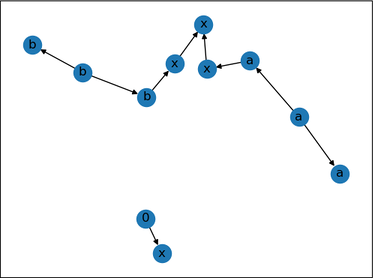 |
inspect4py使用AST,更具體地說是Python中的AST模塊,生成了一個對象樹(每個文件),其類別從AST.AST繼承。
inspect4py將每個輸入文件解析為AST樹,提取相關信息並將其存儲為JSON文件。此外,它還使用另外兩個庫捕獲每個輸入文件的控制流:
我們還使用docstring_parser,該docstring_parser支持REST,Google和NumpyDoc-Style Docstrings。可以在此處找到一些使用此庫進行的(基本)測試。
最後,我們重用Pigar自動生成給定存儲庫的要求。這是一個可選的該概要。為了激活參數( -r ),必須在運行Inspect4Py時指示。
請引用我們的MSR 2022演示紙:
 @inproceedings{FilgueiraG22,
  author    = {Rosa Filgueira and
               Daniel Garijo},
  title     = {Inspect4py: {A} Knowledge Extraction Framework for Python Code Repositories},
  booktitle = {{IEEE/ACM} 19th International Conference on Mining Software Repositories,
               {MSR} 2022, Pittsburgh, PA, USA, May 23-24, 2022},
  pages     = {232--236},
  publisher = {{IEEE}},
  year      = {2022},
  url       = {https://dgarijo.com/papers/inspect4py_MSR2022.pdf},
  doi       = {10.1145/3524842.3528497}
}
確保已安裝了樹劑,需要C符合C,更多信息:
pip install tree-sitter
請注意,如果“ .so”文件無法正常工作,建議運行以下操作以生成OS的SO文件:
 git clone https://github.com/tree-sitter/tree-sitter-python

python inspect4py/build.py
確保已安裝了GraphViz:
sudo apt-get install graphviz
我們已經在python 3.7+中測試了inspect4py 。我們推薦的版本是Python 3.9 。
我們已經在UNIX,MACOS和Windows 11(22621.1265)中測試了inspect4py 。
inspect4py在PYPI中可用!只需像常規軟件包一樣安裝它:
pip install inspect4py
你完成了!
然後嘗試更新Python-Dev實用程序: sudo apt-get install python3.X-dev (其中x是您的python版本)
準備虛擬Python3環境,CD中的cd到inspect4py文件夾中,並按照以下方式安裝包裹:
 git clone https://github.com/SoftwareUnderstanding/inspect4py
cd inspect4py
pip install -e .
你完成了!
 docstring_parser==0.7
astor
graphviz
click
pigar
setuptools==54.2.0
json2html
configparser
bigcode_astgen
GitPython
tree-sitter
如果您想運行評估,請不要忘記將pandas添加到上一組中。
您需要安裝Docker。
接下來,克隆inspect4py存儲庫:
git clone https://github.com/SoftwareUnderstanding/inspect4py/
生成inspect4py的Docker圖像:
docker build --tag inspect4py:1.0 .
運行inspect4py圖像:
docker run -it --rm inspect4py:1.0 /bin/bash
現在您可以運行inspect4py :
root@e04792563e6a:/# inspect4py --help
有關inspect4py執行選項的更多信息,請參見下面的部分(執行)。
請注意,與Docker一起運行inspect4py時,您需要為目標存儲庫提供一條路徑進行分析。您可以通過:
 docker run -it --rm inspect4py:1.0 /bin/bash
# Docker image starts
root@e04792563e6a:/# git clone https://github.com/repo/id
root@e04792563e6a:/# inspect4py -i id
 docker run -it -v -v $PWD:/out --rm inspect4py:1.0 /bin/bash
# Docker image starts
root@e04792563e6a:/# inspect4py -i /out/path/to/repo
使用Docker時的其他有用命令:
 docker cp [OPTIONS] CONTAINER:SRC_PATH DEST_PATH|-
docker image rm -f inspect4py:1.0
可以執行該工具以檢查文件或給定目錄的所有文件(及其子目錄)。例如,它可用於檢查給定的GitHub存儲庫的所有Python文件(以前已在本地克隆)。
默認情況下,該工具將結果存儲在OutputDir目錄中,但是用戶可以使用-o或--output標誌指定自己的目錄名稱。
inspect4py --input_path <FILE.py | DIRECTORY> [--output_dir "OutputDir", --ignore_dir_pattern "__", ignore_file_pattern "__" --requirements --html_output]
為了清楚起見,我們添加了一個help命令來解釋每個輸入參數:
 inspect4py --help


Usage: inspect4py [OPTIONS]

Options:
  --version                       Show the version and exit.
  -i, --input_path TEXT           input path of the file or directory to
                                  inspect.  [required]
  -o, --output_dir TEXT           output directory path to store results. If
                                  the directory does not exist, the tool will
                                  create it.
  -ignore_dir, --ignore_dir_pattern TEXT
                                  ignore directories starting with a certain
                                  pattern. This parameter can be provided
                                  multiple times to ignore multiple directory
                                  patterns.
  -ignore_file, --ignore_file_pattern TEXT
                                  ignore files starting with a certain
                                  pattern. This parameter can be provided
                                  multiple times to ignore multiple file
                                  patterns.
  -r, --requirements              find the requirements of the repository.
  -html, --html_output            generates an html file of the DirJson in the
                                  output directory.
  -cl, --call_list                generates the call list in a separate html
                                  file.
  -cf, --control_flow             generates the call graph for each file in a
                                  different directory.
  -dt, --directory_tree           captures the file directory tree from the
                                  root path of the target repository.
  -si, --software_invocation      generates which are the software
                                  invocation commands to run and test the
                                  target repository.
  -ast, -—abstract_syntax_tree    generates abstract syntax tree in json format.
  -sc, --source_code              generates source code of each ast node.
  -ld, --license_detection        detects the license of the target repository.
  -rm, --readme                   extract all readme files in the target repository.
  -md, --metadata                 extract metadata of the target repository using
                                  Github API.
  -df, --data_flow                extract data flow graph for every function, BOOL
  -st, --symbol_table             symbol table file location. STR
  --help                          Show this message and exit.
有關其他文檔和示例,請查看我們的在線文檔
歡迎解決任何當前問題的貢獻。為了推動您的貢獻,只需將拉力請求推到開發分支( dev ) 。主分支僅具有與最新版本關聯的代碼。
我們要感謝徽標設計師Laura Camacho







