inspect4py
Inspect4py 0.0.8:

ライブラリは、ユーザーがソフトウェアプロジェクトフォルダー(つまり、ディレクトリとそのサブディレクトリ)を検査し、クラス、メソッド、パラメータードキュメント、クラス(およびその方法)などの最も関連するすべての情報を抽出できるようにします。
コードを含むフォルダーが与えられた場合、 inspect4py次のとおりです。
inspect4py Libraryをメインタイプとして返します)すべてのメタデータはJSONファイルとして抽出されます。
Inspect4pyは現在、Python 3プロジェクトでのみ機能しています。
inspect4py GraphCodebert:Github&Paperに触発された各機能のキャプチャデータフローグラフの機能を追加しました。イラストが与えられます:
| ソースコード | リスト出力をリストします | NetworkXイメージ |
|---|---|---|
def max(a、b): | ( 'a'、3、 'comefrom'、[]、[]) | 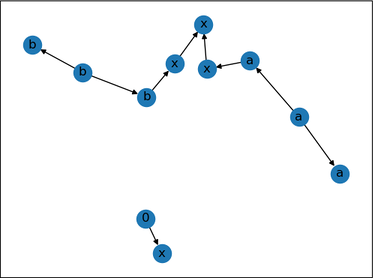 |
inspect4py 、より具体的にはPythonのASTモジュールをより具体的に使用し、クラスがすべてAST.ASTから継承するオブジェクト(ファイルごと)を生成します。
inspect4py 、各入力ファイルをASTツリーとして解析し、関連情報を抽出し、JSONファイルとして保存します。さらに、別の2つのライブラリを使用して、各入力ファイルの制御フローもキャプチャします。
また、REST、Google、およびNumpyDocスタイルのDocstringsをサポートしているDocstring_Parserも使用しています。このライブラリを使用して行われたいくつかの(基本的な)テストは、こちらで見つけることができます。
最後に、特定のリポジトリの要件を自動的に生成するためにPigarを再利用します。これはオプションの機能です。 inspect4pyを実行するときに引数( -r )をアクティブにするために(-r)を示す必要があります。
MSR 2022デモペーパーを引用してください:
 @inproceedings{FilgueiraG22,
  author    = {Rosa Filgueira and
               Daniel Garijo},
  title     = {Inspect4py: {A} Knowledge Extraction Framework for Python Code Repositories},
  booktitle = {{IEEE/ACM} 19th International Conference on Mining Software Repositories,
               {MSR} 2022, Pittsburgh, PA, USA, May 23-24, 2022},
  pages     = {232--236},
  publisher = {{IEEE}},
  year      = {2022},
  url       = {https://dgarijo.com/papers/inspect4py_MSR2022.pdf},
  doi       = {10.1145/3524842.3528497}
}
ツリーシッターがインストールされていることを確認してください。Cコンプライアが必要です。詳細:
pip install tree-sitter
「.so」ファイルが正常に機能していない場合は、OSのSOファイルを生成するために次のCommedを実行することをお勧めします。
 git clone https://github.com/tree-sitter/tree-sitter-python

python inspect4py/build.py
GraphVizがインストールされていることを確認してください。
sudo apt-get install graphviz
Python 3.7+でinspect4pyをテストしました。推奨バージョンはPython 3.9です。
UNIX、MACOS、およびWindows 11(22621.1265)でinspect4pyテストしました。
inspect4py Pypiで利用できます!通常のパッケージのようにインストールするだけです:
pip install inspect4py
あなたは終わりました!
次に、python-devユーティリティを更新してみてください: sudo apt-get install python3.X-dev (xはpythonバージョン)
Virtual Python3 Enviroment、 cdをinspect4pyフォルダーに準備し、次のようにパッケージをインストールします。
 git clone https://github.com/SoftwareUnderstanding/inspect4py
cd inspect4py
pip install -e .
あなたは終わりました!
 docstring_parser==0.7
astor
graphviz
click
pigar
setuptools==54.2.0
json2html
configparser
bigcode_astgen
GitPython
tree-sitter
評価を実行したい場合は、前のセットにpandasを追加することを忘れないでください。
Dockerをインストールする必要があります。
次に、 inspect4pyリポジトリをクローンします。
git clone https://github.com/SoftwareUnderstanding/inspect4py/
inspect4pyのDocker画像を生成します。
docker build --tag inspect4py:1.0 .
inspect4py画像を実行します:
docker run -it --rm inspect4py:1.0 /bin/bash
これで、 inspect4pyを実行できます:
root@e04792563e6a:/# inspect4py --help
inspect4py実行オプションの詳細については、以下のセクション(実行)を参照してください。
Dockerを使用してinspect4py実行する場合、分析するためにターゲットリポジトリへのパスを提供する必要があることに注意してください。あなたはこれを行うことができます:
 docker run -it --rm inspect4py:1.0 /bin/bash
# Docker image starts
root@e04792563e6a:/# git clone https://github.com/repo/id
root@e04792563e6a:/# inspect4py -i id
 docker run -it -v -v $PWD:/out --rm inspect4py:1.0 /bin/bash
# Docker image starts
root@e04792563e6a:/# inspect4py -i /out/path/to/repo
Dockerを使用する場合のその他の有用なコマンド:
 docker cp [OPTIONS] CONTAINER:SRC_PATH DEST_PATH|-
docker image rm -f inspect4py:1.0
このツールは、ファイル、または特定のディレクトリ(およびそのサブディレクトリ)のすべてのファイルを検査するために実行できます。たとえば、特定のGitHubリポジトリのすべてのPythonファイルを検査するために使用できます(以前はローカルでクローン化されていました)。
このツールはデフォルトで結果をOutputDirディレクトリに保存しますが、ユーザーは-oまたは--outputフラグを使用して独自のディレクトリ名を指定できます。
inspect4py --input_path <FILE.py | DIRECTORY> [--output_dir "OutputDir", --ignore_dir_pattern "__", ignore_file_pattern "__" --requirements --html_output]
明確にするために、各入力パラメーターを説明するためのhelpコマンドを追加しました。
 inspect4py --help


Usage: inspect4py [OPTIONS]

Options:
  --version                       Show the version and exit.
  -i, --input_path TEXT           input path of the file or directory to
                                  inspect.  [required]
  -o, --output_dir TEXT           output directory path to store results. If
                                  the directory does not exist, the tool will
                                  create it.
  -ignore_dir, --ignore_dir_pattern TEXT
                                  ignore directories starting with a certain
                                  pattern. This parameter can be provided
                                  multiple times to ignore multiple directory
                                  patterns.
  -ignore_file, --ignore_file_pattern TEXT
                                  ignore files starting with a certain
                                  pattern. This parameter can be provided
                                  multiple times to ignore multiple file
                                  patterns.
  -r, --requirements              find the requirements of the repository.
  -html, --html_output            generates an html file of the DirJson in the
                                  output directory.
  -cl, --call_list                generates the call list in a separate html
                                  file.
  -cf, --control_flow             generates the call graph for each file in a
                                  different directory.
  -dt, --directory_tree           captures the file directory tree from the
                                  root path of the target repository.
  -si, --software_invocation      generates which are the software
                                  invocation commands to run and test the
                                  target repository.
  -ast, -—abstract_syntax_tree    generates abstract syntax tree in json format.
  -sc, --source_code              generates source code of each ast node.
  -ld, --license_detection        detects the license of the target repository.
  -rm, --readme                   extract all readme files in the target repository.
  -md, --metadata                 extract metadata of the target repository using
                                  Github API.
  -df, --data_flow                extract data flow graph for every function, BOOL
  -st, --symbol_table             symbol table file location. STR
  --help                          Show this message and exit.
追加のドキュメントと例については、オンラインドキュメントをご覧ください
現在の問題のいずれかに対処するための貢献は大歓迎です。貢献をプッシュするために、開発ブランチ( dev )にプルリクエストを押してください。マスターブランチには、最新リリースに関連付けられたコードのみがあります。
ロゴのデザイナーであるローラ・カマチョに感謝します







