Squeak SemanticText
1.0.0

Chatgpt,嵌入搜索和檢索尖叫/Smalltalk的檢索一代
語義(來自古希臘語Sēmantikós )是指信息的重要性或含義。雖然尖叫的正常String和Text類以文本為一系列字符和格式化說明, SemanticText側重於文本的意義和理解。隨著NLP(自然語言處理)和LLM(大語言模型)的出現,計算系統中文本可解釋性的可用性正在大大擴展。該軟件包旨在通過提供以下功能來使語義上下文可以在尖叫/Smalltalk中訪問:
有關更多詳細信息,請安裝軟件包並潛入類評論和代碼中,或繼續在下面閱讀。
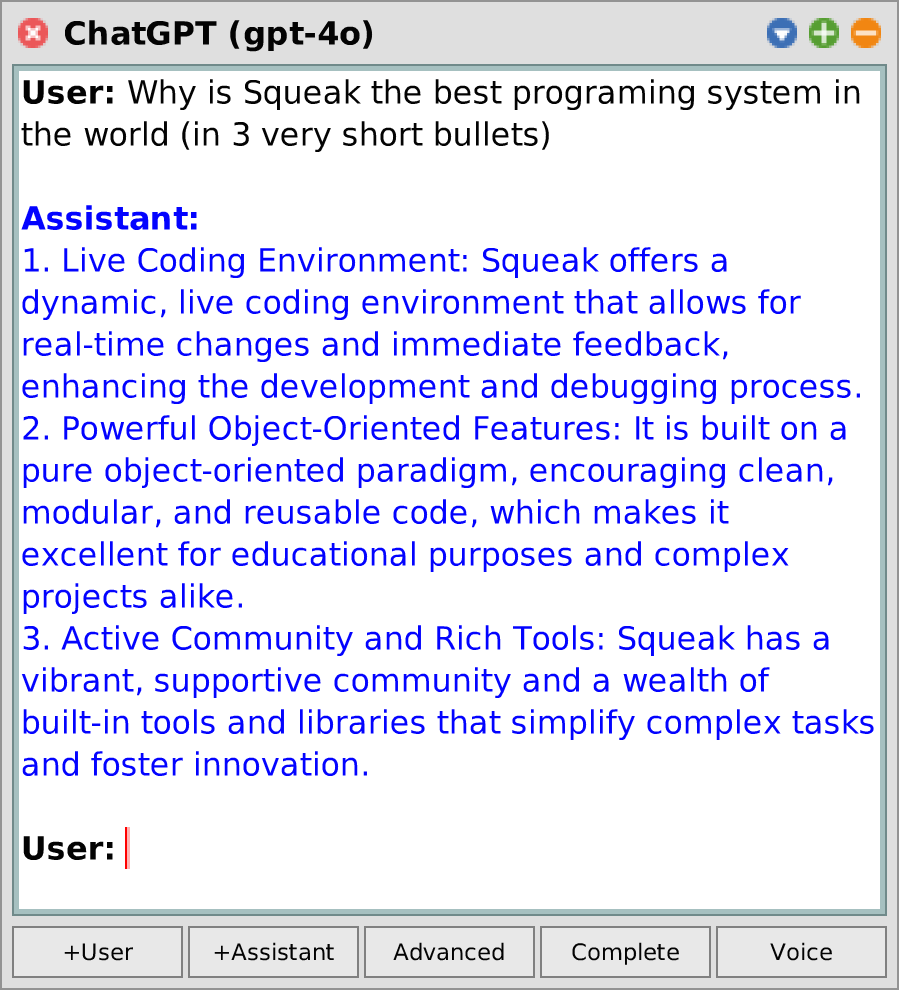
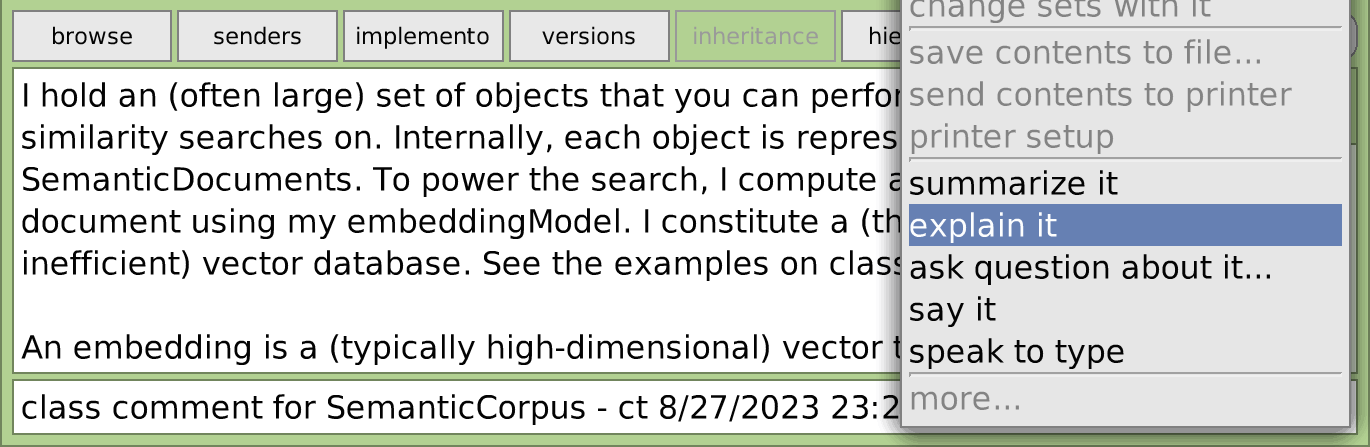
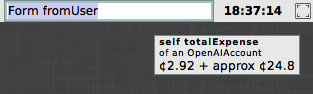
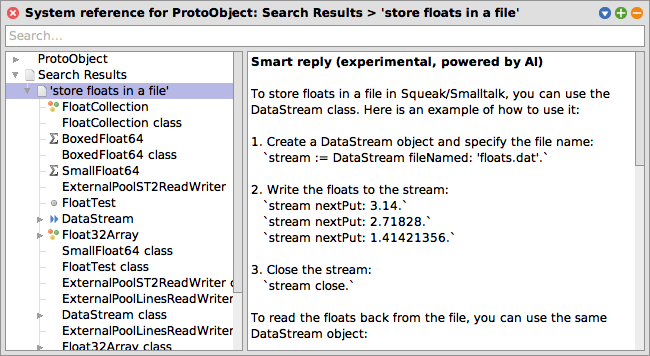
chatgpt 編輯器集成:解釋 /總結 /說 Openai API費用觀察者 | 幫助瀏覽器集成:語義搜索和檢索增強發電(RAG) 尖叫收件箱談話集成:類似的對話搜索 |
仍在開發中。可能會隨之而來。反饋和貢獻歡迎!
獲取當前的吱吱聲軀幹圖像(推薦)或尖叫式6.0圖像(僅支持有限),並在工作區中執行此操作:
 Metacello new
	baseline: ' SemanticText ' ;
	repository: ' github://hpi-swa-lab/Squeak-SemanticText:main ' ;
	get; " for updates "
	load.
由於大多數功能當前基於OpenAI API,因此您需要在此處設置一個API密鑰並將其粘貼到OpenAI API Key偏好中。雖然OpenAI API無法免費使用,但您只為所需的費用付費,並且信用機制也不令人驚訝。令牌真的很便宜 - 例如,您可以設置5美元的門檻,足以聊天超過1 mio。單詞或嵌入50 mio。單詞(或莎士比亞收集的作品的42倍)。
從世界主碼頭欄中,轉到Apps > Chatgpt 。輸入您的提示,然後按CMD + S ,或按聲音進行連續的音頻對話。在高級模式下,您還可以定義模型可以調用的系統指令和功能。通過窗口菜單 ,您也可以選擇其他模型或編輯更多的首選項。
在String , Collection , SequenceableCollection , AbstractSound等上查看*SemanticText擴展方法。一些例子:
 ' smalltalk inventor ' semanticAnswer. -- > ' Alan Kay '
' It ' ' s easier to invent the future than ' semanticComplete. -- > ' to predict it. '

#(apple banana cherry) semanticComplete: 5 . -- > #('date' 'elderberry' 'fig' 'grape' 'honeydew')

Character comment asString semanticSummarize.
Morph comment asString semanticAsk: ' difference between bounds and fullBounds ' .

(( SystemWindow windowsIn: Project current world satisfying: [ :ea | ea model isKindOf: Workspace ]) collect: #label )
	semanticFindRankedObjects: 20 similarToQuery: ' open bugs ' .

' Hello Squeak ' semanticSayIt.
SampledSound semanticFromUser semanticToText.基本用法就是這樣:
 SemanticConversation new
	addSystemMessage: ' You make a bad pun about everything the user writes to you. ' ;
	addUserMessage: ' Yesterday I met a black cat! ' ;
getAssistantReply. -- > ' I hope it was a purr-fectly nice encounter and not a cat-astrophe! '您還可以通過在交互之前插入其他用戶/助手消息來改進提示(幾次提示):
 SemanticConversation new
	addSystemMessage: ' You answer every question with the opposite of the truth. ' ;
	addUserMessage: ' What is the biggest animal on earth? ' ;
	addAssistantMessage: ' The biggest animal on earth is plankton. ' ;
	addUserMessage: ' What is the smallest country on earth? ' ;
getAssistantReply. -- > ' The smallest country on earth is Russia. ' | conversation message |
conversation := SemanticConversation new .
message := conversation
addUserMessage: ' What time is it? ' ;
addFunction: ( SemanticFunction fromString: ' getTime ' action: [ Time now]);
getAssistantMessage.
[conversation resolveAllToolCalls] whileTrue:
[message := conversation getAssistantMessage].
message -- > [assistant] ' The current time is 20:29:52. ' SemanticConversation new
withConfigDo: [ :config |
config temperature: 1.5 .
config nucleusSamplingMass: 0.8 .
config maxTokens: 200 " high temperatures may cause the model to output nonsense and not find an end! " ];
addUserMessage: ' Write a short poem about Alan Kay and Smalltalk ' ;
getAssistantReply -- > ' In the realm of silicon and spark,
A visionary left his mark,
Alan Kay, with dreams unfurled,
Birthed a language to change the world.
Smalltalk, a whisper, soft and clear,
A paradigm that pioneers,
Objects dancing, message flows,
In its design, innovation grows.
A windowed world where thoughts collide,
A playground where ideas abide,
From his vision, the seeds were sown,
For the digital gardens we have grown.
So here ' ' s to Kay, a mind so bright,
Who lit the way with insight ' ' s light,
In every line of code, we find,
A legacy that reshapes the mind. ' 您可以在SemanticConversation的班級側面找到更多示例(例如消息流,檢索多個響應和記錄令牌概率)。
可以這樣定義一個簡單的代理:
 SemanticAgent subclass: #SemanticSqueakAgent
	instanceVariableNames: ' '
	classVariableNames: ' '
	poolDictionaries: ' '
	category: ' SemanticText-Model-Agents ' .

SemanticSqueakAgent >> initializeConversation: aConversation
	super initializeConversation: aConversation.
	aConversation addSystemMessage: ' You are a Squeak/Smalltalk assistant. ' .

SemanticSqueakAgent >> eval: aString
	" Evaluate a Smalltalk expression in the running Squeak image. "
	< function: eval(
		expression: string " e.g. '(8 nthRoot: 3)-1' "
	) >
	^ Compiler evaluate: aString
然後,這樣調用:
 SemanticSqueakAgent makeNewConversation
	addUserMessage: ' how many windows are open ' ;
getAssistantReply -- > ' You currently have 138 open windows in your Squeak environment. '或通過使用SemanticSqueakAgent openNewConversation來提出對話編輯。
一切都始於類SemanticCorpus 。例如,這是您如何為尖叫的幫助系統設置語義搜索語料庫:
 " Set up and populate semantic corpus "
helpTopics := CustomHelp asHelpTopic semanticDeepSubtopicsSkip: [ :topic |
	topic title = ' All message categories ' ]. " not relevant "
corpus := SemanticPluggableCorpus titleBlock: #title contentBlock: #contents .
corpus addFragmentDocumentsFromAll: helpTopics.
corpus estimatePriceToInitializeEmbeddings. -- > approx ¢ 1.66
corpus updateEmbeddings.

" Similarity search "
originTopic := helpTopics detect: [ :ea | ea key = #firstContribution ].
results := corpus findObjects: 10 similarToObject: originTopic.

" Semantic search "
results := corpus findObjects: 10 similarToQuery: ' internet connection ' .
" Optionally, display results in a HelpBrowser "
resultsTopic := HelpTopic named: ' Search results ' .
results do: [ :ea | resultsTopic addSubtopic: ea].
resultsTopic browse.

" RAG "
(corpus newConversationForQuery: ' internet connection ' ) open.在任何文本編輯器上yound單擊(在此之前選擇選擇的一部分文本),單擊更多... ,然後選擇“解釋” ,總結它,詢問問題...或說。還是通過鍵盤不久: ESC ? ,輸入, q 。 ?
您也可以選擇“與類型”的說法來指示文本。
打開世界主碼頭欄的幫助瀏覽器,然後將查詢輸入搜索字段。請注意,目前,同義搜索詞比問題更好(例如,“我可以訪問互聯網?”而不是“互聯網連接”?)。
筆記
首先需要在首選項瀏覽器中啟用此功能(“幫助瀏覽器中的語義搜索”)。
獲取尖叫收件箱談話(世界主碼頭欄>工具>尖叫收件箱談話),通過“設置”菜單將其更新為最新版本,然後在Preageences瀏覽器中打開“ Squeak Inbox Talk”中的選項語義搜索。之後,您可以:
這是一個實驗研究項目。請查看語義Queak,我們的論文或我的論文,以獲取更多信息。
這樣做:
OpenAIAccount openExpenseWatcher我個人喜歡從這種變體中獲取最後一個子類型,並將其插入我的主要碼頭欄中。如果您也喜歡這樣做,請提交功能請求或拉動請求以自動化此問題!
提供商可以註冊不同的模型,通過SemanticText接口進行選擇和使用。今天的主要提供商是OpenAI API客戶端,但可能會遵循更多的客戶。註冊表可以像defaultEmbeddingModel , chooseDefaultConversationModel或registeredSpeechSynthesisModels一樣查詢。
為了進行調試和測試目的,我們還為對話和嵌入式提供了模擬提供商。
此外,還有一個針對克拉特插件的語音合成提供商。它需要語音軟件包,可以與SemanticTextProviders-Klatt軟件包分開加載(或通過指定load: #full )。
我的論文附錄中提供了有關Semantictext的體系結構,API和工具的更多詳細信息。請注意,這可能包括過時的信息或尚未應用的重構(但也包括不錯的圖表和示例!以及背後的一堆理論!)。
目前,已知以下項目使用Semantictext:
雖然在技術上無關,但Squeakgpt探索了使用生成AI進行尖叫的類似方法。
感謝Marcel Taeumel(@marceltaeumel)在整個學習和實驗中為我提供建議。感謝Toni Mattis(@Amintos)的有關嵌入搜索的提示(尤其是541ae49 )。感謝Vincent Eichhorn(@vincenteichhorn)給我概述了向量DBS的索引技術(很快就會實施!)。感謝R/MachineLearning的人們建議替代嵌入模型(您的建議可能有一天可以實施)。
快樂的吱吱作響!





![尖叫收件箱談話集成:類似的對話搜索。 [尖叫 - dev]有關浮子和縮放小數的符號的一些問題和評論。類似的對話(由OpenAI嵌入式提供) /實驗。可能有偏見或無效。 /數字問題:讀取浮點常數 /回复:浮點平等? (WAS:[錯誤]浮動nan的) /圓形浮子 /小數作為浮子中的分數 /錯誤? / float差異 /浮點精度 / ...](https://images.downcodes.com/uploads/20250528/img_68365b8ac47ec34.png)