Squeak SemanticText
1.0.0

Squeak/Smalltalk에 대한 Chatgpt, Embedding Search 및 검색 세대
시맨틱 (고대 그리스어 Sēmantikós )은 정보의 중요성 또는 의미를 말합니다. Squeak의 일반 String 및 Text 클래스는 일련의 문자 및 서식 지침으로 텍스트에 대한 구문을 볼 수 있지만 SemanticText 텍스트의 의미와 이해에 중점을 둡니다. NLP (자연어 처리) 및 LLM (대형 언어 모델)의 출현으로 컴퓨팅 시스템에서 텍스트 해석 가능성의 가용성이 크게 확장되고 있습니다. 이 패키지는 다음과 같은 기능을 제공하여 Squeak/Smalltalk에서 시맨틱 컨텍스트에 액세스 할 수 있도록하는 것을 목표로합니다.
자세한 내용은 패키지를 설치하고 클래스 주석 및 코드에 뛰어 들거나 아래에서 계속 읽으십시오.
chatgpt 편집기 통합 : 설명 / 요약 / Say It Openai API 비용 감시자 | 도움말 브라우저 통합 : 시맨틱 검색 및 검색 증강 생성 (RAG) Squeak Inbox Talk 통합 : 유사한 대화 검색 |
여전히 개발 중입니다. 더 많은 것을 따를 수도 있습니다. 피드백과 기부금을 환영합니다!
현재 Squeak 트렁크 이미지 (권장) 또는 Squeak 6.0 이미지 (제한된 지원 만)를 받고 작업 공간에서이를 수행하십시오.
 Metacello new
	baseline: ' SemanticText ' ;
	repository: ' github://hpi-swa-lab/Squeak-SemanticText:main ' ;
	get; " for updates "
	load.
대부분의 기능은 현재 OpenAI API를 기반으로하므로 여기에 API 키를 설정하여 OpenAI API Key 기본 설정에 붙여 넣어야합니다. OpenAI API는 자유롭게 사용할 수 없지만 필요한 것에 대해서만 비용을 지불하며 놀라운 신용 메커니즘은 없습니다. 토큰은 정말 저렴합니다. 예를 들어, $ 5의 임계 값을 설정할 수 있습니다. 이는 1 MIO 이상의 채팅에 충분합니다. 단어 또는 임베딩 50 mio. 단어 (또는 셰익스피어의 수집 된 작품의 42 배).
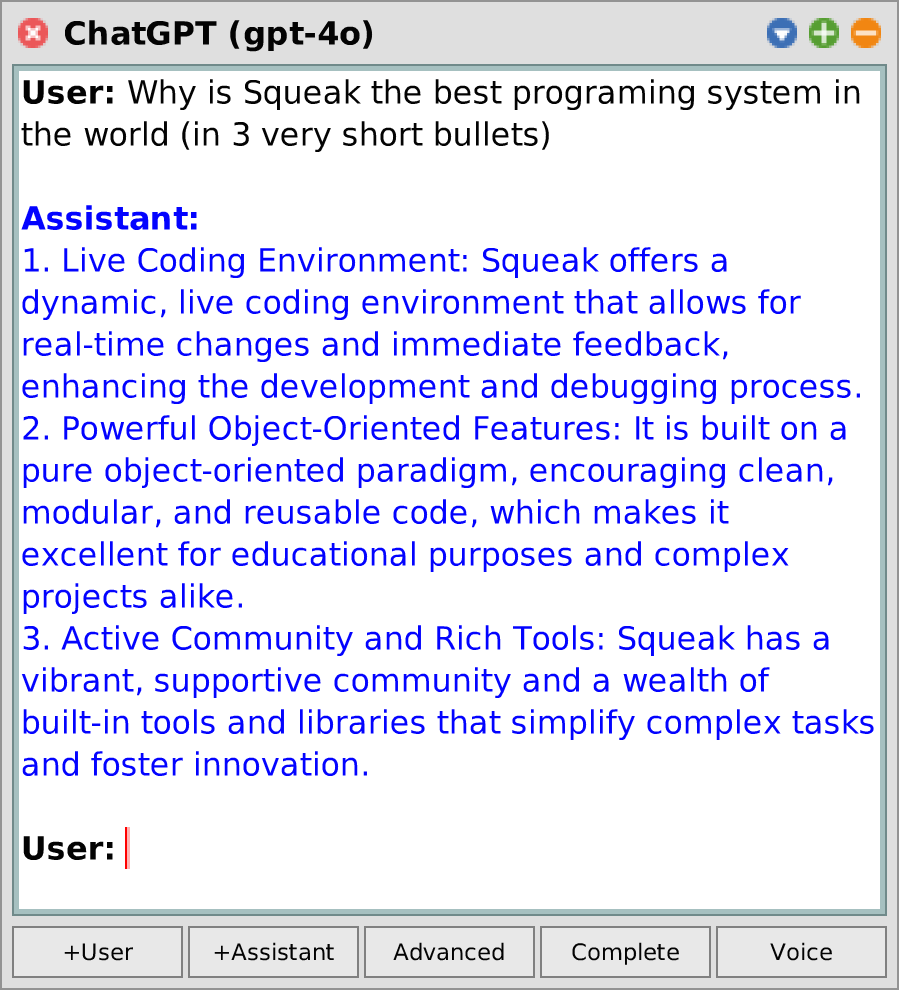
세계 메인 도킹 바에서 앱 > chatgpt 로 이동하십시오. 프롬프트를 입력하고 CMD + S를 누르거나 보이스를 눌러 지속적인 오디오 대화를합니다. 고급 모드에서는 모델이 호출 할 수있는 시스템 지침 및 기능을 정의 할 수도 있습니다. 창 메뉴를 통해 , 다른 모델을 선택하거나 추가 선호도를 편집 할 수도 있습니다.
String , Collection , SequenceableCollection , AbstractSound 등의 *SemanticText 확장 메소드를 확인하십시오. 몇 가지 예 :
 ' smalltalk inventor ' semanticAnswer. -- > ' Alan Kay '
' It ' ' s easier to invent the future than ' semanticComplete. -- > ' to predict it. '

#(apple banana cherry) semanticComplete: 5 . -- > #('date' 'elderberry' 'fig' 'grape' 'honeydew')

Character comment asString semanticSummarize.
Morph comment asString semanticAsk: ' difference between bounds and fullBounds ' .

(( SystemWindow windowsIn: Project current world satisfying: [ :ea | ea model isKindOf: Workspace ]) collect: #label )
	semanticFindRankedObjects: 20 similarToQuery: ' open bugs ' .

' Hello Squeak ' semanticSayIt.
SampledSound semanticFromUser semanticToText.기본 사용량은 다음과 같습니다.
 SemanticConversation new
	addSystemMessage: ' You make a bad pun about everything the user writes to you. ' ;
	addUserMessage: ' Yesterday I met a black cat! ' ;
	getAssistantReply. -- > ' I hope it was a purr-fectly nice encounter and not a cat-astrophe! '
상호 작용 전에 추가 사용자/비서 메시지 쌍을 삽입하여 프롬프트를 향상시킬 수도 있습니다 ( 소수의 프롬프트 ).
 SemanticConversation new
	addSystemMessage: ' You answer every question with the opposite of the truth. ' ;
	addUserMessage: ' What is the biggest animal on earth? ' ;
	addAssistantMessage: ' The biggest animal on earth is plankton. ' ;
	addUserMessage: ' What is the smallest country on earth? ' ;
getAssistantReply. -- > ' The smallest country on earth is Russia. ' | conversation message |
conversation := SemanticConversation new .
message := conversation
addUserMessage: ' What time is it? ' ;
addFunction: ( SemanticFunction fromString: ' getTime ' action: [ Time now]);
getAssistantMessage.
[conversation resolveAllToolCalls] whileTrue:
[message := conversation getAssistantMessage].
message -- > [assistant] ' The current time is 20:29:52. ' SemanticConversation new
withConfigDo: [ :config |
config temperature: 1.5 .
config nucleusSamplingMass: 0.8 .
config maxTokens: 200 " high temperatures may cause the model to output nonsense and not find an end! " ];
addUserMessage: ' Write a short poem about Alan Kay and Smalltalk ' ;
getAssistantReply -- > ' In the realm of silicon and spark,
A visionary left his mark,
Alan Kay, with dreams unfurled,
Birthed a language to change the world.
Smalltalk, a whisper, soft and clear,
A paradigm that pioneers,
Objects dancing, message flows,
In its design, innovation grows.
A windowed world where thoughts collide,
A playground where ideas abide,
From his vision, the seeds were sown,
For the digital gardens we have grown.
So here ' ' s to Kay, a mind so bright,
Who lit the way with insight ' ' s light,
In every line of code, we find,
A legacy that reshapes the mind. ' SemanticConversation 클래스 측면에서 더 많은 예제 (예 : 메시지 스트리밍, 여러 응답 검색 및 로깅 토큰 확률)를 찾을 수 있습니다.
간단한 에이전트는 다음과 같이 정의 할 수 있습니다.
 SemanticAgent subclass: #SemanticSqueakAgent
	instanceVariableNames: ' '
	classVariableNames: ' '
	poolDictionaries: ' '
	category: ' SemanticText-Model-Agents ' .

SemanticSqueakAgent >> initializeConversation: aConversation
	super initializeConversation: aConversation.
	aConversation addSystemMessage: ' You are a Squeak/Smalltalk assistant. ' .

SemanticSqueakAgent >> eval: aString
	" Evaluate a Smalltalk expression in the running Squeak image. "
	< function: eval(
		expression: string " e.g. '(8 nthRoot: 3)-1' "
	) >
	^ Compiler evaluate: aString
그런 다음 다음과 같이 호출하십시오.
 SemanticSqueakAgent makeNewConversation
	addUserMessage: ' how many windows are open ' ;
	getAssistantReply -- > ' You currently have 138 open windows in your Squeak environment. '
또는 SemanticSqueakAgent openNewConversation 수행하여 대화 편집기를 키우십시오.
모든 것은 SemanticCorpus 수업에서 시작합니다. 예를 들어, 이것은 Squeak의 도움말 시스템을위한 시맨틱 검색 코퍼스를 설정하는 방법입니다.
 " Set up and populate semantic corpus "
helpTopics := CustomHelp asHelpTopic semanticDeepSubtopicsSkip: [ :topic |
	topic title = ' All message categories ' ]. " not relevant "
corpus := SemanticPluggableCorpus titleBlock: #title contentBlock: #contents .
corpus addFragmentDocumentsFromAll: helpTopics.
corpus estimatePriceToInitializeEmbeddings. -- > approx ¢ 1.66
corpus updateEmbeddings.

" Similarity search "
originTopic := helpTopics detect: [ :ea | ea key = #firstContribution ].
results := corpus findObjects: 10 similarToObject: originTopic.

" Semantic search "
results := corpus findObjects: 10 similarToQuery: ' internet connection ' .
" Optionally, display results in a HelpBrowser "
resultsTopic := HelpTopic named: ' Search results ' .
results do: [ :ea | resultsTopic addSubtopic: ea].
resultsTopic browse.

" RAG "
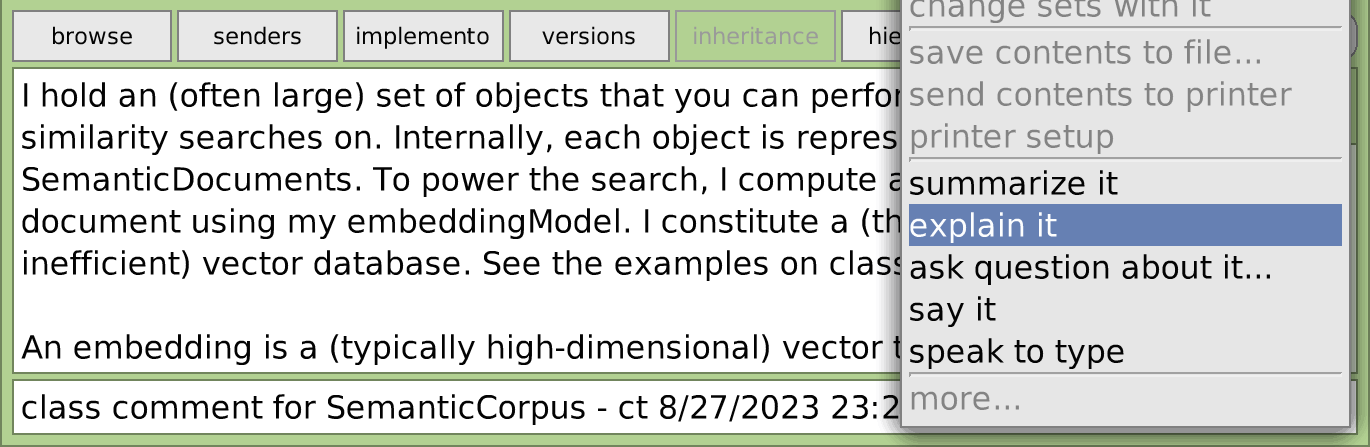
(corpus newConversationForQuery: ' internet connection ' ) open.모든 텍스트 편집기 (선택적으로 그 전에 텍스트의 일부를 선택)를 옐로 클릭하고 더 많은 것을 클릭하고 설명 중 하나를 선택하거나 요약하고 , 질문에 대해 질문 하거나 말하십시오 . 또는 곧 키보드를 통해 : ESC ,? , 입력 , q . ?
텍스트를 지시하려면 유형에 대해서는 말하기를 선택할 수도 있습니다.
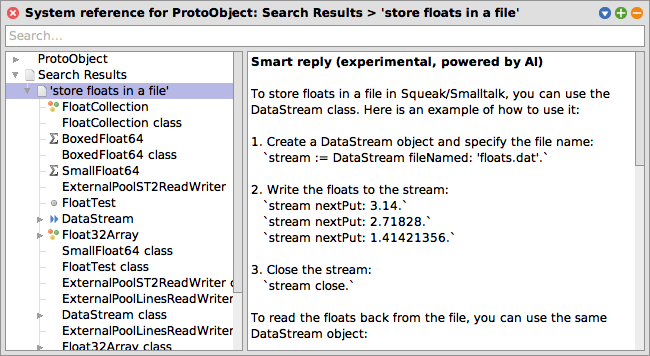
World Main Docking Bar에서 도움말 브라우저를 열고 쿼리를 검색 필드에 입력하십시오. 현재 동의어 검색 용어는 질문보다 더 잘 작동합니다 (예 : "인터넷에"인터넷에 액세스 할 수있는 방법 "보다"인터넷 연결을 선호합니까? ").
메모
이 기능은 선호도 브라우저에서 먼저 활성화되어야합니다 ( "도움말 브라우저의 의미 론적 검색").
Squeak Inbox Talk (World Main Docking Bar> Tools > Squeak Inbox Talk )를 작성하고 설정 메뉴를 통해 최신 버전으로 업데이트 한 다음 환경 설정 브라우저에서 Squeak받은 편지함 대화에서 옵션 시맨틱 검색을 켜십시오. 그런 다음 할 수 있습니다.
이것은 실험적 연구 프로젝트입니다. 자세한 내용은 Semanticsqueak, 논문 또는 논문을 확인하십시오.
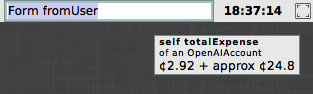
이것을 수행하십시오 :
OpenAIAccount openExpenseWatcher나는 개인적 으로이 Morph에서 마지막 잠수형을 잡고 메인 도킹 바에 삽입하는 것을 좋아합니다. 당신이 이것도 마음에 들면, 그것을 자동화하기위한 기능 요청이나 풀 요청을 제출하십시오!
다른 모델은 제공자가 등록하고, SemanticText 인터페이스를 통해 선택하고 사용될 수 있습니다. 오늘날 주요 제공 업체는 OpenAI API 클라이언트 이지만 추가 클라이언트가 따라갈 수 있습니다. 레지스트리는 defaultEmbeddingModel , chooseDefaultConversationModel 또는 registeredSpeechSynthesisModels 처럼 쿼리 할 수 있습니다.
디버깅 및 테스트 목적으로 대화 및 임베드를위한 모의 제공 업체 도 제공합니다.
또한 KLATT 플러그인에 대한 음성 합성 제공자가 있습니다. 스피치 패키지 load: #full 필요하며 SemanticTextProviders-Klatt 패키지와 별도로로드 할 수 있습니다.
SemanticText의 아키텍처, API 및 도구에 대한 자세한 내용은 논문의 부록에서 확인할 수 있습니다. 여기에는 오래된 정보가 포함되거나 아직 적용되지 않은 리팩토링 (뿐만 아니라 멋진 다이어그램과 예제 및 그 뒤에 많은 이론이 포함됩니다!).
현재 다음 프로젝트는 SemanticText를 사용하는 것으로 알려져 있습니다.
기술적으로 관련이 없지만 Squeakgpt는 Squeak에 생성 AI를 사용하는 것과 유사한 접근법을 탐색합니다.
연구와 실험 전반에 걸쳐 저에게 조언 해 주신 Marcel Taeumel (@marceltaeumel)에게 감사드립니다. 검색 임베딩에 관한 팁 (특히 541ae49 )에 대한 Toni Mattis (@amintos)에게 감사드립니다. Vincent Eichhorn (@vincenteichhorn)에게 감사합니다. 대체 임베딩 모델을 제안한 R/MachineLearning 사람들 덕분에 (귀하의 제안은 언젠가 구현 될 수 있음).
행복한 삐걱 거리는!





![Squeak Inbox Talk 통합 : 유사한 대화 검색. [Squeak-Dev] 플로트 및 스케일링 소수의 표기법에 관한 몇 가지 질문과 의견. 비슷한 대화 (OpenAi 임베딩으로 구동) / 실험. 편견이 있거나 비효율적 일 수 있습니다. / Numerics 질문 : 부동 소수점 상수 / Re : 플로트 평등? (is : [버그] 플로트 NAN 's) / 둥근 플로트 / 소수점은 플로트의 분수 / 버그입니까? / 플로트 차이 / 플로트 정밀도 / ...](https://images.downcodes.com/uploads/20250528/img_68365b8ac47ec34.png)