Squeak SemanticText
1.0.0

chatgpt, การค้นหาแบบฝังและการค้นพบแบบสืบค้นเพื่อรับสารภาพ/smalltalk
ความหมาย (จากกรีกโบราณ Sēmantikós ) หมายถึงความสำคัญหรือความหมายของข้อมูล ในขณะที่คลาส String และ Text ปกติในการส่งสารภาพใช้มุมมองทางวากยสัมพันธ์กับข้อความเป็นลำดับของอักขระและคำแนะนำในการจัดรูปแบบ SemanticText มุ่งเน้นไปที่ความรู้สึกและความเข้าใจของข้อความ ด้วยการถือกำเนิดของ NLP (การประมวลผลภาษาธรรมชาติ) และ LLMS (แบบจำลองภาษาขนาดใหญ่) ความพร้อมใช้งานของความสามารถในการตีความข้อความในระบบคอมพิวเตอร์กำลังขยายตัวอย่างมาก แพ็คเกจนี้มีจุดมุ่งหมายเพื่อให้บริบทความหมายสามารถเข้าถึงได้ใน Squeak/SmallTalk โดยให้คุณสมบัติต่อไปนี้:
สำหรับรายละเอียดเพิ่มเติมติดตั้งแพ็คเกจและดำน้ำในความคิดเห็นของคลาสและรหัสหรืออ่านต่อด้านล่าง
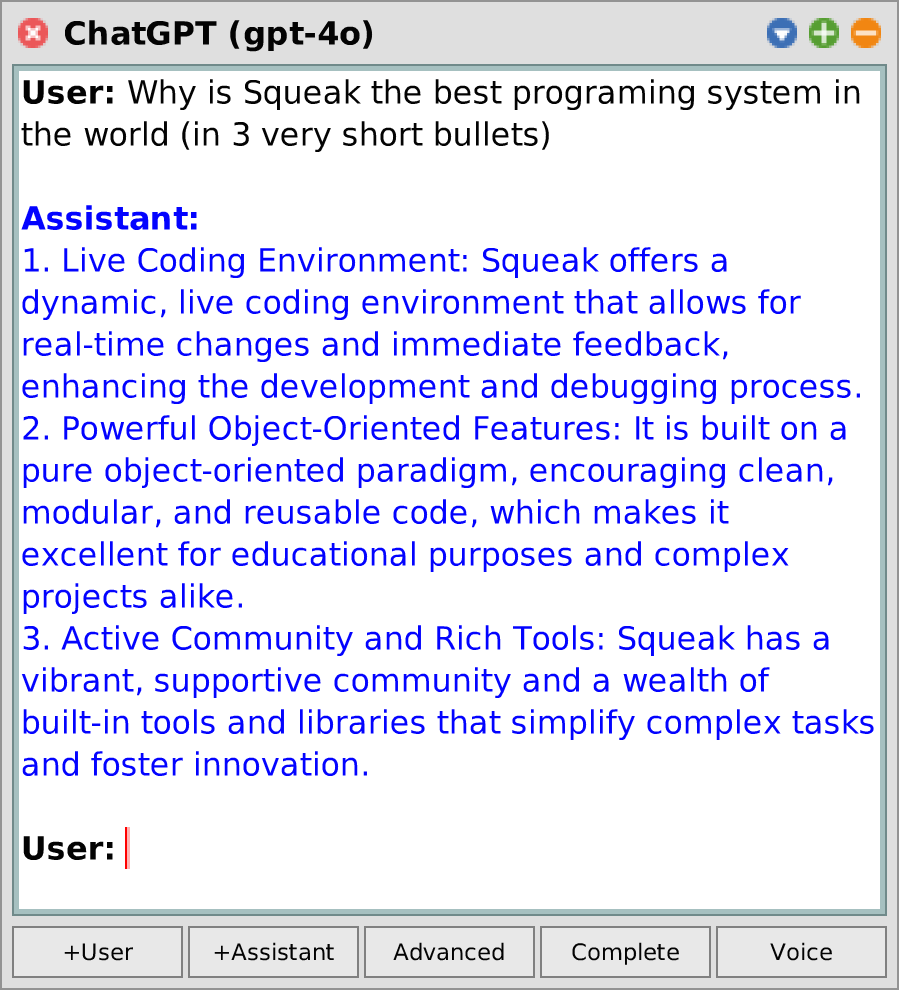
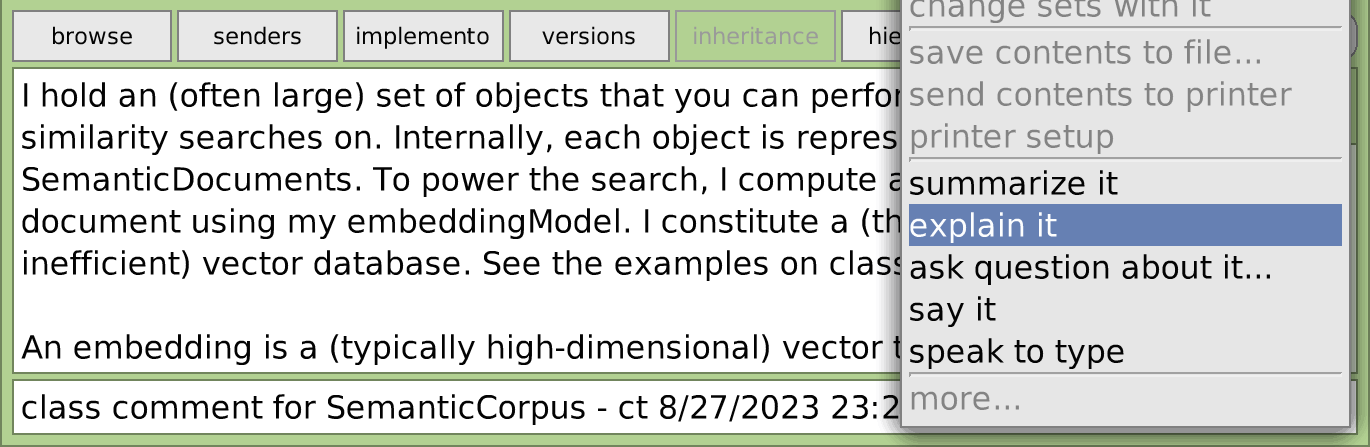
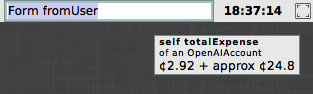
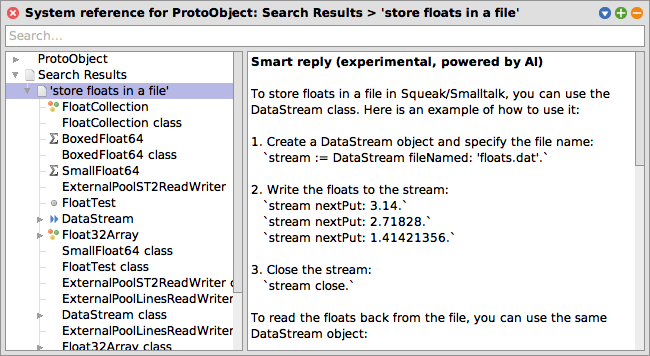
CHATGPT การรวมตัวแก้ไข: อธิบาย / สรุป / พูดมัน ผู้เฝ้าดูค่าใช้จ่าย Openai API | วิธีการรวมเบราว์เซอร์: การค้นหาความหมายและการเพิ่มการดึง (RAG) การรวมกล่องจดหมายเข้าของ Squeak: การค้นหาการสนทนาที่คล้ายกัน |
ยังอยู่ระหว่างการพัฒนา อาจติดตามมากขึ้น ยินดีต้อนรับข้อเสนอแนะและการมีส่วนร่วม!
รับอิมเมจ Squeak Trunk ปัจจุบัน (แนะนำ) หรือ Squeak 6.0 Image (การสนับสนุนที่ จำกัด เท่านั้น) และทำสิ่งนี้ในพื้นที่ทำงาน:
 Metacello new
	baseline: ' SemanticText ' ;
	repository: ' github://hpi-swa-lab/Squeak-SemanticText:main ' ;
	get; " for updates "
	load.
เนื่องจากฟังก์ชั่นส่วนใหญ่ขึ้นอยู่กับ OpenAI API คุณต้องตั้งค่าคีย์ API ที่นี่และวางไว้ในการตั้งค่า OpenAI API Key ในขณะที่ OpenAI API ไม่สามารถใช้งานได้ แต่คุณจ่ายเฉพาะสิ่งที่คุณต้องการและไม่มีกลไกเครดิตที่น่าแปลกใจ โทเค็นราคาถูกจริงๆ - ตัวอย่างเช่นคุณสามารถตั้งค่าเกณฑ์ $ 5 ซึ่งเพียงพอสำหรับการแชทมากกว่า 1 Mio คำหรือฝัง 50 mio คำ (หรือ 42 เท่าของงานที่รวบรวมของเช็คสเปียร์)
จากแถบการเชื่อมต่อหลักของโลกไปที่ แอพ > chatgpt พิมพ์พรอมต์ของคุณและกด CMD + S หรือกด เสียง เพื่อการสนทนาด้วยเสียงอย่างต่อเนื่อง ในโหมดขั้นสูงคุณยังสามารถกำหนดคำแนะนำระบบและฟังก์ชั่นที่โมเดลสามารถเรียกได้ ผ่านเมนูหน้าต่าง นอกจากนี้คุณยังสามารถเลือกโมเดลที่แตกต่างกันหรือแก้ไขการตั้งค่าเพิ่มเติม
ตรวจสอบวิธีการขยาย *SemanticText บน String , Collection , SequenceableCollection , AbstractSound และอื่น ๆ ตัวอย่างบางส่วน:
 ' smalltalk inventor ' semanticAnswer. -- > ' Alan Kay '
' It ' ' s easier to invent the future than ' semanticComplete. -- > ' to predict it. '

#(apple banana cherry) semanticComplete: 5 . -- > #('date' 'elderberry' 'fig' 'grape' 'honeydew')

Character comment asString semanticSummarize.
Morph comment asString semanticAsk: ' difference between bounds and fullBounds ' .

(( SystemWindow windowsIn: Project current world satisfying: [ :ea | ea model isKindOf: Workspace ]) collect: #label )
	semanticFindRankedObjects: 20 similarToQuery: ' open bugs ' .

' Hello Squeak ' semanticSayIt.
SampledSound semanticFromUser semanticToText.การใช้งานขั้นพื้นฐานเป็นเช่นนี้:
 SemanticConversation new
	addSystemMessage: ' You make a bad pun about everything the user writes to you. ' ;
	addUserMessage: ' Yesterday I met a black cat! ' ;
	getAssistantReply. -- > ' I hope it was a purr-fectly nice encounter and not a cat-astrophe! '
นอกจากนี้คุณยังสามารถปรับปรุงพรอมต์ได้โดยการแทรกข้อความผู้ใช้/ผู้ช่วยเพิ่มเติมก่อนการโต้ตอบ ( การแจ้งเตือนไม่กี่นัด ):
 SemanticConversation new
	addSystemMessage: ' You answer every question with the opposite of the truth. ' ;
	addUserMessage: ' What is the biggest animal on earth? ' ;
	addAssistantMessage: ' The biggest animal on earth is plankton. ' ;
	addUserMessage: ' What is the smallest country on earth? ' ;
getAssistantReply. -- > ' The smallest country on earth is Russia. ' | conversation message |
conversation := SemanticConversation new .
message := conversation
addUserMessage: ' What time is it? ' ;
addFunction: ( SemanticFunction fromString: ' getTime ' action: [ Time now]);
getAssistantMessage.
[conversation resolveAllToolCalls] whileTrue:
[message := conversation getAssistantMessage].
message -- > [assistant] ' The current time is 20:29:52. ' SemanticConversation new
withConfigDo: [ :config |
config temperature: 1.5 .
config nucleusSamplingMass: 0.8 .
config maxTokens: 200 " high temperatures may cause the model to output nonsense and not find an end! " ];
addUserMessage: ' Write a short poem about Alan Kay and Smalltalk ' ;
getAssistantReply -- > ' In the realm of silicon and spark,
A visionary left his mark,
Alan Kay, with dreams unfurled,
Birthed a language to change the world.
Smalltalk, a whisper, soft and clear,
A paradigm that pioneers,
Objects dancing, message flows,
In its design, innovation grows.
A windowed world where thoughts collide,
A playground where ideas abide,
From his vision, the seeds were sown,
For the digital gardens we have grown.
So here ' ' s to Kay, a mind so bright,
Who lit the way with insight ' ' s light,
In every line of code, we find,
A legacy that reshapes the mind. ' คุณสามารถค้นหาตัวอย่างเพิ่มเติมได้ (เช่นการสตรีมข้อความการดึงคำตอบหลายครั้งและความน่าจะเป็นโทเค็นในการบันทึก) ที่ด้านชั้นเรียนของ SemanticConversation
ตัวแทนง่าย ๆ สามารถกำหนดได้เช่นนี้:
 SemanticAgent subclass: #SemanticSqueakAgent
	instanceVariableNames: ' '
	classVariableNames: ' '
	poolDictionaries: ' '
	category: ' SemanticText-Model-Agents ' .

SemanticSqueakAgent >> initializeConversation: aConversation
	super initializeConversation: aConversation.
	aConversation addSystemMessage: ' You are a Squeak/Smalltalk assistant. ' .

SemanticSqueakAgent >> eval: aString
	" Evaluate a Smalltalk expression in the running Squeak image. "
	< function: eval(
		expression: string " e.g. '(8 nthRoot: 3)-1' "
	) >
	^ Compiler evaluate: aString
จากนั้นเรียกมันแบบนี้:
 SemanticSqueakAgent makeNewConversation
	addUserMessage: ' how many windows are open ' ;
	getAssistantReply -- > ' You currently have 138 open windows in your Squeak environment. '
หรือนำตัวแก้ไขการสนทนาขึ้นมาโดยการทำ SemanticSqueakAgent openNewConversation
ทุกอย่างเริ่มต้นที่คลาส SemanticCorpus ตัวอย่างเช่นนี่คือวิธีที่คุณสามารถตั้งค่าคลังการค้นหาความหมายสำหรับระบบความช่วยเหลือของ Squeak ด้วยตัวเอง:
 " Set up and populate semantic corpus "
helpTopics := CustomHelp asHelpTopic semanticDeepSubtopicsSkip: [ :topic |
	topic title = ' All message categories ' ]. " not relevant "
corpus := SemanticPluggableCorpus titleBlock: #title contentBlock: #contents .
corpus addFragmentDocumentsFromAll: helpTopics.
corpus estimatePriceToInitializeEmbeddings. -- > approx ¢ 1.66
corpus updateEmbeddings.

" Similarity search "
originTopic := helpTopics detect: [ :ea | ea key = #firstContribution ].
results := corpus findObjects: 10 similarToObject: originTopic.

" Semantic search "
results := corpus findObjects: 10 similarToQuery: ' internet connection ' .
" Optionally, display results in a HelpBrowser "
resultsTopic := HelpTopic named: ' Search results ' .
results do: [ :ea | resultsTopic addSubtopic: ea].
resultsTopic browse.

" RAG "
(corpus newConversationForQuery: ' internet connection ' ) open.คลิกสีเหลืองบนตัวแก้ไขข้อความใด ๆ (เลือกส่วนหนึ่งของข้อความก่อนหน้านั้น) คลิก เพิ่มเติม ... และเลือกหนึ่งใน การอธิบาย สรุป ถามคำถามเกี่ยวกับเรื่องนี้ ... หรือ พูด หรือในไม่ช้าผ่านแป้นพิมพ์: ESC ,? , Enter , q . -
คุณยังสามารถเลือก พูดเพื่อพิมพ์ เพื่อกำหนดข้อความ
เปิดเบราว์เซอร์ช่วยเหลือจากแถบการเชื่อมต่อหลักของโลกและพิมพ์คำถามของคุณลงในช่องค้นหา โปรดทราบว่าในขณะนี้คำค้นหาที่มีความหมายเหมือนกันทำงานได้ดีกว่าคำถาม (เช่นชอบ "การเชื่อมต่ออินเทอร์เน็ต" มากกว่า "ฉันจะเข้าถึงอินเทอร์เน็ตได้อย่างไร")
บันทึก
คุณสมบัตินี้จำเป็นต้องเปิดใช้งานในเบราว์เซอร์การตั้งค่าก่อน ("การค้นหาความหมายในเบราว์เซอร์ช่วยเหลือ")
รับ Squeak Inbox Talk (แถบการเชื่อมต่อหลักของโลก> เครื่องมือ > Squeak Inbox Talk ) อัปเดตเป็นเวอร์ชันล่าสุดผ่านเมนู การตั้งค่า และเปิดตัวเลือก การค้นหาความหมายในการพูดคุยในกล่องจดหมายวิงบอน ในเบราว์เซอร์การตั้งค่า หลังจากนั้นคุณสามารถ:
นี่คือโครงการวิจัยเชิงทดลอง ตรวจสอบ Semantics ค่ายกระดาษหรือวิทยานิพนธ์ของฉันสำหรับข้อมูลเพิ่มเติม
ทำสิ่งนี้:
OpenAIAccount openExpenseWatcherโดยส่วนตัวแล้วฉันชอบที่จะคว้า submorph สุดท้ายจาก morph นี้และใส่มันในแถบการเชื่อมต่อหลักของฉัน หากคุณชอบสิ่งนี้เช่นกันให้ส่งคำขอคุณสมบัติหรือคำขอดึงสำหรับการทำสิ่งนี้โดยอัตโนมัติ!
โมเดลที่แตกต่างกันสามารถลงทะเบียนโดยผู้ให้บริการเลือกและใช้ผ่านอินเตอร์เฟส SemanticText ผู้ให้บริการหลักในวันนี้คือ ไคลเอนต์ OpenAI API แต่ลูกค้าอาจติดตามเพิ่มเติม รีจิสทรีสามารถสอบถามได้เช่น defaultEmbeddingModel , chooseDefaultConversationModel หรือ registeredSpeechSynthesisModels
เพื่อการดีบักและการทดสอบเรายังเสนอ ผู้ให้บริการจำลอง สำหรับการสนทนาและการฝังตัว
นอกจากนี้ยังมีผู้ให้บริการสังเคราะห์คำพูดสำหรับปลั๊กอิน Klatt มันต้องใช้แพ็คเกจคำพูดและสามารถโหลดแยกต่างหากจากแพ็คเกจ SemanticTextProviders-Klatt (หรือโดยการระบุ load: #full ในสคริปต์ Metacello)
รายละเอียดเพิ่มเติมเกี่ยวกับสถาปัตยกรรม API และเครื่องมือของ SemanticText มีอยู่ในภาคผนวกของวิทยานิพนธ์ของฉัน โปรดทราบว่าสิ่งนี้อาจรวมถึงข้อมูลที่ล้าสมัยหรือยังไม่ได้ใช้ refactorings (แต่ยังรวมถึงไดอะแกรมและตัวอย่างที่ดี! และทฤษฎีมากมายที่อยู่เบื้องหลัง!)
ในขณะนี้โครงการต่อไปนี้เป็นที่รู้กันว่าใช้ประโยชน์จาก SemanticText:
ในขณะที่ไม่เกี่ยวข้องกับเทคนิค SqueakGpt สำรวจวิธีการที่คล้ายกันในการใช้ AI Generative สำหรับ Squeak
ขอบคุณ Marcel Taeumel (@marceltaeumel) ที่ให้คำปรึกษาแก่ฉันตลอดการศึกษาและการทดลองของฉัน ขอบคุณ Toni Mattis (@AMINTOS) สำหรับเคล็ดลับเกี่ยวกับการค้นหาการฝัง (โดยเฉพาะสำหรับ 541ae49 ) ขอบคุณ Vincent Eichhorn (@vincenteichhorn) ที่ให้ภาพรวมของเทคนิคการจัดทำดัชนีสำหรับ DBS Vector (จะใช้งานเร็ว ๆ นี้!) ต้องขอบคุณ R/Machinelearning Folks สำหรับการแนะนำรูปแบบการฝังทางเลือก (คำแนะนำของคุณอาจถูกนำไปใช้หนึ่งวัน)
ส่งเสียงดังเอี๊ยด!





![การรวมกล่องจดหมายเข้าของ Squeak: การค้นหาการสนทนาที่คล้ายกัน [Squeak-Dev] คำถามและความคิดเห็นบางอย่างเกี่ยวกับสัญกรณ์ของลอยและทศนิยมที่ปรับขนาด การสนทนาที่คล้ายกัน (ขับเคลื่อนโดย OpenAI EMBEDDINGS) / การทดลอง อาจมีอคติหรือไม่มีประสิทธิภาพ / คำถามตัวเลข: การอ่านค่าคงที่จุดลอยตัว / Re: ความเท่าเทียมกันลอย? (คือ: [Bug] Float Nan's) / การปัดเศษลอย / ทศนิยมเป็นเศษส่วน / ข้อผิดพลาดในลอย? / ลอยความแตกต่าง / ความแม่นยำลอย / ...](https://images.downcodes.com/uploads/20250528/img_68365b8ac47ec34.png)