Squalr
3.0.2

Squalr官方網站
加入我們的不和諧頻道
Squalr是性能的內存編輯軟件,允許用戶在其Windows桌面遊戲中創建和共享作弊。這包括內存掃描,指針,X86/X64組裝注入等。
Squalr通過多線程與SIMD說明相結合,可以快速掃描。請參閱本文:.net中的simd。為了利用這些收益,您的CPU需要支持SSE,AVX或AVX-512。
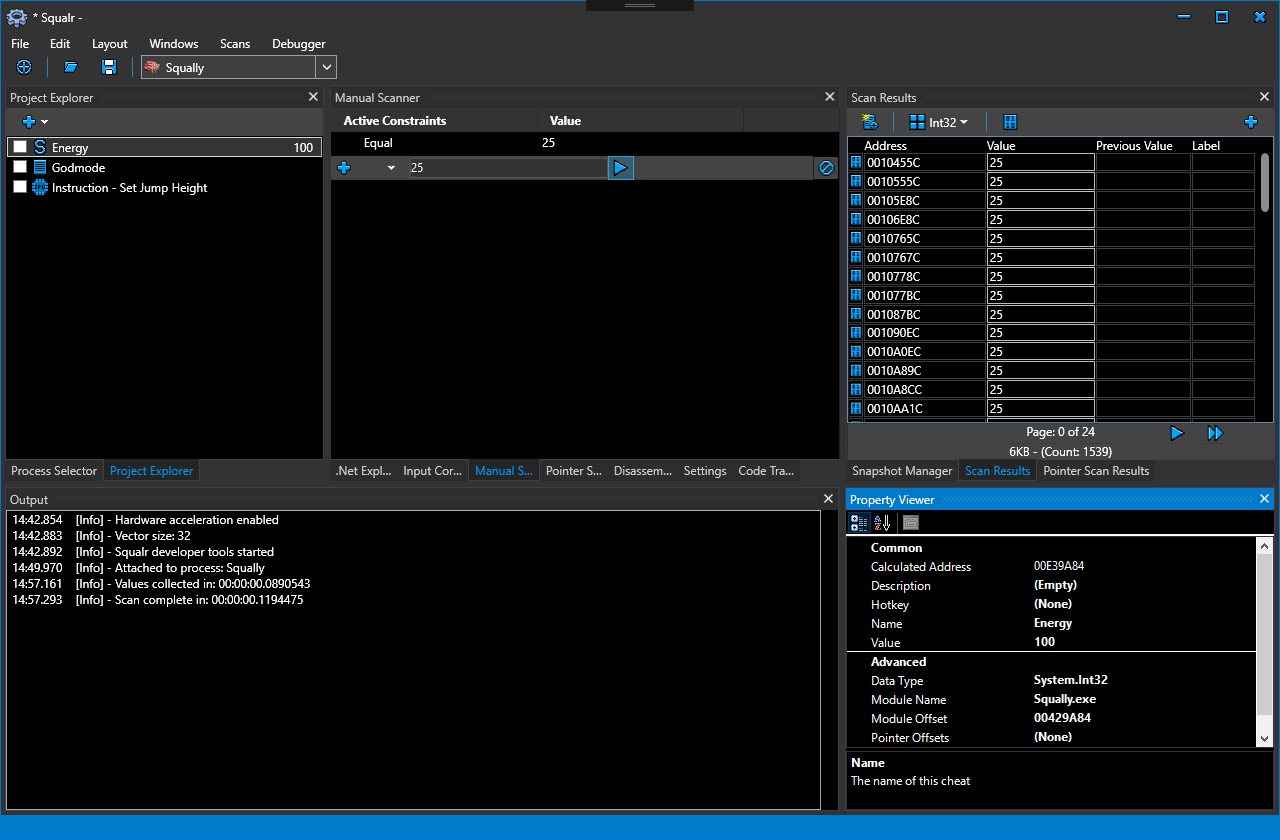
您可以在Wiki上找到詳細的文檔。使用Squalr有三種方法:
以下是Nuget軟件包API的一些簡短文檔
如果使用Nuget軟件包,則重要的是要掛在發動機的輸出中以接收事件日誌。這些對於診斷問題是無價的。
 using Squalr . Engine . Logging ;

.. .

// Receive logs from the engine
Logger . Subscribe ( new EngineLogEvents ( ) ) ;

.. .

class EngineLogEvents : ILoggerObserver
{
	public void OnLogEvent ( LogLevel logLevel , string message , string innerMessage )
	{
		Console . WriteLine ( message ) ;
		Console . WriteLine ( innerMessage ) ;
	}
} using Squalr . Engine . OS ;
.. .
IEnumerable < Process > processes = Processes . Default . GetProcesses ( ) ;
// Pick a process. For this example, we are just grabbing the first one.
Process process = processes . FirstOrDefault ( ) ;
Processes . Default . OpenedProcess = process ; using Squalr . Engine . Memory ;
.. .
Reader . Default . Read < Int32 > ( address ) ;
Writer . Default . Write < Int32 > ( address ) ;
Allocator . Alloc ( address , 256 ) ;
IEnumerable < NormalizedRegion > regions = Query . GetVirtualPages ( requiredProtection , excludedProtection , allowedTypes , startAddress , endAddress ) ;
IEnumerable < NormalizedModule > modules = Query . GetModules ( ) ;Squalr可以組裝並拆卸X86/X64指令,利用NASM。
 using Squalr . Engine . Architecture ;
using Squalr . Engine . Architecture . Assemblers ;

.. .

// Perform assembly
AssemblerResult result = Assembler . Default . Assemble ( assembly : "mov eax, 5" , isProcess32Bit : true , baseAddress : 0x10000 ) ;

Console . WriteLine ( BitConverter . ToString ( result . Bytes ) . Replace ( "-" , " " ) ) ;

// Disassemble the result (we will get the same instructions back)
Instruction [ ] instructions = Disassembler . Default . Disassemble ( bytes : result . Bytes , isProcess32Bit : true , baseAddress : 0x10000 ) ;

Console . WriteLine ( instructions [ 0 ] . Mnemonic ) ;Squalr具有用於執行高性能記憶掃描的API:
 using Squalr . Engine . Scanning ;
using Squalr . Engine . Scanning . Scanners ;
using Squalr . Engine . Scanning . Scanners . Constraints ;
using Squalr . Engine . Scanning . Snapshots ;

.. .

DataType dataType = DataType . Int32 ;

// Collect values
TrackableTask < Snapshot > valueCollectorTask = ValueCollector . CollectValues (
	SnapshotManager . GetSnapshot ( Snapshot . SnapshotRetrievalMode . FromActiveSnapshotOrPrefilter , dataType ) ) ;

// Perform manual scan on value collection complete
valueCollectorTask . CompletedCallback += ( ( completedValueCollection ) =>
{
	Snapshot snapshot = completedValueCollection . Result ;

	// Constraints
	ScanConstraintCollection scanConstraints = new ScanConstraintCollection ( ) ;
	scanConstraints . AddConstraint ( new ScanConstraint ( ScanConstraint . ConstraintType . Equal , 25 ) ) ;

	TrackableTask < Snapshot > scanTask = ManualScanner . Scan (
		snapshot ,
		allScanConstraints ) ;

	SnapshotManager . SaveSnapshot ( scanTask . Result ) ;
} ) ;


for ( UInt64 index = 0 ; index < snapshot . ElementCount ; index ++ )
{
	SnapshotElementIndexer element = snapshot [ index ] ;

	Object currentValue = element . HasCurrentValue ( ) ? element . LoadCurrentValue ( ) : null ;
	Object previousValue = element . HasPreviousValue ( ) ? element . LoadPreviousValue ( ) : null ;
} // Example: Tracing write events on a float
BreakpointSize size = Debugger . Default . SizeToBreakpointSize ( sizeof ( float ) ) ;
CancellationTokenSource cancellationTokenSource = Debugger . Default . FindWhatWrites ( 0x10000 , size , this . CodeTraceEvent ) ;
.. .
// When finished, cancel the instruction collection
cancellationTokenSource . cancel ( ) ;
.. .
private void CodeTraceEvent ( CodeTraceInfo codeTraceInfo )
{
Console . WriteLine ( codeTraceInfo . Instruction . Address . ToString ( "X" ) ) ;
Console . WriteLine ( codeTraceInfo . Instruction . Mnemonic ) ;
} | 參考 | 描述 |
|---|---|
| XAML格式化 | XAML應該通過此格式 |
| Stylecop | 執行代碼約定的Stylecop。請注意,我們在某些標準慣例上偏離。我們使用變量的完整類型名稱(EX INT32而不是INT)。原因是這是一個內存編輯器,因此我們更喜歡使用最明確的類型名稱來避免編碼錯誤。 |
為了編譯Squalr,您只需要Visual Studio 2017 。這應該是最新的,我們經常更新Squalr以使用最新版本的.NET框架。這是該項目使用的重要第三方庫:
| 圖書館 | 描述 |
|---|---|
| Easyhook | 託管/不受管理的API鉤 |
| 尖銳的 | UDIS86彙編器移植到C# |
| CSScript | C#腳本庫 |
| Avalonedit | 代碼編輯庫 |
| SharpDx | DirectX包裝器 |
| clrmd | .NET應用程序檢查庫 |
| Avalondock | 對接庫 |
| Livecharts | WPF圖表 |
| 圖書館 | 描述 | 目的 |
|---|---|---|
| ASMJIT | x86/x64彙編器 | 替換FASM,大幅度改進腳本 |
| ASMJIT | x86/x64彙編器 | 原始C ++項目。如果上述版本不起作用,則可以端口/互動(均無法完全起作用,並且可能需要自定義的東西) |
| wpfhexeditorcontrol | 十六進制編輯 | 六角編輯 /內存六角編輯器 |
| OPENTK | OpenGL包裝紙 | 圖形注入 |
| SharpDx | DirectX包裝器 | 圖形注入(目前使用SharpDX僅用於輸入) |
| sharppcap | 數據包捕獲 | 數據包編輯器 |
| packet.net | 數據包捕獲 | 數據包編輯器 |





