Squalr
3.0.2

Squalr 공식 웹 사이트
Discord 채널에서 우리와 함께하십시오
Squalr은 사용자가 Windows 데스크탑 게임에서 치트를 생성하고 공유 할 수있는 성능의 메모리 편집 소프트웨어입니다. 여기에는 메모리 스캔, 포인터, x86/x64 어셈블리 주입 등이 포함됩니다.
Squalr는 SIMD 지침과 결합 된 멀티 스레딩을 통해 빠른 스캔을 달성합니다. .NET의 SIMD를 참조하십시오. 이러한 이익을 활용하려면 CPU는 SSE, AVX 또는 AVX-512를 지원해야합니다.
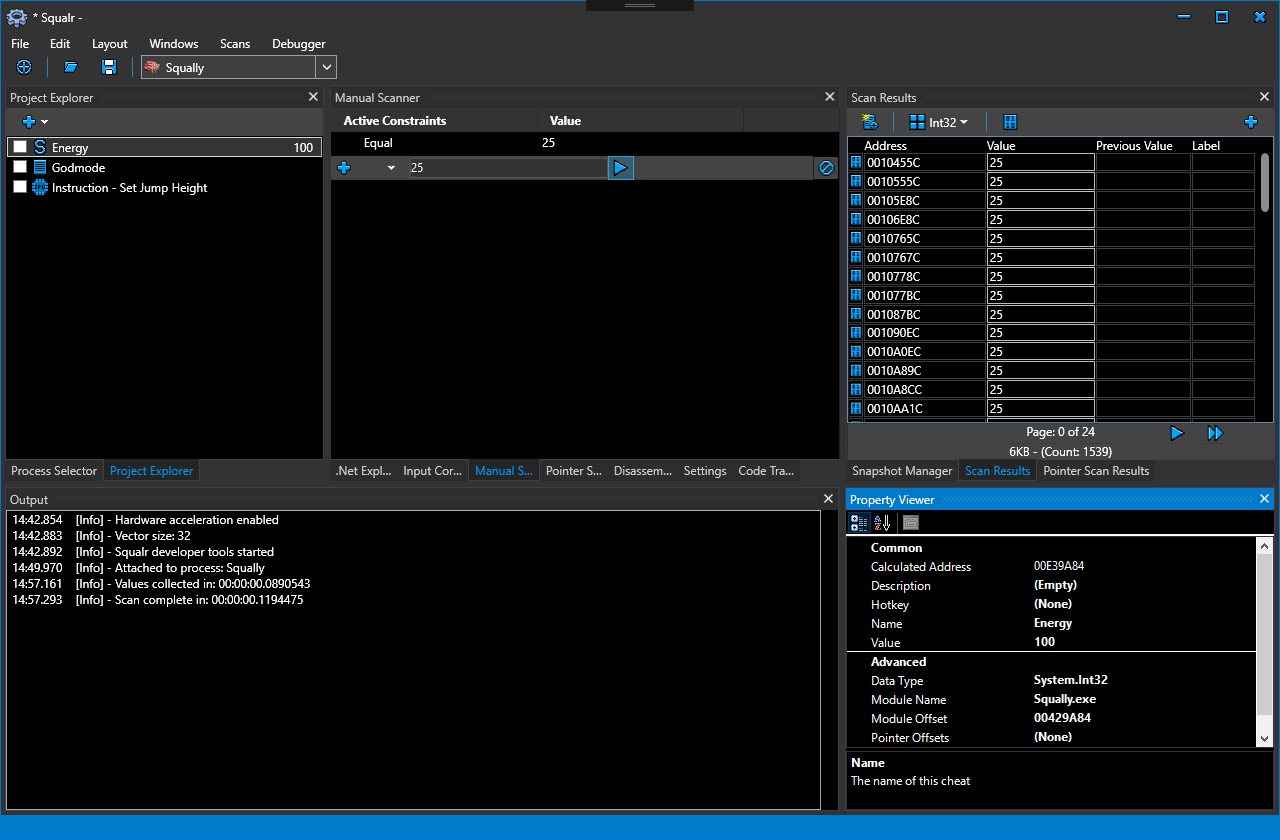
위키에 대한 자세한 문서를 찾을 수 있습니다. Squalr을 사용하는 세 가지 방법이 있습니다.
아래는 Nuget 패키지 API에 대한 간단한 문서입니다.
Nuget 패키지를 사용하는 경우 엔진의 출력에 연결하여 이벤트 로그를받는 것이 중요합니다. 문제는 문제를 진단하는 데 매우 중요합니다.
 using Squalr . Engine . Logging ;

.. .

// Receive logs from the engine
Logger . Subscribe ( new EngineLogEvents ( ) ) ;

.. .

class EngineLogEvents : ILoggerObserver
{
	public void OnLogEvent ( LogLevel logLevel , string message , string innerMessage )
	{
		Console . WriteLine ( message ) ;
		Console . WriteLine ( innerMessage ) ;
	}
} using Squalr . Engine . OS ;
.. .
IEnumerable < Process > processes = Processes . Default . GetProcesses ( ) ;
// Pick a process. For this example, we are just grabbing the first one.
Process process = processes . FirstOrDefault ( ) ;
Processes . Default . OpenedProcess = process ; using Squalr . Engine . Memory ;
.. .
Reader . Default . Read < Int32 > ( address ) ;
Writer . Default . Write < Int32 > ( address ) ;
Allocator . Alloc ( address , 256 ) ;
IEnumerable < NormalizedRegion > regions = Query . GetVirtualPages ( requiredProtection , excludedProtection , allowedTypes , startAddress , endAddress ) ;
IEnumerable < NormalizedModule > modules = Query . GetModules ( ) ;Squalr은 x86/x64 지침을 조립하고 분해하여 NASM을 활용할 수 있습니다.
 using Squalr . Engine . Architecture ;
using Squalr . Engine . Architecture . Assemblers ;

.. .

// Perform assembly
AssemblerResult result = Assembler . Default . Assemble ( assembly : "mov eax, 5" , isProcess32Bit : true , baseAddress : 0x10000 ) ;

Console . WriteLine ( BitConverter . ToString ( result . Bytes ) . Replace ( "-" , " " ) ) ;

// Disassemble the result (we will get the same instructions back)
Instruction [ ] instructions = Disassembler . Default . Disassemble ( bytes : result . Bytes , isProcess32Bit : true , baseAddress : 0x10000 ) ;

Console . WriteLine ( instructions [ 0 ] . Mnemonic ) ;Squalr에는 고성능 메모리 스캔을 수행하기위한 API가 있습니다.
 using Squalr . Engine . Scanning ;
using Squalr . Engine . Scanning . Scanners ;
using Squalr . Engine . Scanning . Scanners . Constraints ;
using Squalr . Engine . Scanning . Snapshots ;

.. .

DataType dataType = DataType . Int32 ;

// Collect values
TrackableTask < Snapshot > valueCollectorTask = ValueCollector . CollectValues (
	SnapshotManager . GetSnapshot ( Snapshot . SnapshotRetrievalMode . FromActiveSnapshotOrPrefilter , dataType ) ) ;

// Perform manual scan on value collection complete
valueCollectorTask . CompletedCallback += ( ( completedValueCollection ) =>
{
	Snapshot snapshot = completedValueCollection . Result ;

	// Constraints
	ScanConstraintCollection scanConstraints = new ScanConstraintCollection ( ) ;
	scanConstraints . AddConstraint ( new ScanConstraint ( ScanConstraint . ConstraintType . Equal , 25 ) ) ;

	TrackableTask < Snapshot > scanTask = ManualScanner . Scan (
		snapshot ,
		allScanConstraints ) ;

	SnapshotManager . SaveSnapshot ( scanTask . Result ) ;
} ) ;


for ( UInt64 index = 0 ; index < snapshot . ElementCount ; index ++ )
{
	SnapshotElementIndexer element = snapshot [ index ] ;

	Object currentValue = element . HasCurrentValue ( ) ? element . LoadCurrentValue ( ) : null ;
	Object previousValue = element . HasPreviousValue ( ) ? element . LoadPreviousValue ( ) : null ;
} // Example: Tracing write events on a float
BreakpointSize size = Debugger . Default . SizeToBreakpointSize ( sizeof ( float ) ) ;
CancellationTokenSource cancellationTokenSource = Debugger . Default . FindWhatWrites ( 0x10000 , size , this . CodeTraceEvent ) ;
.. .
// When finished, cancel the instruction collection
cancellationTokenSource . cancel ( ) ;
.. .
private void CodeTraceEvent ( CodeTraceInfo codeTraceInfo )
{
Console . WriteLine ( codeTraceInfo . Instruction . Address . ToString ( "X" ) ) ;
Console . WriteLine ( codeTraceInfo . Instruction . Mnemonic ) ;
} | 참조 | 설명 |
|---|---|
| Xaml Formatter | XAML 은이 포맷터를 통해 실행되어야합니다 |
| 스타일 콥 | 코드 규칙을 시행하기위한 스타일 콥. 우리는 일부 표준 규칙을 벗어납니다. 변수의 전체 유형 이름을 사용합니다 (int가 아닌 int32). 추론은 이것이 메모리 편집기이므로 코딩 실수를 피하기 위해 가장 명백한 유형 이름을 사용하는 것이 좋습니다. |
Squalr을 컴파일하려면 Visual Studio 2017 만 필요합니다. 최신 버전의 .NET 프레임 워크를 사용하기 위해 Squalr을 자주 업데이트해야합니다. 이 프로젝트가 사용하는 중요한 제 3 자 라이브러리는 다음과 같습니다.
| 도서관 | 설명 |
|---|---|
| 쉬운 | 관리/관리되지 않은 API 훅킹 |
| Sharpdisasm | UDIS86 어셈블러가 C#에 포팅되었습니다. |
| CSScript | C# 스크립팅 라이브러리 |
| Avalonedit | 코드 편집 라이브러리 |
| Sharpdx | DirectX 래퍼 |
| clrmd | .NET 응용 프로그램 검사 라이브러리 |
| Avalondock | 도킹 라이브러리 |
| LiveCharts | WPF 차트 |
| 도서관 | 설명 | 목적 |
|---|---|---|
| asmjit | x86/x64 어셈블러 | FASM을 교체하고 스크립팅을 크게 향상시킵니다 |
| asmjit | x86/x64 어셈블러 | 원래 C ++ 프로젝트. 위의 버전이 작동하지 않으면 포트/인터 로프 할 수 있습니다 (완전히 작동하지 않으며 사용자 정의가 필요할 수 있습니다). |
| WPFHEXEDITORCONTROL | 16 진 편집자 | hex 편집기 / 메모리 육각 편집기 |
| Opentk | Opengl 래퍼 | 그래픽 주입 |
| Sharpdx | DirectX 래퍼 | 그래픽 주입 (현재 입력을 위해 SharpDX를 사용하고 있음) |
| Sharppcap | 패킷 캡처 | 패킷 편집기 |
| packet.net | 패킷 캡처 | 패킷 편집기 |





