Squalr
3.0.2

Squalr公式ウェブサイト
Discordチャンネルにご参加ください
Squalrは、Windowsデスクトップゲームでチートを作成および共有できるようにするパフォーマンスのあるメモリ編集ソフトウェアです。これには、メモリスキャン、ポインター、x86/x64アセンブリインジェクションなどが含まれます。
Squalrは、SIMDの指示と組み合わせたマルチスレッドを使用して、高速スキャンを実現します。この記事を参照してください:simd in .net。これらの利益を活用するには、CPUがSSE、AVX、またはAVX-512をサポートする必要があります。
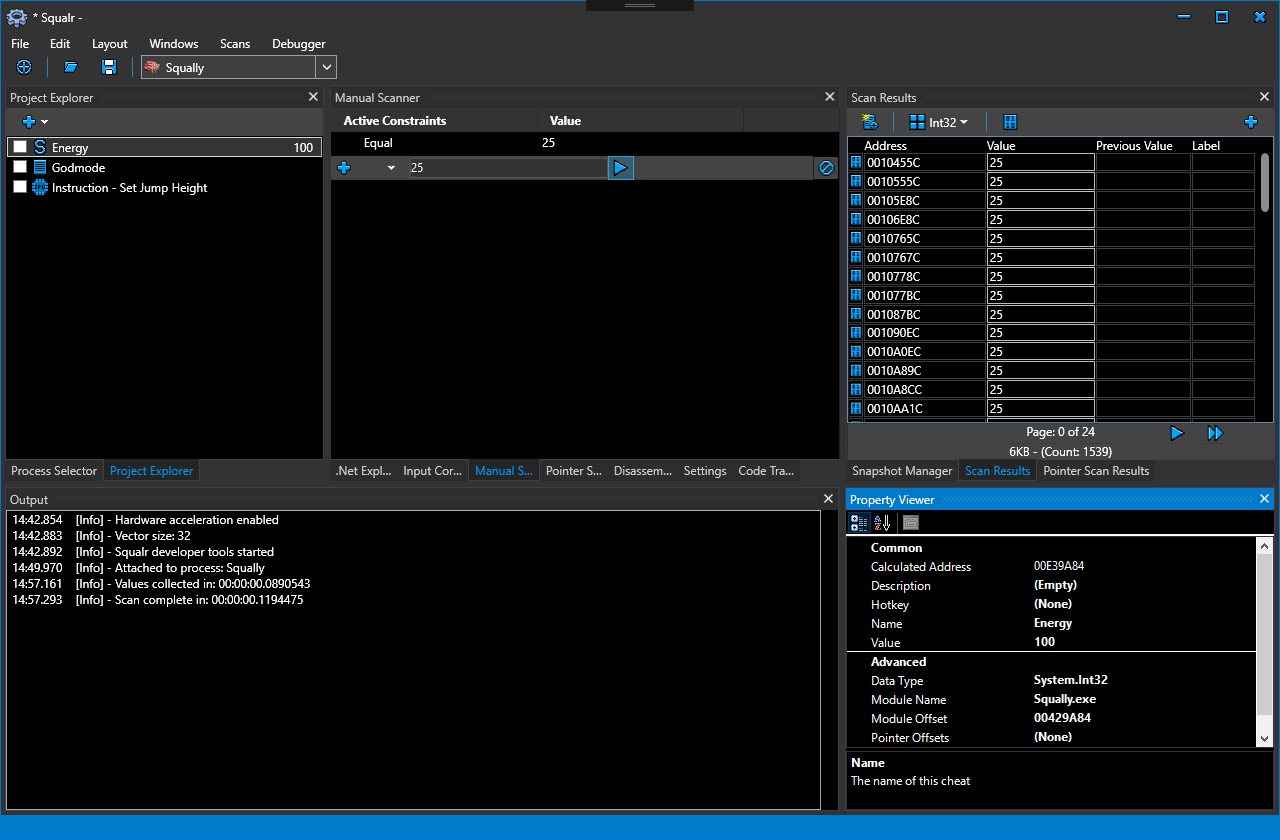
Wikiで詳細なドキュメントを見つけることができます。 Squalrを使用するには3つの方法があります。
以下は、NugetパッケージAPIに関するいくつかの簡単なドキュメントです
NUGETパッケージを使用する場合、イベントのログを受信するためにエンジンの出力にフックすることが重要です。これらは、問題を診断するために非常に貴重です。
 using Squalr . Engine . Logging ;

.. .

// Receive logs from the engine
Logger . Subscribe ( new EngineLogEvents ( ) ) ;

.. .

class EngineLogEvents : ILoggerObserver
{
	public void OnLogEvent ( LogLevel logLevel , string message , string innerMessage )
	{
		Console . WriteLine ( message ) ;
		Console . WriteLine ( innerMessage ) ;
	}
} using Squalr . Engine . OS ;
.. .
IEnumerable < Process > processes = Processes . Default . GetProcesses ( ) ;
// Pick a process. For this example, we are just grabbing the first one.
Process process = processes . FirstOrDefault ( ) ;
Processes . Default . OpenedProcess = process ; using Squalr . Engine . Memory ;
.. .
Reader . Default . Read < Int32 > ( address ) ;
Writer . Default . Write < Int32 > ( address ) ;
Allocator . Alloc ( address , 256 ) ;
IEnumerable < NormalizedRegion > regions = Query . GetVirtualPages ( requiredProtection , excludedProtection , allowedTypes , startAddress , endAddress ) ;
IEnumerable < NormalizedModule > modules = Query . GetModules ( ) ;Squalrは、X86/X64の命令を組み立てて分解し、NASMを活用できます。
 using Squalr . Engine . Architecture ;
using Squalr . Engine . Architecture . Assemblers ;

.. .

// Perform assembly
AssemblerResult result = Assembler . Default . Assemble ( assembly : "mov eax, 5" , isProcess32Bit : true , baseAddress : 0x10000 ) ;

Console . WriteLine ( BitConverter . ToString ( result . Bytes ) . Replace ( "-" , " " ) ) ;

// Disassemble the result (we will get the same instructions back)
Instruction [ ] instructions = Disassembler . Default . Disassemble ( bytes : result . Bytes , isProcess32Bit : true , baseAddress : 0x10000 ) ;

Console . WriteLine ( instructions [ 0 ] . Mnemonic ) ;Squalrには、高性能メモリスキャンを実行するためのAPIがあります。
 using Squalr . Engine . Scanning ;
using Squalr . Engine . Scanning . Scanners ;
using Squalr . Engine . Scanning . Scanners . Constraints ;
using Squalr . Engine . Scanning . Snapshots ;

.. .

DataType dataType = DataType . Int32 ;

// Collect values
TrackableTask < Snapshot > valueCollectorTask = ValueCollector . CollectValues (
	SnapshotManager . GetSnapshot ( Snapshot . SnapshotRetrievalMode . FromActiveSnapshotOrPrefilter , dataType ) ) ;

// Perform manual scan on value collection complete
valueCollectorTask . CompletedCallback += ( ( completedValueCollection ) =>
{
	Snapshot snapshot = completedValueCollection . Result ;

	// Constraints
	ScanConstraintCollection scanConstraints = new ScanConstraintCollection ( ) ;
	scanConstraints . AddConstraint ( new ScanConstraint ( ScanConstraint . ConstraintType . Equal , 25 ) ) ;

	TrackableTask < Snapshot > scanTask = ManualScanner . Scan (
		snapshot ,
		allScanConstraints ) ;

	SnapshotManager . SaveSnapshot ( scanTask . Result ) ;
} ) ;


for ( UInt64 index = 0 ; index < snapshot . ElementCount ; index ++ )
{
	SnapshotElementIndexer element = snapshot [ index ] ;

	Object currentValue = element . HasCurrentValue ( ) ? element . LoadCurrentValue ( ) : null ;
	Object previousValue = element . HasPreviousValue ( ) ? element . LoadPreviousValue ( ) : null ;
} // Example: Tracing write events on a float
BreakpointSize size = Debugger . Default . SizeToBreakpointSize ( sizeof ( float ) ) ;
CancellationTokenSource cancellationTokenSource = Debugger . Default . FindWhatWrites ( 0x10000 , size , this . CodeTraceEvent ) ;
.. .
// When finished, cancel the instruction collection
cancellationTokenSource . cancel ( ) ;
.. .
private void CodeTraceEvent ( CodeTraceInfo codeTraceInfo )
{
Console . WriteLine ( codeTraceInfo . Instruction . Address . ToString ( "X" ) ) ;
Console . WriteLine ( codeTraceInfo . Instruction . Mnemonic ) ;
} | 参照 | 説明 |
|---|---|
| XAMLフォーマッタ | XAMLはこのフォーマッタを介して実行する必要があります |
| stylecop | コード規則を実施するためのstylecop。いくつかの標準的な規則について逸脱していることに注意してください。変数に完全なタイプ名を使用します(intではなくex int32)。理由は、これがメモリエディターであるため、コード化の間違いを避けるために最も明示的なタイプ名を使用することを好みます。 |
Squalrをコンパイルするには、 Visual Studio 2017のみが必要です。これは最新のものである必要があります。squalrを頻繁に更新して、.NETフレームワークの最新バージョンを使用します。このプロジェクトが使用する重要なサードパーティライブラリは次のとおりです。
| 図書館 | 説明 |
|---|---|
| EasyHook | 管理/管理されていないAPIフック |
| シャープディサズム | c#に移植されたudis86アセンブラー |
| csscript | C#スクリプトライブラリ |
| Avalonedit | コード編集ライブラリ |
| sharpdx | DirectXラッパー |
| clrmd | .NETアプリケーション検査ライブラリ |
| Avalondock | ドッキングライブラリ |
| LiveCharts | WPFチャート |
| 図書館 | 説明 | 目的 |
|---|---|---|
| asmjit | x86/x64アセンブラー | FASMを交換し、スクリプトを劇的に改善します |
| asmjit | x86/x64アセンブラー | オリジナルのC ++プロジェクト。上記のバージョンが機能しない場合、これをポート/インタートゥすることができます(どちらも完全に機能しない可能性があり、何か習慣が必要になる場合があります) |
| wpfhexeditorcontrol | ヘックスエディター | HEXエディター /メモリヘックスエディター |
| opentk | OpenGLラッパー | グラフィックインジェクション |
| sharpdx | DirectXラッパー | グラフィックインジェクション(現在、入力のためだけにSharpDXを使用しています) |
| Sharppcap | パケットキャプチャ | パケットエディター |
| packet.net | パケットキャプチャ | パケットエディター |





