janus webrtc gateway docker
stable

此存儲庫不再維護。使用此存儲庫https://github.com/wangsrgit119/janus-webrtc-gateway-docker提出問題或PRS。謝謝。
https://www.useloom.com/share/325799006D6F4B64A6CE0662CA3F1D57
 1. git clone https://github.com/atyenoria/janus-webrtc-gateway-docker.git && cd janus-webrtc-gateway-docker
2. make build
3. make run
4. star this repository after succeeding. Create the issue if you failed. We will help you as much as possible
這是Janus Webrtc網關的Docker圖像。 Janus Gateway仍處於主動發展階段。因此,正如官方文檔所說,對中間件庫版本的一些小修改經常發生。我嘗試盡可能多地處理這樣的喧囂。如果您需要有關此回購的任何請求,請免費與我聯繫。關於此Docker映像的設置詳細信息,您應該仔細閱讀官方文檔https://janus.conf.meetecho.com/index.html。
借助最新的Libnice,Janus Gateway似乎表現出色。此倉庫包含此補丁(請參閱https://gitlab.freedesktop.org/libnice/libnice/libnice/merge_requests/13)https://webrtchacks.com/sfu-load-testing/ 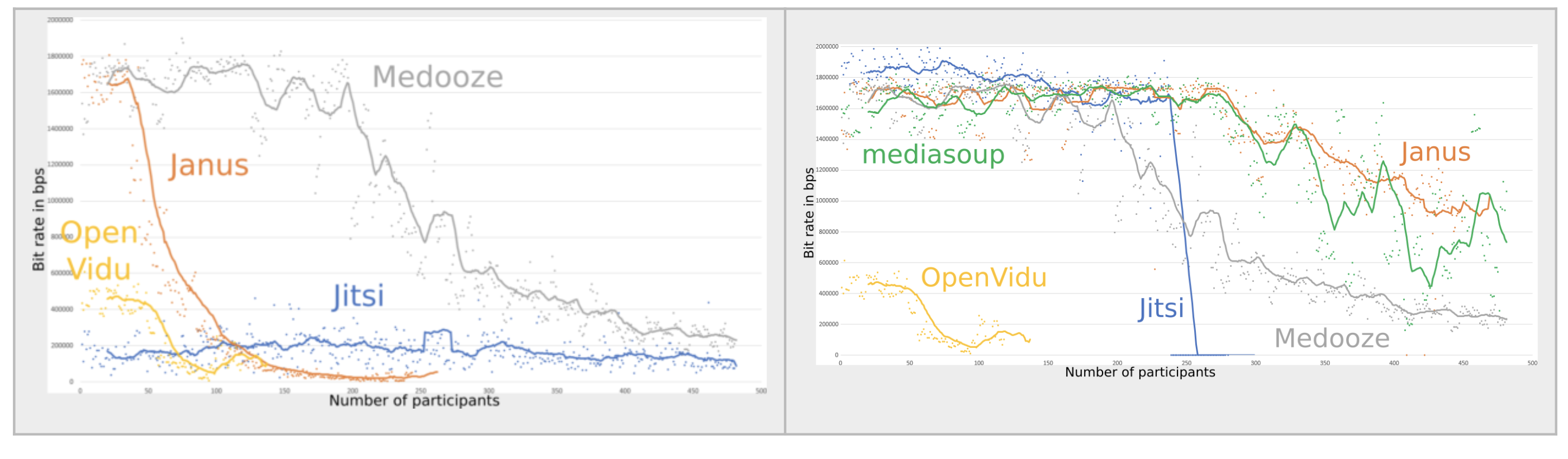 (右側Janus圖可用於此Docker映像)
我認為Janus更適合網絡研討會(Web研討會),而Jitsi更適合Web會議系統。當前的JITSI視頻橋(20181007)的可伸縮性很差,因為沒有本地記錄文件(我不確定這一點。)。 https://www.youtube.com/watch?v= ohhoqkcjjjjjj jitsi jitsi last-n + vp8 simulcasting在網絡會議https://jitsi.org/wp/wp-content/uploads/2016/12/12/nossdav2015lastn.pdfff ins https://jitsi.org/wp/wp-content/uploads https://jitsi.org/wp/wp-content/uplastn.pdfff tofe inforts in jan inftood infore foreption,使用Chrome headless + FFMPEG(ALSA,LIBXCB)進行混合視頻會議。從這些觀點來看,Janus適合網絡研討會,JITSI適用於網絡會議。當然,兩個Webrtc SFU都是很棒的工作!我都在使用。
使用iperf,netperf
 libsrtp version:           2.x
SSL/crypto library:        BoringSSL
DTLS set-timeout:          yes
Mutex implementation:      GMutex (native futex on Linux)
DataChannels support:      yes
Recordings post-processor: yes
TURN REST API client:      yes
Doxygen documentation:     no
Transports:
    REST (HTTP/HTTPS):     yes
    WebSockets:            yes
    RabbitMQ:              no
    MQTT:                  no
    Unix Sockets:          no
    Nanomsg:               no
Plugins:
    Echo Test:             yes
    Streaming:             yes
    Video Call:            yes
    SIP Gateway (Sofia):   yes
    SIP Gateway (libre):   no
    NoSIP (RTP Bridge):    yes
    Audio Bridge:          yes
    Video Room:            yes
    Voice Mail:            yes
    Record&Play:           yes
    Text Room:             yes
    Lua Interpreter:       no
    Duktape Interpreter:   no
Event handlers:
    Sample event handler:  no
    RabbitMQ event handler:no
    MQTT event handler:    no
JavaScript modules:        no
 IP=0.0.0.0
PORT=8888
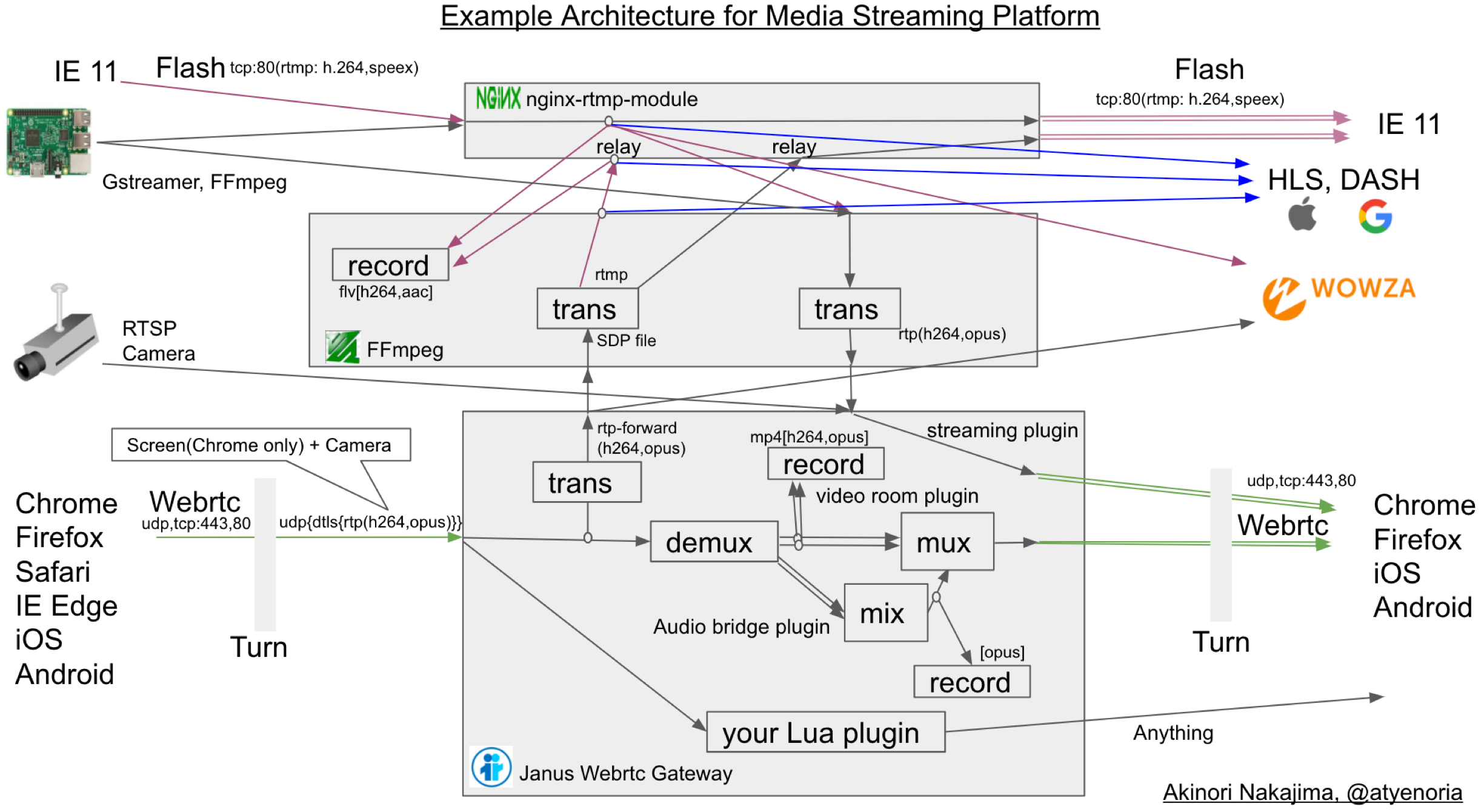
/root/bin/ffmpeg -y -i  "rtmp://$IP:80/rtmp_relay/$1  live=1"  -c:v libx264 -profile:v main -s 640x480  -an -preset ultrafast  -tune zerolatency -f rtp  rtp://$IP:$PORT
您應該使用Janus流插件
https://github.com/meetecho/janus-gateway/blob/8B388AEBB0DE3CCFAD3B25F940F61E48E308E308E604/PLUGINS/PLUGINS/JANUS_STREAMINGING.C
 IP=0.0.0.0
PORT=8888
SDP_FILE=sdp.file
/root/bin/ffmpeg -analyzeduration 300M -probesize 300M -protocol_whitelist file,udp,rtp  -i $SDP_FILE  -c:v copy -c:a aac -ar 16k -ac 1 -preset ultrafast -tune zerolatency  -f flv rtmp://$IP:$PORT/rtmp_relay/atyenoria
為了使密鑰幀更容易,在Janus Conf中設置FIR_FREQ = 1很有用
您應該使用Janus視頻室或AudioBridge插件
https://github.com/meetecho/janus-gateway/blob/8B388AEBB0DE3CCFAD3B25F940F61E48E308E308E604/PLUGINS/PLUGINS/JANUS_VIDEOROOM.C
https://github.com/meetecho/janus-gateway/blob/8b3888888aebb0de3ccfad3b25f940f61e48e308e604/plugins/plugins/janus_audiobridge.c
在您的房間中發布供稿後,您應該使用RTP前向。示例JavaScript命令是
 # Input this in Google Chrome debug console. you must change publisher_id, room, video_port, host, secret for your conf.
var register = { "request" : "rtp_forward", "publisher_id": 3881836128186438, "room" : 1234, "video_port": 8050, "host" : "your ip address", "secret" : "unko" }
sfutest.send({"message": register});
 `#{ffmpeg_path} -y
              -ss #{member[0].ss_at_time} -t #{member[0].t_at_time} -i #{member[0].file_path} -ss #{member[1].ss_at_time} -t #{member[1].t_at_time}  -i #{member[1].file_path}
              -ss #{member[2].ss_at_time} -t #{member[2].t_at_time} -i #{member[2].file_path}  -f lavfi -i "color=White"
                -filter_complex "
                nullsrc=size=640x480 [base];
                [0:v] setpts=PTS-STARTPTS, scale=320x240 [upperleft];
                [1:v] setpts=PTS-STARTPTS, scale=320x240 [upperright];
                [2:v] setpts=PTS-STARTPTS, scale=320x240 [lowerleft];
                [3:v] setpts=PTS-STARTPTS, scale=320x240 [lowerright];
                [base][upperleft] overlay=shortest=1 [tmp1];
                [tmp1][upperright] overlay=shortest=1:x=320 [tmp2];
                [tmp2][lowerleft] overlay=shortest=1:y=240 [tmp3];
                [tmp3][lowerright] overlay=shortest=1:y=240:x=320;
                [0:a][1:a][2:a] amerge=inputs=3
              "
                -preset ultrafast -r 30 -b:v 300k -c:v libx264 #{"/tmp/" + @conference["room_name"] + "/" + index.to_s + ".mp4"}`
 server_names_hash_bucket_size 64;

server {
    listen 443 ssl;
    server_name temp;

    ssl_protocols TLSv1 TLSv1.1 TLSv1.2;
    ssl_prefer_server_ciphers on;
    ssl_ciphers "EECDH+ECDSA+AESGCM:EECDH+aRSA+AESGCM:EECDH+ECDSA+SHA256:EECDH+aRSA+SHA256:EECDH+ECDSA+SHA384:EECDH+ECDSA+SHA256:EECDH+aRSA+SHA384:EDH+aRSA+AESGCM:EDH+aRSA+SHA256:EDH+aRSA:EECDH:!aNULL:!eNULL:!MEDIUM:!LOW:!3DES:!MD5:!EXP:!PSK:!SRP:!DSS:!RC4:!SEED";

    add_header Strict-Transport-Security "max-age=31536000";

    ssl_certificate /usr/local/nginx/server.crt;
    ssl_certificate_key /usr/local/nginx/server.key;

    access_log  /app/log/nginx_access.log  ;
    error_log  /app/log/nginx_error.log  debug;

    location /janus {
         proxy_set_header X-Real-IP $remote_addr;
         proxy_set_header Host $host;
         proxy_set_header X-Forwarded-For $proxy_add_x_forwarded_for;
         proxy_set_header X-Forwarded-Proto $scheme;
         proxy_http_version 1.1;
         proxy_set_header Upgrade $http_upgrade;
         proxy_set_header Connection "upgrade";
         proxy_set_header Host $host;
         proxy_redirect off;

         proxy_pass http://127.0.0.1:8188;
     }

     location /janus_http {
     proxy_pass http://127.0.0.1:8078;
     }

    location /janus_admin {
         proxy_set_header X-Real-IP $remote_addr;
         proxy_set_header Host $host;
         proxy_set_header X-Forwarded-For $proxy_add_x_forwarded_for;
         proxy_http_version 1.1;
         proxy_set_header Upgrade $http_upgrade;
         proxy_set_header Connection "upgrade";
         proxy_set_header Host $host;
         proxy_pass http://127.0.0.1:7188;
    }

    location /janus_admin_http {
     proxy_pass http://127.0.0.1:7088;
     }

    location /hls {
         types {
             application/vnd.apple.mpegurl m3u8;
             video/mp2t ts;
         }
         root /tmp;
         add_header Cache-Control no-cache;
     }

}
Akinori Nakajima https://twitter.com/atyenori
任何人都歡迎。







