janus webrtc gateway docker
stable

لم يعد هذا الريبو يتم الحفاظ عليه بعد الآن. استخدم هذا المستودع https://github.com/wangsrgit119/janus-webrtc-gateway-docker لزيادة القضايا أو PRS. شكرًا.
https://www.useloom.com/share/325799006d6f4b64a6ce0662ca3f1d57
 1. git clone https://github.com/atyenoria/janus-webrtc-gateway-docker.git && cd janus-webrtc-gateway-docker
2. make build
3. make run
4. star this repository after succeeding. Create the issue if you failed. We will help you as much as possible
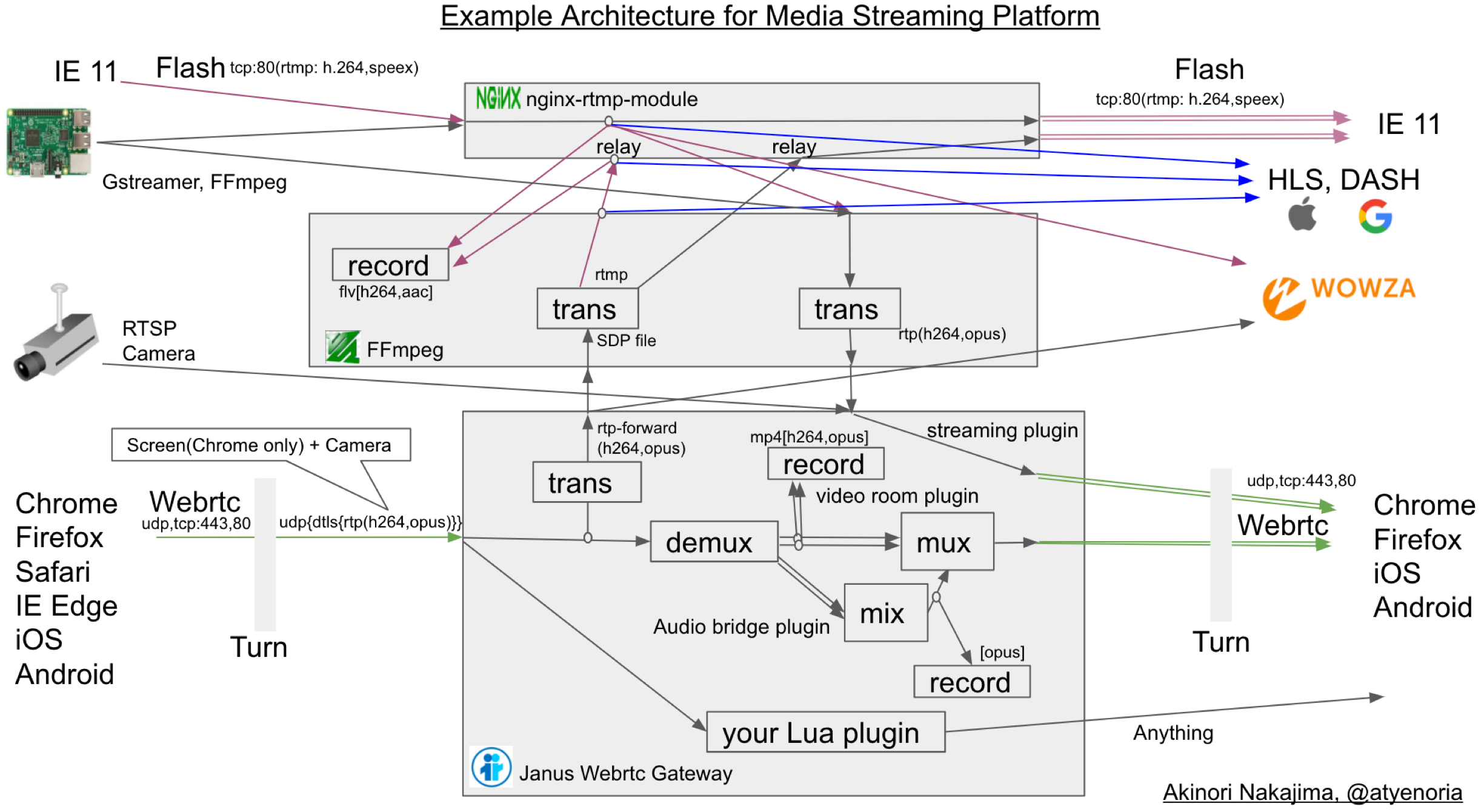
هذه صورة Docker لبوابة Janus Webrtc. GANES GATEWAY لا تزال تحت مرحلة التطوير النشط. لذلك ، كما تقول المستندات الرسمية ، يحدث بعض التعديل البسيط لإصدارات مكتبة الوسيطة بشكل متكرر. أحاول أن أتعامل مع مثل هذا العدد بقدر ما أستطيع. إذا كنت بحاجة إلى أي طلب حول هذا الريبو ، فاحرار الاتصال بي. حول تفاصيل الإعداد لصورة Docker هذه ، يجب عليك قراءة المستندات الرسمية https://janus.conf.meetecho.com/index.html بعناية.
مع أحدث libnice ، يبدو أن Ganus Gateway هو أداء رائع. يحتوي هذا الريبو على هذا التصحيح (انظر https://gitlab.freedesktop.org/libnice/libnice/merge_requests/13) https://webrtchacks.com/sfu-load-testing/ 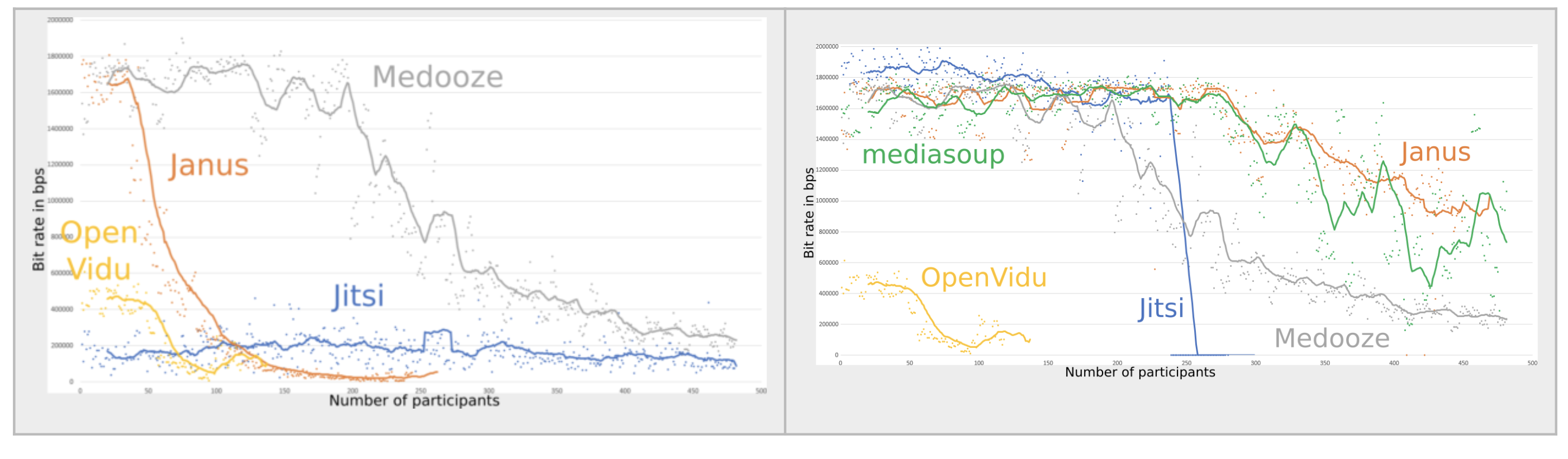 (الجانب الأيمن يانوس الرسم البياني متاح لصورة Docker هذه)
أعتقد أن Janus أفضل لندوة الويب (ندوة الويب) ، و Jitsi أفضل لنظام مؤتمر الويب. قابلية توسيع نطاق جسر فيديو Jitsi الحالي (20181007) ضعيف بسبب عدم وجود ملف تسجيل محلي (لست متأكدًا من هذا ..). https://www.youtube.com/watch؟v=OHHOQKCCJJJ0E JITSI LAST-N + VP8 MISULCTING يتمتع بأداء جيد للغاية لمؤتمر الويب https://jitsi.org/wp-content/uploads/2016/12/nossdav2015lastn.pdf for the for the for the for the for the for the for the for the for the for the the JITSI هو مؤتمر فيديو مختلط باستخدام Chrome Headlesss + FFMPEG (ALSA ، LIBXCB). من هذه النقاط ، فإن Janus مناسب للندوة عبر الإنترنت ، Jitsi هو مؤتمر الويب. بالطبع ، كل من Webrtc SFU عمل رائع !! أنا أستخدم كليهما.
استخدم IPerf ، Netperf
 libsrtp version:           2.x
SSL/crypto library:        BoringSSL
DTLS set-timeout:          yes
Mutex implementation:      GMutex (native futex on Linux)
DataChannels support:      yes
Recordings post-processor: yes
TURN REST API client:      yes
Doxygen documentation:     no
Transports:
    REST (HTTP/HTTPS):     yes
    WebSockets:            yes
    RabbitMQ:              no
    MQTT:                  no
    Unix Sockets:          no
    Nanomsg:               no
Plugins:
    Echo Test:             yes
    Streaming:             yes
    Video Call:            yes
    SIP Gateway (Sofia):   yes
    SIP Gateway (libre):   no
    NoSIP (RTP Bridge):    yes
    Audio Bridge:          yes
    Video Room:            yes
    Voice Mail:            yes
    Record&Play:           yes
    Text Room:             yes
    Lua Interpreter:       no
    Duktape Interpreter:   no
Event handlers:
    Sample event handler:  no
    RabbitMQ event handler:no
    MQTT event handler:    no
JavaScript modules:        no
 IP=0.0.0.0
PORT=8888
/root/bin/ffmpeg -y -i  "rtmp://$IP:80/rtmp_relay/$1  live=1"  -c:v libx264 -profile:v main -s 640x480  -an -preset ultrafast  -tune zerolatency -f rtp  rtp://$IP:$PORT
يجب عليك استخدام البرنامج المساعد Janus Streaming
https://github.com/meetecho/janus-gateway/blob/8b388aebb0de3ccfad3b25f940f61e48e308e604/plugins/janus_streaming.c
 IP=0.0.0.0
PORT=8888
SDP_FILE=sdp.file
/root/bin/ffmpeg -analyzeduration 300M -probesize 300M -protocol_whitelist file,udp,rtp  -i $SDP_FILE  -c:v copy -c:a aac -ar 16k -ac 1 -preset ultrafast -tune zerolatency  -f flv rtmp://$IP:$PORT/rtmp_relay/atyenoria
من أجل الحصول على Keyframe أسهل بكثير ، من المفيد تعيين Fir_freq = 1 في Janus Conf
يجب عليك استخدام janus video Room أو Audiobridge plugin
https://github.com/meetecho/janus-gateway/blob/8b388aebb0de3ccfad3b25f940f61e48e308e604/plugins/janus_videoroom.c
https://github.com/meetecho/janus-gateway/blob/8b388aebb0de3ccfad3b25f940f61e48e308e604/plugins/janus_audiobridge.c
بعد نشر خلاصتك في غرفتك ، يجب عليك استخدام RTP-Forward. أمر عينة JavaScript
 # Input this in Google Chrome debug console. you must change publisher_id, room, video_port, host, secret for your conf.
var register = { "request" : "rtp_forward", "publisher_id": 3881836128186438, "room" : 1234, "video_port": 8050, "host" : "your ip address", "secret" : "unko" }
sfutest.send({"message": register});
 `#{ffmpeg_path} -y
              -ss #{member[0].ss_at_time} -t #{member[0].t_at_time} -i #{member[0].file_path} -ss #{member[1].ss_at_time} -t #{member[1].t_at_time}  -i #{member[1].file_path}
              -ss #{member[2].ss_at_time} -t #{member[2].t_at_time} -i #{member[2].file_path}  -f lavfi -i "color=White"
                -filter_complex "
                nullsrc=size=640x480 [base];
                [0:v] setpts=PTS-STARTPTS, scale=320x240 [upperleft];
                [1:v] setpts=PTS-STARTPTS, scale=320x240 [upperright];
                [2:v] setpts=PTS-STARTPTS, scale=320x240 [lowerleft];
                [3:v] setpts=PTS-STARTPTS, scale=320x240 [lowerright];
                [base][upperleft] overlay=shortest=1 [tmp1];
                [tmp1][upperright] overlay=shortest=1:x=320 [tmp2];
                [tmp2][lowerleft] overlay=shortest=1:y=240 [tmp3];
                [tmp3][lowerright] overlay=shortest=1:y=240:x=320;
                [0:a][1:a][2:a] amerge=inputs=3
              "
                -preset ultrafast -r 30 -b:v 300k -c:v libx264 #{"/tmp/" + @conference["room_name"] + "/" + index.to_s + ".mp4"}`
 server_names_hash_bucket_size 64;

server {
    listen 443 ssl;
    server_name temp;

    ssl_protocols TLSv1 TLSv1.1 TLSv1.2;
    ssl_prefer_server_ciphers on;
    ssl_ciphers "EECDH+ECDSA+AESGCM:EECDH+aRSA+AESGCM:EECDH+ECDSA+SHA256:EECDH+aRSA+SHA256:EECDH+ECDSA+SHA384:EECDH+ECDSA+SHA256:EECDH+aRSA+SHA384:EDH+aRSA+AESGCM:EDH+aRSA+SHA256:EDH+aRSA:EECDH:!aNULL:!eNULL:!MEDIUM:!LOW:!3DES:!MD5:!EXP:!PSK:!SRP:!DSS:!RC4:!SEED";

    add_header Strict-Transport-Security "max-age=31536000";

    ssl_certificate /usr/local/nginx/server.crt;
    ssl_certificate_key /usr/local/nginx/server.key;

    access_log  /app/log/nginx_access.log  ;
    error_log  /app/log/nginx_error.log  debug;

    location /janus {
         proxy_set_header X-Real-IP $remote_addr;
         proxy_set_header Host $host;
         proxy_set_header X-Forwarded-For $proxy_add_x_forwarded_for;
         proxy_set_header X-Forwarded-Proto $scheme;
         proxy_http_version 1.1;
         proxy_set_header Upgrade $http_upgrade;
         proxy_set_header Connection "upgrade";
         proxy_set_header Host $host;
         proxy_redirect off;

         proxy_pass http://127.0.0.1:8188;
     }

     location /janus_http {
     proxy_pass http://127.0.0.1:8078;
     }

    location /janus_admin {
         proxy_set_header X-Real-IP $remote_addr;
         proxy_set_header Host $host;
         proxy_set_header X-Forwarded-For $proxy_add_x_forwarded_for;
         proxy_http_version 1.1;
         proxy_set_header Upgrade $http_upgrade;
         proxy_set_header Connection "upgrade";
         proxy_set_header Host $host;
         proxy_pass http://127.0.0.1:7188;
    }

    location /janus_admin_http {
     proxy_pass http://127.0.0.1:7088;
     }

    location /hls {
         types {
             application/vnd.apple.mpegurl m3u8;
             video/mp2t ts;
         }
         root /tmp;
         add_header Cache-Control no-cache;
     }

}
Akinori Nakajima https://twitter.com/atyenori
رحب أي شخص.







