janus webrtc gateway docker
stable

Repo ini tidak dipertahankan lagi. Gunakan repositori ini https://github.com/wangsrgit119/janus-webrtc-gateway-docker untuk mengangkat masalah atau PR. Terima kasih.
https://www.useloom.com/share/325799006d6f4b64a6ce0662ca3f1d57
 1. git clone https://github.com/atyenoria/janus-webrtc-gateway-docker.git && cd janus-webrtc-gateway-docker
2. make build
3. make run
4. star this repository after succeeding. Create the issue if you failed. We will help you as much as possible
Ini adalah gambar Docker untuk Janus Webrtc Gateway. Janus Gateway masih dalam fase pengembangan aktif. Jadi, seperti yang dikatakan dokumen resmi, beberapa modifikasi kecil dari versi perpustakaan middleware sering terjadi. Saya mencoba untuk berurusan dengan pengikuk sebanyak yang saya bisa. Jika Anda membutuhkan permintaan tentang repo ini, bebas untuk menghubungi saya. Tentang detail pengaturan untuk gambar Docker ini, Anda harus membaca dokumen resmi https://janus.conf.meetecho.com/index.html dengan hati -hati.
Dengan Libnice terbaru, Janus Gateway tampaknya merupakan kinerja yang hebat. Repo ini berisi tambalan ini (lihat https://gitlab.freedesktop.org/libnice/libnice/merge_requests/13) https://webrtchacks.com/sfu-load-testing/ 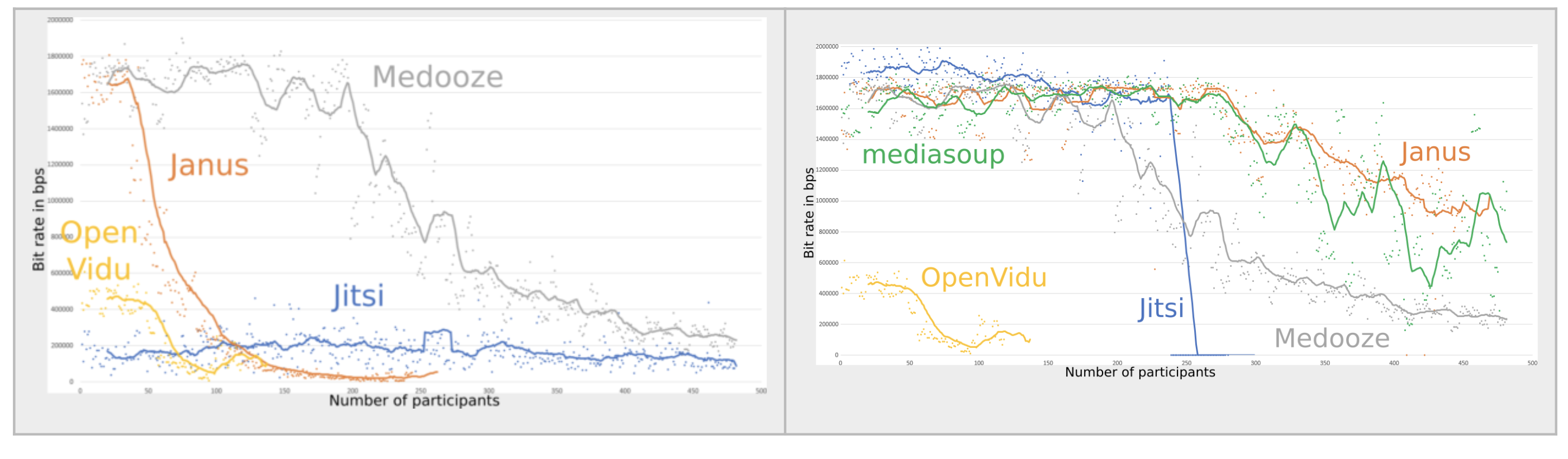 (Grafik kanan Janus tersedia untuk gambar Docker ini)
Saya pikir Janus lebih baik untuk Webinar (Seminar Web), dan Jitsi lebih baik untuk sistem konferensi Web. Skalabilitas jembatan video jitsi saat ini (20181007) buruk karena tidak memiliki file perekaman lokal (saya tidak yakin akan hal ini ..). https://www.youtube.com/watch?v=ohhoqkcjj0e jitsi last-- n + vp8 simulcasting memiliki kinerja yang sangat baik untuk konferensi web https://jitsi.org/wp-content/upploads/2016/12/nossdav2015lastn.pontent, video for, video forsion, video forsdav2015 Untuk konferensi video campuran dengan menggunakan Chrome Headlesss + FFMPEG (ALSA, LIBXCB). Dari poin -poin ini, Janus cocok untuk Webinar, Jitsi adalah untuk konferensi web. Tentu saja, keduanya SFU WEBRTC adalah pekerjaan yang luar biasa !! Saya menggunakan keduanya.
Gunakan Iperf, Netperf
 libsrtp version:           2.x
SSL/crypto library:        BoringSSL
DTLS set-timeout:          yes
Mutex implementation:      GMutex (native futex on Linux)
DataChannels support:      yes
Recordings post-processor: yes
TURN REST API client:      yes
Doxygen documentation:     no
Transports:
    REST (HTTP/HTTPS):     yes
    WebSockets:            yes
    RabbitMQ:              no
    MQTT:                  no
    Unix Sockets:          no
    Nanomsg:               no
Plugins:
    Echo Test:             yes
    Streaming:             yes
    Video Call:            yes
    SIP Gateway (Sofia):   yes
    SIP Gateway (libre):   no
    NoSIP (RTP Bridge):    yes
    Audio Bridge:          yes
    Video Room:            yes
    Voice Mail:            yes
    Record&Play:           yes
    Text Room:             yes
    Lua Interpreter:       no
    Duktape Interpreter:   no
Event handlers:
    Sample event handler:  no
    RabbitMQ event handler:no
    MQTT event handler:    no
JavaScript modules:        no
 IP=0.0.0.0
PORT=8888
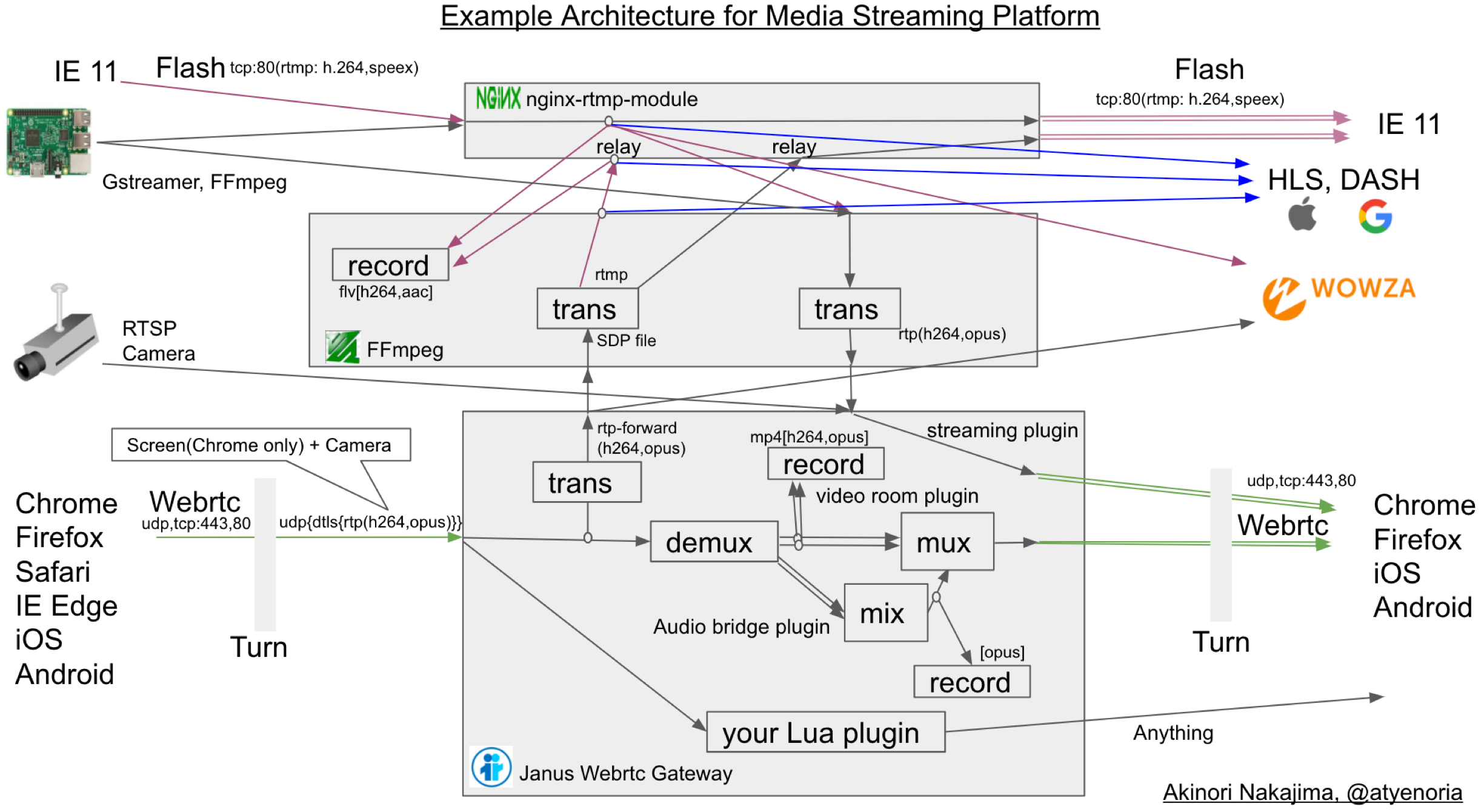
/root/bin/ffmpeg -y -i  "rtmp://$IP:80/rtmp_relay/$1  live=1"  -c:v libx264 -profile:v main -s 640x480  -an -preset ultrafast  -tune zerolatency -f rtp  rtp://$IP:$PORT
Anda harus menggunakan plugin streaming Janus
https://github.com/meetecho/janus-gateway/blob/8b388aebbb0de3ccfad3b25f940f61e48e308e604/plugins/janus_streaming.c
 IP=0.0.0.0
PORT=8888
SDP_FILE=sdp.file
/root/bin/ffmpeg -analyzeduration 300M -probesize 300M -protocol_whitelist file,udp,rtp  -i $SDP_FILE  -c:v copy -c:a aac -ar 16k -ac 1 -preset ultrafast -tune zerolatency  -f flv rtmp://$IP:$PORT/rtmp_relay/atyenoria
Untuk mendapatkan Kunci lebih mudah, akan berguna untuk mengatur fir_freq = 1 di Janus conf
Anda harus menggunakan ruang video Janus atau plugin Audiobridge
https://github.com/meetecho/janus-gateway/blob/8b388aebbb0de3ccfad3b25f940f61e48e308e604/plugins/janus_videoroom.c
https://github.com/meetecho/janus-gateway/blob/8b388aebbb0de3ccfad3b25f940f61e48e308e604/plugins/janus_audiobridge.c.
Setelah menerbitkan feed Anda di kamar Anda, Anda harus menggunakan RTP-forward. Perintah sampel javascript adalah
 # Input this in Google Chrome debug console. you must change publisher_id, room, video_port, host, secret for your conf.
var register = { "request" : "rtp_forward", "publisher_id": 3881836128186438, "room" : 1234, "video_port": 8050, "host" : "your ip address", "secret" : "unko" }
sfutest.send({"message": register});
 `#{ffmpeg_path} -y
              -ss #{member[0].ss_at_time} -t #{member[0].t_at_time} -i #{member[0].file_path} -ss #{member[1].ss_at_time} -t #{member[1].t_at_time}  -i #{member[1].file_path}
              -ss #{member[2].ss_at_time} -t #{member[2].t_at_time} -i #{member[2].file_path}  -f lavfi -i "color=White"
                -filter_complex "
                nullsrc=size=640x480 [base];
                [0:v] setpts=PTS-STARTPTS, scale=320x240 [upperleft];
                [1:v] setpts=PTS-STARTPTS, scale=320x240 [upperright];
                [2:v] setpts=PTS-STARTPTS, scale=320x240 [lowerleft];
                [3:v] setpts=PTS-STARTPTS, scale=320x240 [lowerright];
                [base][upperleft] overlay=shortest=1 [tmp1];
                [tmp1][upperright] overlay=shortest=1:x=320 [tmp2];
                [tmp2][lowerleft] overlay=shortest=1:y=240 [tmp3];
                [tmp3][lowerright] overlay=shortest=1:y=240:x=320;
                [0:a][1:a][2:a] amerge=inputs=3
              "
                -preset ultrafast -r 30 -b:v 300k -c:v libx264 #{"/tmp/" + @conference["room_name"] + "/" + index.to_s + ".mp4"}`
 server_names_hash_bucket_size 64;

server {
    listen 443 ssl;
    server_name temp;

    ssl_protocols TLSv1 TLSv1.1 TLSv1.2;
    ssl_prefer_server_ciphers on;
    ssl_ciphers "EECDH+ECDSA+AESGCM:EECDH+aRSA+AESGCM:EECDH+ECDSA+SHA256:EECDH+aRSA+SHA256:EECDH+ECDSA+SHA384:EECDH+ECDSA+SHA256:EECDH+aRSA+SHA384:EDH+aRSA+AESGCM:EDH+aRSA+SHA256:EDH+aRSA:EECDH:!aNULL:!eNULL:!MEDIUM:!LOW:!3DES:!MD5:!EXP:!PSK:!SRP:!DSS:!RC4:!SEED";

    add_header Strict-Transport-Security "max-age=31536000";

    ssl_certificate /usr/local/nginx/server.crt;
    ssl_certificate_key /usr/local/nginx/server.key;

    access_log  /app/log/nginx_access.log  ;
    error_log  /app/log/nginx_error.log  debug;

    location /janus {
         proxy_set_header X-Real-IP $remote_addr;
         proxy_set_header Host $host;
         proxy_set_header X-Forwarded-For $proxy_add_x_forwarded_for;
         proxy_set_header X-Forwarded-Proto $scheme;
         proxy_http_version 1.1;
         proxy_set_header Upgrade $http_upgrade;
         proxy_set_header Connection "upgrade";
         proxy_set_header Host $host;
         proxy_redirect off;

         proxy_pass http://127.0.0.1:8188;
     }

     location /janus_http {
     proxy_pass http://127.0.0.1:8078;
     }

    location /janus_admin {
         proxy_set_header X-Real-IP $remote_addr;
         proxy_set_header Host $host;
         proxy_set_header X-Forwarded-For $proxy_add_x_forwarded_for;
         proxy_http_version 1.1;
         proxy_set_header Upgrade $http_upgrade;
         proxy_set_header Connection "upgrade";
         proxy_set_header Host $host;
         proxy_pass http://127.0.0.1:7188;
    }

    location /janus_admin_http {
     proxy_pass http://127.0.0.1:7088;
     }

    location /hls {
         types {
             application/vnd.apple.mpegurl m3u8;
             video/mp2t ts;
         }
         root /tmp;
         add_header Cache-Control no-cache;
     }

}
Akinori Nakajima https://twitter.com/atyenori
Ada yang disambut.







