crsTransformations dotnet
Version 3.0.0 of crsTransformations-dotnet

請注意,帶有適配器API和常規代碼的“核心”庫將使用MIT許可證發布。
但是,適配器實現庫的許可方式與每個此類實施中的單獨的“ lince_notice”文件(在適配器基本目錄中)中指定的改編庫。
此F#/C#/。網絡項目旨在在不同的坐標參考系統(CRS)之間轉換坐標。
這些適配器將第三部分.NET庫用作適應器。
該代碼已使用f#實現,但是測試(以及subproject“ programMerare.crstransformations.constants”中的生成常數)用C#實現。
以下這些版本適用於nuget版本的v3.0.0,例如programmerare.crstransformations.core:
.NET目標版本為.NET標準2.0(例如.NET Framework 4.6.1或更高版本),但可以與.NET Framework 2.0或更高版本一起使用帶常數(ProgramMerare.CrstransFormations.Constants)的庫版本10.36。
f#版本為6.0.1(即用於“ fsharp.core”的軟件包引用)
該代碼項目的以下五個庫已發布/分發到Nuget:
名稱中包含“適配器”的三個庫是上述“核心”庫的適配器實現。
這三個適配器正在使用三個適應器庫進行坐標轉換。
上述“ Mightyltergeodesy ”庫僅對WGS84(非常常見的全局CR)和瑞典坐標參考系統(CRS)Sweref99(13版本eg“ Sweref99 tm”)和RT90(6版本EG“ RT90 2.5 GON V”)。
上面的庫“ programmerare.crstransformations。常數”實際上完全獨立於其他庫。
它不依賴任何東西,沒有任何取決於它。
它是一個C#庫(即甚至不依賴F#的不同),只有一個具有很多C#常數的類。
(其他四個核心/適配器庫使用F#實現)
C#常數類是從EPSG數據集版本10.036生成的,這是其版本編號的原因。
“核心”庫不需要包括在內,因為從所有“適配器”庫到“核心”都有隱式/及物的依賴性。
不需要“常數”庫,但是如果您想將常數用於EPSG數字,而不是用整數文字來定義您自己的整數常數,則可能會很有趣。
 <!-- Use one, two or three of the below three Adapters -->
< PackageReference Include = " Programmerare.CrsTransformations.Adapter.DotSpatial " Version = " 3.0.0 " />
< PackageReference Include = " Programmerare.CrsTransformations.Adapter.ProjNet " Version = " 3.0.0 " />
< PackageReference Include = " Programmerare.CrsTransformations.Adapter.MightyLittleGeodesy " Version = " 3.0.0 " />


<!-- The Core should not be necessary to include explicitly as below (since it should be implicitly included when using one of the others above ) -->
< PackageReference Include = " Programmerare.CrsTransformations.Core " Version = " 3.0.0 " />

<!-- Optional (and totally independent) library with only one class with lots of integer constants -->
< PackageReference Include = " Programmerare.CrsTransformations.Constants " Version = " 10.36.0 " />
上述庫可以在我的Nuget頁面上找到。
代碼(即核心和適配器庫)已使用F#實現,但測試代碼是用“ programMerare.crstransformations.test”中的C#編寫的。
三種.NET語言C#,F#和VB.NET也有一些示例代碼項目。
這三個項目使用相同的代碼(即做同樣的事情),但使用不同語言的語法。
除了上述C#代碼(即C#測試項目和C#Nuget示例項目)外,下面的此GitHub頁面還說明瞭如何使用C#代碼使用庫。
轉換坐標的方法是在接口ICRStransformationAdapter中定義的。
目前有七個類實現接口。三個“葉子”和四個“複合材料”。
每個葉子適配器都使用一些適應器庫進行實施。
四個“複合材料”正在使用這樣的葉子:
另外兩種核心類型是CRSIDENIFIER和CRS.CORIDATION。這兩者在下面的各節中進行了說明。
 using System . Collections . Generic ; // IList
using Programmerare . CrsTransformations ; // ICrsTransformationAdapter
using Programmerare . CrsTransformations . CompositeTransformations ; // CrsTransformationAdapterCompositeFactory
using Programmerare . CrsTransformations . Adapter . DotSpatial ;
using Programmerare . CrsTransformations . Adapter . ProjNet ;
using Programmerare . CrsTransformations . Adapter . MightyLittleGeodesy ;

	// ...

    // The interface with seven implementations as illustrated below
    ICrsTransformationAdapter crsTransformationAdapter ;
    // The interface is defined in the library "Programmerare.CrsTransformations.Core" with this full name:
    // Programmerare.CrsTransformations.ICrsTransformationAdapter

    // The three 'Leaf' implementations:

    // Library "Programmerare.CrsTransformations.Adapter.DotSpatial", class:
    // Programmerare.CrsTransformations.Adapter.DotSpatial.CrsTransformationAdapterDotSpatial
    crsTransformationAdapter = new CrsTransformationAdapterDotSpatial ( ) ;

    // Library "Programmerare.CrsTransformations.Adapter.ProjNet", class:
    // Programmerare.CrsTransformations.Adapter.ProjNet.CrsTransformationAdapterProjNet
    crsTransformationAdapter = new CrsTransformationAdapterProjNet ( ) ;

    // Library "Programmerare.CrsTransformations.Adapter.MightyLittleGeodesy", class:
    // Programmerare.CrsTransformations.Adapter.MightyLittleGeodesy.CrsTransformationAdapterMightyLittleGeodesy
    crsTransformationAdapter = new CrsTransformationAdapterMightyLittleGeodesy ( ) ;

    // - - - - - - - - - - - -

    // The four 'Composite' implementations below are all located in the library
    // "Programmerare.CrsTransformations.Core" and the factory class is:
    // Programmerare.CrsTransformations.CompositeTransformations.CrsTransformationAdapterCompositeFactory
    var crsTransformationAdapterCompositeFactory = CrsTransformationAdapterCompositeFactory . Create ( ) ;

    crsTransformationAdapter = crsTransformationAdapterCompositeFactory . CreateCrsTransformationMedian ( ) ;

    crsTransformationAdapter = crsTransformationAdapterCompositeFactory . CreateCrsTransformationAverage ( ) ;

    crsTransformationAdapter = crsTransformationAdapterCompositeFactory . CreateCrsTransformationFirstSuccess ( ) ;

    // All of the above three factory methods without any parameter will try to use as many of
    // the three (currently) 'leaf' implementations as are available in runtime
    // (e.g. are included as NuGet dependencies).
    // If you want to specify explicitly which ones to be used, you can provide
    // a parameter 'IList<ICrsTransformationAdapter>' to the Create method like this:
    crsTransformationAdapterCompositeFactory = CrsTransformationAdapterCompositeFactory . Create (
        new List < ICrsTransformationAdapter > {
            new CrsTransformationAdapterDotSpatial ( ) ,
            new CrsTransformationAdapterProjNet ( ) ,
            new CrsTransformationAdapterMightyLittleGeodesy ( ) ,
        }
    ) ;

    // The fourth 'Composite' below does not use any implicit implementations
    // but if you want to use a result created as a weighted average then the weights need
    // to be specified explicitly per leaf implementation as in the example below.
    var weightFactory = CrsTransformationAdapterWeightFactory . Create ( ) ;
    crsTransformationAdapter = crsTransformationAdapterCompositeFactory . CreateCrsTransformationWeightedAverage (
        new List < CrsTransformationAdapterWeight > {
            weightFactory . CreateFromInstance ( new CrsTransformationAdapterDotSpatial ( ) , 1.0 ) ,
            weightFactory . CreateFromInstance ( new CrsTransformationAdapterProjNet ( ) , 1.0 ) ,
            weightFactory . CreateFromInstance ( new CrsTransformationAdapterMightyLittleGeodesy ( ) , 2.0 ) ,
        }
    ) ;
    // The weight values above illustrates a situation where you (for some reason) want to consider
// the transformation results from 'MightyLittleGeodesy' as being 'two times better' than the others.所有轉換方法(在上述接口ICRStransFormationAdapter中定義)需要兩個參數,一個輸入坐標和一個參數,指定目標系統IE,IE將輸入坐標轉換為哪個坐標參考系統。
目標系統可以使用三種數據類型(即帶有超載方法),一個整數或字符串或“ CRSIDENTIFIER”指定。
如果使用整數或字符串,則將創建內部“ CRSIDENIFIER”,以將其作為參數發送到適配器實現。
因此,如果您打算從坐標參考系統進行許多轉換,那麼您可以選擇自己創建一個CRSIDENIFIER的關鍵,但是為了更方便,您可能需要使用帶有整數作為參數的過載方法(如果您已經對某些“ Epsg:epsg:epsg:epsg:” - 字符串而言,則可能需要使用字符串,請參見下面的示例)。
坐標(類型crsCoortion)包括有關坐標參考系統的信息,即“ crsidentifier”,但也有工廠方法(創建坐標實例),這些方法被整數或字符串參數重載。
如下示例中,有許多工廠方法具有不同的名稱和不同的訂單。
根據您上下文中所需的語義,您可能需要使用類似的不同方法(或類似地命名的crsoorceardors ):
 using Programmerare . CrsTransformations . Identifier ; // CrsIdentifier
using Programmerare . CrsTransformations . Coordinate ; // CrsCoordinate
using static Programmerare . CrsTransformations . Coordinate . CrsCoordinateFactory ;
// The above row with "using static" enables many factory methods:
// LatLon , LonLat , YX , XY , ... and so on (see the example code below)

	// ...

    int epsgNumber = 4326 ;
    string crsCode = "EPSG:" + epsgNumber ;
    CrsIdentifier crsIdentifier ; // namespace Programmerare.CrsTransformations.Identifier
    crsIdentifier = CrsIdentifierFactory . CreateFromEpsgNumber ( epsgNumber ) ;
    // Alternative:
    crsIdentifier = CrsIdentifierFactory . CreateFromCrsCode ( crsCode ) ;

    double latitude = 59.330231 ;
    double longitude = 18.059196 ;

    CrsCoordinate crsCoordinate ; // namespace Programmerare.CrsTransformations.Coordinate
    // All the below methods are alternatives for creating the same coordinate
    // with the above latitude/longitude and coordinate reference system.
    // No class or object is used for the methods below because of the following static import:
    // using static Programmerare.CrsTransformations.Coordinate.CrsCoordinateFactory;
    crsCoordinate = LatLon ( latitude , longitude , epsgNumber ) ;
    crsCoordinate = LatLon ( latitude , longitude , crsCode ) ;
    crsCoordinate = LatLon ( latitude , longitude , crsIdentifier ) ;

    crsCoordinate = LonLat ( longitude , latitude , epsgNumber ) ;
    crsCoordinate = LonLat ( longitude , latitude , crsCode ) ;
    crsCoordinate = LonLat ( longitude , latitude , crsIdentifier ) ;

    crsCoordinate = YX ( latitude , longitude , epsgNumber ) ;
    crsCoordinate = YX ( latitude , longitude , crsCode ) ;
    crsCoordinate = YX ( latitude , longitude , crsIdentifier ) ;

    crsCoordinate = XY ( longitude , latitude , epsgNumber ) ;
    crsCoordinate = XY ( longitude , latitude , crsCode ) ;
    crsCoordinate = XY ( longitude , latitude , crsIdentifier ) ;

    crsCoordinate = NorthingEasting ( latitude , longitude , epsgNumber ) ;
    crsCoordinate = NorthingEasting ( latitude , longitude , crsCode ) ;
    crsCoordinate = NorthingEasting ( latitude , longitude , crsIdentifier ) ;

    crsCoordinate = EastingNorthing ( longitude , latitude , epsgNumber ) ;
    crsCoordinate = EastingNorthing ( longitude , latitude , crsCode ) ;
    crsCoordinate = EastingNorthing ( longitude , latitude , crsIdentifier ) ;

    crsCoordinate = CreateFromYNorthingLatitudeAndXEastingLongitude ( latitude , longitude , epsgNumber ) ;
    crsCoordinate = CreateFromYNorthingLatitudeAndXEastingLongitude ( latitude , longitude , crsCode ) ;
    crsCoordinate = CreateFromYNorthingLatitudeAndXEastingLongitude ( latitude , longitude , crsIdentifier ) ;

    crsCoordinate = CreateFromXEastingLongitudeAndYNorthingLatitude ( longitude , latitude , epsgNumber ) ;
    crsCoordinate = CreateFromXEastingLongitudeAndYNorthingLatitude ( longitude , latitude , crsCode ) ;
    crsCoordinate = CreateFromXEastingLongitudeAndYNorthingLatitude ( longitude , latitude , crsIdentifier ) ;

    CrsIdentifier targetCrs = CrsIdentifierFactory . CreateFromEpsgNumber ( 3006 ) ;
    ICrsTransformationAdapter crsTransformationAdapter = CrsTransformationAdapterCompositeFactory . Create ( ) . CreateCrsTransformationAverage ( ) ;
    CrsTransformationResult crsTransformationResult = crsTransformationAdapter . Transform ( crsCoordinate , targetCrs ) ;
// see more example code further down in this webpage以下是一個小的C#示例代碼,可與當前版本1.0.0一起使用。
示例代碼將坐標從全局CRS WGS84(EPSG代碼4326)緯度/經度轉換為瑞典CRS SWEREF99TM(EPSG代碼3006)。
 using Programmerare . CrsTransformations ;
using Programmerare . CrsTransformations . Coordinate ;
using Programmerare . CrsTransformations . CompositeTransformations ;
using System ; // Console

class SmallCSharpeExample {
    static void Main ( string [ ] args ) {
        int epsgWgs84  = 4326 ;
        int epsgSweRef = 3006 ;
        // alternative to the above two hardcodings: use the library "Programmerare.CrsTransformations.Constants"
        // and constants EpsgNumber.WORLD__WGS_84__4326 and EpsgNumber.SWEDEN__SWEREF99_TM__3006
        // from the class Programmerare.CrsConstants.ConstantsByAreaNameNumber.v9_5_4.EpsgNumber

        CrsCoordinate centralStockholmWgs84 = CrsCoordinateFactory . LatLon ( 59.330231 , 18.059196 , epsgWgs84 ) ;

        ICrsTransformationAdapter crsTransformationAdapter = CrsTransformationAdapterCompositeFactory . Create ( ) . CreateCrsTransformationMedian ( ) ;
        // If the NuGet configuration includes all (currently three) adapter implementations, then the
        // above created 'Composite' implementation will below use all three 'leaf' implementations
        // and return a coordinate with a median longitude and a median latitude
        CrsTransformationResult centralStockholmResultSweRef = crsTransformationAdapter . Transform ( centralStockholmWgs84 , epsgSweRef ) ;

        if ( centralStockholmResultSweRef . IsSuccess ) {
            Console . WriteLine ( centralStockholmResultSweRef . OutputCoordinate ) ;
            // Console output from the above code row:
            // CrsCoordinate(xEastingLongitude=674032.357177155, yNorthingLatitude=6580821.99121561, crsIdentifier=CrsIdentifier(crsCode='EPSG:3006', isEpsgCode=True, epsgNumber=3006))
        }
    }
} using Programmerare . CrsConstants . ConstantsByAreaNameNumber . v10_036 ;
using Programmerare . CrsTransformations ;
using Programmerare . CrsTransformations . CompositeTransformations ;
using Programmerare . CrsTransformations . Coordinate ;
using System ;
using System . Collections . Generic ;
.. .
// Some terminology regarding the names used in the below code example:
// "CRS" = Coordinate Reference System
// "WGS84" is the most frequently used coordinate system (e.g. the coordinates usually used in a GPS)
// "SWEREF99TM" is the official coordinate system used by authorities in Sweden
// "EPSG" = "European Petroleum Survey Group" was (but the EPSG name is still often used)
// an organization defining CRS with integer numbers e.g. 4326 for WGS84 or 3006 for SWEREF99TM
int epsgWgs84 = EpsgNumber . WORLD__WGS_84__4326 ;
int epsgSweRef = EpsgNumber . SWEDEN__SWEREF99_TM__3006 ;
// The above "EpsgNumber" class with LOTS OF constants (and more constants classes) have been generated,
// using "FreeMarker" and database downloaded from EPSG ( http://www.epsg.org or http://www.epsg-registry.org )
// from "crs-transformation-code-generation" in the project https://github.com/TomasJohansson/crsTransformations
CrsCoordinate centralStockholmWgs84 = CrsCoordinateFactory . LatLon ( 59.330231 , 18.059196 , epsgWgs84 ) ;
// https://kartor.eniro.se/m/03Yxp
// SWEREF99TM coordinates (for WGS84 59.330231, 18.059196)
// according to Eniro (above URL): 6580822, 674032 (northing, easting)
ICrsTransformationAdapter crsTransformationAdapter ; // interface with concrete "leaf" implementation or "composite" implementations
// This code example is using a "composite" which will use multiple libraries to do the same transformation and then
// return a coordinate with the median values (median of the northing values and median of the easting values)
crsTransformationAdapter = CrsTransformationAdapterCompositeFactory . Create ( ) . CreateCrsTransformationMedian ( ) ;
// The above factory will try to use those known objects which implements the interface i.e. the number
// of "leaf" objects will depend on how many you included as for example NuGet dependencies (three in the above NuGet example)
Console . WriteLine ( "Number of 'leafs' : " + crsTransformationAdapter . TransformationAdapterChildren . Count ) ;
// Console output from the above row:
// Number of 'leafs' : 3
// Transform the WGS84 coordinate to a SWEREF99TM coordinate:
CrsCoordinate centralStockholmSweRef = crsTransformationAdapter . TransformToCoordinate ( centralStockholmWgs84 , epsgSweRef ) ;
Console . WriteLine ( "Median Composite Northing: " + centralStockholmSweRef . Northing ) ;
Console . WriteLine ( "Median Composite Easting: " + centralStockholmSweRef . Easting ) ;
// Console output from the above two rows:
// Median Composite Northing: 6580821.99121561
// Median Composite Easting: 674032.357177155
// (and these can be compared with the 'Eniro' values above i.e. '6580822, 674032 (northing, easting)' )
// The coordinate class provides four properties with different names for the same east-west value and
// four properties for the same name each north-south value, as below:
// Four EQUIVALENT properties: Easting , X , Longitude , XEastingLongitude
// Four EQUIVALENT properties: Northing , Y , Latitude , YNorthingLatitude
// Regarding the above alternative methods, depending on the desired semantic in your context, you may want to use:
// X/Y for a geocentric or cartesian system
// Longitude/Latitude for a geodetic or geographic system
// Easting/Northing for a cartographic or projected system
// xEastingLongitude/yNorthingLatitude for general code handling different types of system
// If you want more details for the result you can use the following 'Transform' method:
// (instead of the method 'TransformToCoordinate' used above)
CrsTransformationResult centralStockholmResultSweRef = crsTransformationAdapter . Transform ( centralStockholmWgs84 , epsgSweRef ) ;
if ( ! centralStockholmResultSweRef . IsSuccess ) {
Console . WriteLine ( "No coordinate result" ) ;
}
else {
if ( centralStockholmResultSweRef . IsReliable (
2 , // minimumNumberOfSuccesfulResults
0.01 // maxDeltaValueForXLongitudeAndYLatitude
) ) {
// at least 2 succesful results and the maximal difference in northing or easting is less than 0.01
// (and if you want to know the exact difference you can find it in this code example further down the page)
Console . WriteLine ( "Reliable result" ) ; // according to your chosen parameters to the method 'isReliable'
}
else {
Console . WriteLine ( "Not reliable result" ) ;
}
Console . WriteLine ( centralStockholmResultSweRef . OutputCoordinate ) ;
// Console output from the above code row:
// CrsCoordinate(xEastingLongitude=674032.357177155, yNorthingLatitude=6580821.99121561, crsIdentifier=CrsIdentifier(crsCode='EPSG:3006', isEpsgCode=True, epsgNumber=3006))
// When your code is in a context where you only have the result (but not the adapter object)
// (e.g. in a method receiving the result as a parameter)
// you can get back the object which created the result as below:
ICrsTransformationAdapter crsTransformationAdapterResultSource = centralStockholmResultSweRef . CrsTransformationAdapterResultSource ;
CrsTransformationAdapteeType adapteeType = crsTransformationAdapterResultSource . AdapteeType ;
Console . WriteLine ( "adapteeType: " + adapteeType ) ; // console output: COMPOSITE_MEDIAN
// The above code row returned an enum which is not really a true adaptee just like the 'composite' is not a true adapter.
// However, when iterating (as below) the "leaf" results,
// it might be more interesting to keep track of from where the different values originated
IList < CrsTransformationResult > transformationResultChildren = centralStockholmResultSweRef . TransformationResultChildren ;
foreach ( CrsTransformationResult crsTransformationResultLeaf in transformationResultChildren ) {
if ( ! crsTransformationResultLeaf . IsSuccess ) continue ; // continue with the next 'leaf'
ICrsTransformationAdapter resultAdapter = crsTransformationResultLeaf . CrsTransformationAdapterResultSource ;
Console . WriteLine ( resultAdapter . AdapteeType ) ;
// The above code row will output rows like this:
// "LEAF_PROJ_NET_4_GEO_API_1_4_1" or "LEAF_MIGHTY_LITTLE_GEODESY_1_0_1" and so on
if ( ! crsTransformationResultLeaf . IsReliable (
2 , // minimumNumberOfSuccesfulResults
1000 // maxDeltaValueForXLongitudeAndYLatitude
) ) {
// The above constraint "at least 2 implementations" will always fail because now we are dealing with "leafs"
// The above delta value constraint has very high tolerance but it does not matter since
// the constraint about the number of implementations will fail
Console . WriteLine ( "Only 'composites' can have more than one result and this is a 'leaf' and thus does not have at least two results" ) ;
}
Console . WriteLine ( "Adapter long name: " + resultAdapter . LongNameOfImplementation ) ; // full class name including package
Console . WriteLine ( "Adapter short name: " + resultAdapter . ShortNameOfImplementation ) ; // class name suffix i.e. the unique part
// The above "long" names will be for example:
// Programmerare.CrsTransformations.Adapter.DotSpatial.CrsTransformationAdapterDotSpatial
// Programmerare.CrsTransformations.Adapter.MightyLittleGeodesy.CrsTransformationAdapterMightyLittleGeodesy
// The above "short" names will be for example:
// DotSpatial
// MightyLittleGeodesy
Console . WriteLine ( "adaptee: " + resultAdapter . AdapteeType ) ;
// The above row will output for example:
// LEAF_DOT_SPATIAL_2_0_0_RC1
// LEAF_MIGHTY_LITTLE_GEODESY_1_0_1
// (note that the version number is included for the adaptees)
Console . WriteLine ( "isComposite: " + resultAdapter . IsComposite ) ; // "False" since we are iterating "leaf" results
Console . WriteLine ( "Coordinate result for " + resultAdapter . AdapteeType + " : " + crsTransformationResultLeaf . OutputCoordinate ) ;
// The above row will output these rows when doing the iteration:
// Coordinate result for LEAF_DOT_SPATIAL_2_0_0_RC1 : CrsCoordinate(xEastingLongitude=674032.357322213, yNorthingLatitude=6580821.99121561, crsIdentifier=CrsIdentifier(crsCode='EPSG:3006', isEpsgCode=True, epsgNumber=3006))
// Coordinate result for LEAF_PROJ_NET_4_GEO_API_1_4_1 : CrsCoordinate(xEastingLongitude=674032.357177155, yNorthingLatitude=6580821.99437121, crsIdentifier=CrsIdentifier(crsCode='EPSG:3006', isEpsgCode=True, epsgNumber=3006))
// Coordinate result for LEAF_MIGHTY_LITTLE_GEODESY_1_0_1 : CrsCoordinate(xEastingLongitude=674032.357, yNorthingLatitude=6580821.991, crsIdentifier=CrsIdentifier(crsCode='EPSG:3006', isEpsgCode=True, epsgNumber=3006))
// Note that the median value for "x" is 674032.357177155 for the above
// three values 674032.357 , 674032.357177155 , 674032.357322213 .
// That is the same value as was displayed before the iteration of the children/leafs for the median composite.
// The same applies for the above "y" i.e. the median is 6580821.99121561
// for the three y values 6580821.991 , 6580821.99121561 , 6580821.99437121
}
// The result object also provides convenience methods for the results (which you of course otherwise might calculate by iterating the above results)
CrsTransformationResultStatistic crsTransformationResultStatistic = centralStockholmResultSweRef . CrsTransformationResultStatistic ;
// Note that the initially created composite was a "median composite" returning the median as the main value,
// but you can also create an average composite and regardless you can access both the median and the average with the aggregated statistics object:
Console . WriteLine ( "average coordinate: " + crsTransformationResultStatistic . CoordinateAverage ) ;
Console . WriteLine ( "median coordinate: " + crsTransformationResultStatistic . CoordinateMedian ) ;
// Console output from the above two rows:
// average coordinate: CrsCoordinate(xEastingLongitude=674032.357166456, yNorthingLatitude=6580821.99219561, crsIdentifier=CrsIdentifier(crsCode='EPSG:3006', isEpsgCode=True, epsgNumber=3006))
// median coordinate: CrsCoordinate(xEastingLongitude=674032.357177155, yNorthingLatitude=6580821.99121561, crsIdentifier=CrsIdentifier(crsCode='EPSG:3006', isEpsgCode=True, epsgNumber=3006))
Console . WriteLine ( "MaxDifferenceForXEastingLongitude: " + crsTransformationResultStatistic . MaxDifferenceForXEastingLongitude ) ;
Console . WriteLine ( "MaxDifferenceForYNorthingLatitude: " + crsTransformationResultStatistic . MaxDifferenceForYNorthingLatitude ) ;
// Output from the above two rows:
// MaxDifferenceForXEastingLongitude: 0.000322213280014694
// MaxDifferenceForYNorthingLatitude: 0.00337121076881886
// As you can see in the above iteration, the min and max x values are 674032.357 and 674032.357322213 (and the difference is 0.000322213).
// Similarly the min and max y values are 6580821.991 and 6580821.99437121 (and the difference is 0.00337121).
// The above two "MaxDifference" methods are used within the implementation of the convenience method 'isReliable'
// (also illustrated in this example further above)
}版本3.0.0添加了對WKT-CRS的支持,但請注意,WKT-CRS字符串已轉發到實現,而無需弄清楚提供的字符串是“ WKT OGC”還是“ WKT ESRI”
代碼示例,使用複合適配器(具有葉子實現的DOTSPatial和Projnet):
crstransformationAdapterCompositewkttest.cs
整數常數是通過使用EPSG數據庫生成的
和項目中的“ CRS-Transformation-Code-generation”中的Java Library freemarker https://github.com/tomasjohansson/crstransformations
每個常數用於定義坐標參考系統(CRS)。
常數的名稱是以下三個部分的串聯:
請注意,以下屏幕截圖和本節中的文本適用於較舊版本的9.5.4,但現在有更高版本。您可以在其Nuget存儲庫中找到最新版本的“ ProgramMerare.crstransformations.constants”。
選擇上述三列時SQL結果示例: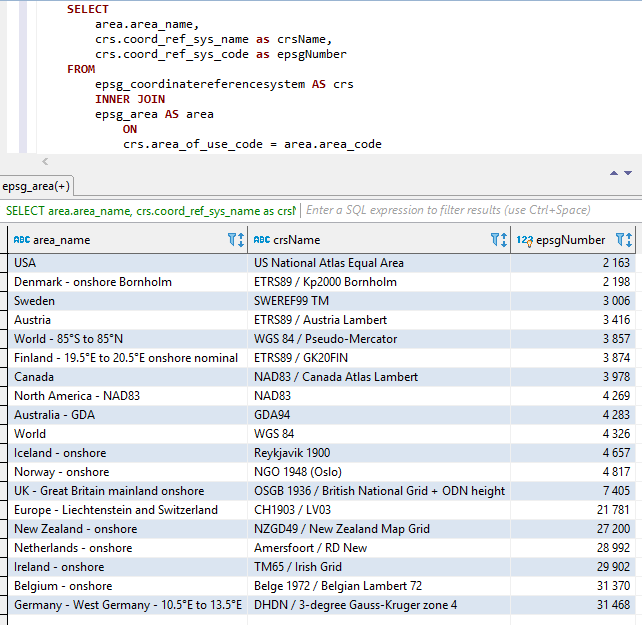
以上三個部分是連接的(在上述順序中,即Areaname+crsname+epsgnumber),兩個下劃線作為零件之間的分離器。
空間和其他特殊字符被下劃線取代。
如下所示,常數名稱也被插入。
Visual Studio 2017的屏幕截圖與類Epsgnumber一起使用Intellisense/AutoCompletion: 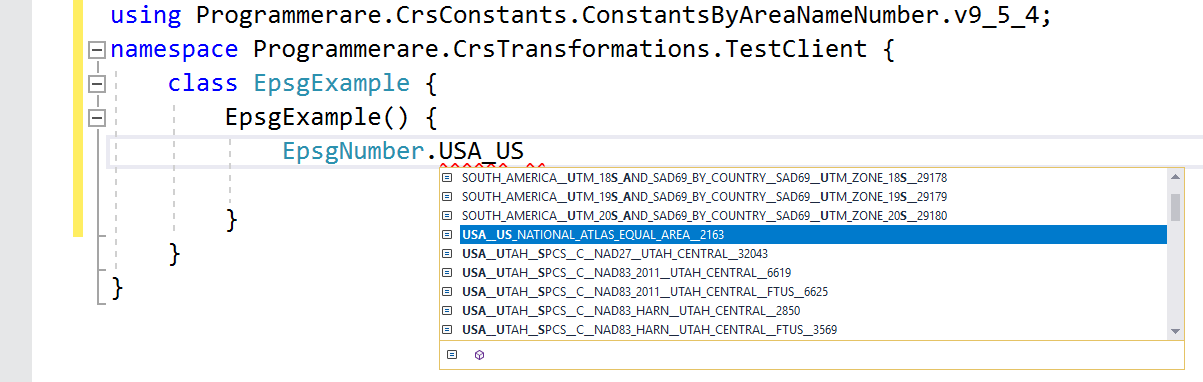
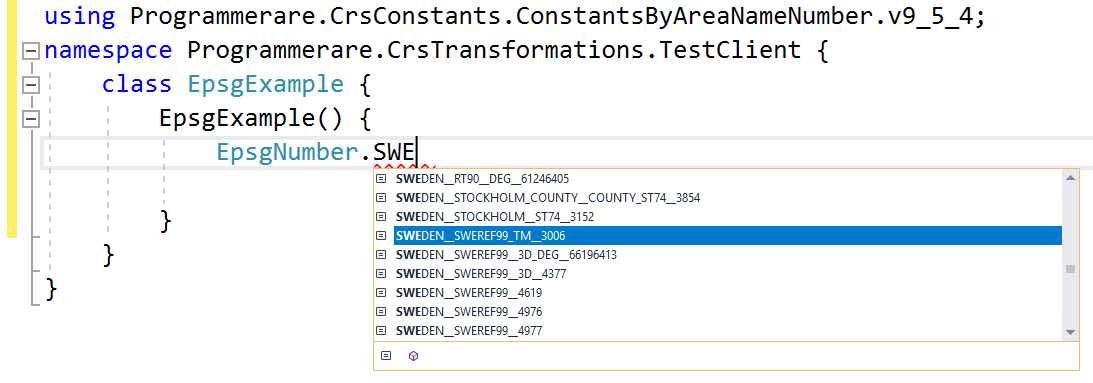
C#類proginmerare.crsconstants.constantsbyareanamenumber.v9_5_4.epsgnumber中的其他常數名稱的更多示例
(並且您可以將下面的這些常數名稱與上面的SQL屏幕截圖的三個結果列進行比較)
 WORLD__WGS_84__4326
WORLD__85_S_TO_85_N__WGS_84__PSEUDO_MERCATOR__3857
NORTH_AMERICA__NAD83__NAD83__4269
USA__US_NATIONAL_ATLAS_EQUAL_AREA__2163
CANADA__NAD83__CANADA_ATLAS_LAMBERT__3978
UK__GREAT_BRITAIN_MAINLAND_ONSHORE__OSGB_1936__BRITISH_NATIONAL_GRID__ODN_HEIGHT__7405
IRELAND__ONSHORE__TM65__IRISH_GRID__29902
AUSTRALIA__GDA__GDA94__4283
NEW_ZEALAND__ONSHORE__NZGD49__NEW_ZEALAND_MAP_GRID__27200
SWEDEN__SWEREF99_TM__3006
FINLAND__19_5_E_TO_20_5_E_ONSHORE_NOMINAL__ETRS89__GK20FIN__3874
DENMARK__ONSHORE_BORNHOLM__ETRS89__KP2000_BORNHOLM__2198
NORWAY__ONSHORE__NGO_1948__OSLO__4817
ICELAND__ONSHORE__REYKJAVIK_1900__4657
NETHERLANDS__ONSHORE__AMERSFOORT__RD_NEW__28992
BELGIUM__ONSHORE__BELGE_1972__BELGIAN_LAMBERT_72__31370
GERMANY__WEST_GERMANY__10_5_E_TO_13_5_E__DHDN__3_DEGREE_GAUSS_KRUGER_ZONE_4__31468
AUSTRIA__ETRS89__AUSTRIA_LAMBERT__3416
EUROPE__LIECHTENSTEIN_AND_SWITZERLAND__CH1903__LV03__21781
上面的常數示例顯示很少。
生成類中有數千個常數。
可以使用C#code'typeof(epsgnumber).getFields()()'type'''。
也可以使用SQL語句返回的值驗證相同的數字“ select count(不同的coord_ref_sys_code)從epsg_coordinatereferencesystem'(或簡單地從epsg_coordinatereferencesystem中選擇“ count Count(*)”,從epsg_coordinatereferencesystem中'從'coord_ref_sys_code'起'in coord_ref_sys_code'是主鍵)。






