crsTransformations dotnet
Version 3.0.0 of crsTransformations-dotnet

لاحظ أنه يتم إصدار مكتبة "Core" مع API Adapter و General Code مع ترخيص MIT.
ومع ذلك ، فإن مكتبات تطبيقات المحول مرخصة بنفس الطريقة مثل المكتبات المعدلة التي يتم تحديدها في ملفات "ترخيص_ نوتس" منفصلة (في الدلائل الأساسية للمحول) لكل تطبيق من هذا القبيل.
هذا المشروع الصافي F#/C#/. مخصص لتحويل الإحداثيات بين الأنظمة المرجعية الإحداثي المختلفة (CRS).
تستخدم المحولات مكتبات .NET من الجهة الثالثة كـ Adaptee's.
تم تنفيذ الرمز باستخدام F# ولكن يتم تنفيذ الاختبارات (والثوابت التي تم إنشاؤها في المشاريع الفرعية "Probrammerare.crstransformations.constants") مع C#.
تنطبق هذه الإصدارات أدناه على v3.0.0 من Nuget إصدارات eg probrammerare.crstransformations.core:
إصدار .NET Target هو .NET Standard 2.0 (على سبيل المثال .NET Framework 4.6.1 أو أحدث) ولكن يمكن استخدام الإصدار 10.36 من المكتبة مع الثوابت (Probrammerare.crstransformations.constants) مع .NET Framework 2.0 أو أحدث.
إصدار F# هو 6.0.1 (أي للإشارة إلى "FSHARP.CORE")
تم إصدار/توزيع المكتبات الخمس التالية من مشروع الرمز هذا على Nuget:
المكتبات الثلاث أعلاه التي تتضمن " محول " في الاسم هي تطبيقات محول لمكتبة " Core " أعلاه.
تستخدم هذه المحولات الثلاثة مكتبات Adaptee الثلاث لتحويلات الإحداثيات.
تعد مكتبة " MayyLittlegeodesy " أعلاه مفيدة فقط للتحول بين WGS84 (وهو CRS عالمي شائع جدًا) و SWEREF99 SWEREF99 (13 إصدارًا على سبيل المثال "SWERF99 TM") و RT90 (6 إصدارات مثل RT90 2.5 GON V ").
المكتبة أعلاه " البرمجة .
لا يعتمد على أي شيء ولا شيء يعتمد عليه.
إنها مكتبة C# (أي حتى لا تعتمد على f# مثل الآخرين) مع فئة واحدة فقط مع الكثير من الثوابت C#.
(يتم تنفيذ مكتبات Core/Adapter الأربعة الأخرى باستخدام F#)
تم إنشاء فئة C# الثابت من الإصدار 10.036 مجموعة بيانات EPSG وهو سبب رقم الإصدار.
المكتبة "الأساسية" ليست ضرورية لتضمينها نظرًا لوجود تبعية ضمنية/متعدية من جميع المكتبات "المحول" إلى "Core".
ليست هناك حاجة لمكتبة "الثوابت" ولكن قد تكون مثيرة للاهتمام إذا كنت ترغب في استخدام الثوابت لأرقام EPSG بدلاً من ترميزها مع حرفيات عدد صحيح أو تحديد ثوابتك الصحيح.
 <!-- Use one, two or three of the below three Adapters -->
< PackageReference Include = " Programmerare.CrsTransformations.Adapter.DotSpatial " Version = " 3.0.0 " />
< PackageReference Include = " Programmerare.CrsTransformations.Adapter.ProjNet " Version = " 3.0.0 " />
< PackageReference Include = " Programmerare.CrsTransformations.Adapter.MightyLittleGeodesy " Version = " 3.0.0 " />


<!-- The Core should not be necessary to include explicitly as below (since it should be implicitly included when using one of the others above ) -->
< PackageReference Include = " Programmerare.CrsTransformations.Core " Version = " 3.0.0 " />

<!-- Optional (and totally independent) library with only one class with lots of integer constants -->
< PackageReference Include = " Programmerare.CrsTransformations.Constants " Version = " 10.36.0 " />
يمكن العثور على المكتبات المذكورة أعلاه في صفحة Nuget الخاصة بي.
تم تنفيذ الرمز (IE Core و Libraries) باستخدام F# ولكن تم كتابة رمز الاختبار باستخدام C# في "probluary.crstransformations.test".
هناك أيضًا بعض مشاريع رمز المثال للغات الثلاث .NET C# و F# و VB.NET.
تستخدم هذه المشاريع الثلاثة نفس النوع من التعليمات البرمجية (أي القيام بنفس الشيء) ولكن مع بناء جملة مختلف للغات المختلفة.
بالإضافة إلى رمز C# المذكور أعلاه (أي مشروع اختبار C# ومشروع مثال C# nuget) ، فإن صفحة GitHub أدناه توضح أيضًا كيفية استخدام المكتبة مع رمز C#.
يتم تعريف طرق تحويل الإحداثيات في الواجهة ICRSTRANSTFORMATIONADAPTER .
يوجد حاليًا سبعة فصول تنفذ الواجهة. ثلاثة "أوراق" وأربعة "مركبات".
يستخدم كل محول ورقة بعض مكتبة Adaptee للتنفيذ.
تستخدم "المركبات" الأربعة أوراق مثل هذه:
نوعان أساسيان آخران هما crsidentifier و crscoordinate. كلاهما موضح في الأقسام أدناه.
 using System . Collections . Generic ; // IList
using Programmerare . CrsTransformations ; // ICrsTransformationAdapter
using Programmerare . CrsTransformations . CompositeTransformations ; // CrsTransformationAdapterCompositeFactory
using Programmerare . CrsTransformations . Adapter . DotSpatial ;
using Programmerare . CrsTransformations . Adapter . ProjNet ;
using Programmerare . CrsTransformations . Adapter . MightyLittleGeodesy ;

	// ...

    // The interface with seven implementations as illustrated below
    ICrsTransformationAdapter crsTransformationAdapter ;
    // The interface is defined in the library "Programmerare.CrsTransformations.Core" with this full name:
    // Programmerare.CrsTransformations.ICrsTransformationAdapter

    // The three 'Leaf' implementations:

    // Library "Programmerare.CrsTransformations.Adapter.DotSpatial", class:
    // Programmerare.CrsTransformations.Adapter.DotSpatial.CrsTransformationAdapterDotSpatial
    crsTransformationAdapter = new CrsTransformationAdapterDotSpatial ( ) ;

    // Library "Programmerare.CrsTransformations.Adapter.ProjNet", class:
    // Programmerare.CrsTransformations.Adapter.ProjNet.CrsTransformationAdapterProjNet
    crsTransformationAdapter = new CrsTransformationAdapterProjNet ( ) ;

    // Library "Programmerare.CrsTransformations.Adapter.MightyLittleGeodesy", class:
    // Programmerare.CrsTransformations.Adapter.MightyLittleGeodesy.CrsTransformationAdapterMightyLittleGeodesy
    crsTransformationAdapter = new CrsTransformationAdapterMightyLittleGeodesy ( ) ;

    // - - - - - - - - - - - -

    // The four 'Composite' implementations below are all located in the library
    // "Programmerare.CrsTransformations.Core" and the factory class is:
    // Programmerare.CrsTransformations.CompositeTransformations.CrsTransformationAdapterCompositeFactory
    var crsTransformationAdapterCompositeFactory = CrsTransformationAdapterCompositeFactory . Create ( ) ;

    crsTransformationAdapter = crsTransformationAdapterCompositeFactory . CreateCrsTransformationMedian ( ) ;

    crsTransformationAdapter = crsTransformationAdapterCompositeFactory . CreateCrsTransformationAverage ( ) ;

    crsTransformationAdapter = crsTransformationAdapterCompositeFactory . CreateCrsTransformationFirstSuccess ( ) ;

    // All of the above three factory methods without any parameter will try to use as many of
    // the three (currently) 'leaf' implementations as are available in runtime
    // (e.g. are included as NuGet dependencies).
    // If you want to specify explicitly which ones to be used, you can provide
    // a parameter 'IList<ICrsTransformationAdapter>' to the Create method like this:
    crsTransformationAdapterCompositeFactory = CrsTransformationAdapterCompositeFactory . Create (
        new List < ICrsTransformationAdapter > {
            new CrsTransformationAdapterDotSpatial ( ) ,
            new CrsTransformationAdapterProjNet ( ) ,
            new CrsTransformationAdapterMightyLittleGeodesy ( ) ,
        }
    ) ;

    // The fourth 'Composite' below does not use any implicit implementations
    // but if you want to use a result created as a weighted average then the weights need
    // to be specified explicitly per leaf implementation as in the example below.
    var weightFactory = CrsTransformationAdapterWeightFactory . Create ( ) ;
    crsTransformationAdapter = crsTransformationAdapterCompositeFactory . CreateCrsTransformationWeightedAverage (
        new List < CrsTransformationAdapterWeight > {
            weightFactory . CreateFromInstance ( new CrsTransformationAdapterDotSpatial ( ) , 1.0 ) ,
            weightFactory . CreateFromInstance ( new CrsTransformationAdapterProjNet ( ) , 1.0 ) ,
            weightFactory . CreateFromInstance ( new CrsTransformationAdapterMightyLittleGeodesy ( ) , 2.0 ) ,
        }
    ) ;
    // The weight values above illustrates a situation where you (for some reason) want to consider
// the transformation results from 'MightyLittleGeodesy' as being 'two times better' than the others.تحتاج جميع طرق التحويل (المحددة في الواجهة أعلاه ICRStransformationAdapter ) إلى معلمتين ، إحداثيات إدخال واحدة ومعلمة واحدة تحدد النظام المستهدف أي نظام مرجع تنسيق سيتم تحويل إحداثيات الإدخال إلى.
يمكن تحديد النظام المستهدف بثلاثة أنواع بيانات (أي مع طرق محملة) ، إما عدد صحيح أو سلسلة ، أو "crsidentifier".
إذا تم استخدام عدد صحيح أو سلسلة ، فسيتم إنشاء "crsidentifier" داخليًا ، لإرسالها كمعلمة إلى تطبيقات المحول.
لذلك ، إذا كنت تنوي القيام بالعديد من التحول من أو إلى نظام مرجعي تنسيق ، فيمكنك اختيار إنشاء مؤسسة من crsidentifier بنفسك ، ولكن لمزيد من الراحة ، قد ترغب في استخدام الأساليب الزائدة مع عدد صحيح كمعلمة (أو ربما تكون سلسلة بالفعل إذا كان لديك بعض "EPSG:"-سلسلة ، انظر المثال أدناه).
يتضمن الإحداثيات (Type CrsCoordinate) معلومات حول النظام المرجعي للإحداثيات ، أي "crsidentifier" ولكن هناك أيضًا طرق المصنع (إنشاء مثيلات إحداثيات) يتم تحميلها بشكل زائد بمعلمات عدد صحيح أو سلسلة.
هناك العديد من أساليب المصنع بأسماء مختلفة وترتيب مختلف لقيم الموضع (x/y) كما هو موضح في المثال أدناه.
اعتمادًا على الدلالي المطلوبة في سياقك ، قد ترغب في استخدام الطرق المختلفة (أو الملحقات المسماة بالمثل في CrsCoordinate ) مثل هذا:
 using Programmerare . CrsTransformations . Identifier ; // CrsIdentifier
using Programmerare . CrsTransformations . Coordinate ; // CrsCoordinate
using static Programmerare . CrsTransformations . Coordinate . CrsCoordinateFactory ;
// The above row with "using static" enables many factory methods:
// LatLon , LonLat , YX , XY , ... and so on (see the example code below)

	// ...

    int epsgNumber = 4326 ;
    string crsCode = "EPSG:" + epsgNumber ;
    CrsIdentifier crsIdentifier ; // namespace Programmerare.CrsTransformations.Identifier
    crsIdentifier = CrsIdentifierFactory . CreateFromEpsgNumber ( epsgNumber ) ;
    // Alternative:
    crsIdentifier = CrsIdentifierFactory . CreateFromCrsCode ( crsCode ) ;

    double latitude = 59.330231 ;
    double longitude = 18.059196 ;

    CrsCoordinate crsCoordinate ; // namespace Programmerare.CrsTransformations.Coordinate
    // All the below methods are alternatives for creating the same coordinate
    // with the above latitude/longitude and coordinate reference system.
    // No class or object is used for the methods below because of the following static import:
    // using static Programmerare.CrsTransformations.Coordinate.CrsCoordinateFactory;
    crsCoordinate = LatLon ( latitude , longitude , epsgNumber ) ;
    crsCoordinate = LatLon ( latitude , longitude , crsCode ) ;
    crsCoordinate = LatLon ( latitude , longitude , crsIdentifier ) ;

    crsCoordinate = LonLat ( longitude , latitude , epsgNumber ) ;
    crsCoordinate = LonLat ( longitude , latitude , crsCode ) ;
    crsCoordinate = LonLat ( longitude , latitude , crsIdentifier ) ;

    crsCoordinate = YX ( latitude , longitude , epsgNumber ) ;
    crsCoordinate = YX ( latitude , longitude , crsCode ) ;
    crsCoordinate = YX ( latitude , longitude , crsIdentifier ) ;

    crsCoordinate = XY ( longitude , latitude , epsgNumber ) ;
    crsCoordinate = XY ( longitude , latitude , crsCode ) ;
    crsCoordinate = XY ( longitude , latitude , crsIdentifier ) ;

    crsCoordinate = NorthingEasting ( latitude , longitude , epsgNumber ) ;
    crsCoordinate = NorthingEasting ( latitude , longitude , crsCode ) ;
    crsCoordinate = NorthingEasting ( latitude , longitude , crsIdentifier ) ;

    crsCoordinate = EastingNorthing ( longitude , latitude , epsgNumber ) ;
    crsCoordinate = EastingNorthing ( longitude , latitude , crsCode ) ;
    crsCoordinate = EastingNorthing ( longitude , latitude , crsIdentifier ) ;

    crsCoordinate = CreateFromYNorthingLatitudeAndXEastingLongitude ( latitude , longitude , epsgNumber ) ;
    crsCoordinate = CreateFromYNorthingLatitudeAndXEastingLongitude ( latitude , longitude , crsCode ) ;
    crsCoordinate = CreateFromYNorthingLatitudeAndXEastingLongitude ( latitude , longitude , crsIdentifier ) ;

    crsCoordinate = CreateFromXEastingLongitudeAndYNorthingLatitude ( longitude , latitude , epsgNumber ) ;
    crsCoordinate = CreateFromXEastingLongitudeAndYNorthingLatitude ( longitude , latitude , crsCode ) ;
    crsCoordinate = CreateFromXEastingLongitudeAndYNorthingLatitude ( longitude , latitude , crsIdentifier ) ;

    CrsIdentifier targetCrs = CrsIdentifierFactory . CreateFromEpsgNumber ( 3006 ) ;
    ICrsTransformationAdapter crsTransformationAdapter = CrsTransformationAdapterCompositeFactory . Create ( ) . CreateCrsTransformationAverage ( ) ;
    CrsTransformationResult crsTransformationResult = crsTransformationAdapter . Transform ( crsCoordinate , targetCrs ) ;
// see more example code further down in this webpage فيما يلي رمز مثال C# صغير يعمل مع الإصدار الحالي 1.0.0.
يحول رمز المثال إحداثيًا من CRS WGS84 (رمز EPSG 4326) خط العرض/خط الطول إلى CRS SWEREF99TM السويدي (رمز EPSG 3006).
 using Programmerare . CrsTransformations ;
using Programmerare . CrsTransformations . Coordinate ;
using Programmerare . CrsTransformations . CompositeTransformations ;
using System ; // Console

class SmallCSharpeExample {
    static void Main ( string [ ] args ) {
        int epsgWgs84  = 4326 ;
        int epsgSweRef = 3006 ;
        // alternative to the above two hardcodings: use the library "Programmerare.CrsTransformations.Constants"
        // and constants EpsgNumber.WORLD__WGS_84__4326 and EpsgNumber.SWEDEN__SWEREF99_TM__3006
        // from the class Programmerare.CrsConstants.ConstantsByAreaNameNumber.v9_5_4.EpsgNumber

        CrsCoordinate centralStockholmWgs84 = CrsCoordinateFactory . LatLon ( 59.330231 , 18.059196 , epsgWgs84 ) ;

        ICrsTransformationAdapter crsTransformationAdapter = CrsTransformationAdapterCompositeFactory . Create ( ) . CreateCrsTransformationMedian ( ) ;
        // If the NuGet configuration includes all (currently three) adapter implementations, then the
        // above created 'Composite' implementation will below use all three 'leaf' implementations
        // and return a coordinate with a median longitude and a median latitude
        CrsTransformationResult centralStockholmResultSweRef = crsTransformationAdapter . Transform ( centralStockholmWgs84 , epsgSweRef ) ;

        if ( centralStockholmResultSweRef . IsSuccess ) {
            Console . WriteLine ( centralStockholmResultSweRef . OutputCoordinate ) ;
            // Console output from the above code row:
            // CrsCoordinate(xEastingLongitude=674032.357177155, yNorthingLatitude=6580821.99121561, crsIdentifier=CrsIdentifier(crsCode='EPSG:3006', isEpsgCode=True, epsgNumber=3006))
        }
    }
} using Programmerare . CrsConstants . ConstantsByAreaNameNumber . v10_036 ;
using Programmerare . CrsTransformations ;
using Programmerare . CrsTransformations . CompositeTransformations ;
using Programmerare . CrsTransformations . Coordinate ;
using System ;
using System . Collections . Generic ;
.. .
// Some terminology regarding the names used in the below code example:
// "CRS" = Coordinate Reference System
// "WGS84" is the most frequently used coordinate system (e.g. the coordinates usually used in a GPS)
// "SWEREF99TM" is the official coordinate system used by authorities in Sweden
// "EPSG" = "European Petroleum Survey Group" was (but the EPSG name is still often used)
// an organization defining CRS with integer numbers e.g. 4326 for WGS84 or 3006 for SWEREF99TM
int epsgWgs84 = EpsgNumber . WORLD__WGS_84__4326 ;
int epsgSweRef = EpsgNumber . SWEDEN__SWEREF99_TM__3006 ;
// The above "EpsgNumber" class with LOTS OF constants (and more constants classes) have been generated,
// using "FreeMarker" and database downloaded from EPSG ( http://www.epsg.org or http://www.epsg-registry.org )
// from "crs-transformation-code-generation" in the project https://github.com/TomasJohansson/crsTransformations
CrsCoordinate centralStockholmWgs84 = CrsCoordinateFactory . LatLon ( 59.330231 , 18.059196 , epsgWgs84 ) ;
// https://kartor.eniro.se/m/03Yxp
// SWEREF99TM coordinates (for WGS84 59.330231, 18.059196)
// according to Eniro (above URL): 6580822, 674032 (northing, easting)
ICrsTransformationAdapter crsTransformationAdapter ; // interface with concrete "leaf" implementation or "composite" implementations
// This code example is using a "composite" which will use multiple libraries to do the same transformation and then
// return a coordinate with the median values (median of the northing values and median of the easting values)
crsTransformationAdapter = CrsTransformationAdapterCompositeFactory . Create ( ) . CreateCrsTransformationMedian ( ) ;
// The above factory will try to use those known objects which implements the interface i.e. the number
// of "leaf" objects will depend on how many you included as for example NuGet dependencies (three in the above NuGet example)
Console . WriteLine ( "Number of 'leafs' : " + crsTransformationAdapter . TransformationAdapterChildren . Count ) ;
// Console output from the above row:
// Number of 'leafs' : 3
// Transform the WGS84 coordinate to a SWEREF99TM coordinate:
CrsCoordinate centralStockholmSweRef = crsTransformationAdapter . TransformToCoordinate ( centralStockholmWgs84 , epsgSweRef ) ;
Console . WriteLine ( "Median Composite Northing: " + centralStockholmSweRef . Northing ) ;
Console . WriteLine ( "Median Composite Easting: " + centralStockholmSweRef . Easting ) ;
// Console output from the above two rows:
// Median Composite Northing: 6580821.99121561
// Median Composite Easting: 674032.357177155
// (and these can be compared with the 'Eniro' values above i.e. '6580822, 674032 (northing, easting)' )
// The coordinate class provides four properties with different names for the same east-west value and
// four properties for the same name each north-south value, as below:
// Four EQUIVALENT properties: Easting , X , Longitude , XEastingLongitude
// Four EQUIVALENT properties: Northing , Y , Latitude , YNorthingLatitude
// Regarding the above alternative methods, depending on the desired semantic in your context, you may want to use:
// X/Y for a geocentric or cartesian system
// Longitude/Latitude for a geodetic or geographic system
// Easting/Northing for a cartographic or projected system
// xEastingLongitude/yNorthingLatitude for general code handling different types of system
// If you want more details for the result you can use the following 'Transform' method:
// (instead of the method 'TransformToCoordinate' used above)
CrsTransformationResult centralStockholmResultSweRef = crsTransformationAdapter . Transform ( centralStockholmWgs84 , epsgSweRef ) ;
if ( ! centralStockholmResultSweRef . IsSuccess ) {
Console . WriteLine ( "No coordinate result" ) ;
}
else {
if ( centralStockholmResultSweRef . IsReliable (
2 , // minimumNumberOfSuccesfulResults
0.01 // maxDeltaValueForXLongitudeAndYLatitude
) ) {
// at least 2 succesful results and the maximal difference in northing or easting is less than 0.01
// (and if you want to know the exact difference you can find it in this code example further down the page)
Console . WriteLine ( "Reliable result" ) ; // according to your chosen parameters to the method 'isReliable'
}
else {
Console . WriteLine ( "Not reliable result" ) ;
}
Console . WriteLine ( centralStockholmResultSweRef . OutputCoordinate ) ;
// Console output from the above code row:
// CrsCoordinate(xEastingLongitude=674032.357177155, yNorthingLatitude=6580821.99121561, crsIdentifier=CrsIdentifier(crsCode='EPSG:3006', isEpsgCode=True, epsgNumber=3006))
// When your code is in a context where you only have the result (but not the adapter object)
// (e.g. in a method receiving the result as a parameter)
// you can get back the object which created the result as below:
ICrsTransformationAdapter crsTransformationAdapterResultSource = centralStockholmResultSweRef . CrsTransformationAdapterResultSource ;
CrsTransformationAdapteeType adapteeType = crsTransformationAdapterResultSource . AdapteeType ;
Console . WriteLine ( "adapteeType: " + adapteeType ) ; // console output: COMPOSITE_MEDIAN
// The above code row returned an enum which is not really a true adaptee just like the 'composite' is not a true adapter.
// However, when iterating (as below) the "leaf" results,
// it might be more interesting to keep track of from where the different values originated
IList < CrsTransformationResult > transformationResultChildren = centralStockholmResultSweRef . TransformationResultChildren ;
foreach ( CrsTransformationResult crsTransformationResultLeaf in transformationResultChildren ) {
if ( ! crsTransformationResultLeaf . IsSuccess ) continue ; // continue with the next 'leaf'
ICrsTransformationAdapter resultAdapter = crsTransformationResultLeaf . CrsTransformationAdapterResultSource ;
Console . WriteLine ( resultAdapter . AdapteeType ) ;
// The above code row will output rows like this:
// "LEAF_PROJ_NET_4_GEO_API_1_4_1" or "LEAF_MIGHTY_LITTLE_GEODESY_1_0_1" and so on
if ( ! crsTransformationResultLeaf . IsReliable (
2 , // minimumNumberOfSuccesfulResults
1000 // maxDeltaValueForXLongitudeAndYLatitude
) ) {
// The above constraint "at least 2 implementations" will always fail because now we are dealing with "leafs"
// The above delta value constraint has very high tolerance but it does not matter since
// the constraint about the number of implementations will fail
Console . WriteLine ( "Only 'composites' can have more than one result and this is a 'leaf' and thus does not have at least two results" ) ;
}
Console . WriteLine ( "Adapter long name: " + resultAdapter . LongNameOfImplementation ) ; // full class name including package
Console . WriteLine ( "Adapter short name: " + resultAdapter . ShortNameOfImplementation ) ; // class name suffix i.e. the unique part
// The above "long" names will be for example:
// Programmerare.CrsTransformations.Adapter.DotSpatial.CrsTransformationAdapterDotSpatial
// Programmerare.CrsTransformations.Adapter.MightyLittleGeodesy.CrsTransformationAdapterMightyLittleGeodesy
// The above "short" names will be for example:
// DotSpatial
// MightyLittleGeodesy
Console . WriteLine ( "adaptee: " + resultAdapter . AdapteeType ) ;
// The above row will output for example:
// LEAF_DOT_SPATIAL_2_0_0_RC1
// LEAF_MIGHTY_LITTLE_GEODESY_1_0_1
// (note that the version number is included for the adaptees)
Console . WriteLine ( "isComposite: " + resultAdapter . IsComposite ) ; // "False" since we are iterating "leaf" results
Console . WriteLine ( "Coordinate result for " + resultAdapter . AdapteeType + " : " + crsTransformationResultLeaf . OutputCoordinate ) ;
// The above row will output these rows when doing the iteration:
// Coordinate result for LEAF_DOT_SPATIAL_2_0_0_RC1 : CrsCoordinate(xEastingLongitude=674032.357322213, yNorthingLatitude=6580821.99121561, crsIdentifier=CrsIdentifier(crsCode='EPSG:3006', isEpsgCode=True, epsgNumber=3006))
// Coordinate result for LEAF_PROJ_NET_4_GEO_API_1_4_1 : CrsCoordinate(xEastingLongitude=674032.357177155, yNorthingLatitude=6580821.99437121, crsIdentifier=CrsIdentifier(crsCode='EPSG:3006', isEpsgCode=True, epsgNumber=3006))
// Coordinate result for LEAF_MIGHTY_LITTLE_GEODESY_1_0_1 : CrsCoordinate(xEastingLongitude=674032.357, yNorthingLatitude=6580821.991, crsIdentifier=CrsIdentifier(crsCode='EPSG:3006', isEpsgCode=True, epsgNumber=3006))
// Note that the median value for "x" is 674032.357177155 for the above
// three values 674032.357 , 674032.357177155 , 674032.357322213 .
// That is the same value as was displayed before the iteration of the children/leafs for the median composite.
// The same applies for the above "y" i.e. the median is 6580821.99121561
// for the three y values 6580821.991 , 6580821.99121561 , 6580821.99437121
}
// The result object also provides convenience methods for the results (which you of course otherwise might calculate by iterating the above results)
CrsTransformationResultStatistic crsTransformationResultStatistic = centralStockholmResultSweRef . CrsTransformationResultStatistic ;
// Note that the initially created composite was a "median composite" returning the median as the main value,
// but you can also create an average composite and regardless you can access both the median and the average with the aggregated statistics object:
Console . WriteLine ( "average coordinate: " + crsTransformationResultStatistic . CoordinateAverage ) ;
Console . WriteLine ( "median coordinate: " + crsTransformationResultStatistic . CoordinateMedian ) ;
// Console output from the above two rows:
// average coordinate: CrsCoordinate(xEastingLongitude=674032.357166456, yNorthingLatitude=6580821.99219561, crsIdentifier=CrsIdentifier(crsCode='EPSG:3006', isEpsgCode=True, epsgNumber=3006))
// median coordinate: CrsCoordinate(xEastingLongitude=674032.357177155, yNorthingLatitude=6580821.99121561, crsIdentifier=CrsIdentifier(crsCode='EPSG:3006', isEpsgCode=True, epsgNumber=3006))
Console . WriteLine ( "MaxDifferenceForXEastingLongitude: " + crsTransformationResultStatistic . MaxDifferenceForXEastingLongitude ) ;
Console . WriteLine ( "MaxDifferenceForYNorthingLatitude: " + crsTransformationResultStatistic . MaxDifferenceForYNorthingLatitude ) ;
// Output from the above two rows:
// MaxDifferenceForXEastingLongitude: 0.000322213280014694
// MaxDifferenceForYNorthingLatitude: 0.00337121076881886
// As you can see in the above iteration, the min and max x values are 674032.357 and 674032.357322213 (and the difference is 0.000322213).
// Similarly the min and max y values are 6580821.991 and 6580821.99437121 (and the difference is 0.00337121).
// The above two "MaxDifference" methods are used within the implementation of the convenience method 'isReliable'
// (also illustrated in this example further above)
}الإصدار 3.0.0 أضاف الدعم لـ WKT-CRS ، ولكن يرجى ملاحظة أن سلسلة WKT-CRS يتم إعادة توجيهها إلى التطبيقات دون محاولة معرفة ما إذا كانت السلسلة المقدمة "WKT OGC" أو "WKT ESRI"
مثال رمز ، باستخدام محول مركب (مع تطبيقات الأوراق dotspatial و projnet):
crstransformationadaptercompositewkttest.cs
يتم إنشاء ثوابت عدد صحيح باستخدام قاعدة بيانات EPSG
ومكتبة Java Freemarker في "CRS-Transformation-Code-Generation" في المشروع https://github.com/tomasjohansson/crstransformations
يتم استخدام كل ثابت لتحديد نظام مرجع الإحداثيات (CRS).
اسم الثابت هو تسلسل للأجزاء الثلاثة التالية:
لاحظ أن لقطات الشاشة والنص الواردة في هذا القسم مخصصة للإصدار الأقدم 9.5.4 ولكن هناك الآن إصدار لاحق . يمكنك العثور على أحدث إصدار من "probluary.crstransformations.constants" في مستودع Nuget الخاص به.
مثال على نتيجة SQL عند تحديد الأعمدة الثلاثة أعلاه: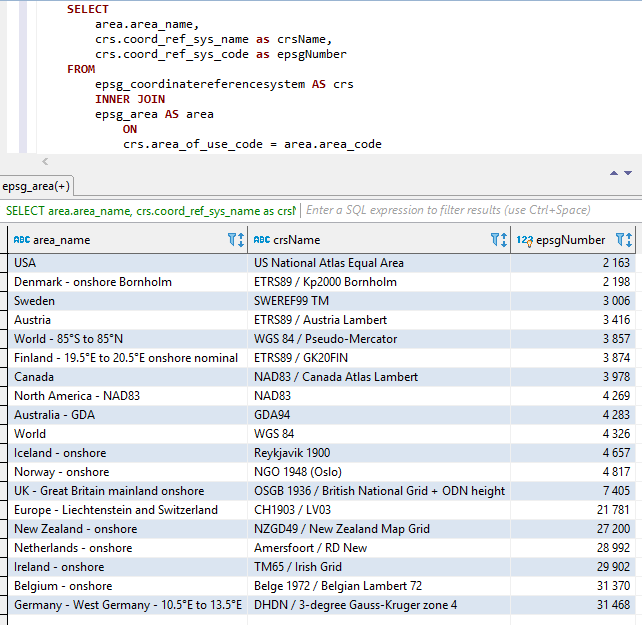
يتم تسلسل الأجزاء الثلاثة أعلاه (بالترتيب أعلاه IE Areaname+CrsName+Epsgnumber) مع اثنين من السفقة الفاصل بين الأجزاء.
يتم استبدال المساحات والشخصيات الخاصة الأخرى بالرسومات السفلية.
الأسماء الثابتة هي أيضا أعلى كما هو موضح أدناه.
لقطات شاشة من Visual Studio 2017 عند استخدام Intellisense/AutoCoftion مع الفئة Epsgnumber: 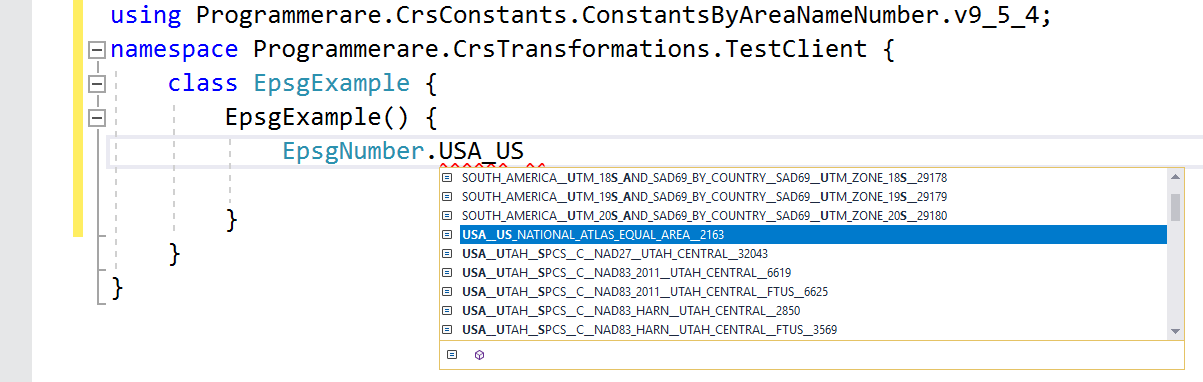
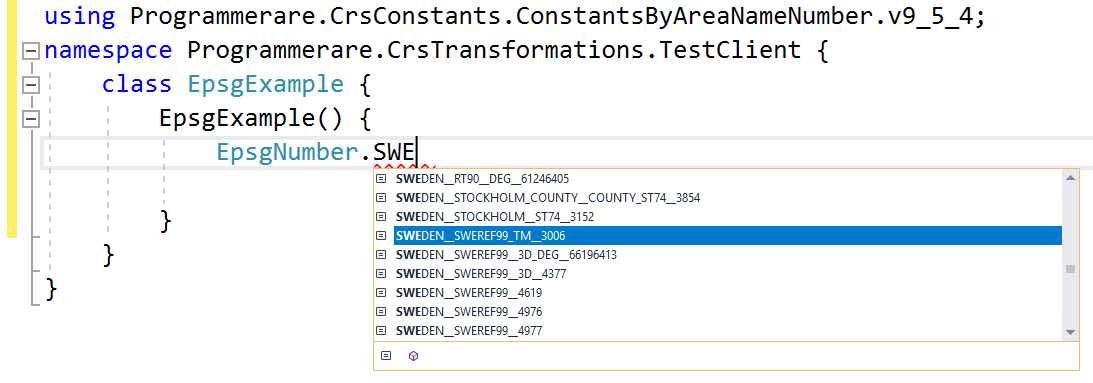
بعض الأمثلة الإضافية للأسماء الثابتة في C# class programmerare.crsconstants.constantsbyareanamenber.v9_5_4.epsgnumber:
(ويمكنك مقارنة هذه الأسماء الثابتة أدناه مع أعمدة النتائج الثلاثة من لقطة شاشة SQL أعلاه)
 WORLD__WGS_84__4326
WORLD__85_S_TO_85_N__WGS_84__PSEUDO_MERCATOR__3857
NORTH_AMERICA__NAD83__NAD83__4269
USA__US_NATIONAL_ATLAS_EQUAL_AREA__2163
CANADA__NAD83__CANADA_ATLAS_LAMBERT__3978
UK__GREAT_BRITAIN_MAINLAND_ONSHORE__OSGB_1936__BRITISH_NATIONAL_GRID__ODN_HEIGHT__7405
IRELAND__ONSHORE__TM65__IRISH_GRID__29902
AUSTRALIA__GDA__GDA94__4283
NEW_ZEALAND__ONSHORE__NZGD49__NEW_ZEALAND_MAP_GRID__27200
SWEDEN__SWEREF99_TM__3006
FINLAND__19_5_E_TO_20_5_E_ONSHORE_NOMINAL__ETRS89__GK20FIN__3874
DENMARK__ONSHORE_BORNHOLM__ETRS89__KP2000_BORNHOLM__2198
NORWAY__ONSHORE__NGO_1948__OSLO__4817
ICELAND__ONSHORE__REYKJAVIK_1900__4657
NETHERLANDS__ONSHORE__AMERSFOORT__RD_NEW__28992
BELGIUM__ONSHORE__BELGE_1972__BELGIAN_LAMBERT_72__31370
GERMANY__WEST_GERMANY__10_5_E_TO_13_5_E__DHDN__3_DEGREE_GAUSS_KRUGER_ZONE_4__31468
AUSTRIA__ETRS89__AUSTRIA_LAMBERT__3416
EUROPE__LIECHTENSTEIN_AND_SWITZERLAND__CH1903__LV03__21781
الأمثلة أعلاه مع الثوابت تظهر عدد قليل جدا منهم.
هناك عدة آلاف من الثوابت في الفئة التي تم إنشاؤها.
يمكن بسهولة استرداد العدد الفعلي للثوابت (لإصدار فئة الثوابت التي تستخدمها) باستخدام رمز C# 'typeof (epsgnumber) .getfields (). الطول.
يمكن أيضًا التحقق من نفس الرقم من خلال القيمة التي يتم إرجاعها بواسطة عبارة SQL "تحديد العدد (CONSORD_REF_SYS_CODE) من EPSG_COORDINATEREFERENCESSYSTER" (أو ببساطة "تحديد العدد (*) من EPSG_COORDINATEREFERESSYSTYS" منذ "coster_ref_sys_code" هو المفتاح الأساسي).






