crsTransformations dotnet
Version 3.0.0 of crsTransformations-dotnet

Observe que a biblioteca "Core" com a API adaptadora e o código geral é lançada com a licença MIT.
No entanto, as bibliotecas de implementações do adaptador são licenciadas da mesma maneira que as bibliotecas adaptadas, especificadas em arquivos "licenciados" separados (nos diretórios da base do adaptador) para cada uma dessas implementação.
Este projeto NET F#/C#/. NET destina -se a transformar coordenadas entre diferentes sistemas de referência de coordenadas (CRS).
Os adaptadores estão usando bibliotecas .NET de terceiros como adaptados.
O código foi implementado com F#, mas os testes (e as constantes geradas no subproject "Programmerare.crstransformations.constants") são implementadas com C#.
Essas versões abaixo se aplicam à v3.0.0 das liberações do NUGET, por exemplo, Programmerare.crstransformations.core:
A versão do destino .NET é o .NET Standard 2.0 (por exemplo, a estrutura do Net 4.6.1 ou posterior), mas a versão 10.36 da biblioteca com constantes (programsameare.crstransformations.constants) pode ser usada com o .NET Framework 2.0 ou posterior.
A versão F# é 6.0.1 (ou seja, para a referência do pacote a "fsharp.core")
As cinco bibliotecas a seguir deste projeto de código foram lançadas/distribuídas para Nuget:
As três bibliotecas acima que incluem " adaptador " no nome são implementações adaptadoras da biblioteca " Core " acima.
Esses três adaptadores estão usando as três bibliotecas adaptadas para as transformações de coordenadas.
A biblioteca ' Mightylittlegeodesy ' acima é útil apenas para a transformação entre o WGS84 (que é um CRS global muito comum) e os sistemas de referência de coordenadas suecas (CRS) Sweref99 (13 versões por exemplo, "Sweref99 TM") e RT90 (6 versões EG "RT90 2.5 GON V").
A biblioteca acima "Programmerare.crStransformations. Constantes " é realmente totalmente independente dos outros.
Não depende de nada e nada depende disso.
É uma biblioteca C# (ou seja, nem mesmo dependendo de F# como os outros) com apenas uma classe com muitas constantes C#.
(as outras quatro bibliotecas de núcleo/adaptador são implementadas com f#)
A classe C# constante foi gerada a partir do conjunto de dados EPSG versão 10.036, que é o motivo do seu número de versão.
A biblioteca "Core" não é necessária para incluir, pois existe uma dependência implícita/transitiva de todas as bibliotecas "adaptadoras" para o "núcleo".
A biblioteca "Constantes" não é necessária, mas pode ser interessante se você quiser usar constantes para os números EPSG, em vez de codificá -los com literais inteiros ou definir suas próprias constantes inteiras.
 <!-- Use one, two or three of the below three Adapters -->
< PackageReference Include = " Programmerare.CrsTransformations.Adapter.DotSpatial " Version = " 3.0.0 " />
< PackageReference Include = " Programmerare.CrsTransformations.Adapter.ProjNet " Version = " 3.0.0 " />
< PackageReference Include = " Programmerare.CrsTransformations.Adapter.MightyLittleGeodesy " Version = " 3.0.0 " />


<!-- The Core should not be necessary to include explicitly as below (since it should be implicitly included when using one of the others above ) -->
< PackageReference Include = " Programmerare.CrsTransformations.Core " Version = " 3.0.0 " />

<!-- Optional (and totally independent) library with only one class with lots of integer constants -->
< PackageReference Include = " Programmerare.CrsTransformations.Constants " Version = " 10.36.0 " />
As bibliotecas acima podem ser encontradas na minha página do NUGET.
O código (ou seja, as bibliotecas do núcleo e do adaptador) foi implementado com F#, mas o código de teste é gravado com C# em "Programmerare.crstransformations.test".
Existem também alguns projetos de código de exemplo para os três idiomas .NET C#, F# e VB.NET.
Esses três projetos estão usando o mesmo tipo de código (ou seja, fazendo a mesma coisa), mas com sintaxe diferente para os diferentes idiomas.
Além do código C# mencionado acima (ou seja, o projeto de teste C# e o projeto de exemplo C# Nuget), esta página do GitHub abaixo também ilustra como usar a biblioteca com o código C#.
Os métodos para transformar coordenadas são definidos na interface ICRSTransformationAdapter .
Atualmente, existem sete classes implementando a interface. Três 'Leafs' e quatro 'compósitos'.
Cada adaptador de folhas está usando alguma biblioteca adaptada para a implementação.
Os quatro 'compósitos' estão usando as folhas como esta:
Dois outros tipos de núcleo são crsIdentifier e CrScoordinate. Ambos são ilustrados nas seções abaixo.
 using System . Collections . Generic ; // IList
using Programmerare . CrsTransformations ; // ICrsTransformationAdapter
using Programmerare . CrsTransformations . CompositeTransformations ; // CrsTransformationAdapterCompositeFactory
using Programmerare . CrsTransformations . Adapter . DotSpatial ;
using Programmerare . CrsTransformations . Adapter . ProjNet ;
using Programmerare . CrsTransformations . Adapter . MightyLittleGeodesy ;

	// ...

    // The interface with seven implementations as illustrated below
    ICrsTransformationAdapter crsTransformationAdapter ;
    // The interface is defined in the library "Programmerare.CrsTransformations.Core" with this full name:
    // Programmerare.CrsTransformations.ICrsTransformationAdapter

    // The three 'Leaf' implementations:

    // Library "Programmerare.CrsTransformations.Adapter.DotSpatial", class:
    // Programmerare.CrsTransformations.Adapter.DotSpatial.CrsTransformationAdapterDotSpatial
    crsTransformationAdapter = new CrsTransformationAdapterDotSpatial ( ) ;

    // Library "Programmerare.CrsTransformations.Adapter.ProjNet", class:
    // Programmerare.CrsTransformations.Adapter.ProjNet.CrsTransformationAdapterProjNet
    crsTransformationAdapter = new CrsTransformationAdapterProjNet ( ) ;

    // Library "Programmerare.CrsTransformations.Adapter.MightyLittleGeodesy", class:
    // Programmerare.CrsTransformations.Adapter.MightyLittleGeodesy.CrsTransformationAdapterMightyLittleGeodesy
    crsTransformationAdapter = new CrsTransformationAdapterMightyLittleGeodesy ( ) ;

    // - - - - - - - - - - - -

    // The four 'Composite' implementations below are all located in the library
    // "Programmerare.CrsTransformations.Core" and the factory class is:
    // Programmerare.CrsTransformations.CompositeTransformations.CrsTransformationAdapterCompositeFactory
    var crsTransformationAdapterCompositeFactory = CrsTransformationAdapterCompositeFactory . Create ( ) ;

    crsTransformationAdapter = crsTransformationAdapterCompositeFactory . CreateCrsTransformationMedian ( ) ;

    crsTransformationAdapter = crsTransformationAdapterCompositeFactory . CreateCrsTransformationAverage ( ) ;

    crsTransformationAdapter = crsTransformationAdapterCompositeFactory . CreateCrsTransformationFirstSuccess ( ) ;

    // All of the above three factory methods without any parameter will try to use as many of
    // the three (currently) 'leaf' implementations as are available in runtime
    // (e.g. are included as NuGet dependencies).
    // If you want to specify explicitly which ones to be used, you can provide
    // a parameter 'IList<ICrsTransformationAdapter>' to the Create method like this:
    crsTransformationAdapterCompositeFactory = CrsTransformationAdapterCompositeFactory . Create (
        new List < ICrsTransformationAdapter > {
            new CrsTransformationAdapterDotSpatial ( ) ,
            new CrsTransformationAdapterProjNet ( ) ,
            new CrsTransformationAdapterMightyLittleGeodesy ( ) ,
        }
    ) ;

    // The fourth 'Composite' below does not use any implicit implementations
    // but if you want to use a result created as a weighted average then the weights need
    // to be specified explicitly per leaf implementation as in the example below.
    var weightFactory = CrsTransformationAdapterWeightFactory . Create ( ) ;
    crsTransformationAdapter = crsTransformationAdapterCompositeFactory . CreateCrsTransformationWeightedAverage (
        new List < CrsTransformationAdapterWeight > {
            weightFactory . CreateFromInstance ( new CrsTransformationAdapterDotSpatial ( ) , 1.0 ) ,
            weightFactory . CreateFromInstance ( new CrsTransformationAdapterProjNet ( ) , 1.0 ) ,
            weightFactory . CreateFromInstance ( new CrsTransformationAdapterMightyLittleGeodesy ( ) , 2.0 ) ,
        }
    ) ;
    // The weight values above illustrates a situation where you (for some reason) want to consider
// the transformation results from 'MightyLittleGeodesy' as being 'two times better' than the others.Todos os métodos de transformação (definidos na interface acima ICRSTRANSFORMATIONADAPAPTER ) precisam de dois parâmetros, uma coordenada de entrada e um parâmetro especificando o sistema de destino, ou seja, para qual sistema de referência de coordenada a coordenada de entrada será transformada.
O sistema de destino pode ser especificado com três tipos de dados (ou seja, com métodos sobrecarregados), um número inteiro ou uma string ou um 'CRSIdentifier'.
Se um número inteiro ou string for usado, será criado internamente um 'CRSIdentifier', para enviá -lo como parâmetro para as implementações do adaptador.
Portanto, se você pretende fazer muitas transformação do ou de um sistema de referência de coordenadas, poderá optar por criar um Instituto de CRSIdentifier, mas, para obter mais conveniência, você pode usar os métodos sobrecarregados com o número inteiro como parâmetro (ou talvez string se você já tiver um acess para "EPSG:"-, veja o exemplo abaixo).
Uma coordenada (tipo CRSCoordine) inclui informações sobre o sistema de referência de coordenadas, ou seja, um 'CRSIdentificador', mas também existem métodos de fábrica (criando instâncias de coordenadas) que são sobrecarregadas com parâmetros inteiros ou string.
Existem muitos métodos de fábrica com nomes diferentes e ordem diferente para os dois valores de posição (x/y), conforme ilustrado no exemplo abaixo.
Dependendo da semântica desejada em seu contexto, convém usar os diferentes métodos (ou acessadores de maneira semelhante em Crscoordine ) como este:
 using Programmerare . CrsTransformations . Identifier ; // CrsIdentifier
using Programmerare . CrsTransformations . Coordinate ; // CrsCoordinate
using static Programmerare . CrsTransformations . Coordinate . CrsCoordinateFactory ;
// The above row with "using static" enables many factory methods:
// LatLon , LonLat , YX , XY , ... and so on (see the example code below)

	// ...

    int epsgNumber = 4326 ;
    string crsCode = "EPSG:" + epsgNumber ;
    CrsIdentifier crsIdentifier ; // namespace Programmerare.CrsTransformations.Identifier
    crsIdentifier = CrsIdentifierFactory . CreateFromEpsgNumber ( epsgNumber ) ;
    // Alternative:
    crsIdentifier = CrsIdentifierFactory . CreateFromCrsCode ( crsCode ) ;

    double latitude = 59.330231 ;
    double longitude = 18.059196 ;

    CrsCoordinate crsCoordinate ; // namespace Programmerare.CrsTransformations.Coordinate
    // All the below methods are alternatives for creating the same coordinate
    // with the above latitude/longitude and coordinate reference system.
    // No class or object is used for the methods below because of the following static import:
    // using static Programmerare.CrsTransformations.Coordinate.CrsCoordinateFactory;
    crsCoordinate = LatLon ( latitude , longitude , epsgNumber ) ;
    crsCoordinate = LatLon ( latitude , longitude , crsCode ) ;
    crsCoordinate = LatLon ( latitude , longitude , crsIdentifier ) ;

    crsCoordinate = LonLat ( longitude , latitude , epsgNumber ) ;
    crsCoordinate = LonLat ( longitude , latitude , crsCode ) ;
    crsCoordinate = LonLat ( longitude , latitude , crsIdentifier ) ;

    crsCoordinate = YX ( latitude , longitude , epsgNumber ) ;
    crsCoordinate = YX ( latitude , longitude , crsCode ) ;
    crsCoordinate = YX ( latitude , longitude , crsIdentifier ) ;

    crsCoordinate = XY ( longitude , latitude , epsgNumber ) ;
    crsCoordinate = XY ( longitude , latitude , crsCode ) ;
    crsCoordinate = XY ( longitude , latitude , crsIdentifier ) ;

    crsCoordinate = NorthingEasting ( latitude , longitude , epsgNumber ) ;
    crsCoordinate = NorthingEasting ( latitude , longitude , crsCode ) ;
    crsCoordinate = NorthingEasting ( latitude , longitude , crsIdentifier ) ;

    crsCoordinate = EastingNorthing ( longitude , latitude , epsgNumber ) ;
    crsCoordinate = EastingNorthing ( longitude , latitude , crsCode ) ;
    crsCoordinate = EastingNorthing ( longitude , latitude , crsIdentifier ) ;

    crsCoordinate = CreateFromYNorthingLatitudeAndXEastingLongitude ( latitude , longitude , epsgNumber ) ;
    crsCoordinate = CreateFromYNorthingLatitudeAndXEastingLongitude ( latitude , longitude , crsCode ) ;
    crsCoordinate = CreateFromYNorthingLatitudeAndXEastingLongitude ( latitude , longitude , crsIdentifier ) ;

    crsCoordinate = CreateFromXEastingLongitudeAndYNorthingLatitude ( longitude , latitude , epsgNumber ) ;
    crsCoordinate = CreateFromXEastingLongitudeAndYNorthingLatitude ( longitude , latitude , crsCode ) ;
    crsCoordinate = CreateFromXEastingLongitudeAndYNorthingLatitude ( longitude , latitude , crsIdentifier ) ;

    CrsIdentifier targetCrs = CrsIdentifierFactory . CreateFromEpsgNumber ( 3006 ) ;
    ICrsTransformationAdapter crsTransformationAdapter = CrsTransformationAdapterCompositeFactory . Create ( ) . CreateCrsTransformationAverage ( ) ;
    CrsTransformationResult crsTransformationResult = crsTransformationAdapter . Transform ( crsCoordinate , targetCrs ) ;
// see more example code further down in this webpage Abaixo está um pequeno código de exemplo C# que trabalha com a versão atual 1.0.0.
O código de exemplo transforma uma coordenada de uma latitude/longitude Global CRS WGS84 (Código EPSG 4326) para o CRS sueco Sweref99TM (código EPSG 3006).
 using Programmerare . CrsTransformations ;
using Programmerare . CrsTransformations . Coordinate ;
using Programmerare . CrsTransformations . CompositeTransformations ;
using System ; // Console

class SmallCSharpeExample {
    static void Main ( string [ ] args ) {
        int epsgWgs84  = 4326 ;
        int epsgSweRef = 3006 ;
        // alternative to the above two hardcodings: use the library "Programmerare.CrsTransformations.Constants"
        // and constants EpsgNumber.WORLD__WGS_84__4326 and EpsgNumber.SWEDEN__SWEREF99_TM__3006
        // from the class Programmerare.CrsConstants.ConstantsByAreaNameNumber.v9_5_4.EpsgNumber

        CrsCoordinate centralStockholmWgs84 = CrsCoordinateFactory . LatLon ( 59.330231 , 18.059196 , epsgWgs84 ) ;

        ICrsTransformationAdapter crsTransformationAdapter = CrsTransformationAdapterCompositeFactory . Create ( ) . CreateCrsTransformationMedian ( ) ;
        // If the NuGet configuration includes all (currently three) adapter implementations, then the
        // above created 'Composite' implementation will below use all three 'leaf' implementations
        // and return a coordinate with a median longitude and a median latitude
        CrsTransformationResult centralStockholmResultSweRef = crsTransformationAdapter . Transform ( centralStockholmWgs84 , epsgSweRef ) ;

        if ( centralStockholmResultSweRef . IsSuccess ) {
            Console . WriteLine ( centralStockholmResultSweRef . OutputCoordinate ) ;
            // Console output from the above code row:
            // CrsCoordinate(xEastingLongitude=674032.357177155, yNorthingLatitude=6580821.99121561, crsIdentifier=CrsIdentifier(crsCode='EPSG:3006', isEpsgCode=True, epsgNumber=3006))
        }
    }
} using Programmerare . CrsConstants . ConstantsByAreaNameNumber . v10_036 ;
using Programmerare . CrsTransformations ;
using Programmerare . CrsTransformations . CompositeTransformations ;
using Programmerare . CrsTransformations . Coordinate ;
using System ;
using System . Collections . Generic ;
.. .
// Some terminology regarding the names used in the below code example:
// "CRS" = Coordinate Reference System
// "WGS84" is the most frequently used coordinate system (e.g. the coordinates usually used in a GPS)
// "SWEREF99TM" is the official coordinate system used by authorities in Sweden
// "EPSG" = "European Petroleum Survey Group" was (but the EPSG name is still often used)
// an organization defining CRS with integer numbers e.g. 4326 for WGS84 or 3006 for SWEREF99TM
int epsgWgs84 = EpsgNumber . WORLD__WGS_84__4326 ;
int epsgSweRef = EpsgNumber . SWEDEN__SWEREF99_TM__3006 ;
// The above "EpsgNumber" class with LOTS OF constants (and more constants classes) have been generated,
// using "FreeMarker" and database downloaded from EPSG ( http://www.epsg.org or http://www.epsg-registry.org )
// from "crs-transformation-code-generation" in the project https://github.com/TomasJohansson/crsTransformations
CrsCoordinate centralStockholmWgs84 = CrsCoordinateFactory . LatLon ( 59.330231 , 18.059196 , epsgWgs84 ) ;
// https://kartor.eniro.se/m/03Yxp
// SWEREF99TM coordinates (for WGS84 59.330231, 18.059196)
// according to Eniro (above URL): 6580822, 674032 (northing, easting)
ICrsTransformationAdapter crsTransformationAdapter ; // interface with concrete "leaf" implementation or "composite" implementations
// This code example is using a "composite" which will use multiple libraries to do the same transformation and then
// return a coordinate with the median values (median of the northing values and median of the easting values)
crsTransformationAdapter = CrsTransformationAdapterCompositeFactory . Create ( ) . CreateCrsTransformationMedian ( ) ;
// The above factory will try to use those known objects which implements the interface i.e. the number
// of "leaf" objects will depend on how many you included as for example NuGet dependencies (three in the above NuGet example)
Console . WriteLine ( "Number of 'leafs' : " + crsTransformationAdapter . TransformationAdapterChildren . Count ) ;
// Console output from the above row:
// Number of 'leafs' : 3
// Transform the WGS84 coordinate to a SWEREF99TM coordinate:
CrsCoordinate centralStockholmSweRef = crsTransformationAdapter . TransformToCoordinate ( centralStockholmWgs84 , epsgSweRef ) ;
Console . WriteLine ( "Median Composite Northing: " + centralStockholmSweRef . Northing ) ;
Console . WriteLine ( "Median Composite Easting: " + centralStockholmSweRef . Easting ) ;
// Console output from the above two rows:
// Median Composite Northing: 6580821.99121561
// Median Composite Easting: 674032.357177155
// (and these can be compared with the 'Eniro' values above i.e. '6580822, 674032 (northing, easting)' )
// The coordinate class provides four properties with different names for the same east-west value and
// four properties for the same name each north-south value, as below:
// Four EQUIVALENT properties: Easting , X , Longitude , XEastingLongitude
// Four EQUIVALENT properties: Northing , Y , Latitude , YNorthingLatitude
// Regarding the above alternative methods, depending on the desired semantic in your context, you may want to use:
// X/Y for a geocentric or cartesian system
// Longitude/Latitude for a geodetic or geographic system
// Easting/Northing for a cartographic or projected system
// xEastingLongitude/yNorthingLatitude for general code handling different types of system
// If you want more details for the result you can use the following 'Transform' method:
// (instead of the method 'TransformToCoordinate' used above)
CrsTransformationResult centralStockholmResultSweRef = crsTransformationAdapter . Transform ( centralStockholmWgs84 , epsgSweRef ) ;
if ( ! centralStockholmResultSweRef . IsSuccess ) {
Console . WriteLine ( "No coordinate result" ) ;
}
else {
if ( centralStockholmResultSweRef . IsReliable (
2 , // minimumNumberOfSuccesfulResults
0.01 // maxDeltaValueForXLongitudeAndYLatitude
) ) {
// at least 2 succesful results and the maximal difference in northing or easting is less than 0.01
// (and if you want to know the exact difference you can find it in this code example further down the page)
Console . WriteLine ( "Reliable result" ) ; // according to your chosen parameters to the method 'isReliable'
}
else {
Console . WriteLine ( "Not reliable result" ) ;
}
Console . WriteLine ( centralStockholmResultSweRef . OutputCoordinate ) ;
// Console output from the above code row:
// CrsCoordinate(xEastingLongitude=674032.357177155, yNorthingLatitude=6580821.99121561, crsIdentifier=CrsIdentifier(crsCode='EPSG:3006', isEpsgCode=True, epsgNumber=3006))
// When your code is in a context where you only have the result (but not the adapter object)
// (e.g. in a method receiving the result as a parameter)
// you can get back the object which created the result as below:
ICrsTransformationAdapter crsTransformationAdapterResultSource = centralStockholmResultSweRef . CrsTransformationAdapterResultSource ;
CrsTransformationAdapteeType adapteeType = crsTransformationAdapterResultSource . AdapteeType ;
Console . WriteLine ( "adapteeType: " + adapteeType ) ; // console output: COMPOSITE_MEDIAN
// The above code row returned an enum which is not really a true adaptee just like the 'composite' is not a true adapter.
// However, when iterating (as below) the "leaf" results,
// it might be more interesting to keep track of from where the different values originated
IList < CrsTransformationResult > transformationResultChildren = centralStockholmResultSweRef . TransformationResultChildren ;
foreach ( CrsTransformationResult crsTransformationResultLeaf in transformationResultChildren ) {
if ( ! crsTransformationResultLeaf . IsSuccess ) continue ; // continue with the next 'leaf'
ICrsTransformationAdapter resultAdapter = crsTransformationResultLeaf . CrsTransformationAdapterResultSource ;
Console . WriteLine ( resultAdapter . AdapteeType ) ;
// The above code row will output rows like this:
// "LEAF_PROJ_NET_4_GEO_API_1_4_1" or "LEAF_MIGHTY_LITTLE_GEODESY_1_0_1" and so on
if ( ! crsTransformationResultLeaf . IsReliable (
2 , // minimumNumberOfSuccesfulResults
1000 // maxDeltaValueForXLongitudeAndYLatitude
) ) {
// The above constraint "at least 2 implementations" will always fail because now we are dealing with "leafs"
// The above delta value constraint has very high tolerance but it does not matter since
// the constraint about the number of implementations will fail
Console . WriteLine ( "Only 'composites' can have more than one result and this is a 'leaf' and thus does not have at least two results" ) ;
}
Console . WriteLine ( "Adapter long name: " + resultAdapter . LongNameOfImplementation ) ; // full class name including package
Console . WriteLine ( "Adapter short name: " + resultAdapter . ShortNameOfImplementation ) ; // class name suffix i.e. the unique part
// The above "long" names will be for example:
// Programmerare.CrsTransformations.Adapter.DotSpatial.CrsTransformationAdapterDotSpatial
// Programmerare.CrsTransformations.Adapter.MightyLittleGeodesy.CrsTransformationAdapterMightyLittleGeodesy
// The above "short" names will be for example:
// DotSpatial
// MightyLittleGeodesy
Console . WriteLine ( "adaptee: " + resultAdapter . AdapteeType ) ;
// The above row will output for example:
// LEAF_DOT_SPATIAL_2_0_0_RC1
// LEAF_MIGHTY_LITTLE_GEODESY_1_0_1
// (note that the version number is included for the adaptees)
Console . WriteLine ( "isComposite: " + resultAdapter . IsComposite ) ; // "False" since we are iterating "leaf" results
Console . WriteLine ( "Coordinate result for " + resultAdapter . AdapteeType + " : " + crsTransformationResultLeaf . OutputCoordinate ) ;
// The above row will output these rows when doing the iteration:
// Coordinate result for LEAF_DOT_SPATIAL_2_0_0_RC1 : CrsCoordinate(xEastingLongitude=674032.357322213, yNorthingLatitude=6580821.99121561, crsIdentifier=CrsIdentifier(crsCode='EPSG:3006', isEpsgCode=True, epsgNumber=3006))
// Coordinate result for LEAF_PROJ_NET_4_GEO_API_1_4_1 : CrsCoordinate(xEastingLongitude=674032.357177155, yNorthingLatitude=6580821.99437121, crsIdentifier=CrsIdentifier(crsCode='EPSG:3006', isEpsgCode=True, epsgNumber=3006))
// Coordinate result for LEAF_MIGHTY_LITTLE_GEODESY_1_0_1 : CrsCoordinate(xEastingLongitude=674032.357, yNorthingLatitude=6580821.991, crsIdentifier=CrsIdentifier(crsCode='EPSG:3006', isEpsgCode=True, epsgNumber=3006))
// Note that the median value for "x" is 674032.357177155 for the above
// three values 674032.357 , 674032.357177155 , 674032.357322213 .
// That is the same value as was displayed before the iteration of the children/leafs for the median composite.
// The same applies for the above "y" i.e. the median is 6580821.99121561
// for the three y values 6580821.991 , 6580821.99121561 , 6580821.99437121
}
// The result object also provides convenience methods for the results (which you of course otherwise might calculate by iterating the above results)
CrsTransformationResultStatistic crsTransformationResultStatistic = centralStockholmResultSweRef . CrsTransformationResultStatistic ;
// Note that the initially created composite was a "median composite" returning the median as the main value,
// but you can also create an average composite and regardless you can access both the median and the average with the aggregated statistics object:
Console . WriteLine ( "average coordinate: " + crsTransformationResultStatistic . CoordinateAverage ) ;
Console . WriteLine ( "median coordinate: " + crsTransformationResultStatistic . CoordinateMedian ) ;
// Console output from the above two rows:
// average coordinate: CrsCoordinate(xEastingLongitude=674032.357166456, yNorthingLatitude=6580821.99219561, crsIdentifier=CrsIdentifier(crsCode='EPSG:3006', isEpsgCode=True, epsgNumber=3006))
// median coordinate: CrsCoordinate(xEastingLongitude=674032.357177155, yNorthingLatitude=6580821.99121561, crsIdentifier=CrsIdentifier(crsCode='EPSG:3006', isEpsgCode=True, epsgNumber=3006))
Console . WriteLine ( "MaxDifferenceForXEastingLongitude: " + crsTransformationResultStatistic . MaxDifferenceForXEastingLongitude ) ;
Console . WriteLine ( "MaxDifferenceForYNorthingLatitude: " + crsTransformationResultStatistic . MaxDifferenceForYNorthingLatitude ) ;
// Output from the above two rows:
// MaxDifferenceForXEastingLongitude: 0.000322213280014694
// MaxDifferenceForYNorthingLatitude: 0.00337121076881886
// As you can see in the above iteration, the min and max x values are 674032.357 and 674032.357322213 (and the difference is 0.000322213).
// Similarly the min and max y values are 6580821.991 and 6580821.99437121 (and the difference is 0.00337121).
// The above two "MaxDifference" methods are used within the implementation of the convenience method 'isReliable'
// (also illustrated in this example further above)
}Versão 3.0.0 Adicionado suporte para WKT-CRs, mas observe que a sequência WKT-CRS é encaminhada para as implementações sem tentar descobrir se a string fornecida é "WKT OGC" ou "WKT ESRI"
Exemplo de código, usando um adaptador composto (com implementações de folhas Dotspatial e ProJnet):
CrstransformationAdapterComposewkttest.cs
As constantes inteiras são geradas usando o banco de dados EPSG
e a biblioteca Java Freemarker em "CRS-Transformation-Code-Generation" no projeto https://github.com/tomasjohansson/crstransformations
Cada constante é usada para definir um sistema de referência de coordenadas (CRS).
O nome de uma constante é uma concatenação das três partes a seguir:
Observe que as capturas de tela e texto abaixo nesta seção são para uma versão mais antiga 9.5.4, mas agora há uma versão posterior . Você pode encontrar a versão mais recente do 'Programmerare.crstransformations.constants' em seu repositório NUGET.
Exemplo de resultado do SQL ao selecionar as três colunas acima: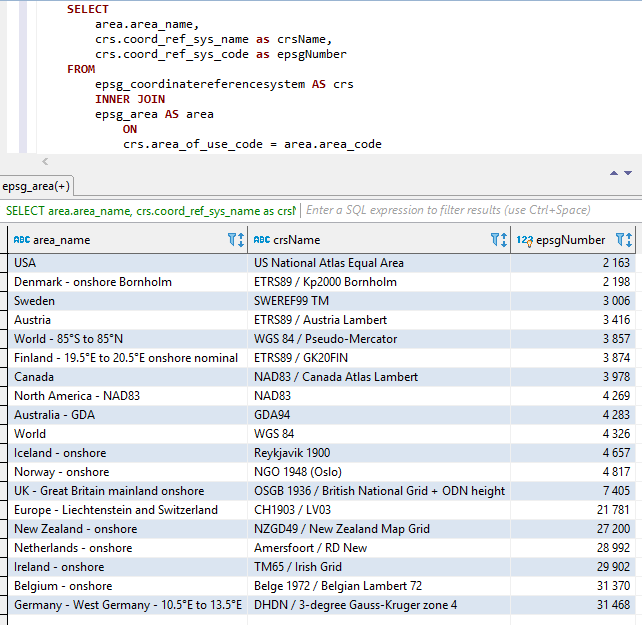
As três partes acima são concatenadas (na ordem acima, ou seja, a nome do nome+CRSName+Epsgnumber) com dois sublinhados como separador entre as partes.
Espaços e outros caracteres especiais são substituídos por sublinhados.
Os nomes constantes também são aumentados como ilustrado abaixo.
Capturas de tela do Visual Studio 2017 ao usar o IntelliSense/AutoCimpletion com a classe Epsgnumber: 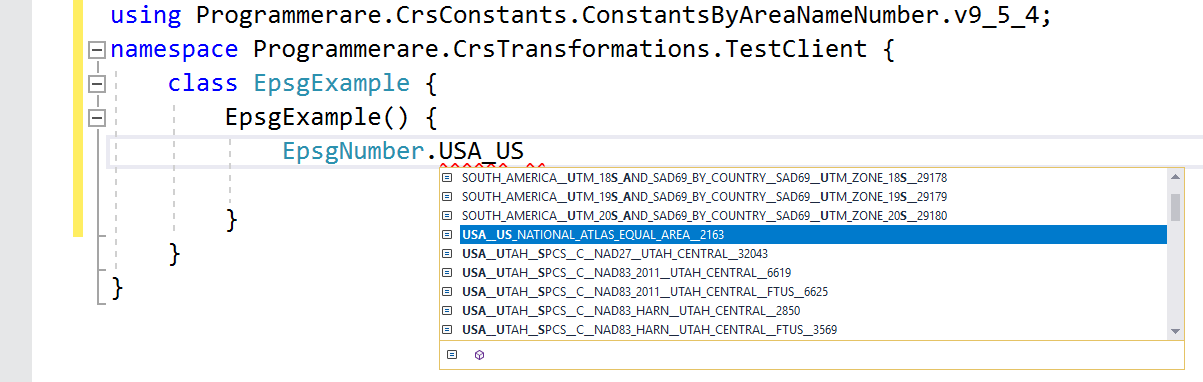
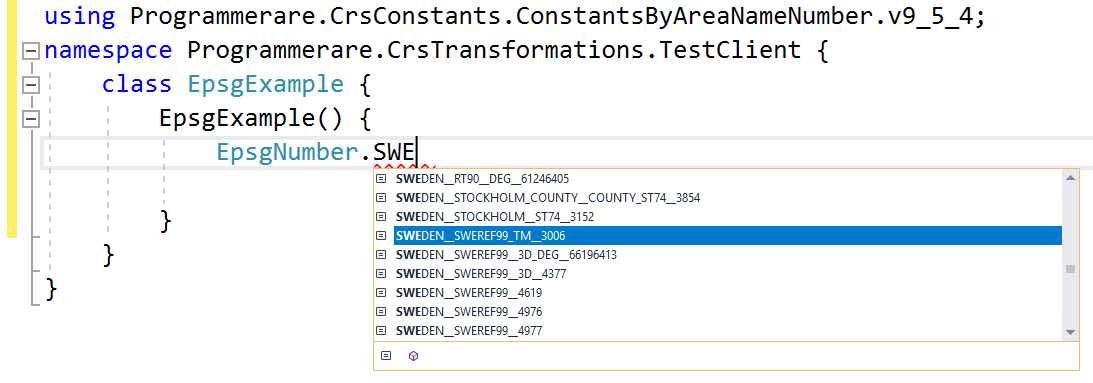
Mais alguns exemplos de nomes constantes no Class C# Programmerare.crsconstants.ConstantsByareanameNumber.v9_5_4.epsgnumber:
(E você pode comparar esses nomes constantes abaixo com as três colunas de resultados da captura de tela SQL acima)
 WORLD__WGS_84__4326
WORLD__85_S_TO_85_N__WGS_84__PSEUDO_MERCATOR__3857
NORTH_AMERICA__NAD83__NAD83__4269
USA__US_NATIONAL_ATLAS_EQUAL_AREA__2163
CANADA__NAD83__CANADA_ATLAS_LAMBERT__3978
UK__GREAT_BRITAIN_MAINLAND_ONSHORE__OSGB_1936__BRITISH_NATIONAL_GRID__ODN_HEIGHT__7405
IRELAND__ONSHORE__TM65__IRISH_GRID__29902
AUSTRALIA__GDA__GDA94__4283
NEW_ZEALAND__ONSHORE__NZGD49__NEW_ZEALAND_MAP_GRID__27200
SWEDEN__SWEREF99_TM__3006
FINLAND__19_5_E_TO_20_5_E_ONSHORE_NOMINAL__ETRS89__GK20FIN__3874
DENMARK__ONSHORE_BORNHOLM__ETRS89__KP2000_BORNHOLM__2198
NORWAY__ONSHORE__NGO_1948__OSLO__4817
ICELAND__ONSHORE__REYKJAVIK_1900__4657
NETHERLANDS__ONSHORE__AMERSFOORT__RD_NEW__28992
BELGIUM__ONSHORE__BELGE_1972__BELGIAN_LAMBERT_72__31370
GERMANY__WEST_GERMANY__10_5_E_TO_13_5_E__DHDN__3_DEGREE_GAUSS_KRUGER_ZONE_4__31468
AUSTRIA__ETRS89__AUSTRIA_LAMBERT__3416
EUROPE__LIECHTENSTEIN_AND_SWITZERLAND__CH1903__LV03__21781
Os exemplos acima com constantes estão mostrando muito poucos deles.
Existem muitos milhares de constantes na classe gerada.
O número real de constantes (para a versão da classe Constants que você está usando) pode ser facilmente recuperado com o código C# 'typeof (epsgnumber) .getfields (). Comprimento'.
O mesmo número também pode ser verificado com o valor retornado pela instrução SQL 'Selecionar contagem (Distinct coord_ref_sys_code) de epsg_coordinatereferencesystem' (ou simplesmente 'selecione count (*) de epsg_coordinatereferencesystem' desde 'coord_ref_sys_code' is the Key).






