doks
0.9.3

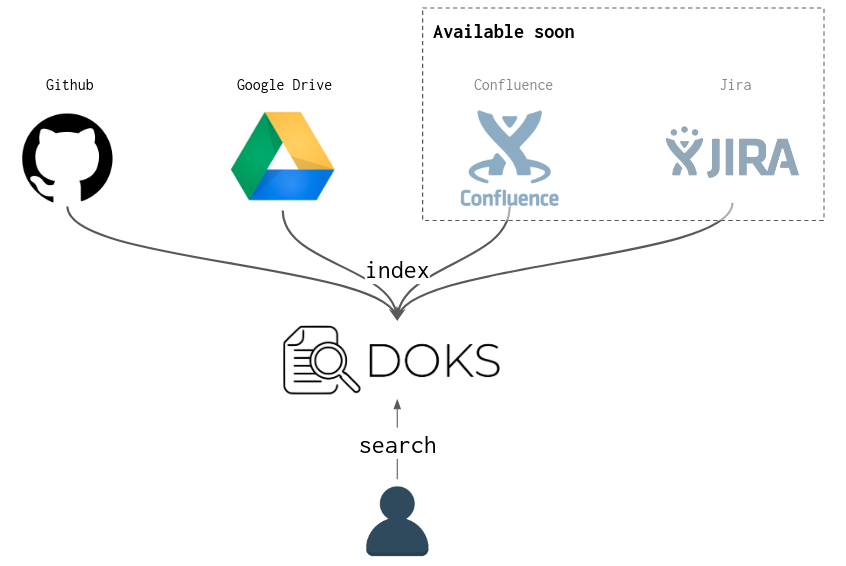
如果您的文檔在整個地方(Github,Google Drive等)都傳播,並且想要一個集中式搜索工具,那麼doks適合您。
DOKS是一個CLI工具,該工具將來自多個來源(GitHub,Google Drive等)的文檔匯總到搜索引擎中(默認情況下,Lucene用於最低本地設置,但可以使用Elasticsearch)。
可以在Docs/install.md上找到安裝過程。
可以在DOCS文件夾中找到文檔。
選擇要與doks一起使用的配置文件(默認情況下: $HOME/.doks/config/default.yml ):
❯ export DOKS_CONFIG_FILE=docs/examples/config/simple.yml在這裡,我們使用了來自文檔/示例/config/simple.yml的簡單配置文件。實際上,您不需要此導出,您只需要將配置放入默認的預期路徑$HOME/.doks/config/default.yml中。
下一步是索引配置文件中引用的文檔,以使其可搜索:
❯ doks index

14:23:58 INFO  - [wlezzar/jtab] cloning into ' /tmp/doks1910419821411559250 '
14:24:00 INFO  - [wlezzar/jtab] 1 documents found !
14:24:00 INFO  - [wlezzar/doks] cloning into ' /tmp/doks8654245137262434689 '
14:24:02 INFO  - [wlezzar/doks] 0 documents found !
14:24:02 INFO  - [adevinta/zoe] cloning into ' /tmp/doks756581970042346717 '
14:24:04 INFO  - [adevinta/zoe] 36 documents found !
執行搜索查詢:
❯ doks search ' aws kafka ' | jq ' . '結果在JSON中,看起來如下:
[
  {
    "link" : " https://github.com/adevinta/zoe/blob/master/docs/advanced/runners/lambda.md " ,
    "score" : 3.4977975 ,
    "matches" : {
      "content" : [
        " # Lambda runner nn The lambda runner triggers lambda functions to read / produce to the <B>Kafka</B> " ,
        " using CloudFormation (an S3 bucket, <B>AWS</B> roles, etc.). For more details on the resources deployed " ,
        " into <B>AWS</B> and registering the lambda within <B>AWS</B>. Zoe jar path needs to be set and must point to a valid zoe "
      ]
    }
  },
  ...
]
您也可以使用JTAB將JSON結果打印為表:
❯ doks search ' documentation search ' | jtab | less -S

┌────────────────────────────────────────────────────────────────────────────────┬───────────────────────────────────────────────────────────────────────────────────────────────────────────────────────────────────────────┬────────────┐
│ link                                                                           │ matches                                                                                                                                   │ score      │
├────────────────────────────────────────────────────────────────────────────────┼───────────────────────────────────────────────────────────────────────────────────────────────────────────────────────────────────────────┼────────────┤
│ https://github.com/wlezzar/doks/blob/master/README.md                          │ content:                                                                                                                                  │ 6.044318   │
│                                                                                │   - " <B>documents</B> coming from multiple sources (github, google drive, etc.) into a <B>search</B> engine (Lucene "                     │            │
│                                                                                │   - "  - [adevinta/zoe] 36 <B>documents</B> found!n ` ` ` nn Make a < B > search < /B > query: nn ` ` ` bashn❯ doks <B>search</B> 'aws kafka' | jq " │            │
│                                                                                │   - " # DoksnnIf you have <B>documentation</B> spread all over the place (github, google drive, etc.) and you "                           │            │
├────────────────────────────────────────────────────────────────────────────────┼───────────────────────────────────────────────────────────────────────────────────────────────────────────────────────────────────────────┼────────────┤
│ https://github.com/adevinta/zoe/blob/master/docs/basics/consume.md             │ content:                                                                                                                                  │ 3.2647414  │
│                                                                                │   - " will discard the message or not.nnThis feature can be used to perform <B>searches</B> into Kafka topics. It is one "               │            │
│                                                                                │   - " ` ) and parallel execution ( ` --jobs 20 ` to spin up 20 pods), we can perform expensive < B > searches < /B > "                                │            │
│                                                                                │   - " execution in the advanced section of the < B > documentation < /B > . nn Filters are enabled with the ` --filter ` option "                   │            │
└────────────────────────────────────────────────────────────────────────────────┴───────────────────────────────────────────────────────────────────────────────────────────────────────────────────────────────────────────┴────────────┘
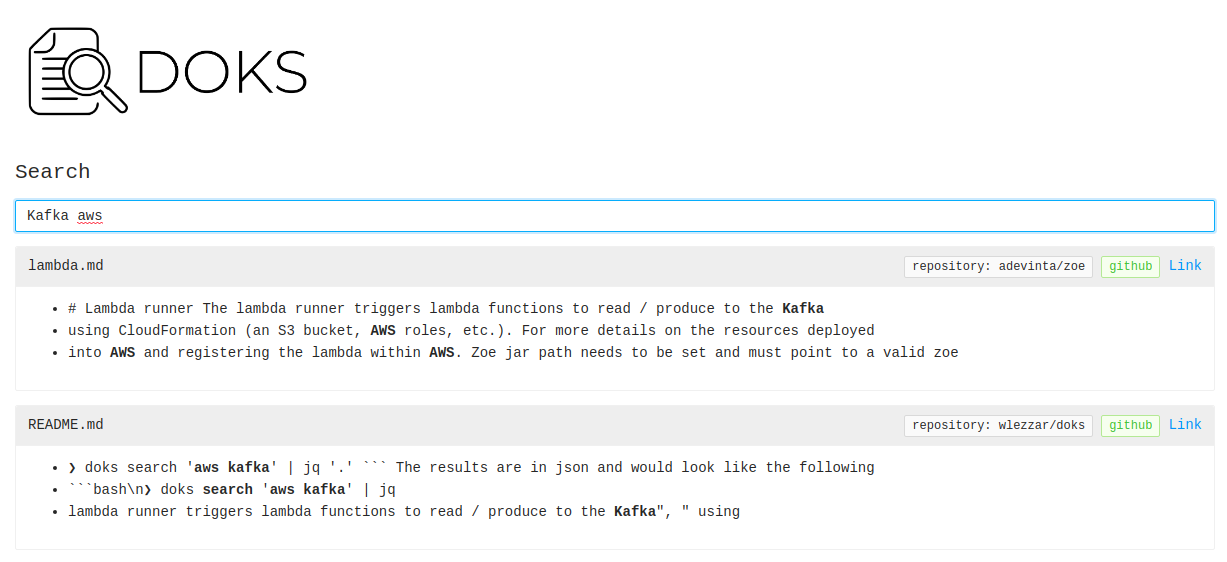
DOKS還具有用於CLI仇恨的UI模式;)
 ❯ doks serve
23:16:10 INFO  - listening on port: 8888
現在,您可以在以下位置打開瀏覽器:http:// localhost:8888。
Doks處於早期階段。應該期望蟲子;)。如果您遇到一些或需要一些幫助,請隨時打開GitHub問題。





