doks
0.9.3

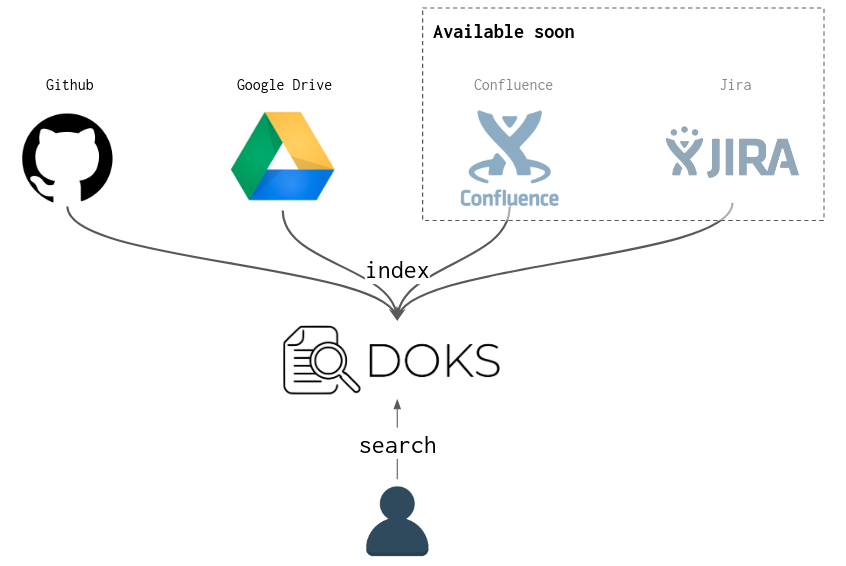
Wenn Sie überall über Dokumentationen verfügen (Github, Google Drive usw.) und ein zentrales Suchwerkzeug darüber möchten, ist doks für Sie.
DOKS ist ein CLI -Tool, mit dem Dokumente aus mehreren Quellen (Github, Google Drive usw.) in eine Suchmaschine zusammengefasst sind (Lucene wird standardmäßig für minimale lokale Einrichtung verwendet, aber stattdessen kann Elasticsearch verwendet werden).
Der Installationsverfahren finden Sie unter DOCS/Install.md.
Die Dokumentation finden Sie im Ordner docs.
Wählen Sie eine Konfigurationsdatei aus, die mit doks verwendet werden soll (standardmäßig: $HOME/.doks/config/default.yml ):
❯ export DOKS_CONFIG_FILE=docs/examples/config/simple.yml Hier verwenden wir eine einfache Konfigurationsdatei von DOCs/Beispielen/config/Simple.yml. In der Praxis benötigen Sie diesen Export nicht. Sie müssen Ihre Konfiguration nur in den Standard -erwarteten Pfad $HOME/.doks/config/default.yml einfügen.
Der nächste Schritt besteht darin, die in der Konfigurationsdatei verwiesenen Dokumente zu indizieren, um sie durchsuchbar zu machen:
❯ doks index

14:23:58 INFO  - [wlezzar/jtab] cloning into ' /tmp/doks1910419821411559250 '
14:24:00 INFO  - [wlezzar/jtab] 1 documents found !
14:24:00 INFO  - [wlezzar/doks] cloning into ' /tmp/doks8654245137262434689 '
14:24:02 INFO  - [wlezzar/doks] 0 documents found !
14:24:02 INFO  - [adevinta/zoe] cloning into ' /tmp/doks756581970042346717 '
14:24:04 INFO  - [adevinta/zoe] 36 documents found !
Führen Sie eine Suchanfrage aus:
❯ doks search ' aws kafka ' | jq ' . 'Die Ergebnisse sind in JSON und würden wie Folgendes aussehen:
[
  {
    "link" : " https://github.com/adevinta/zoe/blob/master/docs/advanced/runners/lambda.md " ,
    "score" : 3.4977975 ,
    "matches" : {
      "content" : [
        " # Lambda runner nn The lambda runner triggers lambda functions to read / produce to the <B>Kafka</B> " ,
        " using CloudFormation (an S3 bucket, <B>AWS</B> roles, etc.). For more details on the resources deployed " ,
        " into <B>AWS</B> and registering the lambda within <B>AWS</B>. Zoe jar path needs to be set and must point to a valid zoe "
      ]
    }
  },
  ...
]
Sie können auch JTAB verwenden, um die JSON -Ergebnisse als Tabelle zu drucken:
❯ doks search ' documentation search ' | jtab | less -S

┌────────────────────────────────────────────────────────────────────────────────┬───────────────────────────────────────────────────────────────────────────────────────────────────────────────────────────────────────────┬────────────┐
│ link                                                                           │ matches                                                                                                                                   │ score      │
├────────────────────────────────────────────────────────────────────────────────┼───────────────────────────────────────────────────────────────────────────────────────────────────────────────────────────────────────────┼────────────┤
│ https://github.com/wlezzar/doks/blob/master/README.md                          │ content:                                                                                                                                  │ 6.044318   │
│                                                                                │   - " <B>documents</B> coming from multiple sources (github, google drive, etc.) into a <B>search</B> engine (Lucene "                     │            │
│                                                                                │   - "  - [adevinta/zoe] 36 <B>documents</B> found!n ` ` ` nn Make a < B > search < /B > query: nn ` ` ` bashn❯ doks <B>search</B> 'aws kafka' | jq " │            │
│                                                                                │   - " # DoksnnIf you have <B>documentation</B> spread all over the place (github, google drive, etc.) and you "                           │            │
├────────────────────────────────────────────────────────────────────────────────┼───────────────────────────────────────────────────────────────────────────────────────────────────────────────────────────────────────────┼────────────┤
│ https://github.com/adevinta/zoe/blob/master/docs/basics/consume.md             │ content:                                                                                                                                  │ 3.2647414  │
│                                                                                │   - " will discard the message or not.nnThis feature can be used to perform <B>searches</B> into Kafka topics. It is one "               │            │
│                                                                                │   - " ` ) and parallel execution ( ` --jobs 20 ` to spin up 20 pods), we can perform expensive < B > searches < /B > "                                │            │
│                                                                                │   - " execution in the advanced section of the < B > documentation < /B > . nn Filters are enabled with the ` --filter ` option "                   │            │
└────────────────────────────────────────────────────────────────────────────────┴───────────────────────────────────────────────────────────────────────────────────────────────────────────────────────────────────────────┴────────────┘
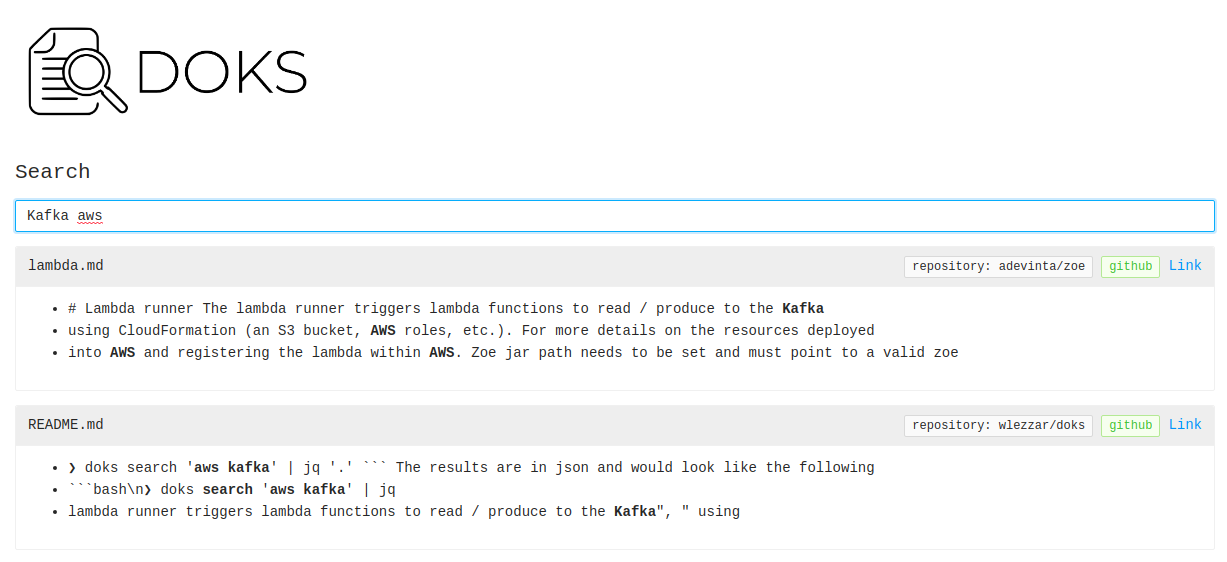
Doks hat auch einen UI -Modus für Cli -Hasser;)
 ❯ doks serve
23:16:10 INFO  - listening on port: 8888
Sie können jetzt Ihren Browser unter: http: // localhost: 8888 öffnen.
Doks ist in den frühen Stadien. Bugs sollten zu erwarten;). Wenn Sie auf einige stoßen oder Hilfe benötigen, zögern Sie nicht, ein Github -Problem zu öffnen.





