doks
0.9.3

إذا كان لديك توثيق في كل مكان (Github ، Google Drive ، إلخ) وتريد أداة بحث مركزية عليها ، فإن doks هي لك.
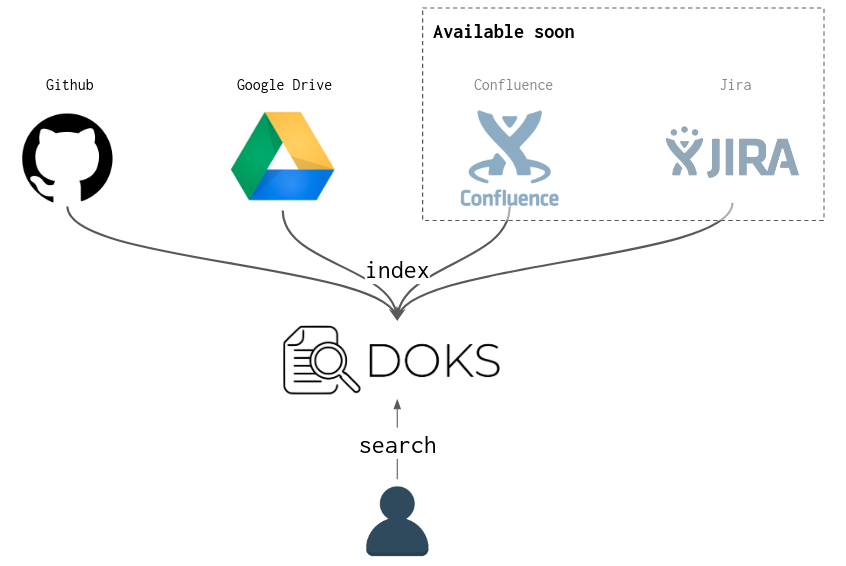
DOKS هي أداة CLI التي تجمع المستندات القادمة من مصادر متعددة (GitHub ، Google Drive ، وما إلى ذلك) إلى محرك بحث (يتم استخدام Lucene افتراضيًا للحصول على الحد الأدنى من الإعداد المحلي ولكن يمكن استخدام Elasticsearch بدلاً من ذلك).
يمكن العثور على إجراء التثبيت على Docs/Install.md.
يمكن العثور على الوثائق في مجلد المستندات.
حدد ملف التكوين ليتم استخدامه مع doks (افتراضيًا: $HOME/.doks/config/default.yml ):
❯ export DOKS_CONFIG_FILE=docs/examples/config/simple.yml نحن هنا نستخدم ملف تكوين بسيط من مستندات/أمثلة/config/simple.yml. في الممارسة العملية ، لا تحتاج إلى هذا التصدير ، فأنت بحاجة فقط إلى وضع التكوين الخاص بك في المسار الافتراضي المتوقع $HOME/.doks/config/default.yml .
الخطوة التالية هي فهرسة المستندات المشار إليها في ملف التكوين لجعلها قابلة للبحث:
❯ doks index

14:23:58 INFO  - [wlezzar/jtab] cloning into ' /tmp/doks1910419821411559250 '
14:24:00 INFO  - [wlezzar/jtab] 1 documents found !
14:24:00 INFO  - [wlezzar/doks] cloning into ' /tmp/doks8654245137262434689 '
14:24:02 INFO  - [wlezzar/doks] 0 documents found !
14:24:02 INFO  - [adevinta/zoe] cloning into ' /tmp/doks756581970042346717 '
14:24:04 INFO  - [adevinta/zoe] 36 documents found !
إجراء استعلام بحث:
❯ doks search ' aws kafka ' | jq ' . 'النتائج في JSON وستبدو كما يلي:
[
  {
    "link" : " https://github.com/adevinta/zoe/blob/master/docs/advanced/runners/lambda.md " ,
    "score" : 3.4977975 ,
    "matches" : {
      "content" : [
        " # Lambda runner nn The lambda runner triggers lambda functions to read / produce to the <B>Kafka</B> " ,
        " using CloudFormation (an S3 bucket, <B>AWS</B> roles, etc.). For more details on the resources deployed " ,
        " into <B>AWS</B> and registering the lambda within <B>AWS</B>. Zoe jar path needs to be set and must point to a valid zoe "
      ]
    }
  },
  ...
]
يمكنك أيضًا استخدام JTAB لطباعة نتائج JSON كجدول:
❯ doks search ' documentation search ' | jtab | less -S

┌────────────────────────────────────────────────────────────────────────────────┬───────────────────────────────────────────────────────────────────────────────────────────────────────────────────────────────────────────┬────────────┐
│ link                                                                           │ matches                                                                                                                                   │ score      │
├────────────────────────────────────────────────────────────────────────────────┼───────────────────────────────────────────────────────────────────────────────────────────────────────────────────────────────────────────┼────────────┤
│ https://github.com/wlezzar/doks/blob/master/README.md                          │ content:                                                                                                                                  │ 6.044318   │
│                                                                                │   - " <B>documents</B> coming from multiple sources (github, google drive, etc.) into a <B>search</B> engine (Lucene "                     │            │
│                                                                                │   - "  - [adevinta/zoe] 36 <B>documents</B> found!n ` ` ` nn Make a < B > search < /B > query: nn ` ` ` bashn❯ doks <B>search</B> 'aws kafka' | jq " │            │
│                                                                                │   - " # DoksnnIf you have <B>documentation</B> spread all over the place (github, google drive, etc.) and you "                           │            │
├────────────────────────────────────────────────────────────────────────────────┼───────────────────────────────────────────────────────────────────────────────────────────────────────────────────────────────────────────┼────────────┤
│ https://github.com/adevinta/zoe/blob/master/docs/basics/consume.md             │ content:                                                                                                                                  │ 3.2647414  │
│                                                                                │   - " will discard the message or not.nnThis feature can be used to perform <B>searches</B> into Kafka topics. It is one "               │            │
│                                                                                │   - " ` ) and parallel execution ( ` --jobs 20 ` to spin up 20 pods), we can perform expensive < B > searches < /B > "                                │            │
│                                                                                │   - " execution in the advanced section of the < B > documentation < /B > . nn Filters are enabled with the ` --filter ` option "                   │            │
└────────────────────────────────────────────────────────────────────────────────┴───────────────────────────────────────────────────────────────────────────────────────────────────────────────────────────────────────────┴────────────┘
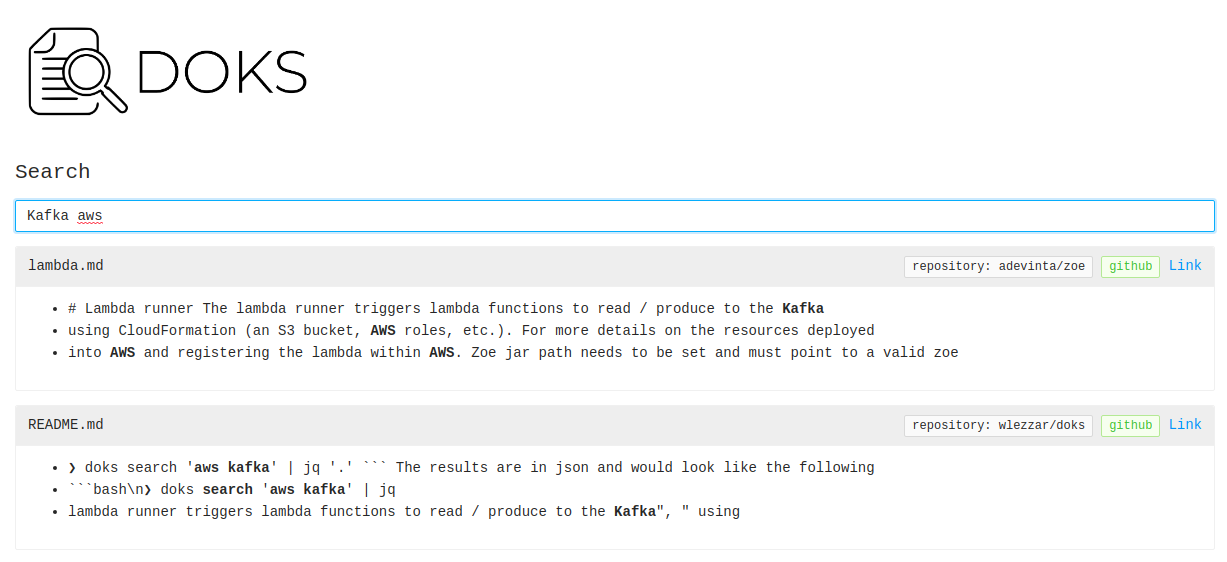
كما أن DOKS لديها وضع واجهة المستخدم للكارهين CLI ؛)
 ❯ doks serve
23:16:10 INFO  - listening on port: 8888
يمكنك الآن فتح متصفحك على: http: // localhost: 8888.
العربات في مراحلها المبكرة. يجب أن يتوقع الحشرات ؛). إذا واجهت البعض أو كنت بحاجة إلى بعض المساعدة ، فلا تتردد في فتح مشكلة github.





