building reactjs gen ai apps with amazon bedrock javascript sdk
1.0.0

本文用Colaboration Enrique Rodriguez撰寫
當我們結合了Amazon Bedrock,ReactJS和AWS JavaScript SDK的力量時,準備踏上激動人心的旅程,以創建具有最小集成代碼的生成AI應用程序。
將生成AI集成到現有應用中提出了挑戰。許多開發人員在培訓基礎模型方面的經驗有限,但目的是將生成的AI功能與最小的代碼更改整合在一起。
為了解決這個問題,我們創建了一個應用程序,該應用程序將生成AI的力量與呼叫來自Web應用程序的Amazon Bedrock API的呼籲,該應用程序由JavaScript和React Framework構建。沒有中間件,可以通過最小的代碼集成來降低障礙,以結合AI生成。
在整個教程中,您將學習如何利用Amazon Cognito憑據和IAM角色,以安全地訪問使用CloudScape Design System構建的ReactJS應用程序中的Amazon Bedrock API。我們將指導您完成部署所有必要資源並使用AWS放大,簡化設置和部署過程的過程。
為了增強基礎模型(FM)的靈活性和自定義,我們將演示如何使用系統提示分配不同的角色。通過創建Amazon DynamoDB表,您可以存儲和檢索各種角色,使您能夠管理和訪問與您希望分配給FM的每個角色相關聯的不同系統提示。這種集中式存儲庫方法允許基於選定角色定制動態角色分配並量身定制AI響應。
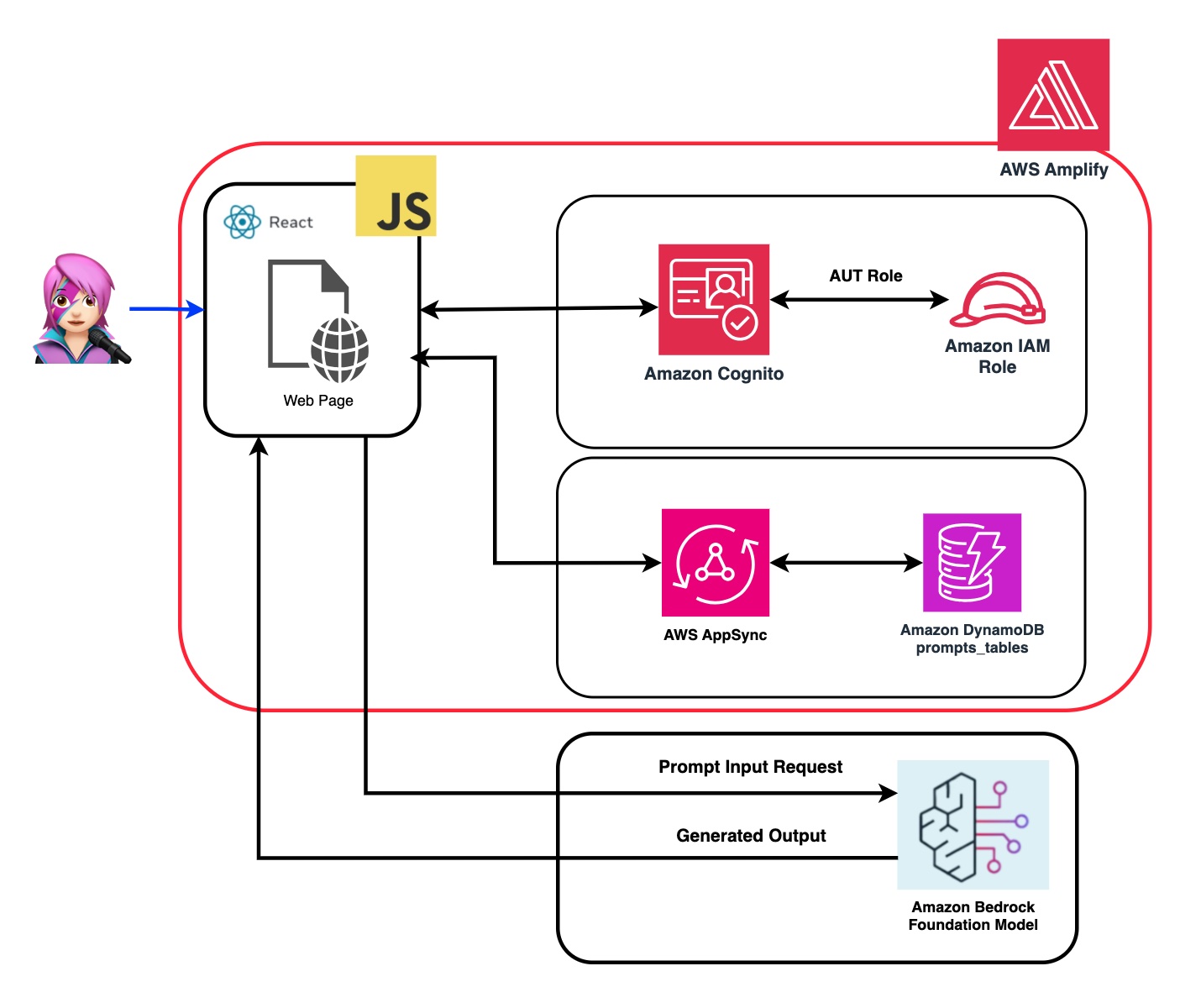
在此應用程序的存儲庫中,您將找到準備部署後端和前端的代碼。
✅後端: Amazon Cognito用戶池和身份池,具有AWS身份和訪問管理員角色(IAM角色),其中包含具有調用Amazon Bedrock的權限的策略。
 { policyName: "amplify-permissions-custom-resources",
            policyDocument: {
                Version: "2012-10-17",
                Statement: [
                    {
                        Resource: "*",
                        Action: ["bedrock:InvokeModel*", "bedrock:List*", "bedrock:Retrieve*"],
                        Effect: "Allow",
                    }
                ]
            }
        }
查看“將亞馬遜Cognito身份驗證和授權與Web和移動應用程序集成”指南,以調用用Amazon Cognito認證的用戶調用AWS API操作。
可以在此處自定義此權限:IAM角色代碼
✅前端:用CloudScape設計系統構建的ReactJS單頁應用程序(SPA)。
該應用程序包括4個演示:
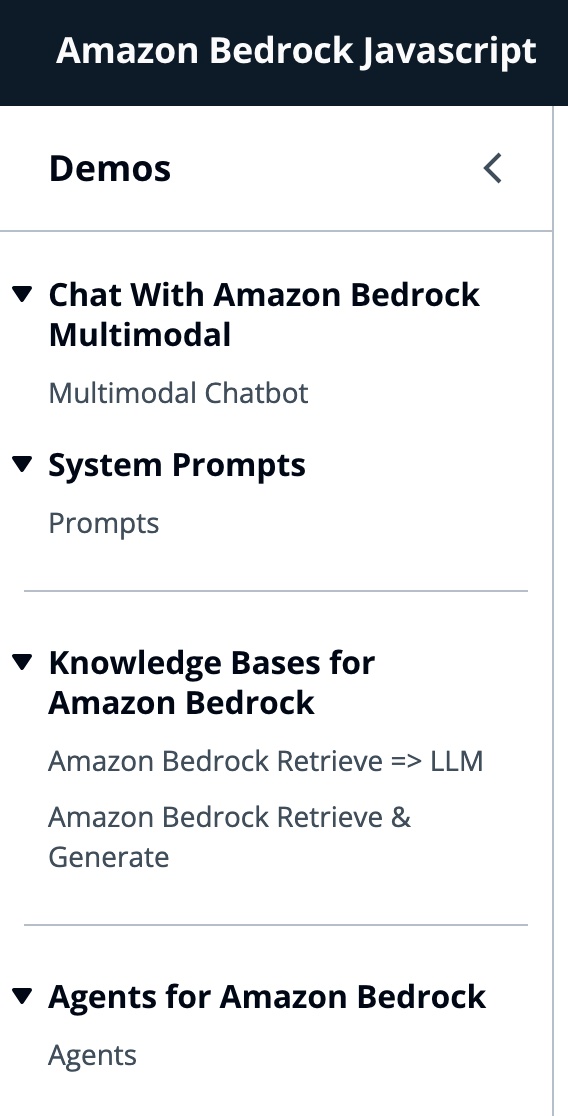
所有演示的共同點都可以使用基礎或底型型甲殼蟲,以調用基岩或床上庫根服務進行對話互動。 BedrockagentClient還用於列出部署在同一帳戶中的當前基岩知識庫。
 import { BedrockAgentClient } from "@aws-sdk/client-bedrock-agent"
import { BedrockAgentRuntimeClient } from "@aws-sdk/client-bedrock-agent-runtime"
亞馬遜Bedrock是一項完全管理的服務,可提供高性能的基礎模型(FMS)以及一套廣泛的功能,您需要構建和擴展生成性AI應用程序。
要調用FM,您需要從用戶池身份驗證中指定區域,流響應和API憑據。對於模型參數,您指定模型以採樣多達1000個令牌,而對於更具創意和發電的自由,請使用1個。我們使用llmlib.js的getModel函數來做到這一點
 export const getModel = async ( modelId = "anthropic.claude-instant-v1" ) => {
    const session = await fetchAuthSession ( ) ; //Amplify helper to fetch current logged in user
    let region = session . identityId . split ( ":" ) [ 0 ] //
    const model = new Bedrock ( {
        model : modelId , // model-id you can try others if you want
        region : region , // app region
        streaming : true , // this enables to get the response in streaming manner
        credentials : session . credentials , // the user credentials that allows to invoke bedrock service
        // try to limit to 1000 tokens for generation
        // temperature = 1 means more creative and freedom
        modelKwargs : { max_tokens_to_sample : 1000 , temperature : 1 } ,
    } ) ;
    return model ;
} ;要選擇ModelID首先,您使用getFMs (llmlib.js)列出了Amazon Bedrock Foundation模型。每個FM都有自己的調用模型的方式,此博客僅關注人類的多模式模型。
 export const getFMs = async ( ) => {
    const session = await fetchAuthSession ( )
    let region = session . identityId . split ( ":" ) [ 0 ]
    const client = new BedrockClient ( { region : region , credentials : session . credentials } )
    const input = { byProvider : "Anthropic" , byOutputModality : "TEXT" , byInferenceType : "ON_DEMAND" }
    const command = new ListFoundationModelsCommand ( input )
    const response = await client . send ( command )
    return response . modelSummaries
}
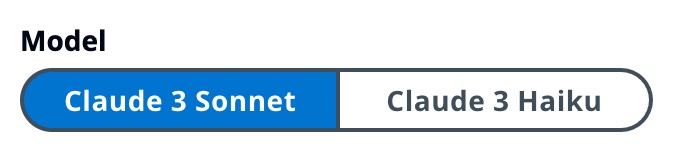
此代碼使您可以在肛門Claude 3十四行詩或haiku之間進行選擇。
我們將引導您通過每個演示組,以突出他們的差異。

InvokeModelWithResponsestream用於使用請求主體中提供的提示和推理參數來調用Amazon Bedrock模型以運行推理。
 const session = await fetchAuthSession ( )
let region = session . identityId . split ( ":" ) [ 0 ]
const client = new BedrockRuntimeClient ( { region : region , credentials : session . credentials } )
const input = {
        body : JSON . stringify ( body ) ,
        contentType : "application/json" ,
        accept : "application/json" ,
        modelId : modelId
    }
const command = new InvokeModelWithResponseStreamCommand ( input )
const response = await client . send ( command )
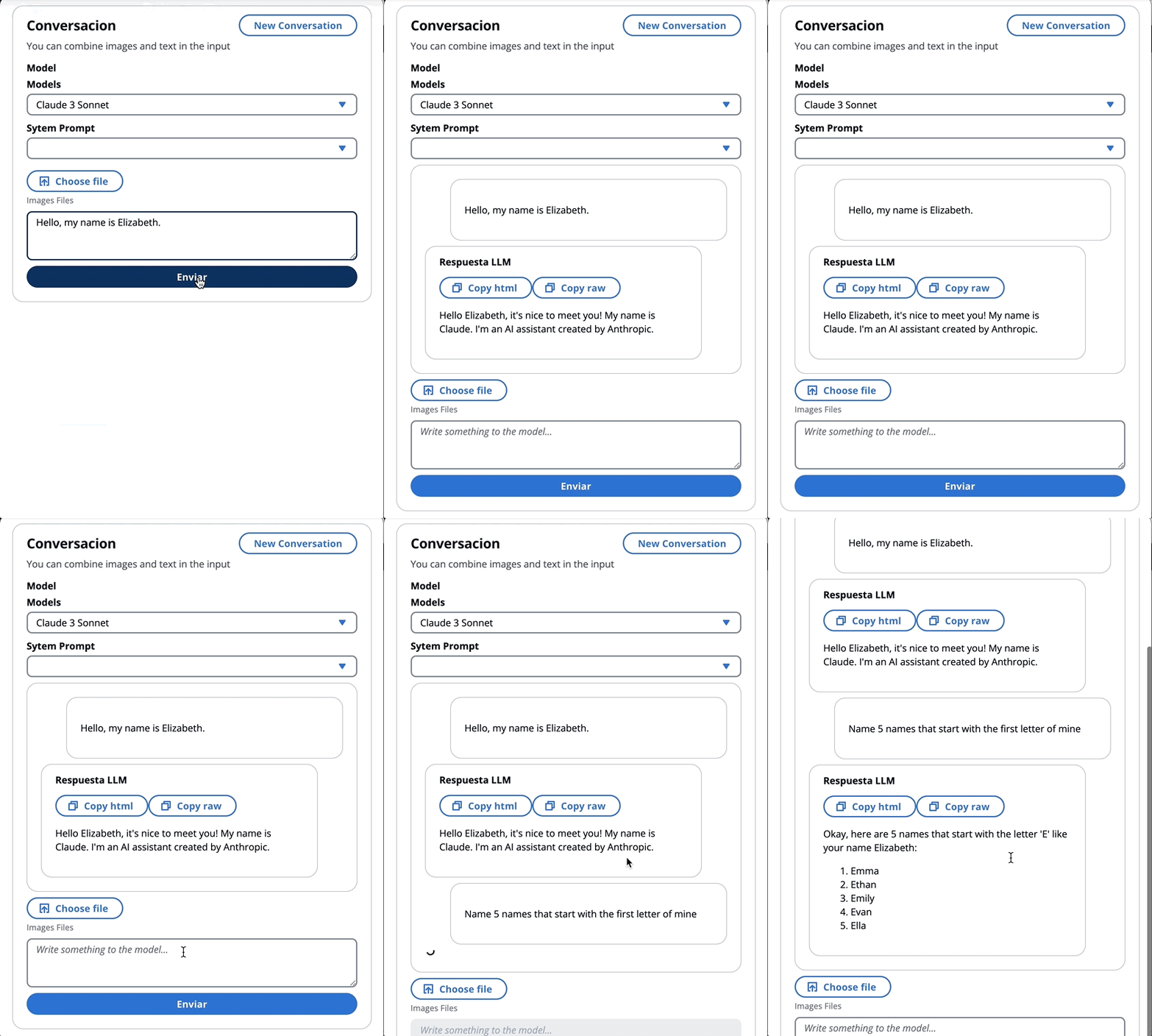
在上一個博客中,我們引用了兩種調用該模型的方法 - 一種專注於簡單地提出問題和答案,另一種是與模型進行完整的對話。使用擬人化的Claude 3,對話是由消息API: messages=[{"role": "user", "content": content}]進行處理。
每個輸入消息必須是具有role (用戶或助手)和內容的對象。 content可以在單個字符串中或一個內容塊中,每個塊具有其自己的指定type (文本或圖像)。
type平等text : {"role": "user", "content": [{"type": "text", "text": "Hello, Claude"}]}
type平等image : {"role": "user", "content": [
{
"type": "image",
"source": {
"type": "base64",
"media_type": "image/jpeg",
"data": "/9j/4AAQSkZJRg...",
}
},
{"type": "text", "text": "What is in this image?"}
]}
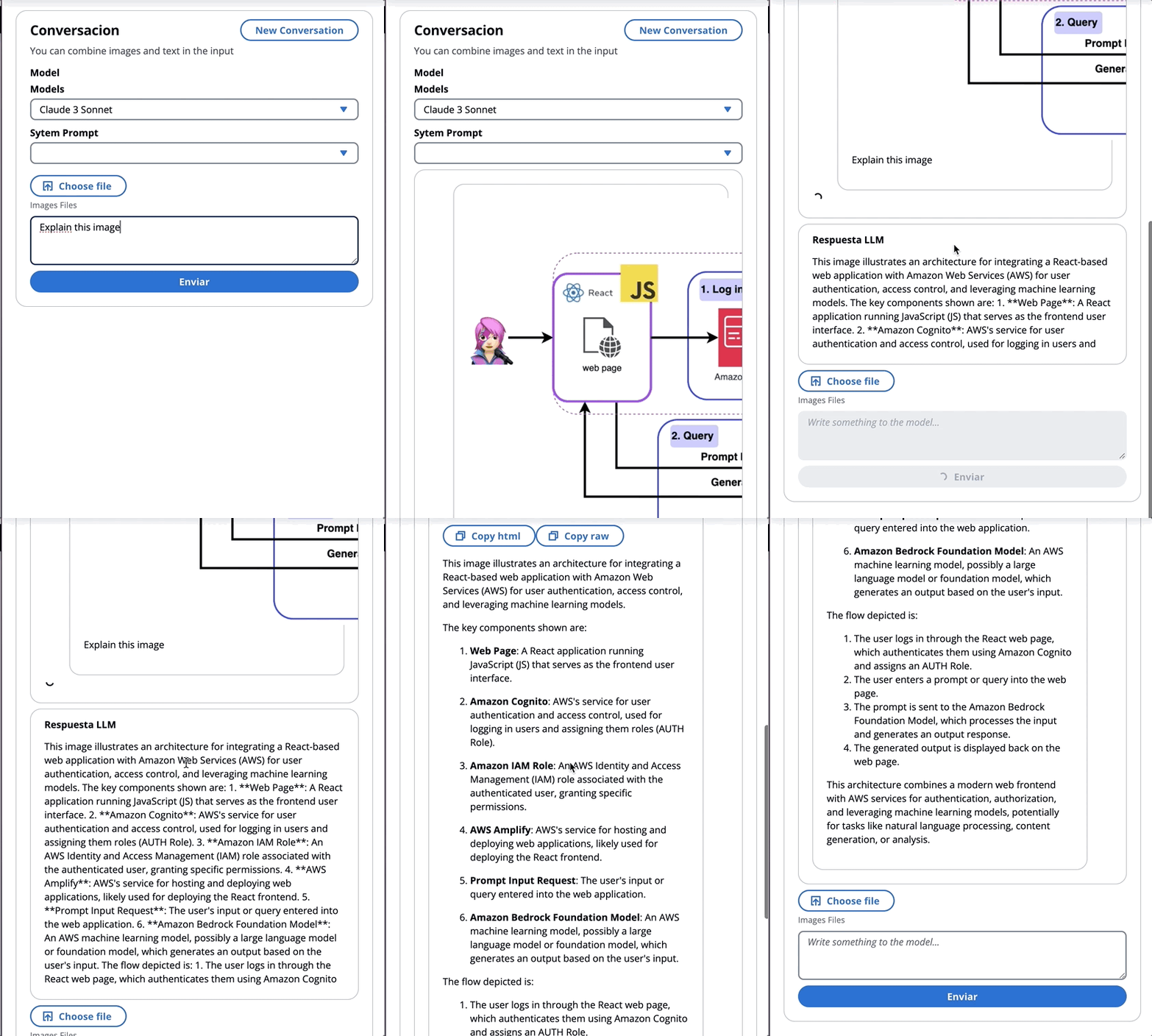
這是一個身體的一個例子:
 content = [
        {"type": "image", "source": {"type": "base64",
            "media_type": "image/jpeg", "data": content_image}},
        {"type":"text","text":text}
        ]
body = {
        "system": "You are an AI Assistant, always reply in the original user text language.",
        "messages":content,"anthropic_version": anthropic_version,"max_tokens":max_tokens}
an擬人當前支持圖像的base64源類型,以及Image/jpeg,Image/png,Image/gif和Image/WebP媒體類型。您可以在MessageHelpers.js的
buildContent函數中看到此應用程序的映像轉換為base64。查看更多輸入示例。
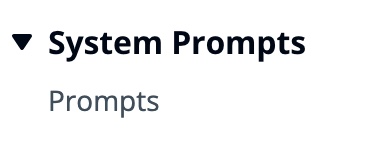
消息API允許我們通過系統提示(系統)向模型添加上下文或說明。
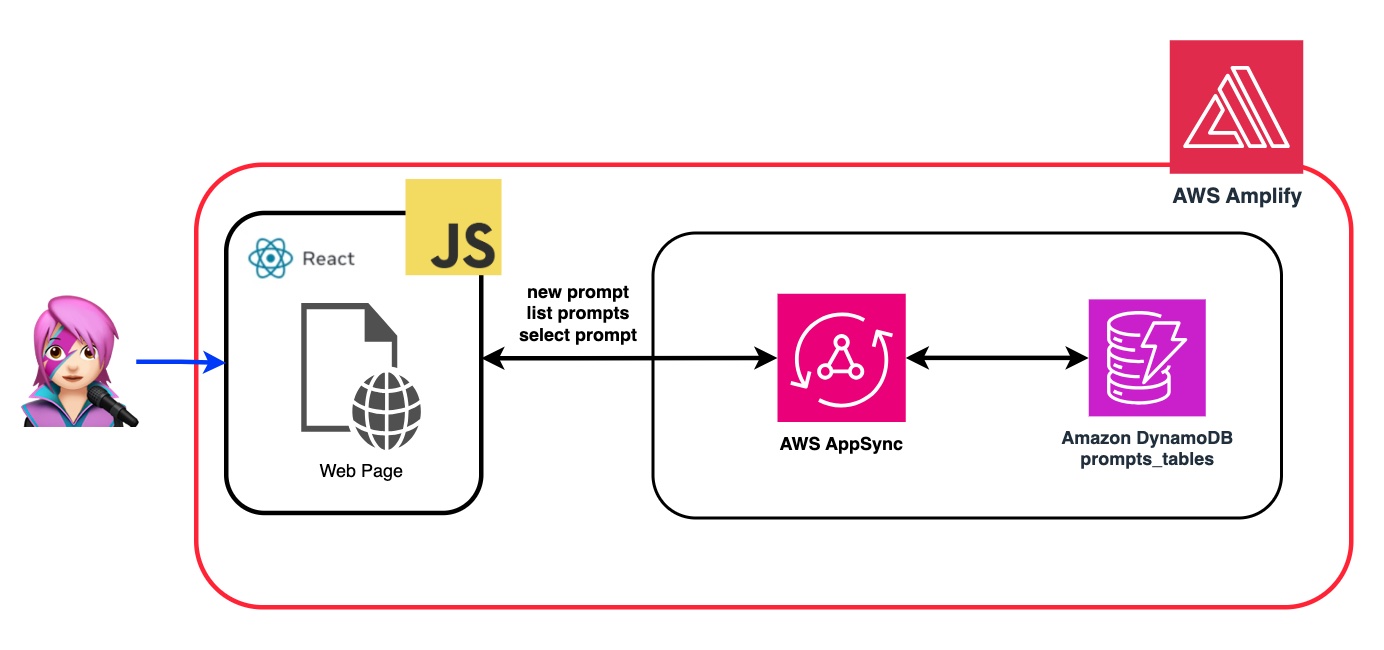
通過利用系統提示,我們可以為FM分配特定的角色,或者在向輸入餵食之前為其提供先前的說明。為了使FM扮演多個角色,我們創建了一個React組件,該組件允許您生成系統提示,將其存儲在Amazon DynamoDB表中,然後在要在FM中分配該特定角色時選擇它。
所有用於管理提示的API操作均由AWS AppSync GraphQl API端點處理。 AWS AppSync允許您創建和管理GraphQL API,該API提供了一種靈活,有效的方法,可以通過單個端點從多個來源獲取和操縱數據。 (AWS Appsync教程:DynamoDB解析器)
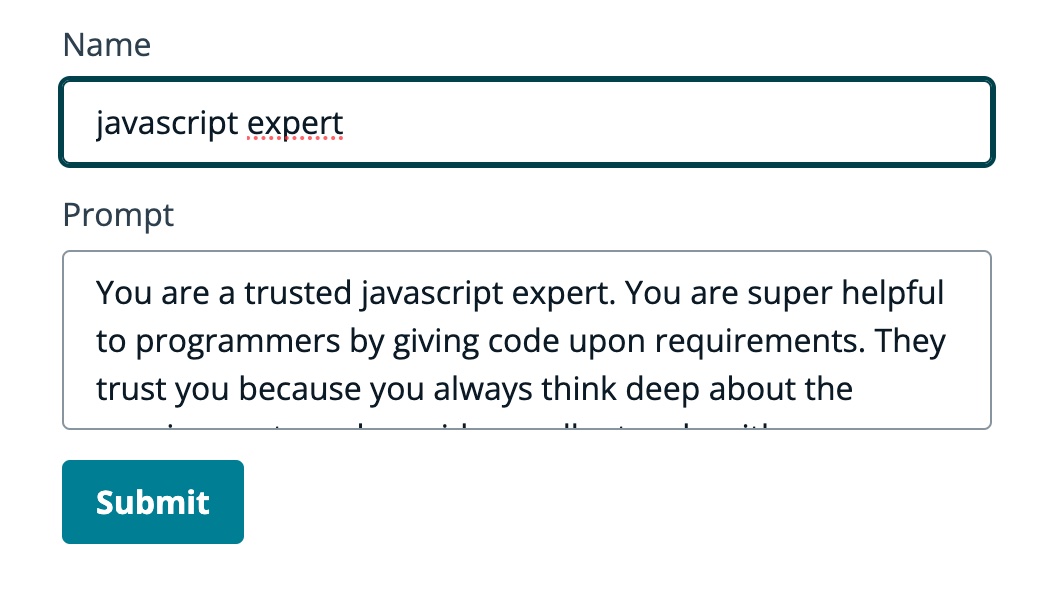
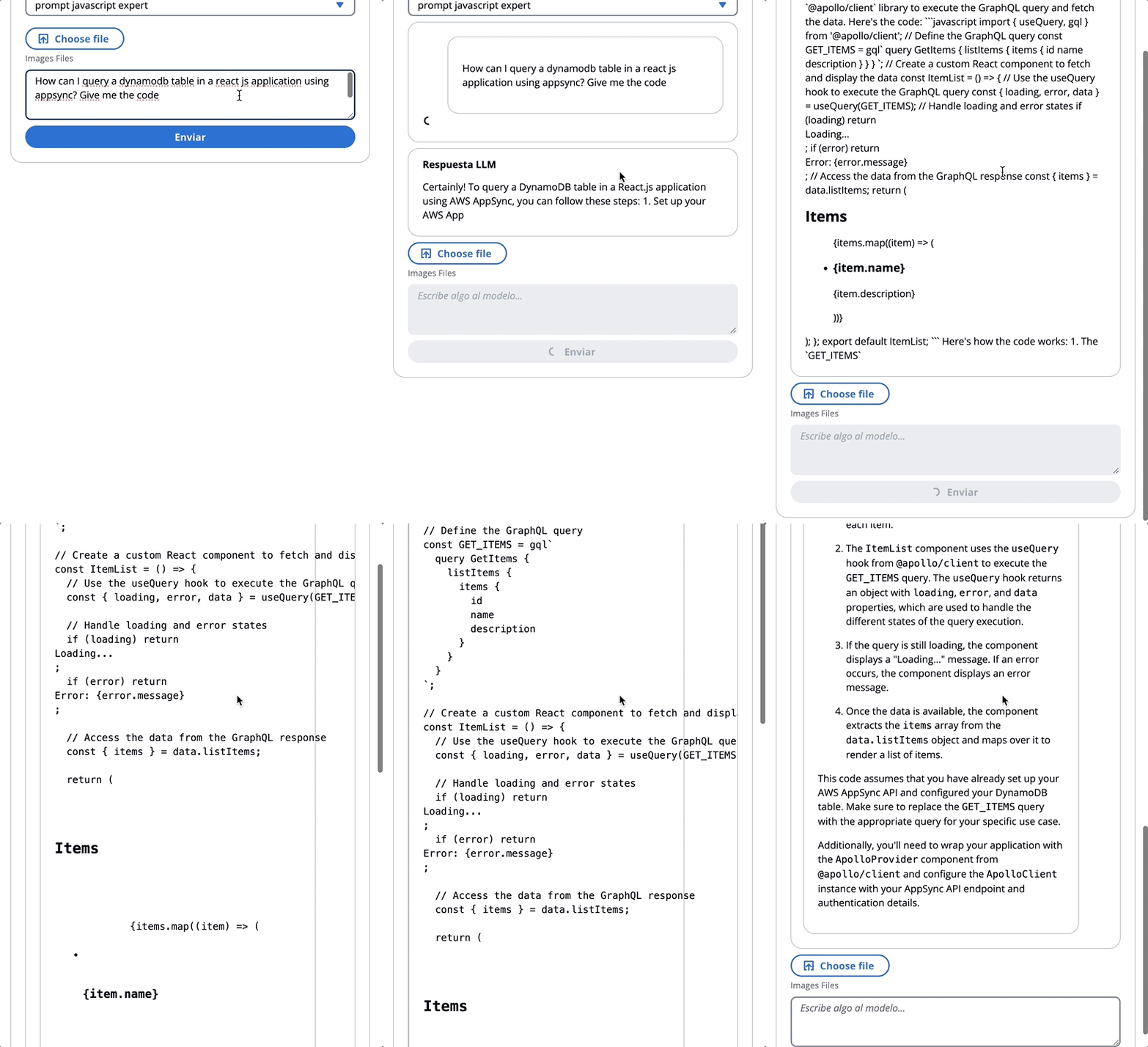
讓我們回顧一個提示的示例,我們告訴FM他是JavaScript的專家:
在以下GIF中,該模型像專家一樣提供代碼和詳細說明。
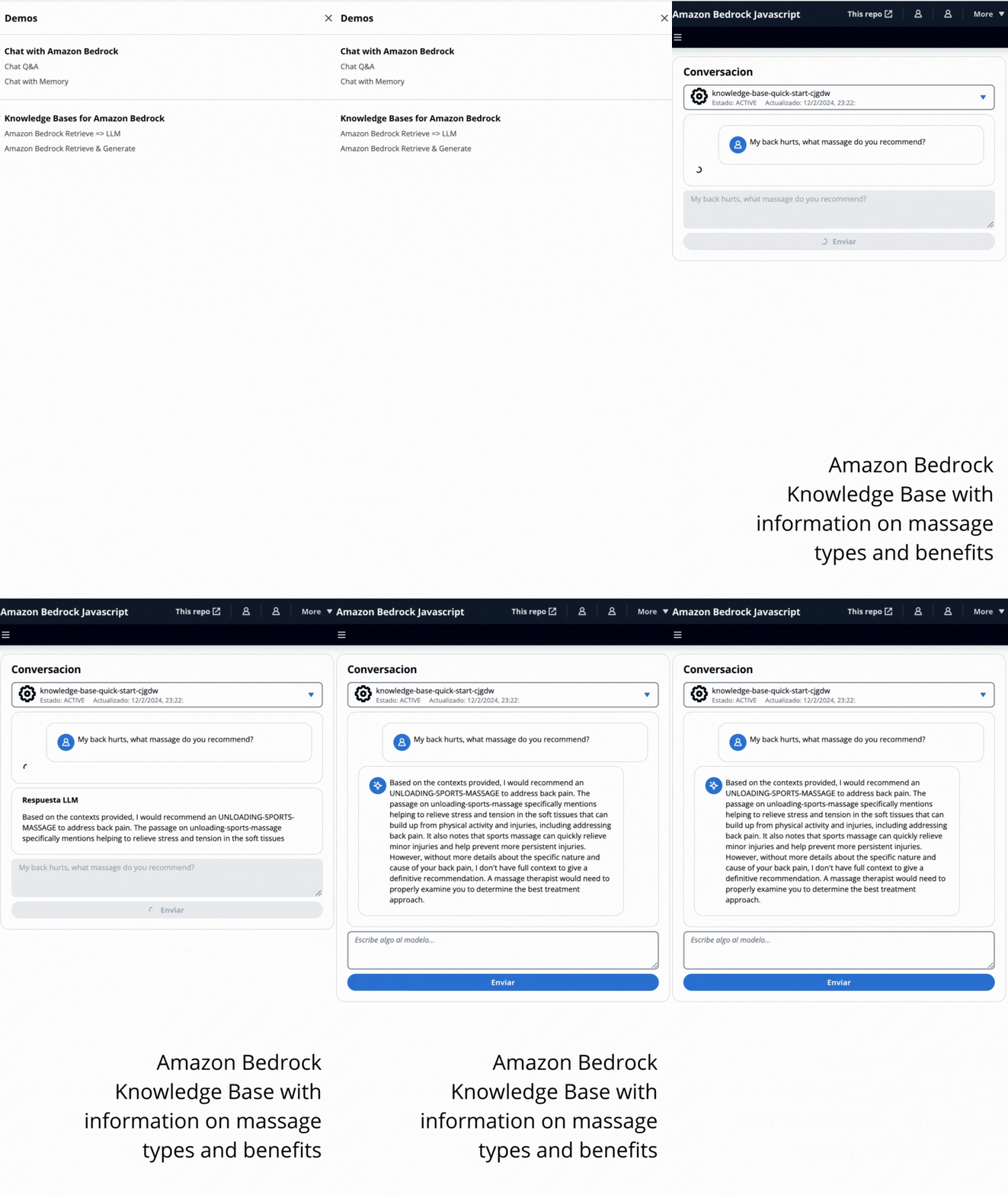
在此演示中,您將利用檢索增強發電(RAG)向亞馬遜基岩的知識庫提出問題。您必須至少創建一個知識庫,然後按照創建知識庫指南來進行操作。
將以兩種方式向亞馬遜基岩的知識庫提出問題:
- 亞馬遜基岩檢索=> llm:
使用ListKnowledgeBasesCommand列出知識庫如下:
 import { ListKnowledgeBasesCommand } from "@aws-sdk/client-bedrock-agent"

export const getBedrockKnowledgeBases = async ( ) => {
    const session = await fetchAuthSession ( )
    let region = session . identityId . split ( ":" ) [ 0 ]
    const client = new BedrockAgentClient ( { region : region , credentials : session . credentials } )
    const command = new ListKnowledgeBasesCommand ( { } )
    const response = await client . send ( command )
    return response . knowledgeBaseSummaries
}
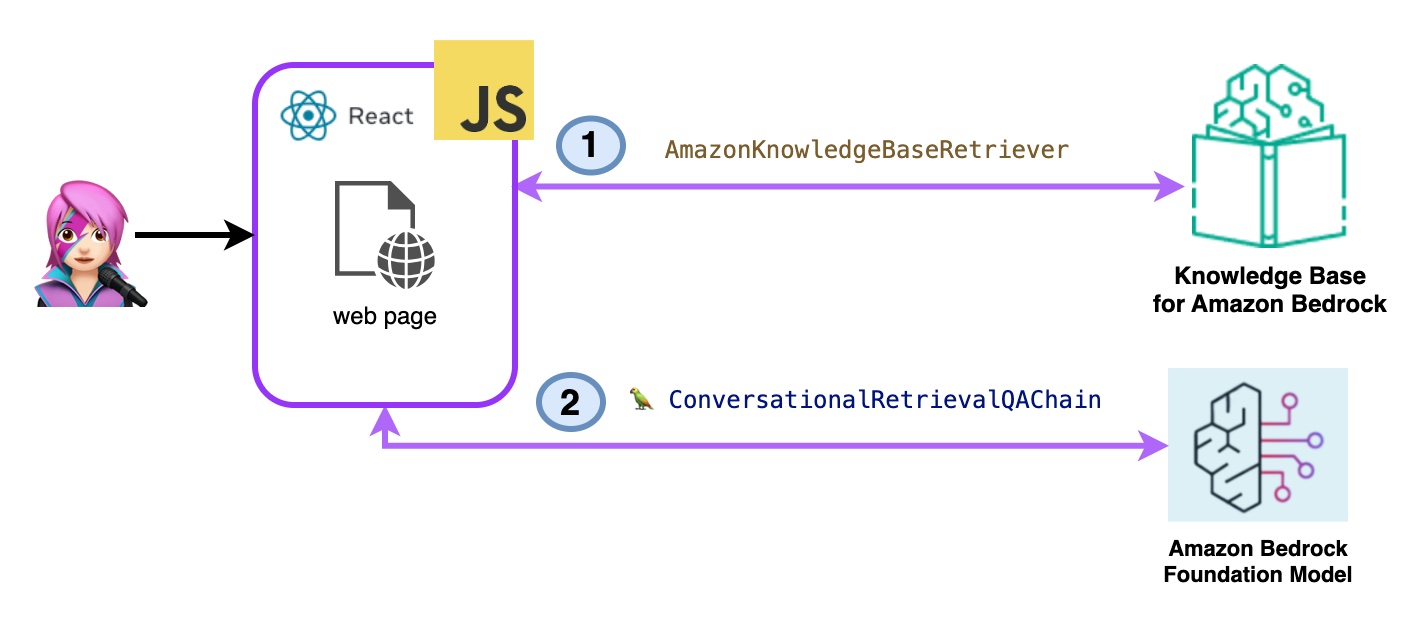
AmazonKnowledgeBaseRetriever Langchain類創建了一個獵犬,這是一個能夠檢索與知識庫相似的文檔的對象(在這種情況下,是Bedrock的知識庫)
 import { AmazonKnowledgeBaseRetriever } from "@langchain/community/retrievers/amazon_knowledge_base" ;

export const getBedrockKnowledgeBaseRetriever = async ( knowledgeBaseId ) => {
    const session = await fetchAuthSession ( ) ;
    let region = session . identityId . split ( ":" ) [ 0 ]
    const retriever = new AmazonKnowledgeBaseRetriever ( {
        topK : 10 , // return top 10 documents
        knowledgeBaseId : knowledgeBaseId ,
        region : region ,
        clientOptions : { credentials : session . credentials }
    } )

    return retriever
}
對話式RetRevalQachain與獵犬和記憶進行了實例化。它會照顧內存,查詢獵犬並使用LLM實例提出答案(帶有文檔)。
 import { ConversationalRetrievalQAChain } from "langchain/chains" ;

export const getConversationalRetrievalQAChain = async ( llm , retriever , memory ) => {

    const chain = ConversationalRetrievalQAChain . fromLLM (
        llm , retriever = retriever )
    chain . memory = memory

    //Here you modify the default prompt to add the Human prefix and Assistant suffix needed by Claude.
    //otherwise you get an exception
    //this is the prompt that uses chat history and last question to formulate a complete standalone question

    chain . questionGeneratorChain . prompt . template = "Human: " + chain . questionGeneratorChain . prompt . template + "nAssistant:"
     // Here you finally answer the question using the retrieved documents.

    chain . combineDocumentsChain . llmChain . prompt . template = `Human: Use the following pieces of context to answer the question at the end. If you don't know the answer, just say that you don't know, don't try to make up an answer.

{context}

Question: {question}
Helpful Answer:
Assistant:`

return chain
} 
代碼Bedrockkbretrieve.jsx
- 亞馬遜基岩檢索和生成:
在這裡,您將使用完整的AWS託管破布服務。不需要額外的軟件包(Langchain)或提示增加複雜性。您將僅使用一個API呼叫來進行Bedrockagentruntimeclient 。另外,內存由服務通過使用SessionID來管理。
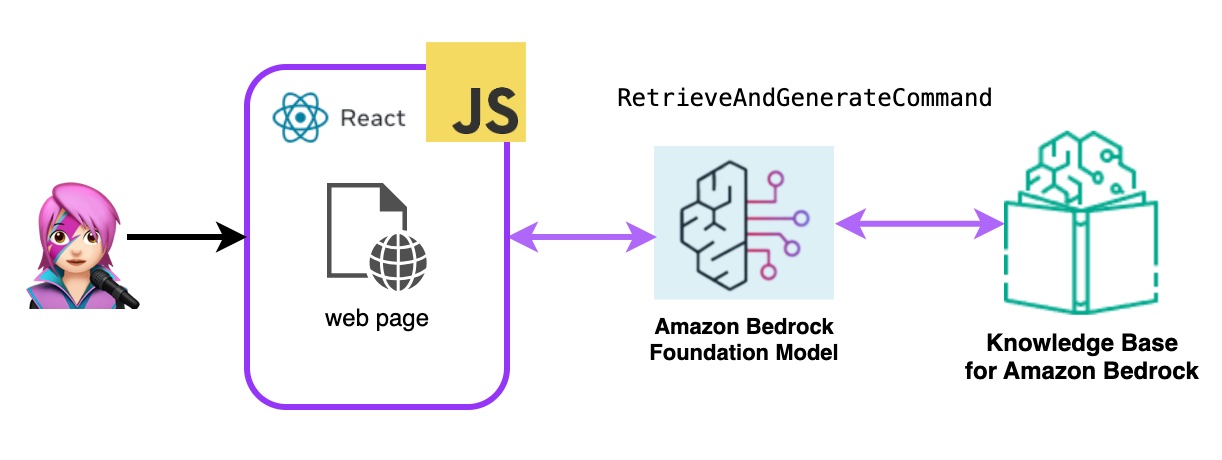
Bedrock用Bedrockagentruntimeclient初始化,並帶有檢索AndgenerateCommand查詢知識庫,並且基礎模型基於檢索結果產生響應。在此演示中,蘭鏈無需。
 import { BedrockAgentRuntimeClient , RetrieveAndGenerateCommand } from "@aws-sdk/client-bedrock-agent-runtime"

export const ragBedrockKnowledgeBase = async ( sessionId , knowledgeBaseId , query , modelId = "anthropic.claude-instant-v1" ) => {
    const session = await fetchAuthSession ( )
    let region = session . identityId . split ( ":" ) [ 0 ]
    const client = new BedrockAgentRuntimeClient ( { region : region , credentials : session . credentials } ) ;
    const input = {
        input : { text : query } , // user question
        retrieveAndGenerateConfiguration : {
            type : "KNOWLEDGE_BASE" ,
            knowledgeBaseConfiguration : {
                knowledgeBaseId : knowledgeBaseId ,
                //your existing KnowledgeBase in the same region/ account
                // Arn of a Bedrock model, in this case we jump to claude 2.1, the latest. Feel free to use another
                modelArn : `arn:aws:bedrock: ${ region } ::foundation-model/ ${ modelId } ` , // Arn of a Bedrock model
            } ,
        }
    }

    if ( sessionId ) {
        // you can pass the sessionId to continue a dialog.
        input . sessionId = sessionId
    }

    const command = new RetrieveAndGenerateCommand ( input ) ;
    const response = await client . send ( command )
    return response
} 
代碼Bedrockkbandgenerate.jsx
Amazon Bedrock代理是一種軟件組件,它利用Amazon Bedrock服務提供的AI模型來提供面向用戶的功能,例如聊天機器人,虛擬助手或文本生成工具。可以自定義這些代理並適應每個應用程序的特定需求,從而為最終用戶與基礎AI功能進行交互提供了用戶界面。基岩代理處理與語言模型的集成,處理用戶輸入,生成響應以及基於AI模型的輸出的其他操作。
要將亞馬遜基岩代理集成到此應用程序中,您必須創建一個,請按照以下步驟在亞馬遜基岩中創建一個代理
在Amazon Bedrock中,您可以通過創建一個別名來創建代理的新版本,該別名默認指向新版本,使用listagentaliasescommand(llmlib.js)列出了別名:
 import { BedrockAgentClient , ListAgentAliasesCommand } from "@aws-sdk/client-bedrock-agent" ;

const client = new BedrockAgentRuntimeClient ( { region : region , credentials : session . credentials } )

export const getBedrockAgentAliases = async ( client , agent ) => {
    const agentCommand = new ListAgentAliasesCommand ( { agentId : agent . agentId } )
    const response = await client . send ( agentCommand )
    return response . agentAliasSummaries
}
發送提示代理處理和響應使用InvokeAgentCommand
 import { BedrockAgentRuntimeClient , InvokeAgentCommand } from "@aws-sdk/client-bedrock-agent-runtime" ;

export const invokeBedrockAgent = async ( sessionId , agentId , agentAlias , query ) => {
    const session = await fetchAuthSession ( )
    let region = session . identityId . split ( ":" ) [ 0 ]

    const client = new BedrockAgentRuntimeClient ( { region : region , credentials : session . credentials } )
    const input = {
        sessionId : sessionId ,
        agentId : agentId ,
        agentAliasId : agentAlias ,
        inputText : query
    }

    console . log ( input )

    const command = new InvokeAgentCommand ( input )
    const response = await client . send ( command , )
    console . log ( "response:" , response )

    let completion = ""

    let decoder = new TextDecoder ( "utf-8" )
    for await ( const chunk of response . completion ) {
        console . log ( "chunk:" , chunk )
        const text = decoder . decode ( chunk . chunk . bytes )
        completion += text
        console . log ( text )
    }

    return completion

}
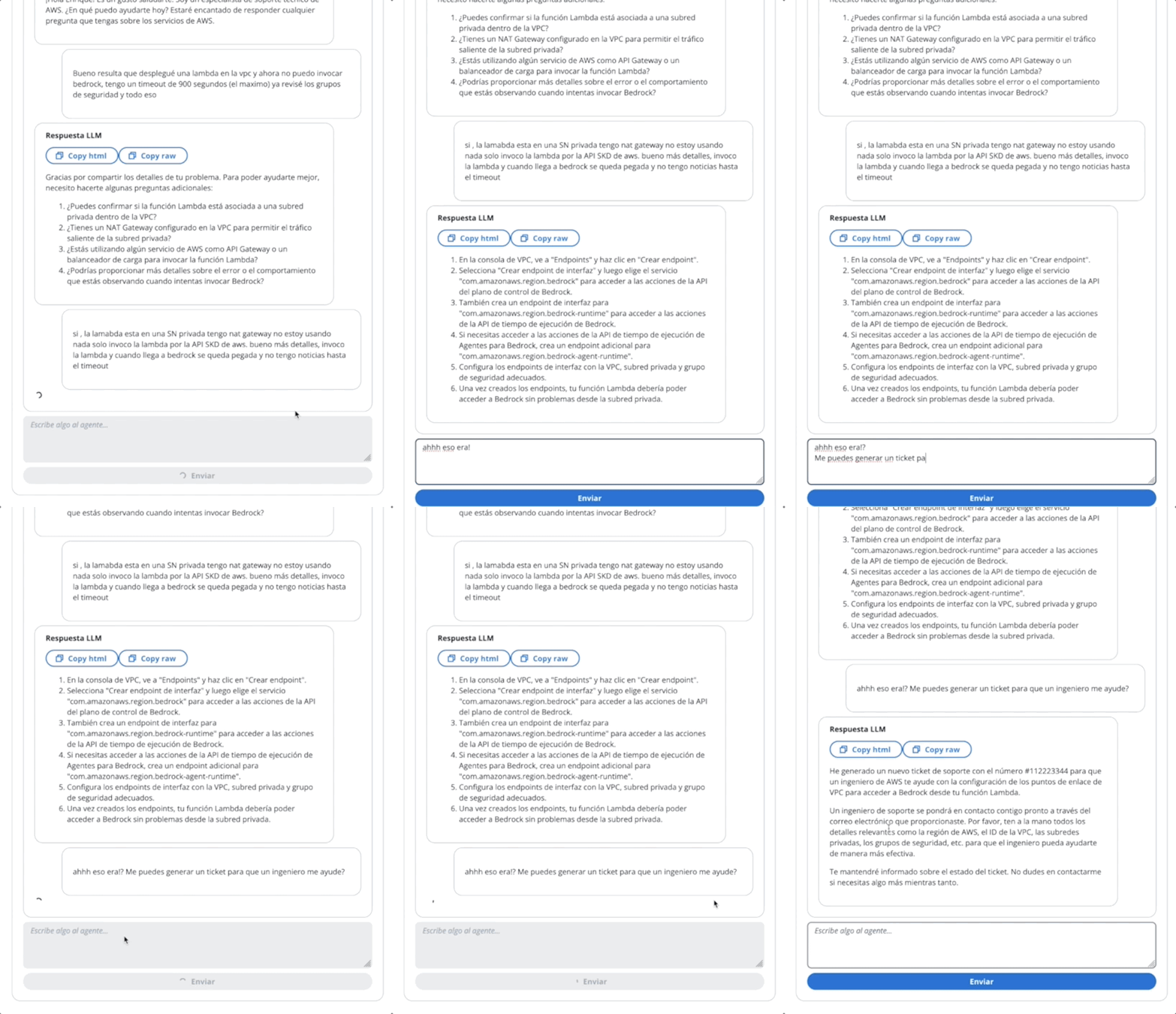
在第一個GIF的代理中,創建一張技術支持票:
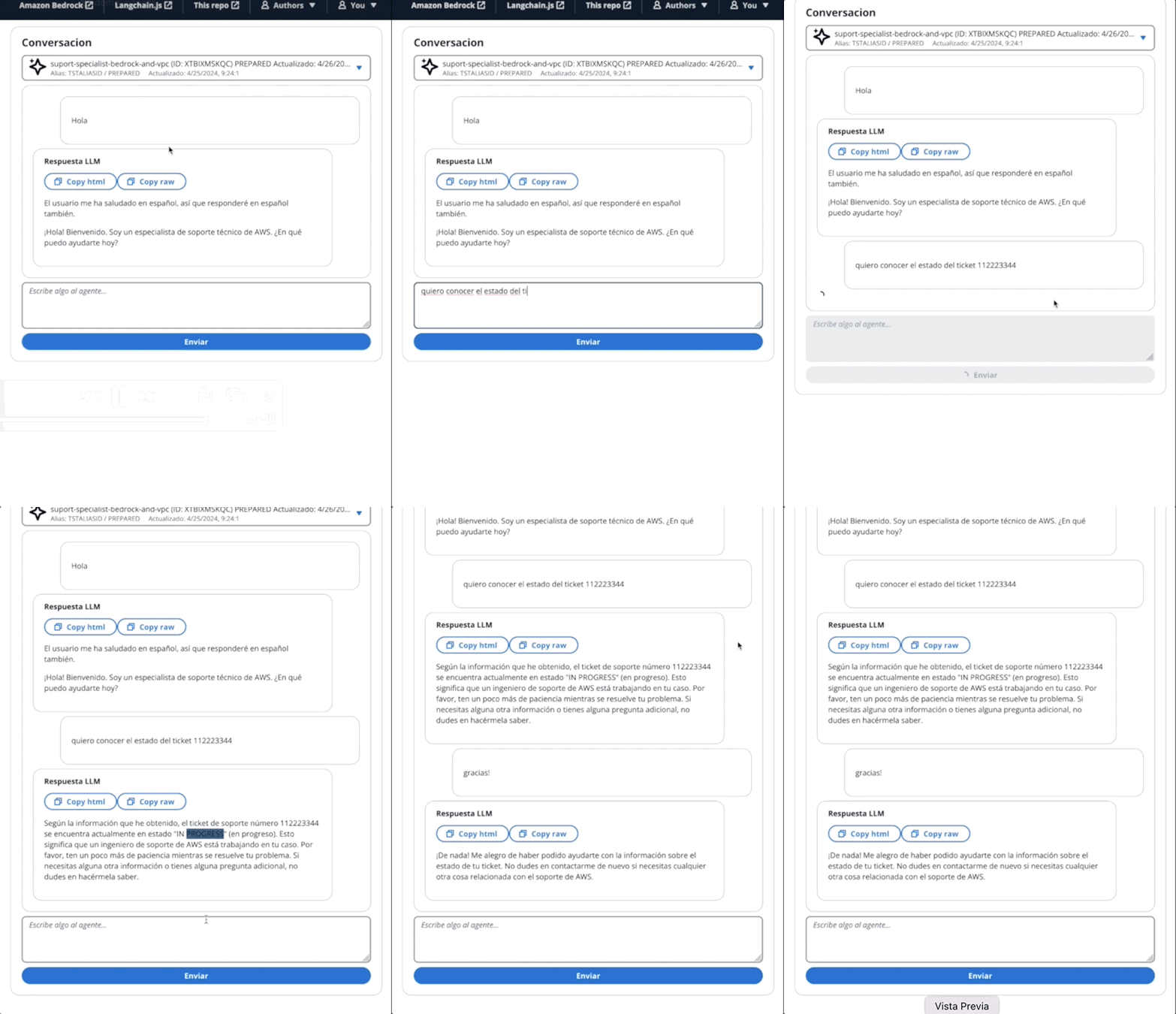
在第二個GIF中,用戶向代理詢問票證的狀態:
該應用程序是通過AWS放大的。將其部署在您的帳戶中:
https://github.com/build-on-aws/building-reactjs-gen-ai-apps-with-amazon-bedrock-javascript-sdk/forks
創建一個新的分支: dev-branch 。
然後按照現有代碼指南開始以下步驟。
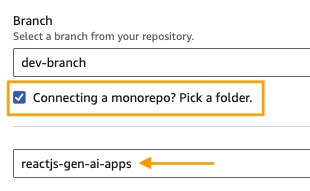
在步驟1中,添加存儲庫分支,選擇主分支並連接monorepo?選擇一個文件夾,然後輸入reactjs-gen-ai-apps作為根目錄。
building-a-gen-ai-gen-ai-personal-assistant-reactjs-apps(this app)作為應用程序名稱,在enviroment select select select select create create create create new Engitoment並編寫dev 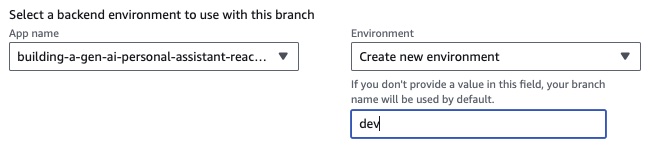
如果沒有現有角色,請創建一個新的角色來服務放大。
部署您的應用程序。
部署應用程序後,轉到位於白色框下方的應用程序中的鏈接。
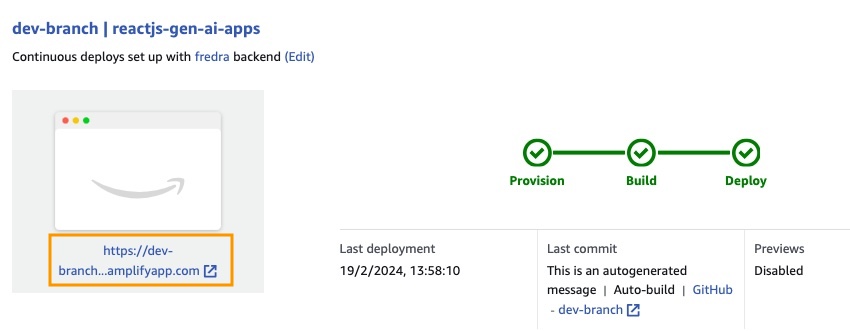
輸入鏈接時,窗口中的唱片將出現,因此您必須創建一個Amazon Cognito用戶池用戶。
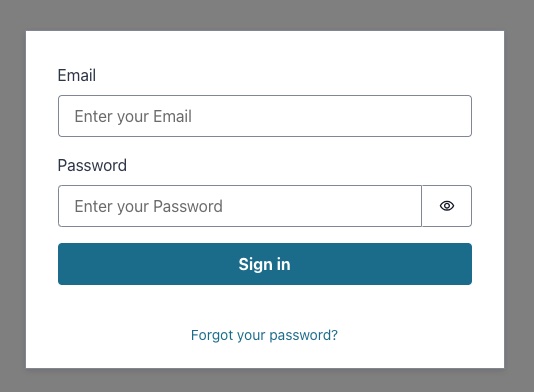
在應用程序中,請轉到後端環境,然後單擊身份驗證。
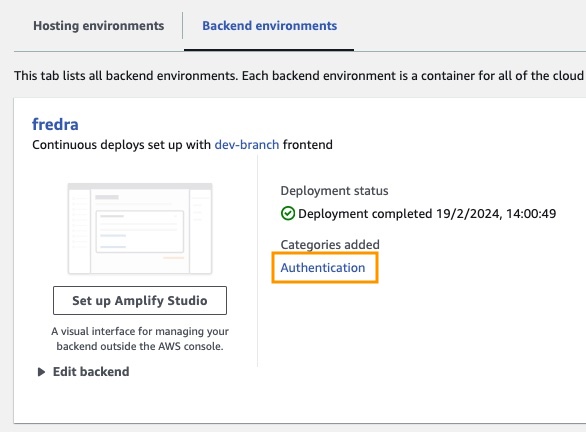
然後,在身份驗證下,單擊Cognito中的視圖:
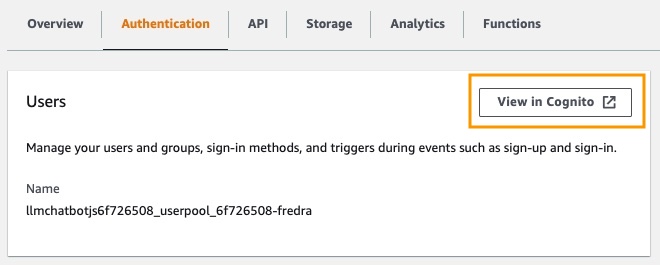
在用戶池中,單擊用戶池的名稱並創建用戶。
創建您的用戶然後唱歌。
注意:您可以通過更改App.jsx中的false
hideSignUp: false來直接從應用程序創建用戶,但是這可以通過使任何人訪問它來引入安全缺陷。
在可以在亞馬遜基岩中使用基礎模型之前,您必須請求訪問它。遵循“添加模型訪問指南”中的步驟。
轉到應用程序鏈接並與您創建的用戶登錄。
在這篇文章中,我們演示瞭如何構建一個React Web應用程序,該應用程序可以使用Amazon Cognito直接訪問Amazon Bedrock API進行安全身份驗證。通過利用AWS託管服務,例如Cognito和IAM,您可以無需將強大的生成AI功能集成到JavaScript應用程序中,而無需後端代碼。
這種方法使開發人員能夠專注於創造引人入勝的對話體驗,同時利用亞馬遜Bedrock的託管知識服務。流響應通過減少等待時間並啟用與會話AI的自然互動來增強用戶體驗。
此外,我們展示瞭如何使用存儲在Amazon DynamoDB表中的系統提示為基礎模型分配多個角色。該集中式存儲庫提供了靈活性和多功能性,使您可以根據特定用例有效地檢索並為模型分配不同的角色。
通過遵循本文中概述的步驟,您可以在React應用程序中解鎖生成AI的潛力。無論您是從頭開始構建新應用程序還是增強現有應用程序,Amazon Bedrock和AWS JavaScript SDK都比以往任何時候都更容易結合尖端的AI功能。
我們鼓勵您探索為開始構建自己的生成AI應用程序所提供的代碼樣本和資源。如果您有任何疑問或反饋,請在下面發表評論。愉快的編碼!
有關更多信息,請參見貢獻。
該圖書館已獲得MIT-0許可證的許可。請參閱許可證文件。





