building reactjs gen ai apps with amazon bedrock javascript sdk
1.0.0

本文用Colaboration Enrique Rodriguez撰写
当我们结合了Amazon Bedrock,ReactJS和AWS JavaScript SDK的力量时,准备踏上激动人心的旅程,以创建具有最小集成代码的生成AI应用程序。
将生成AI集成到现有应用中提出了挑战。许多开发人员在培训基础模型方面的经验有限,但目的是将生成的AI功能与最小的代码更改整合在一起。
为了解决这个问题,我们创建了一个应用程序,该应用程序将生成AI的力量与呼叫来自Web应用程序的Amazon Bedrock API的呼吁,该应用程序由JavaScript和React Framework构建。没有中间件,可以通过最小的代码集成来降低障碍,以结合AI生成。
在整个教程中,您将学习如何利用Amazon Cognito凭据和IAM角色,以安全地访问使用CloudScape Design System构建的ReactJS应用程序中的Amazon Bedrock API。我们将指导您完成部署所有必要资源并使用AWS放大,简化设置和部署过程的过程。
为了增强基础模型(FM)的灵活性和自定义,我们将演示如何使用系统提示分配不同的角色。通过创建Amazon DynamoDB表,您可以存储和检索各种角色,使您能够管理和访问与您希望分配给FM的每个角色相关联的不同系统提示。这种集中式存储库方法允许基于选定角色定制动态角色分配并量身定制AI响应。
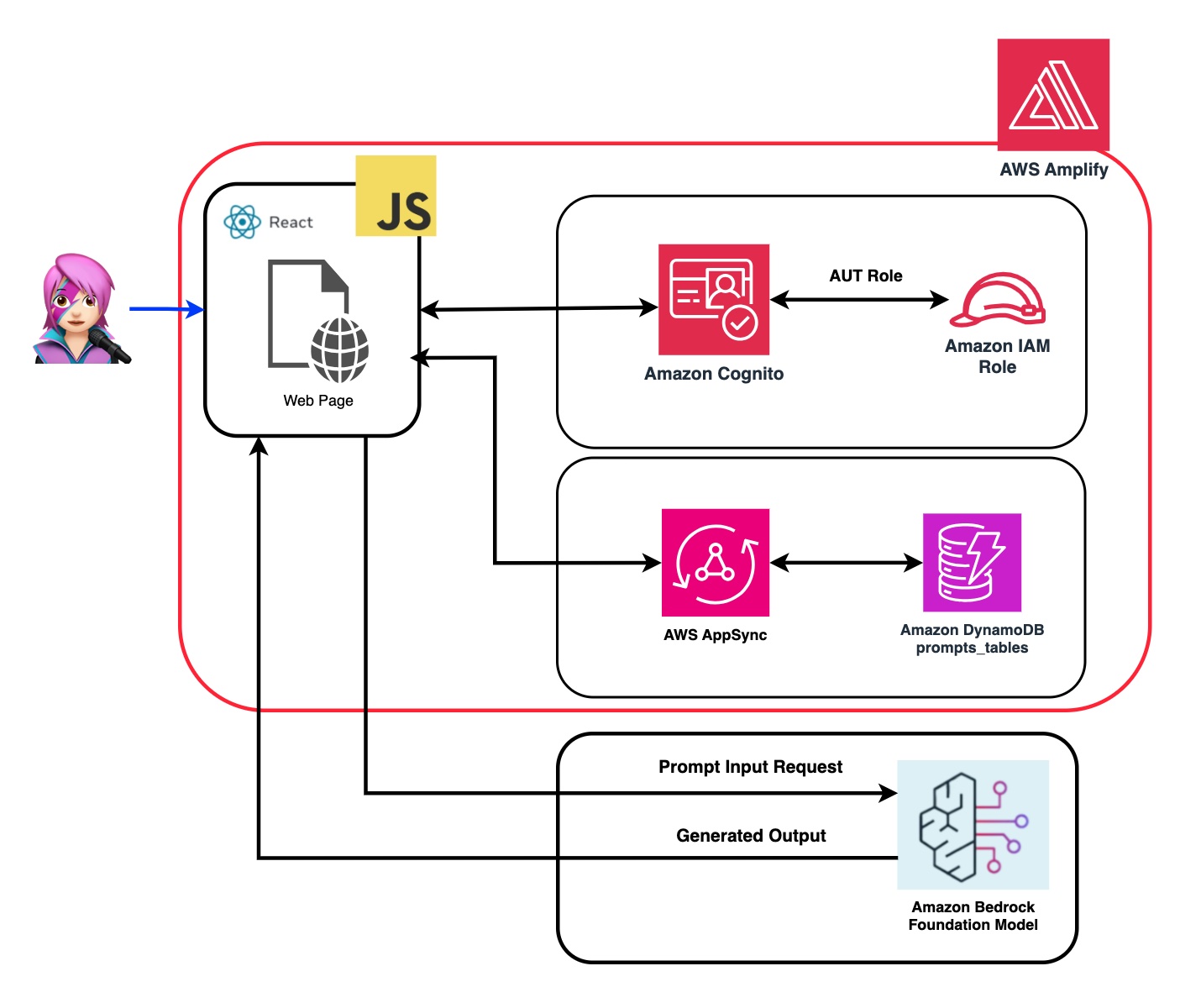
在此应用程序的存储库中,您将找到准备部署后端和前端的代码。
✅后端: Amazon Cognito用户池和身份池,具有AWS身份和访问管理员角色(IAM角色),其中包含具有调用Amazon Bedrock的权限的策略。
 { policyName: "amplify-permissions-custom-resources",
            policyDocument: {
                Version: "2012-10-17",
                Statement: [
                    {
                        Resource: "*",
                        Action: ["bedrock:InvokeModel*", "bedrock:List*", "bedrock:Retrieve*"],
                        Effect: "Allow",
                    }
                ]
            }
        }
查看“将亚马逊Cognito身份验证和授权与Web和移动应用程序集成”指南,以调用用Amazon Cognito认证的用户调用AWS API操作。
可以在此处自定义此权限:IAM角色代码
✅前端:用CloudScape设计系统构建的ReactJS单页应用程序(SPA)。
该应用程序包括4个演示:
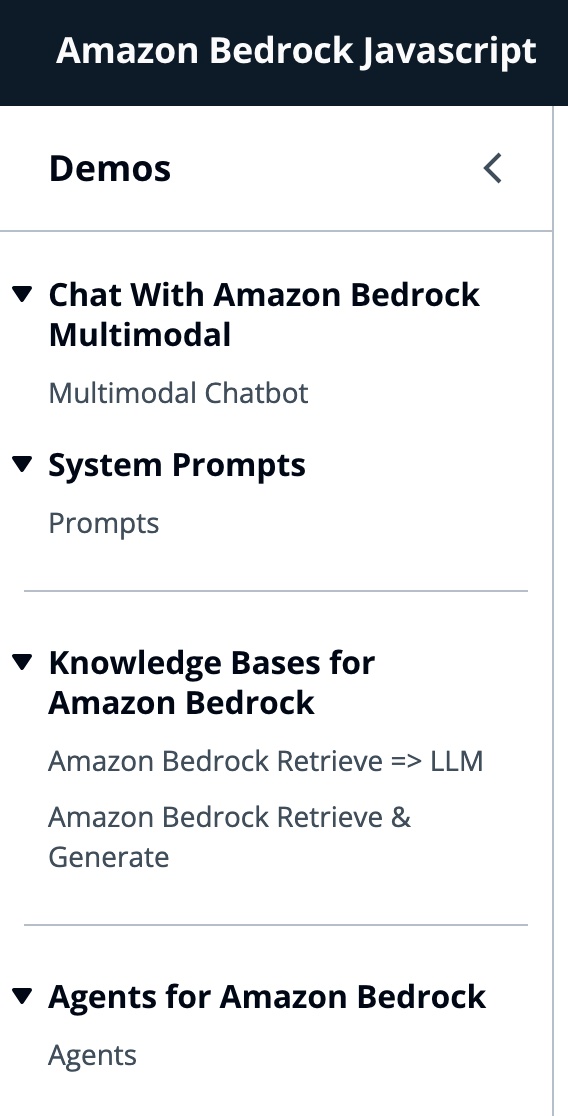
所有演示的共同点都可以使用基础或底型型甲壳虫,以调用基岩或床上库根服务进行对话互动。 BedrockagentClient还用于列出部署在同一帐户中的当前基岩知识库。
 import { BedrockAgentClient } from "@aws-sdk/client-bedrock-agent"
import { BedrockAgentRuntimeClient } from "@aws-sdk/client-bedrock-agent-runtime"
亚马逊Bedrock是一项完全管理的服务,可提供高性能的基础模型(FMS)以及一套广泛的功能,您需要构建和扩展生成性AI应用程序。
要调用FM,您需要从用户池身份验证中指定区域,流响应和API凭据。对于模型参数,您指定模型以采样多达1000个令牌,而对于更具创意和发电的自由,请使用1个。我们使用llmlib.js的getModel函数来做到这一点
 export const getModel = async ( modelId = "anthropic.claude-instant-v1" ) => {
    const session = await fetchAuthSession ( ) ; //Amplify helper to fetch current logged in user
    let region = session . identityId . split ( ":" ) [ 0 ] //
    const model = new Bedrock ( {
        model : modelId , // model-id you can try others if you want
        region : region , // app region
        streaming : true , // this enables to get the response in streaming manner
        credentials : session . credentials , // the user credentials that allows to invoke bedrock service
        // try to limit to 1000 tokens for generation
        // temperature = 1 means more creative and freedom
        modelKwargs : { max_tokens_to_sample : 1000 , temperature : 1 } ,
    } ) ;
    return model ;
} ;要选择ModelID首先,您使用getFMs (llmlib.js)列出了Amazon Bedrock Foundation模型。每个FM都有自己的调用模型的方式,此博客仅关注人类的多模式模型。
 export const getFMs = async ( ) => {
    const session = await fetchAuthSession ( )
    let region = session . identityId . split ( ":" ) [ 0 ]
    const client = new BedrockClient ( { region : region , credentials : session . credentials } )
    const input = { byProvider : "Anthropic" , byOutputModality : "TEXT" , byInferenceType : "ON_DEMAND" }
    const command = new ListFoundationModelsCommand ( input )
    const response = await client . send ( command )
    return response . modelSummaries
}
此代码使您可以在肛门Claude 3十四行诗或haiku之间进行选择。
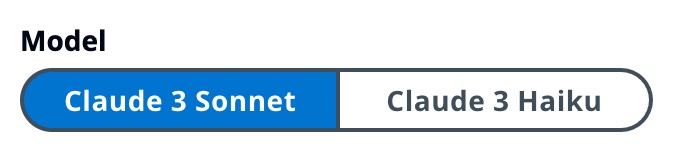
我们将引导您通过每个演示组,以突出他们的差异。

InvokeModelWithResponsestream用于使用请求主体中提供的提示和推理参数来调用Amazon Bedrock模型以运行推理。
 const session = await fetchAuthSession ( )
let region = session . identityId . split ( ":" ) [ 0 ]
const client = new BedrockRuntimeClient ( { region : region , credentials : session . credentials } )
const input = {
        body : JSON . stringify ( body ) ,
        contentType : "application/json" ,
        accept : "application/json" ,
        modelId : modelId
    }
const command = new InvokeModelWithResponseStreamCommand ( input )
const response = await client . send ( command )
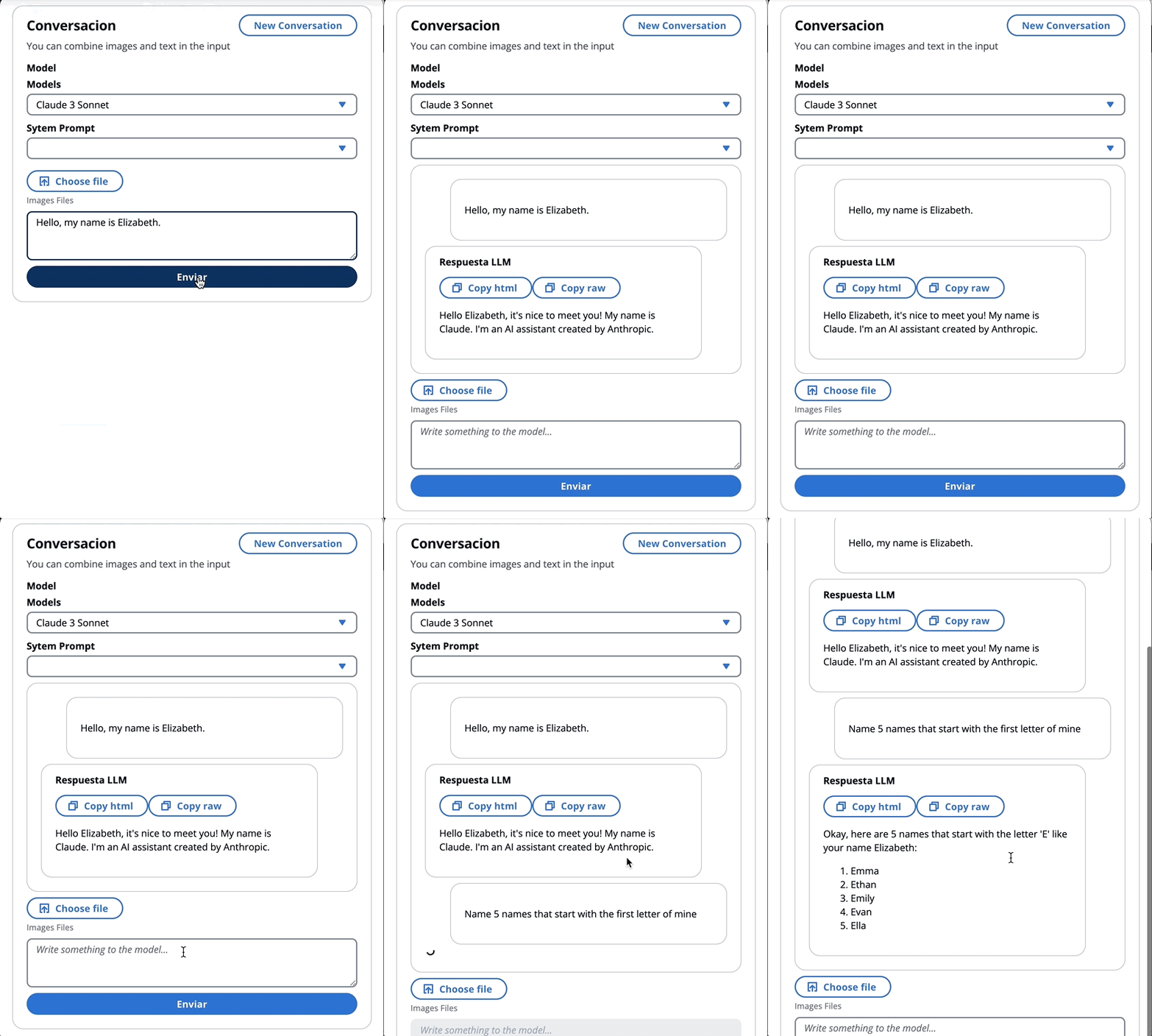
在上一个博客中,我们引用了两种调用该模型的方法 - 一种专注于简单地提出问题和答案,另一种是与模型进行完整的对话。使用拟人化的Claude 3,对话是由消息API: messages=[{"role": "user", "content": content}]进行处理。
每个输入消息必须是具有role (用户或助手)和内容的对象。 content可以在单个字符串中或一个内容块中,每个块具有其自己的指定type (文本或图像)。
type平等text : {"role": "user", "content": [{"type": "text", "text": "Hello, Claude"}]}
type平等image : {"role": "user", "content": [
{
"type": "image",
"source": {
"type": "base64",
"media_type": "image/jpeg",
"data": "/9j/4AAQSkZJRg...",
}
},
{"type": "text", "text": "What is in this image?"}
]}
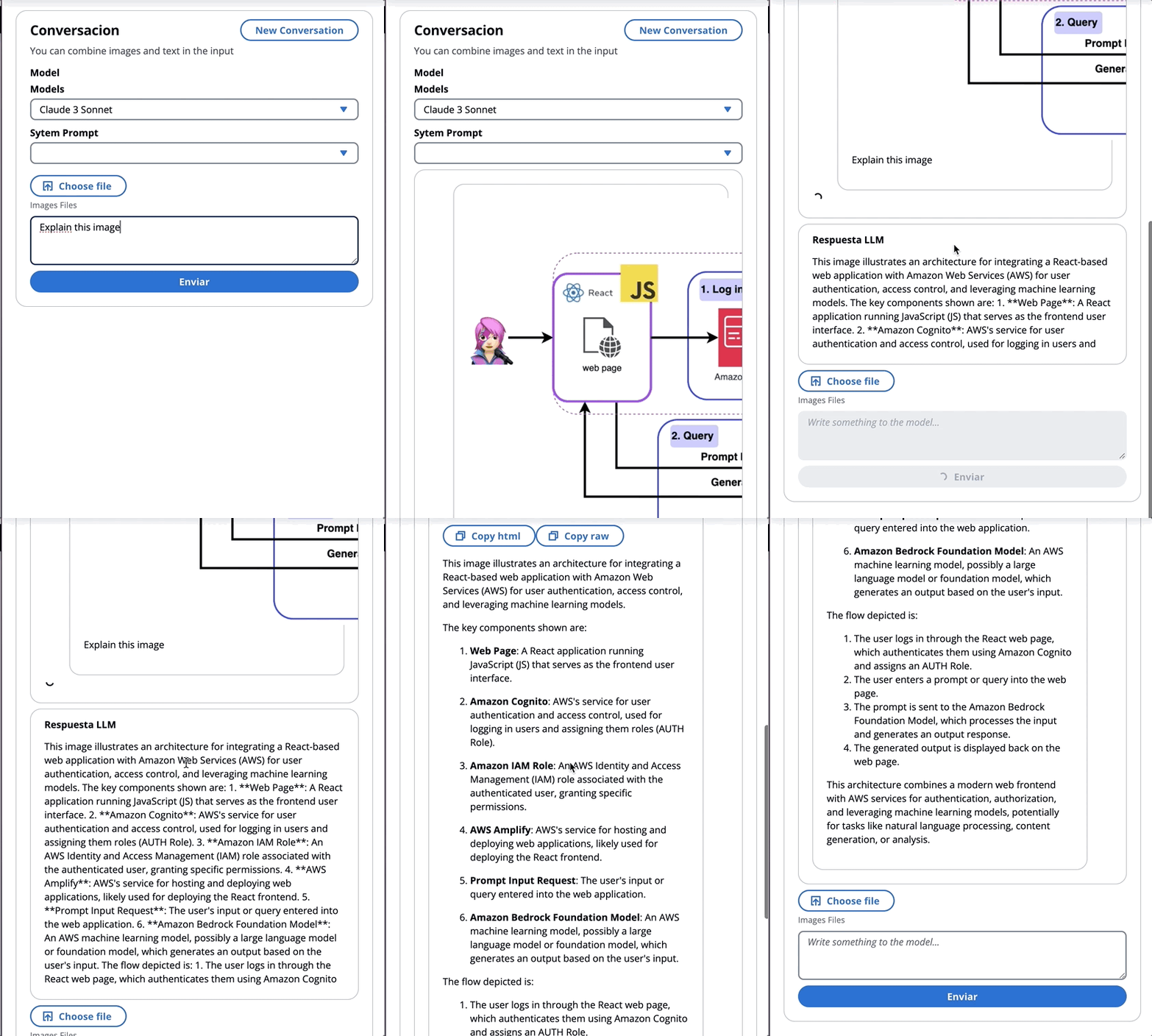
这是一个身体的一个例子:
 content = [
        {"type": "image", "source": {"type": "base64",
            "media_type": "image/jpeg", "data": content_image}},
        {"type":"text","text":text}
        ]
body = {
        "system": "You are an AI Assistant, always reply in the original user text language.",
        "messages":content,"anthropic_version": anthropic_version,"max_tokens":max_tokens}
an拟人当前支持图像的base64源类型,以及Image/jpeg,Image/png,Image/gif和Image/WebP媒体类型。您可以在MessageHelpers.js的
buildContent函数中看到此应用程序的映像转换为base64。查看更多输入示例。
消息API允许我们通过系统提示(系统)向模型添加上下文或说明。
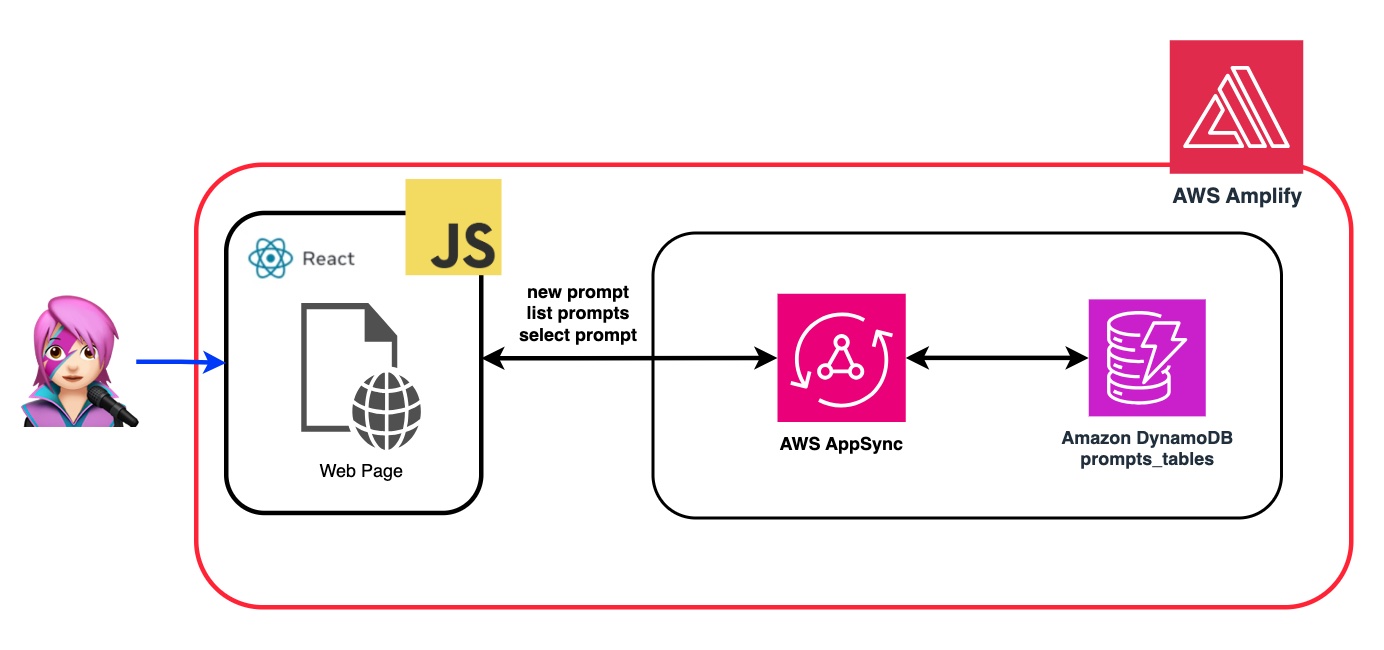
通过利用系统提示,我们可以为FM分配特定的角色,或者在向输入喂食之前为其提供先前的说明。为了使FM扮演多个角色,我们创建了一个React组件,该组件允许您生成系统提示,将其存储在Amazon DynamoDB表中,然后在要在FM中分配该特定角色时选择它。
所有用于管理提示的API操作均由AWS AppSync GraphQl API端点处理。 AWS AppSync允许您创建和管理GraphQL API,该API提供了一种灵活,有效的方法,可以通过单个端点从多个来源获取和操纵数据。 (AWS Appsync教程:DynamoDB解析器)
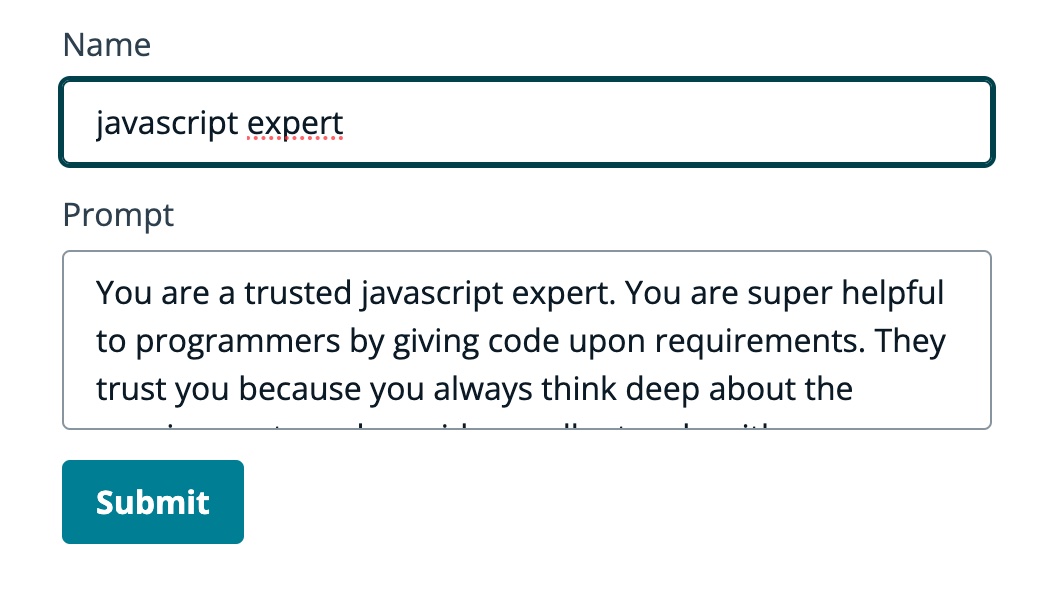
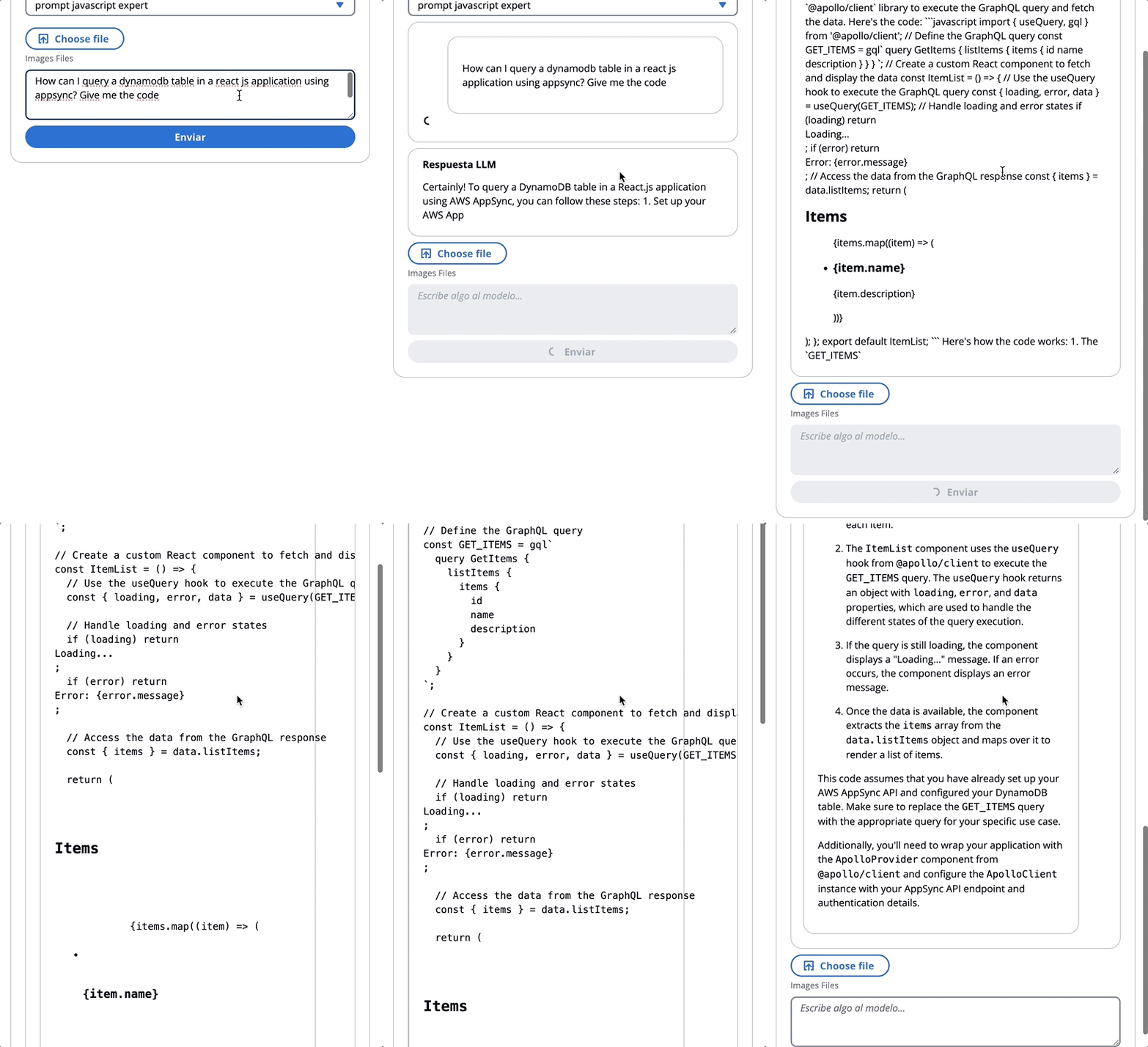
让我们回顾一个提示的示例,我们告诉FM他是JavaScript的专家:
在以下GIF中,该模型像专家一样提供代码和详细说明。
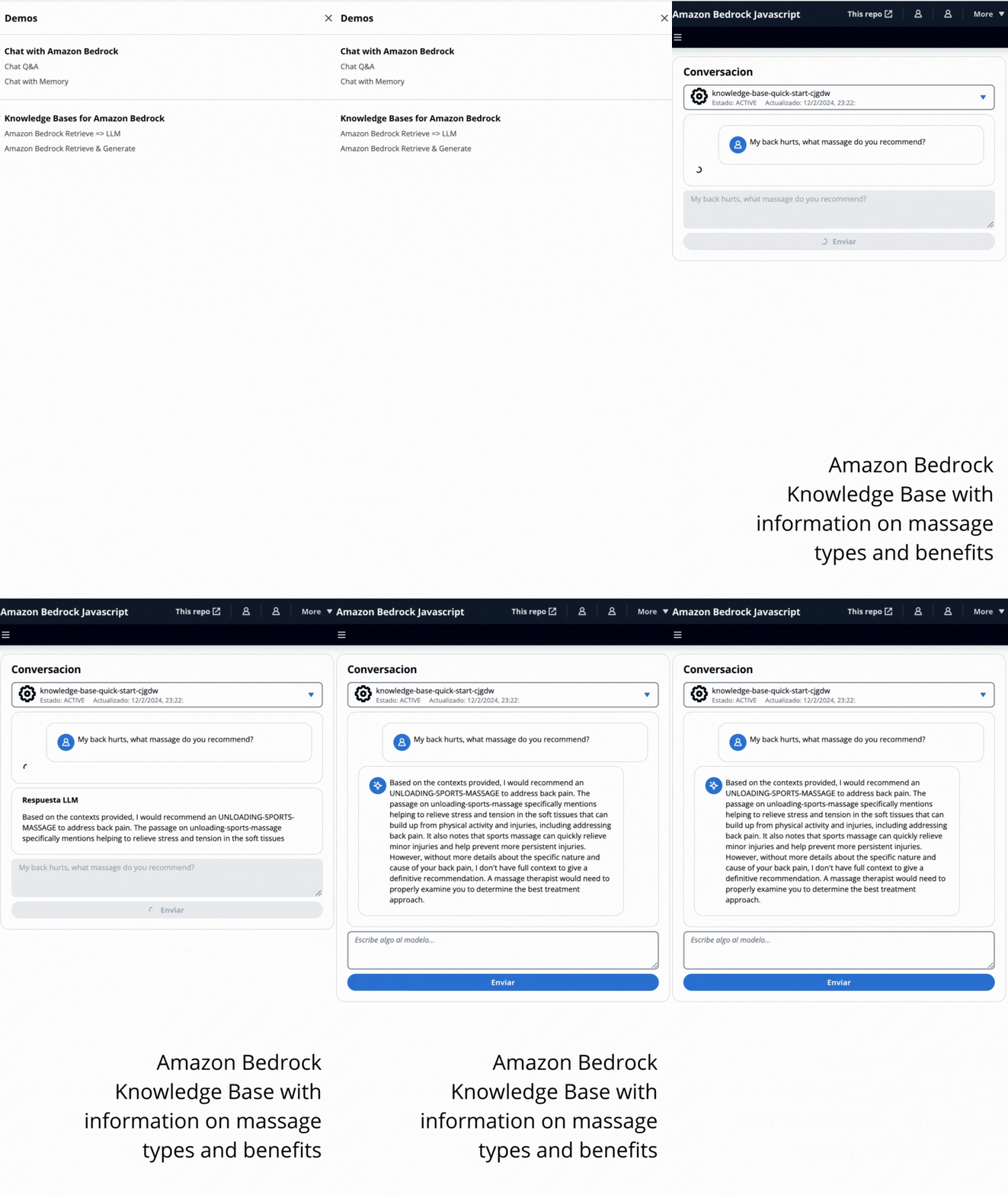
在此演示中,您将利用检索增强发电(RAG)向亚马逊基岩的知识库提出问题。您必须至少创建一个知识库,然后按照创建知识库指南来进行操作。
将以两种方式向亚马逊基岩的知识库提出问题:
- 亚马逊基岩检索=> llm:
使用ListKnowledgeBasesCommand列出知识库如下:
 import { ListKnowledgeBasesCommand } from "@aws-sdk/client-bedrock-agent"

export const getBedrockKnowledgeBases = async ( ) => {
    const session = await fetchAuthSession ( )
    let region = session . identityId . split ( ":" ) [ 0 ]
    const client = new BedrockAgentClient ( { region : region , credentials : session . credentials } )
    const command = new ListKnowledgeBasesCommand ( { } )
    const response = await client . send ( command )
    return response . knowledgeBaseSummaries
}
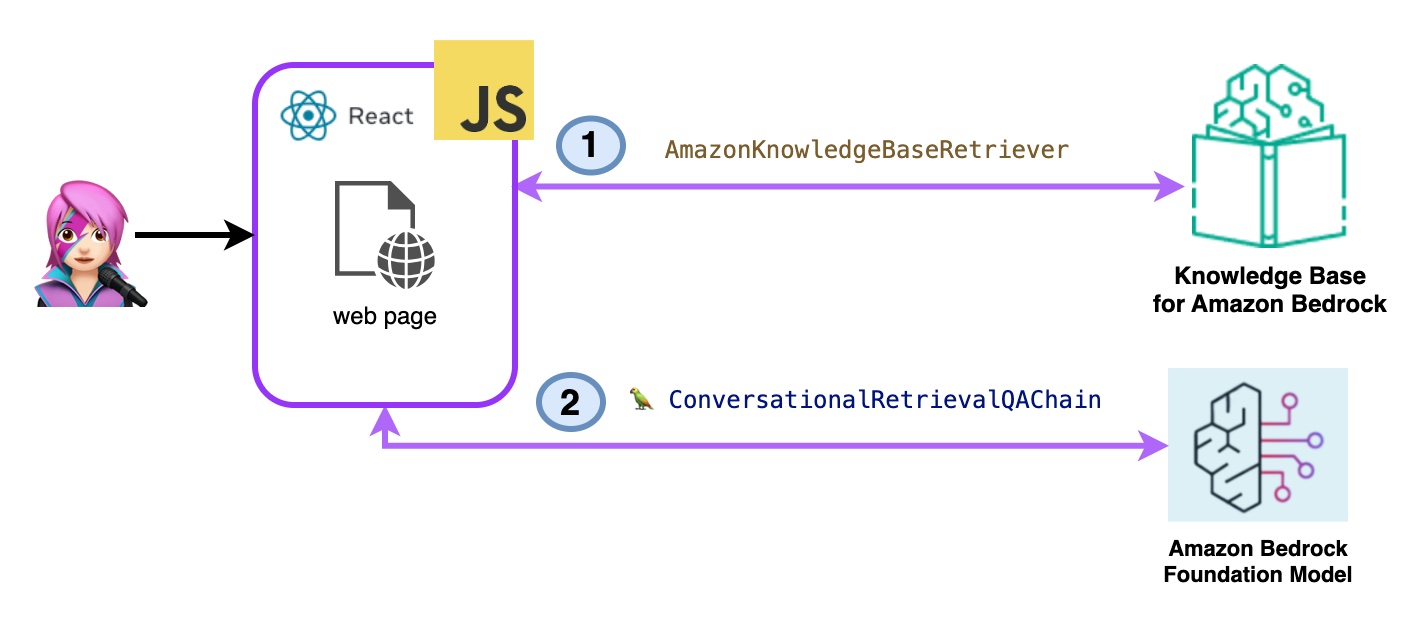
AmazonKnowledgeBaseRetriever Langchain类创建了一个猎犬,这是一个能够检索与知识库相似的文档的对象(在这种情况下,是Bedrock的知识库)
 import { AmazonKnowledgeBaseRetriever } from "@langchain/community/retrievers/amazon_knowledge_base" ;

export const getBedrockKnowledgeBaseRetriever = async ( knowledgeBaseId ) => {
    const session = await fetchAuthSession ( ) ;
    let region = session . identityId . split ( ":" ) [ 0 ]
    const retriever = new AmazonKnowledgeBaseRetriever ( {
        topK : 10 , // return top 10 documents
        knowledgeBaseId : knowledgeBaseId ,
        region : region ,
        clientOptions : { credentials : session . credentials }
    } )

    return retriever
}
对话式RetRevalQachain与猎犬和记忆进行了实例化。它会照顾内存,查询猎犬并使用LLM实例提出答案(带有文档)。
 import { ConversationalRetrievalQAChain } from "langchain/chains" ;

export const getConversationalRetrievalQAChain = async ( llm , retriever , memory ) => {

    const chain = ConversationalRetrievalQAChain . fromLLM (
        llm , retriever = retriever )
    chain . memory = memory

    //Here you modify the default prompt to add the Human prefix and Assistant suffix needed by Claude.
    //otherwise you get an exception
    //this is the prompt that uses chat history and last question to formulate a complete standalone question

    chain . questionGeneratorChain . prompt . template = "Human: " + chain . questionGeneratorChain . prompt . template + "nAssistant:"
     // Here you finally answer the question using the retrieved documents.

    chain . combineDocumentsChain . llmChain . prompt . template = `Human: Use the following pieces of context to answer the question at the end. If you don't know the answer, just say that you don't know, don't try to make up an answer.

{context}

Question: {question}
Helpful Answer:
Assistant:`

return chain
} 
代码Bedrockkbretrieve.jsx
- 亚马逊基岩检索和生成:
在这里,您将使用完整的AWS托管破布服务。不需要额外的软件包(Langchain)或提示增加复杂性。您将仅使用一个API呼叫来进行Bedrockagentruntimeclient 。另外,内存由服务通过使用SessionID来管理。
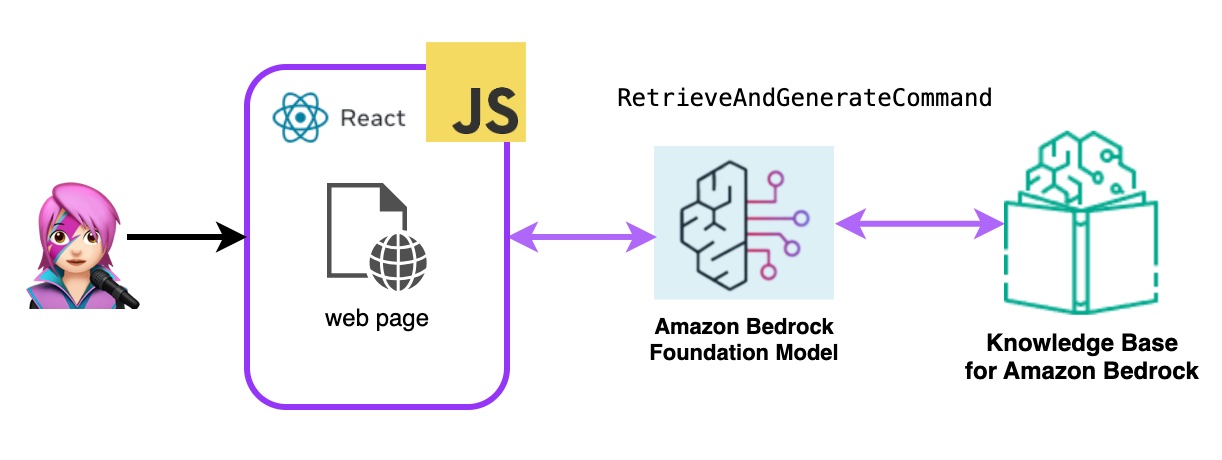
Bedrock用Bedrockagentruntimeclient初始化,并带有检索AndgenerateCommand查询知识库,并且基础模型基于检索结果产生响应。在此演示中,兰链无需。
 import { BedrockAgentRuntimeClient , RetrieveAndGenerateCommand } from "@aws-sdk/client-bedrock-agent-runtime"

export const ragBedrockKnowledgeBase = async ( sessionId , knowledgeBaseId , query , modelId = "anthropic.claude-instant-v1" ) => {
    const session = await fetchAuthSession ( )
    let region = session . identityId . split ( ":" ) [ 0 ]
    const client = new BedrockAgentRuntimeClient ( { region : region , credentials : session . credentials } ) ;
    const input = {
        input : { text : query } , // user question
        retrieveAndGenerateConfiguration : {
            type : "KNOWLEDGE_BASE" ,
            knowledgeBaseConfiguration : {
                knowledgeBaseId : knowledgeBaseId ,
                //your existing KnowledgeBase in the same region/ account
                // Arn of a Bedrock model, in this case we jump to claude 2.1, the latest. Feel free to use another
                modelArn : `arn:aws:bedrock: ${ region } ::foundation-model/ ${ modelId } ` , // Arn of a Bedrock model
            } ,
        }
    }

    if ( sessionId ) {
        // you can pass the sessionId to continue a dialog.
        input . sessionId = sessionId
    }

    const command = new RetrieveAndGenerateCommand ( input ) ;
    const response = await client . send ( command )
    return response
} 
代码Bedrockkbandgenerate.jsx
Amazon Bedrock代理是一种软件组件,它利用Amazon Bedrock服务提供的AI模型来提供面向用户的功能,例如聊天机器人,虚拟助手或文本生成工具。可以自定义这些代理并适应每个应用程序的特定需求,从而为最终用户与基础AI功能进行交互提供了用户界面。基岩代理处理与语言模型的集成,处理用户输入,生成响应以及基于AI模型的输出的其他操作。
要将亚马逊基岩代理集成到此应用程序中,您必须创建一个,请按照以下步骤在亚马逊基岩中创建一个代理
在Amazon Bedrock中,您可以通过创建一个别名来创建代理的新版本,该别名默认指向新版本,使用listagentaliasescommand(llmlib.js)列出了别名:
 import { BedrockAgentClient , ListAgentAliasesCommand } from "@aws-sdk/client-bedrock-agent" ;

const client = new BedrockAgentRuntimeClient ( { region : region , credentials : session . credentials } )

export const getBedrockAgentAliases = async ( client , agent ) => {
    const agentCommand = new ListAgentAliasesCommand ( { agentId : agent . agentId } )
    const response = await client . send ( agentCommand )
    return response . agentAliasSummaries
}
发送提示代理处理和响应使用InvokeAgentCommand
 import { BedrockAgentRuntimeClient , InvokeAgentCommand } from "@aws-sdk/client-bedrock-agent-runtime" ;

export const invokeBedrockAgent = async ( sessionId , agentId , agentAlias , query ) => {
    const session = await fetchAuthSession ( )
    let region = session . identityId . split ( ":" ) [ 0 ]

    const client = new BedrockAgentRuntimeClient ( { region : region , credentials : session . credentials } )
    const input = {
        sessionId : sessionId ,
        agentId : agentId ,
        agentAliasId : agentAlias ,
        inputText : query
    }

    console . log ( input )

    const command = new InvokeAgentCommand ( input )
    const response = await client . send ( command , )
    console . log ( "response:" , response )

    let completion = ""

    let decoder = new TextDecoder ( "utf-8" )
    for await ( const chunk of response . completion ) {
        console . log ( "chunk:" , chunk )
        const text = decoder . decode ( chunk . chunk . bytes )
        completion += text
        console . log ( text )
    }

    return completion

}
在第一个GIF的代理中,创建一张技术支持票:
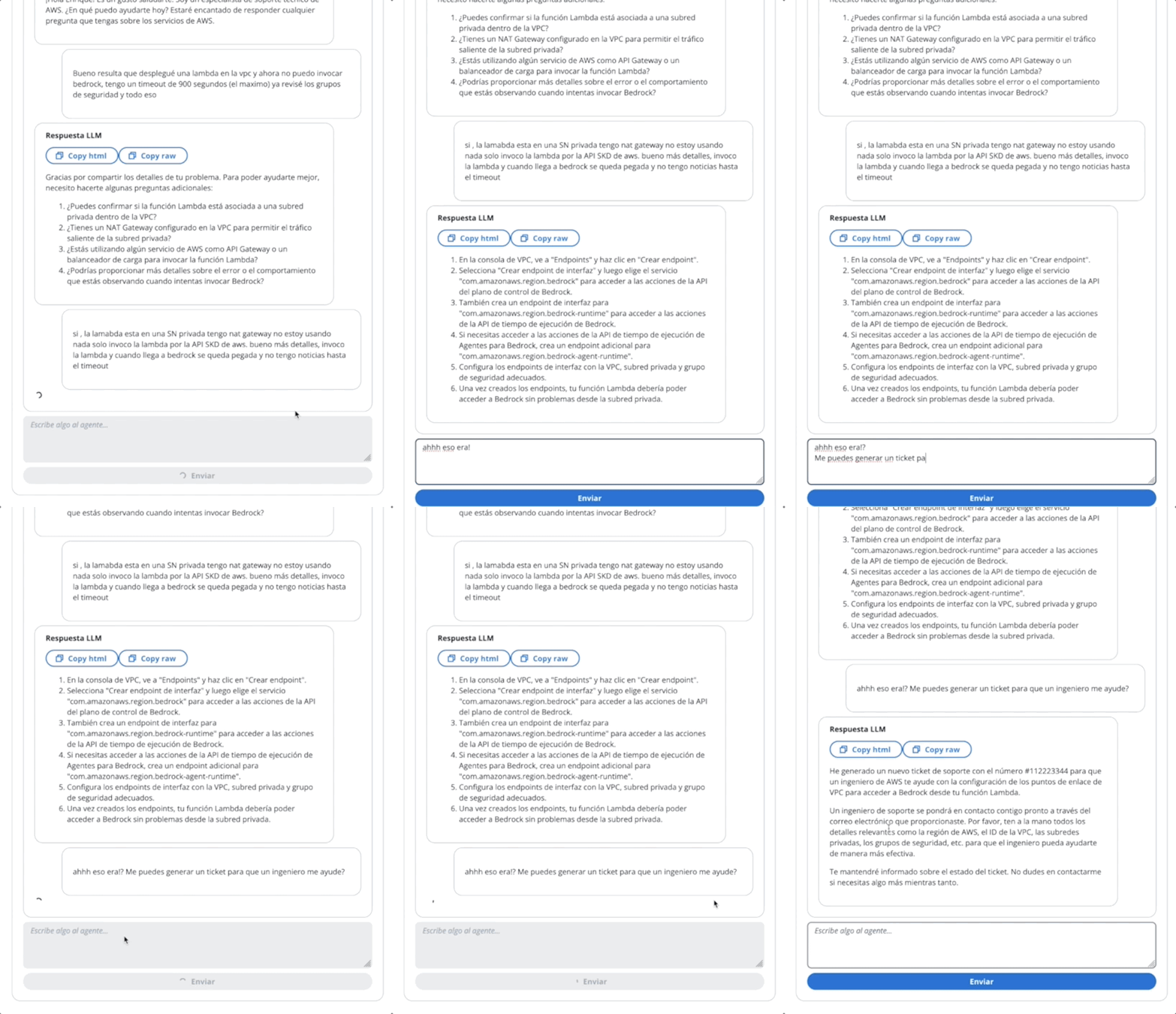
在第二个GIF中,用户向代理询问票证的状态:
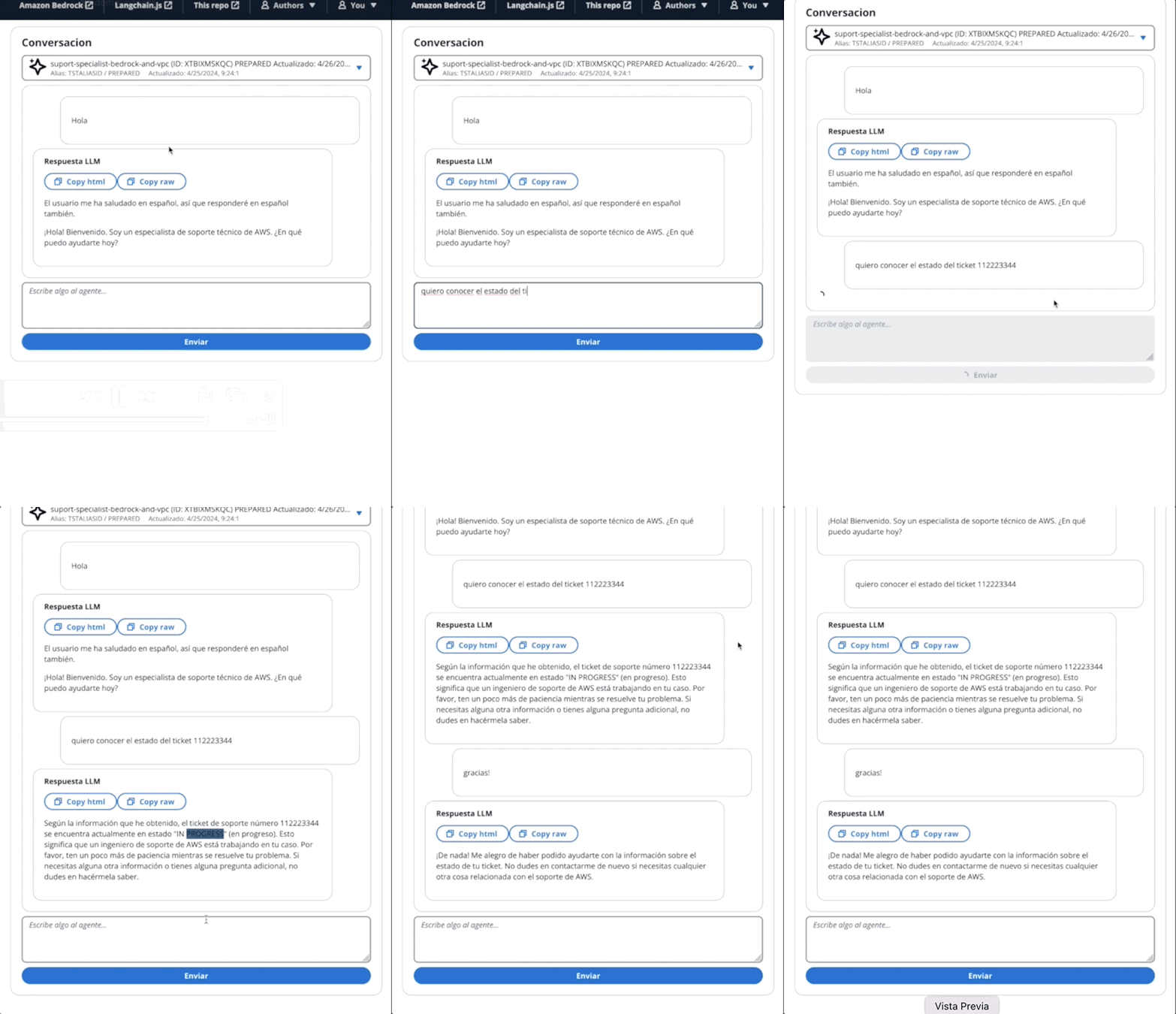
该应用程序是通过AWS放大的。将其部署在您的帐户中:
https://github.com/build-on-aws/building-reactjs-gen-ai-apps-with-amazon-bedrock-javascript-sdk/forks
创建一个新的分支: dev-branch 。
然后按照现有代码指南开始以下步骤。
在步骤1中,添加存储库分支,选择主分支并连接monorepo?选择一个文件夹,然后输入reactjs-gen-ai-apps作为根目录。
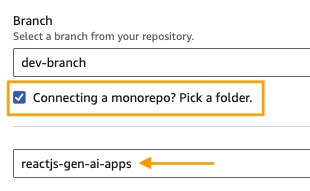
building-a-gen-ai-gen-ai-personal-assistant-reactjs-apps(this app)作为应用程序名称,在enviroment select select select select create create create create new Engitoment并编写dev 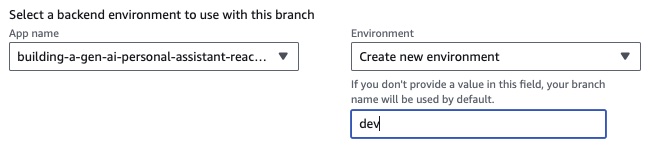
如果没有现有角色,请创建一个新的角色来服务放大。
部署您的应用程序。
部署应用程序后,转到位于白色框下方的应用程序中的链接。
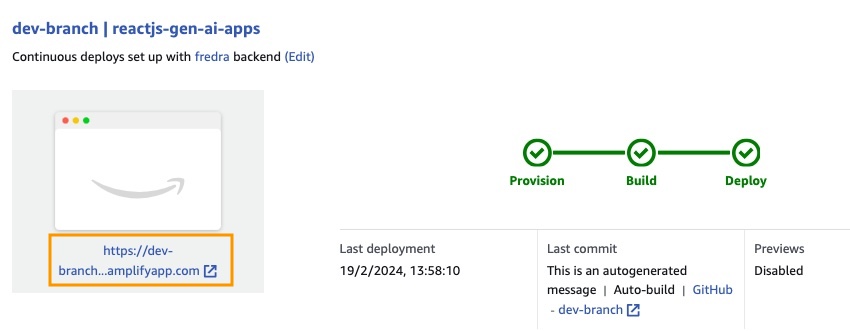
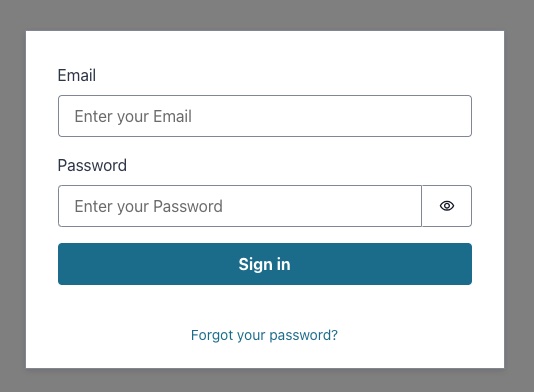
输入链接时,窗口中的唱片将出现,因此您必须创建一个Amazon Cognito用户池用户。
在应用程序中,请转到后端环境,然后单击身份验证。
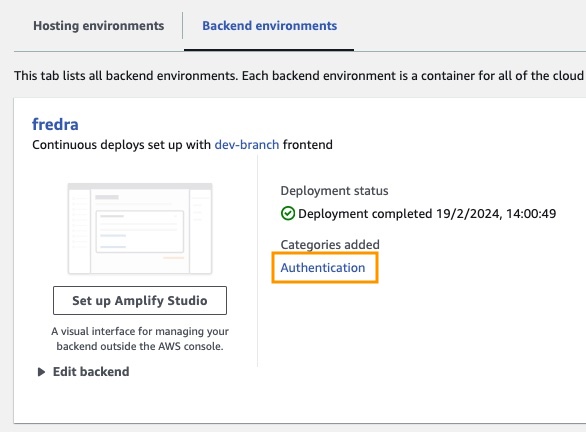
然后,在身份验证下,单击Cognito中的视图:
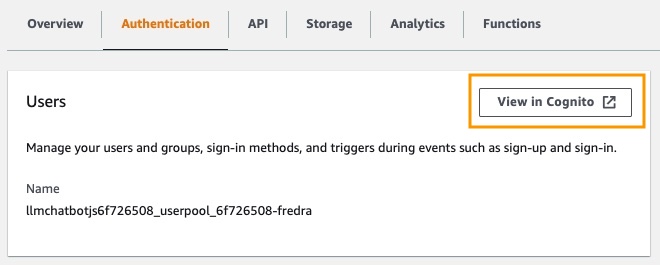
在用户池中,单击用户池的名称并创建用户。
创建您的用户然后唱歌。
注意:您可以通过更改App.jsx中的false
hideSignUp: false来直接从应用程序创建用户,但是这可以通过使任何人访问它来引入安全缺陷。
在可以在亚马逊基岩中使用基础模型之前,您必须请求访问它。遵循“添加模型访问指南”中的步骤。
转到应用程序链接并与您创建的用户登录。
在这篇文章中,我们演示了如何构建一个React Web应用程序,该应用程序可以使用Amazon Cognito直接访问Amazon Bedrock API进行安全身份验证。通过利用AWS托管服务,例如Cognito和IAM,您可以无需将强大的生成AI功能集成到JavaScript应用程序中,而无需后端代码。
这种方法使开发人员能够专注于创造引人入胜的对话体验,同时利用亚马逊Bedrock的托管知识服务。流响应通过减少等待时间并启用与会话AI的自然互动来增强用户体验。
此外,我们展示了如何使用存储在Amazon DynamoDB表中的系统提示为基础模型分配多个角色。该集中式存储库提供了灵活性和多功能性,使您可以根据特定用例有效地检索并为模型分配不同的角色。
通过遵循本文中概述的步骤,您可以在React应用程序中解锁生成AI的潜力。无论您是从头开始构建新应用程序还是增强现有应用程序,Amazon Bedrock和AWS JavaScript SDK都比以往任何时候都更容易结合尖端的AI功能。
我们鼓励您探索为开始构建自己的生成AI应用程序所提供的代码样本和资源。如果您有任何疑问或反馈,请在下面发表评论。愉快的编码!
有关更多信息,请参见贡献。
该图书馆已获得MIT-0许可证的许可。请参阅许可证文件。





