aiconfig
v1.1.32


AICONFIG-建築生產級AI應用程序的開源框架
文件
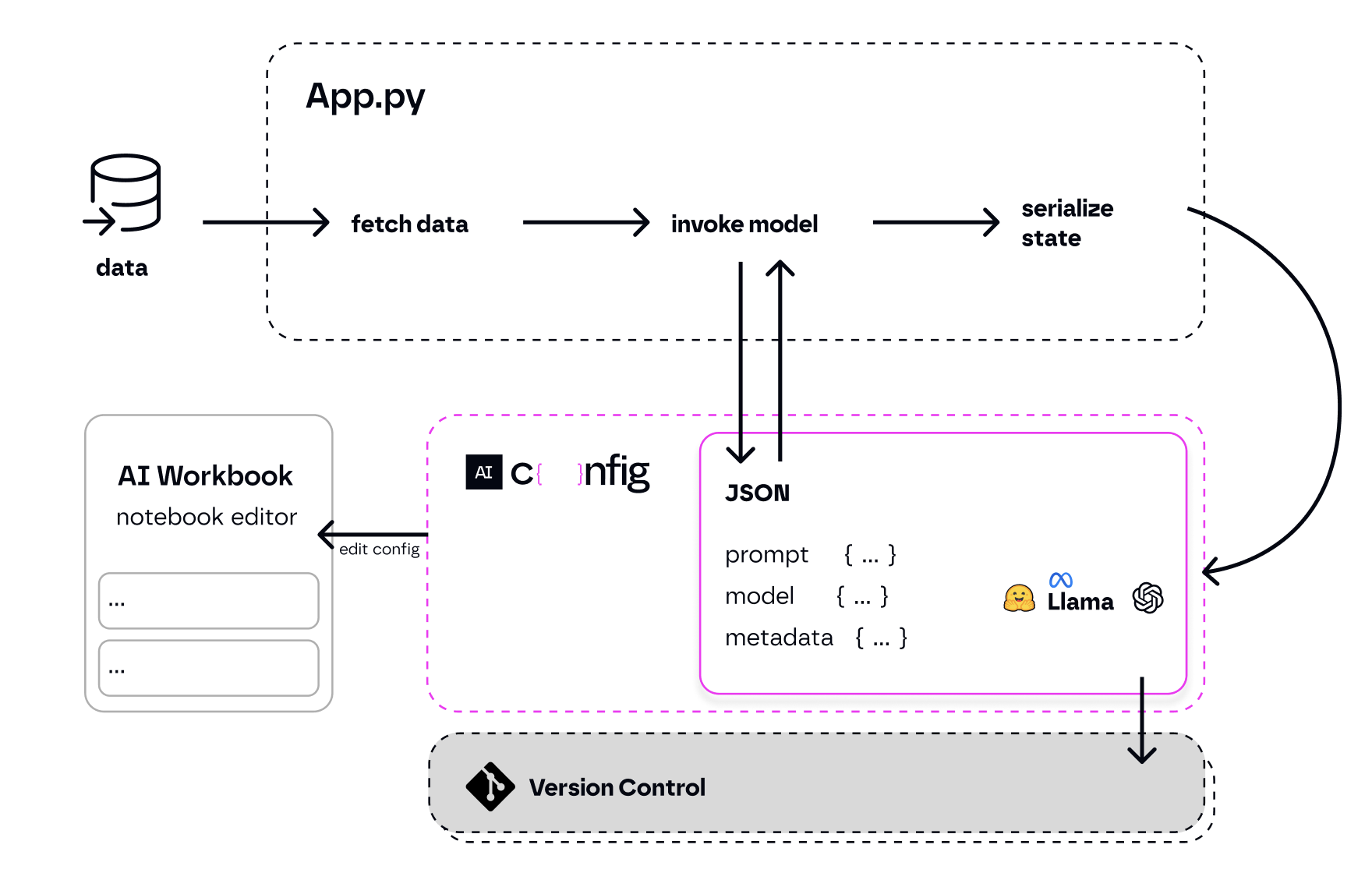
Aiconfig是一個框架,可以輕鬆構建生成生產的AI應用程序。它將生成的AI提示,模型和模型參數視為可通過版本控制,評估,監視和打開的JSON-Serializable配置,以進行快速原型製作。
它使您可以與應用程序代碼分開存儲並迭代生成AI行為,並提供簡化的AI開發工作流程。
這裡更多上下文。
對於VS代碼用戶:
如果您不使用VS代碼,請按照以下步驟:
pip3 install python-aiconfigexport OPENAI_API_KEY='your-key'aiconfig edit查看完整的入門教程。
 # for python installation:
pip3 install python-aiconfig
# or using poetry: poetry add python-aiconfig

# for node.js installation:
npm install aiconfig
# or using yarn: yarn add aiconfig注意:即使您計劃使用節點SDK與應用程序代碼中的Aiconfig進行交互,您也需要安裝Python aiconfig軟件包以使用Aiconfig編輯器來創建和迭代提示。
您必須指定您的OpenAI API密鑰。打開您的export OPENAI_API_KEY='your-api-key-here' 。
Aiconfig編輯器可幫助您視覺創建和編輯以Aiconfigs存儲的提示和模型參數。
travel.aiconfig.json文件。這將在VS代碼中自動打開Aiconfig編輯器。使用Aiconfig編輯器,您可以使用複雜的鏈條和變量創建和運行提示。編輯器每15秒自動儲備每15秒鐘,您可以使用保存按鈕手動保存。您的更新將反映在Aiconfig JSON文件中。請參閱編輯器創建的提示鏈的示例:
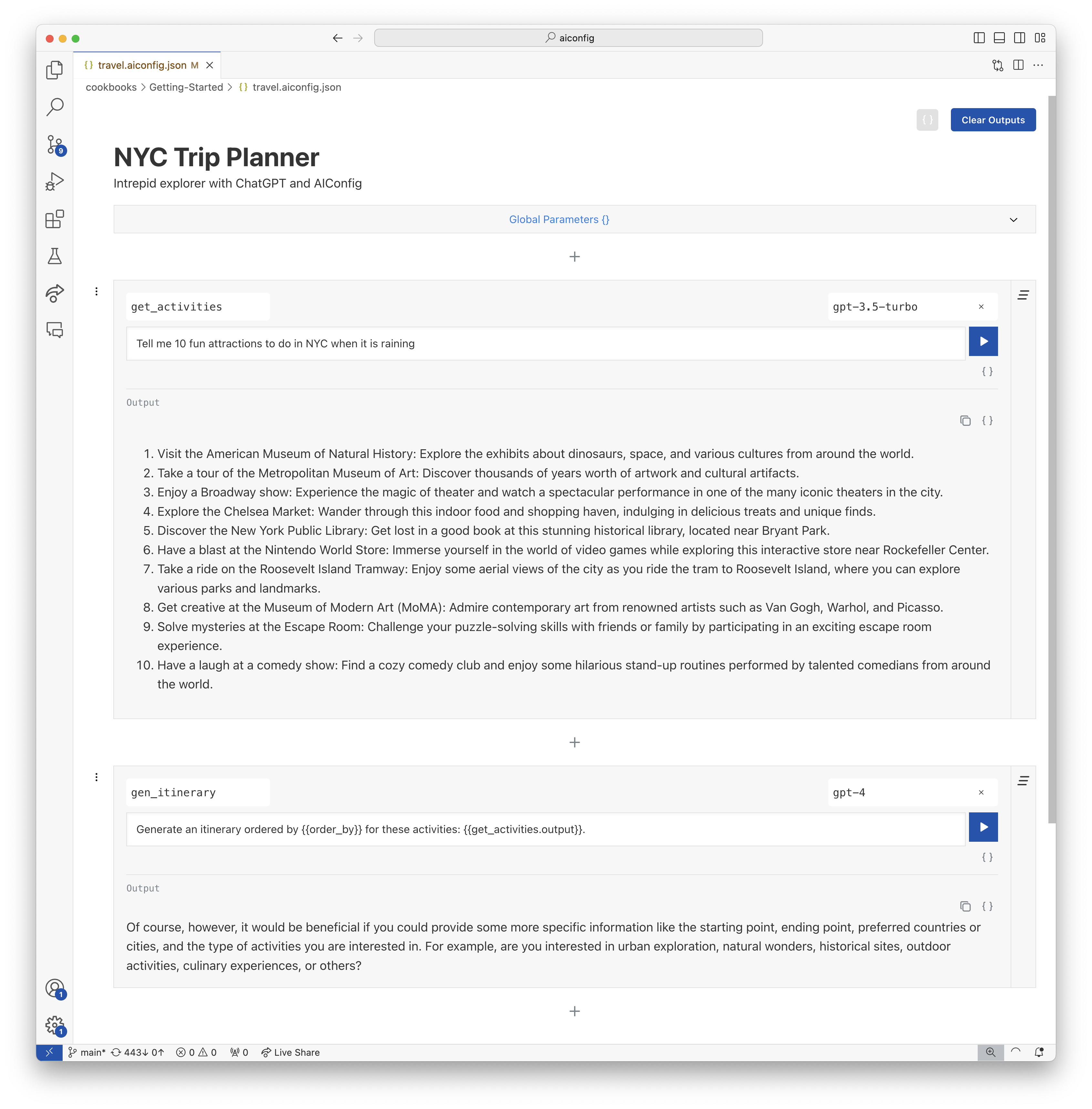
對應的Aiconfig JSON文件:
{
  "name": "NYC Trip Planner",
  "description": "Intrepid explorer with ChatGPT and AIConfig",
  "schema_version": "latest",
  "metadata": {
    "models": {
      "gpt-3.5-turbo": {
        "model": "gpt-3.5-turbo",
        "top_p": 1,
        "temperature": 1
      },
      "gpt-4": {
        "model": "gpt-4",
        "max_tokens": 3000
      }
    },
    "default_model": "gpt-3.5-turbo"
  },
  "prompts": [
    {
      "name": "get_activities",
      "input": "Tell me 10 fun attractions to do in NYC."
    },
    {
      "name": "gen_itinerary",
      "input": "Generate an itinerary ordered by {{order_by}} for these activities: {{get_activities.output}}.",
      "metadata": {
        "model": "gpt-4",
        "parameters": {
          "order_by": "geographic location"
        }
      }
    }
  ]
}
您可以使用Python或Node SDK從應用程序代碼中從AICONFIG編輯器中生成的AICONFIG運行提示。我們在下面顯示了Python SDK。
 # load your AIConfig
from aiconfig import AIConfigRuntime , InferenceOptions
import asyncio

config = AIConfigRuntime . load ( "travel.aiconfig.json" )

# setup streaming
inference_options = InferenceOptions ( stream = True )

# run a prompt
async def gen_nyc_itinerary ():
  gen_itinerary_response = await config . run ( "gen_itinerary" , params = { "order_by" : "location" }, options = inference_options , run_with_dependencies = True )

asyncio . run ( gen_nyc_itinerary ())

# save the aiconfig to disk and serialize outputs from the model run
config . save ( 'updated_travel.aiconfig.json' , include_outputs = True )您可以使用Aiconfig編輯器快速迭代並編輯Aiconfig。
aiconfig edit --aiconfig-path=travel.aiconfig.json使用AICONFIG編輯器的新選項卡在您的默認瀏覽器中打開http:// localhost:8080/帶有提示,鏈接邏輯以及travel.aiconfig.json的設置。編輯器每15秒自動儲備每15秒鐘,您可以使用保存按鈕手動保存。您的更新將反映在Aiconfig文件中。
如今,應用程序代碼與應用程序的Gen AI設置緊密結合 - 提示,參數和模型特定的邏輯都與App Code混為一談。
Aiconfig通過將提示,模型參數和特定於模型的邏輯與您的應用程序分開來幫助放鬆複雜性。
config.run()aiconfig迅速迭代aiconfig這是您應用程序的AI偽像。 aiconfig 。 Aiconfig被設計為模型敏捷和多模式,因此您可以將其擴展到與任何生成的AI模型一起使用,包括文本,圖像和音頻。aiconfig文物共同協作。 Aiconfig使使用複雜的及時鏈條,各種型號和先進的生成AI工作流程變得易於使用。從這些食譜開始,然後在/cookbooks中訪問更多:
Aiconfig開箱即用支持以下模型。請參閱示例:
如果您需要使用開箱即用的模型,則可以為其實現ModelParser 。請參閱有關如何支持Aiconfig中新模型的說明。
Aiconfig旨在定制和擴展用於您的用例。 《可擴展性指南》更詳細。
目前,有3種擴展Aiconfig的核心方法:
aiconfig中我們正在迅速發展Aiconfig!我們歡迎公關貢獻和關於如何改進項目的想法。
#aiconfig頻道我們目前每週都會發布pypi和npm軟件包的新標籤版本。完成後,Hotfix熄滅。





