aiconfig
v1.1.32


AICONFIG-建筑生产级AI应用程序的开源框架
文档
Aiconfig是一个框架,可以轻松构建生成生产的AI应用程序。它将生成的AI提示,模型和模型参数视为可通过版本控制,评估,监视和打开的JSON-Serializable配置,以进行快速原型制作。
它使您可以与应用程序代码分开存储并迭代生成AI行为,并提供简化的AI开发工作流程。
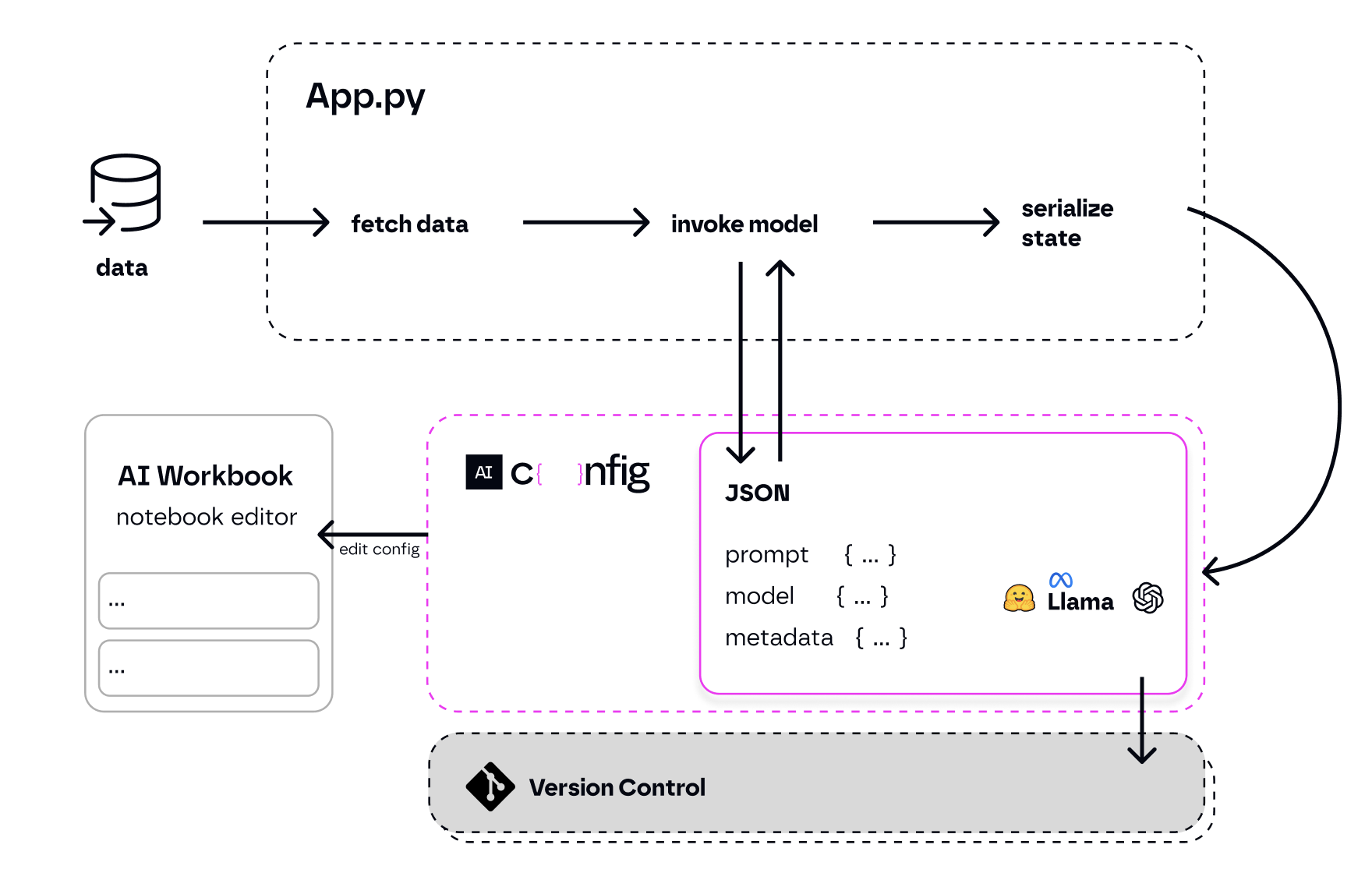
这里更多上下文。
对于VS代码用户:
如果您不使用VS代码,请按照以下步骤:
pip3 install python-aiconfigexport OPENAI_API_KEY='your-key'aiconfig edit查看完整的入门教程。
 # for python installation:
pip3 install python-aiconfig
# or using poetry: poetry add python-aiconfig

# for node.js installation:
npm install aiconfig
# or using yarn: yarn add aiconfig注意:即使您计划使用节点SDK与应用程序代码中的Aiconfig进行交互,您也需要安装Python aiconfig软件包以使用Aiconfig编辑器来创建和迭代提示。
您必须指定您的OpenAI API密钥。打开您的终端并添加此行,用API键代替“您的Api-Key-key-here”: export OPENAI_API_KEY='your-api-key-here' 。
Aiconfig编辑器可帮助您视觉创建和编辑以Aiconfigs存储的提示和模型参数。
travel.aiconfig.json文件。这将在VS代码中自动打开Aiconfig编辑器。使用Aiconfig编辑器,您可以使用复杂的链条和变量创建和运行提示。编辑器每15秒自动储备每15秒钟,您可以使用保存按钮手动保存。您的更新将反映在Aiconfig JSON文件中。请参阅编辑器创建的提示链的示例:
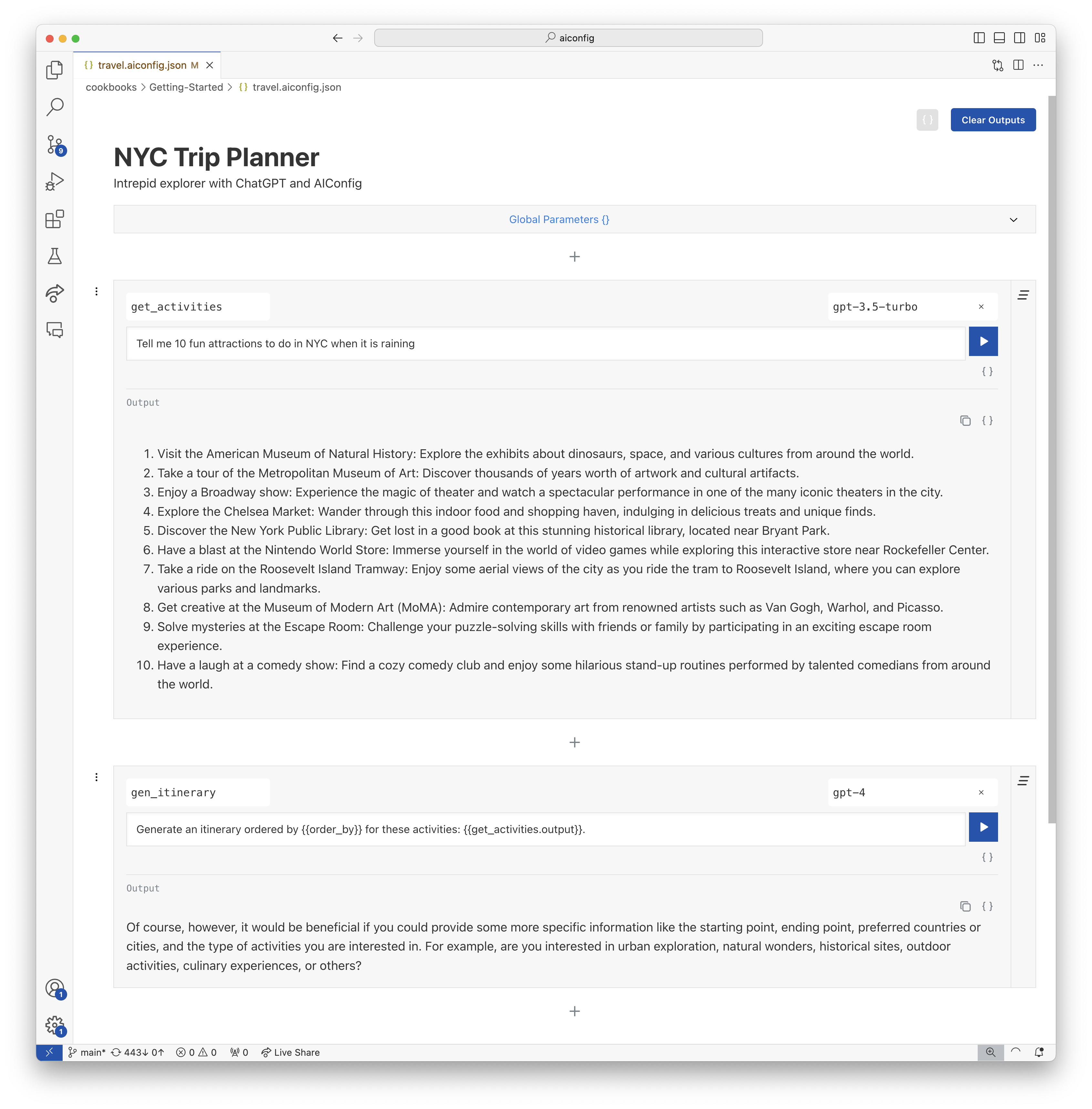
对应的Aiconfig JSON文件:
{
  "name": "NYC Trip Planner",
  "description": "Intrepid explorer with ChatGPT and AIConfig",
  "schema_version": "latest",
  "metadata": {
    "models": {
      "gpt-3.5-turbo": {
        "model": "gpt-3.5-turbo",
        "top_p": 1,
        "temperature": 1
      },
      "gpt-4": {
        "model": "gpt-4",
        "max_tokens": 3000
      }
    },
    "default_model": "gpt-3.5-turbo"
  },
  "prompts": [
    {
      "name": "get_activities",
      "input": "Tell me 10 fun attractions to do in NYC."
    },
    {
      "name": "gen_itinerary",
      "input": "Generate an itinerary ordered by {{order_by}} for these activities: {{get_activities.output}}.",
      "metadata": {
        "model": "gpt-4",
        "parameters": {
          "order_by": "geographic location"
        }
      }
    }
  ]
}
您可以使用Python或Node SDK从应用程序代码中从AICONFIG编辑器中生成的AICONFIG运行提示。我们在下面显示了Python SDK。
 # load your AIConfig
from aiconfig import AIConfigRuntime , InferenceOptions
import asyncio

config = AIConfigRuntime . load ( "travel.aiconfig.json" )

# setup streaming
inference_options = InferenceOptions ( stream = True )

# run a prompt
async def gen_nyc_itinerary ():
  gen_itinerary_response = await config . run ( "gen_itinerary" , params = { "order_by" : "location" }, options = inference_options , run_with_dependencies = True )

asyncio . run ( gen_nyc_itinerary ())

# save the aiconfig to disk and serialize outputs from the model run
config . save ( 'updated_travel.aiconfig.json' , include_outputs = True )您可以使用Aiconfig编辑器快速迭代并编辑Aiconfig。
aiconfig edit --aiconfig-path=travel.aiconfig.json使用AICONFIG编辑器的新选项卡在您的默认浏览器中打开http:// localhost:8080/带有提示,链接逻辑以及travel.aiconfig.json的设置。编辑器每15秒自动储备每15秒钟,您可以使用保存按钮手动保存。您的更新将反映在Aiconfig文件中。
如今,应用程序代码与应用程序的Gen AI设置紧密结合 - 提示,参数和模型特定的逻辑都与App Code混为一谈。
Aiconfig通过将提示,模型参数和特定于模型的逻辑与您的应用程序分开来帮助放松复杂性。
config.run()aiconfig迅速迭代aiconfig这是您应用程序的AI伪像。 aiconfig 。 Aiconfig被设计为模型敏捷和多模式,因此您可以将其扩展到与任何生成的AI模型一起使用,包括文本,图像和音频。aiconfig文物共同协作。 Aiconfig使使用复杂的及时链条,各种型号和先进的生成AI工作流程变得易于使用。从这些食谱开始,然后在/cookbooks中访问更多:
Aiconfig开箱即用支持以下模型。请参阅示例:
如果您需要使用开箱即用的模型,则可以为其实现ModelParser 。请参阅有关如何支持Aiconfig中新模型的说明。
Aiconfig旨在定制和扩展用于您的用例。 《可扩展性指南》更详细。
目前,有3种扩展Aiconfig的核心方法:
aiconfig中我们正在迅速发展Aiconfig!我们欢迎公关贡献和关于如何改进项目的想法。
#aiconfig频道我们目前每周都会发布pypi和npm软件包的新标签版本。完成后,Hotfix熄灭。





