FfDL
1.0.0

用其他語言閱讀此內容:中文。
該存儲庫包含FFDL (用於深度學習)平台的核心服務。 FFDL是一種用於深度學習的操作系統。這是一個合作平台:
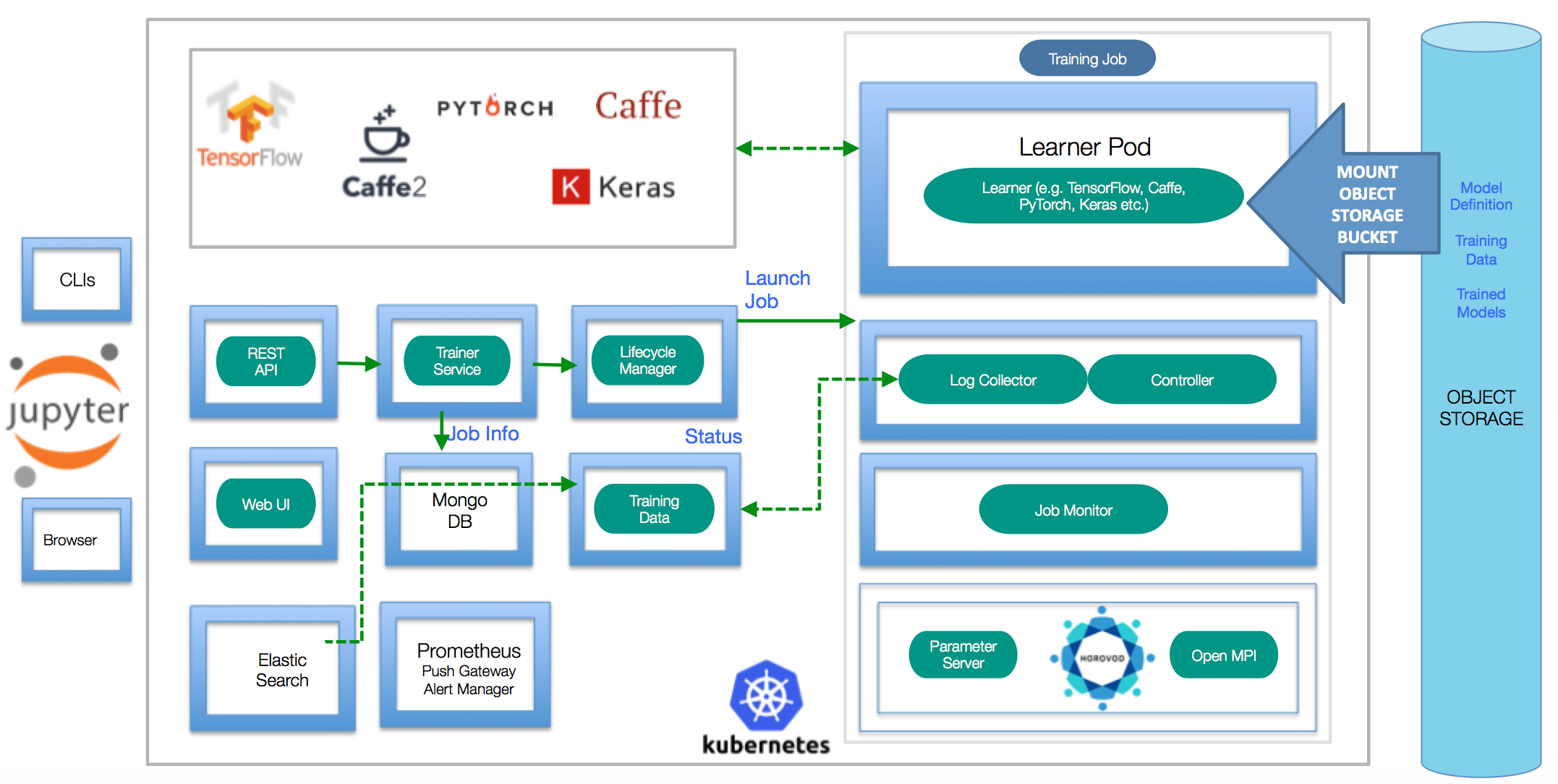
要了解有關建築細節的更多信息,請閱讀設計文檔。如果您正在尋找與FFDL有關的演示,幻燈片,側邊,博客,網絡研討會和其他材料,請在此處找到它們
kubectl :kubernetes命令行接口(https://kubernetes.io/docs/tasks/tools/tools/install-kubectl/)helm :Kubernetes軟件包經理(https://helm.sh)docker :Docker命令行接口(https://www.docker.com/)S3 CLI :配置對象存儲的命令行界面有多個安裝路徑可將FFDL安裝到現有的Kubernetes群集中。以下是快速安裝的步驟。如果您想遵循更詳細的逐步說明,請訪問詳細的安裝指南
helm init初始化Tiller。要將FFDL安裝到任何適當的Kubernetes群集中,請確保kubectl點指向正確的名稱空間,然後部署平台服務:
 export NAMESPACE=default # If your namespace does not exist yet, please create the namespace `kubectl create namespace $NAMESPACE` before running the make commands below
export SHARED_VOLUME_STORAGE_CLASS= " ibmc-file-gold " # Change the storage class to what's available on your Cloud Kubernetes Cluster.

helm install ibmcloud-object-storage-plugin --name ibmcloud-object-storage-plugin --repo https://ibm.github.io/FfDL/helm-charts --set namespace= $NAMESPACE # Configure s3 driver on the cluster
helm install ffdl-helper --name ffdl-helper --repo https://ibm.github.io/FfDL/helm-charts --set namespace= $NAMESPACE ,shared_volume_storage_class= $SHARED_VOLUME_STORAGE_CLASS --wait # Deploy all the helper micro-services for ffdl
helm install ffdl-core --name ffdl-core --repo https://ibm.github.io/FfDL/helm-charts --set namespace= $NAMESPACE ,lcm.shared_volume_storage_class= $SHARED_VOLUME_STORAGE_CLASS --wait # Deploy all the core ffdl services.如果您在計算機上安裝了Kubeadm-Dind,請使用這些命令部署FFDL平台:
 export SHARED_VOLUME_STORAGE_CLASS= " "
export NAMESPACE=default

./bin/s3_driver.sh # Copy the s3 drivers to each of the DIND node
helm install ibmcloud-object-storage-plugin --name ibmcloud-object-storage-plugin --repo https://ibm.github.io/FfDL/helm-charts --set namespace= $NAMESPACE ,cloud=false
helm install ffdl-helper --name ffdl-helper --repo https://ibm.github.io/FfDL/helm-charts --set namespace= $NAMESPACE ,shared_volume_storage_class= $SHARED_VOLUME_STORAGE_CLASS ,localstorage=true --wait
helm install ffdl-core --name ffdl-core --repo https://ibm.github.io/FfDL/helm-charts --set namespace= $NAMESPACE ,lcm.shared_volume_storage_class= $SHARED_VOLUME_STORAGE_CLASS --wait

# Forward the necessary microservices from the DIND cluster to your localhost.
./bin/dind-port-forward.sh要提交此存儲庫中包含的簡單示例培訓工作(請參閱etc/examples文件夾):
注意:對於public_ip,放下可以訪問群集的nodeports的群集公共IP之一。您可以使用
kubectl get nodes -o wide。對於IBM雲,您可以使用bx cs workers <cluster_name>獲得公共IP。
 export PUBLIC_IP= < Cluster Public IP > # Put down localhost if you are running with Kubeadm-DIND
make test-push-data-s3
make test-job-submit該平台帶有簡單的Grafana監視儀表板。運行status製造目標時,將打印出URL。
請參閱《開發人員指南》以獲取更多詳細信息。
如果要從群集中刪除FFDL,只需使用以下命令即可。
helm delete --purge ffdl-core ffdl-helper如果要從群集中刪除存儲驅動程序,請運行:
helm delete --purge ibmcloud-object-storage-plugin對於Kubeadm-Dind,您需要殺死轉發的端口。請注意,下面的命令將殺死用kubectl創建的所有端口。
kill $( lsof -i | grep kubectl | awk ' {printf $2 " " } ' ) 如果glide install失敗,錯誤地抱怨不存在的路徑(例如,“沒有SRC,無法繼續”),請確保遵循標準GO目錄佈局(請參閱先決條件部分)。
要刪除群集上的FFDL,只需運行make undeploy
使用FFDL CLI訓練模型時,請確保您的目錄路徑在最後沒有斜線/ 。
如果您的工作被困在待處理階段,您可以嘗試使用helm install storage-plugin helm install storage-plugin --set dind=true,cloud=false for General Kubernetes群集。另外,請仔細檢查您的培訓清單文件,以確保您具有正確的對象存儲憑據。
基於IBM深度學習研究工作。
B. Bhattacharjee等人,“ IBM深度學習服務”,《 IBM研發雜誌》,第1卷。 61,不。 4,第10:1-10:11,7月至9月。 2017年1月1日。https://arxiv.org/abs/1709.05871
Scott Boag等。深度學習培訓工作的可擴展多框架多租戶生命週期管理,在ML系統的研討會上,nips'17,2017。





