FfDL
1.0.0

これを他の言語で読んでください:中文。
このリポジトリには、 FFDL (ディープラーニング用のファブリック)プラットフォームのコアサービスが含まれています。 FFDLは、深い学習のためのオペレーティングシステム「ファブリック」です。これは次のためのコラボレーションプラットフォームです。
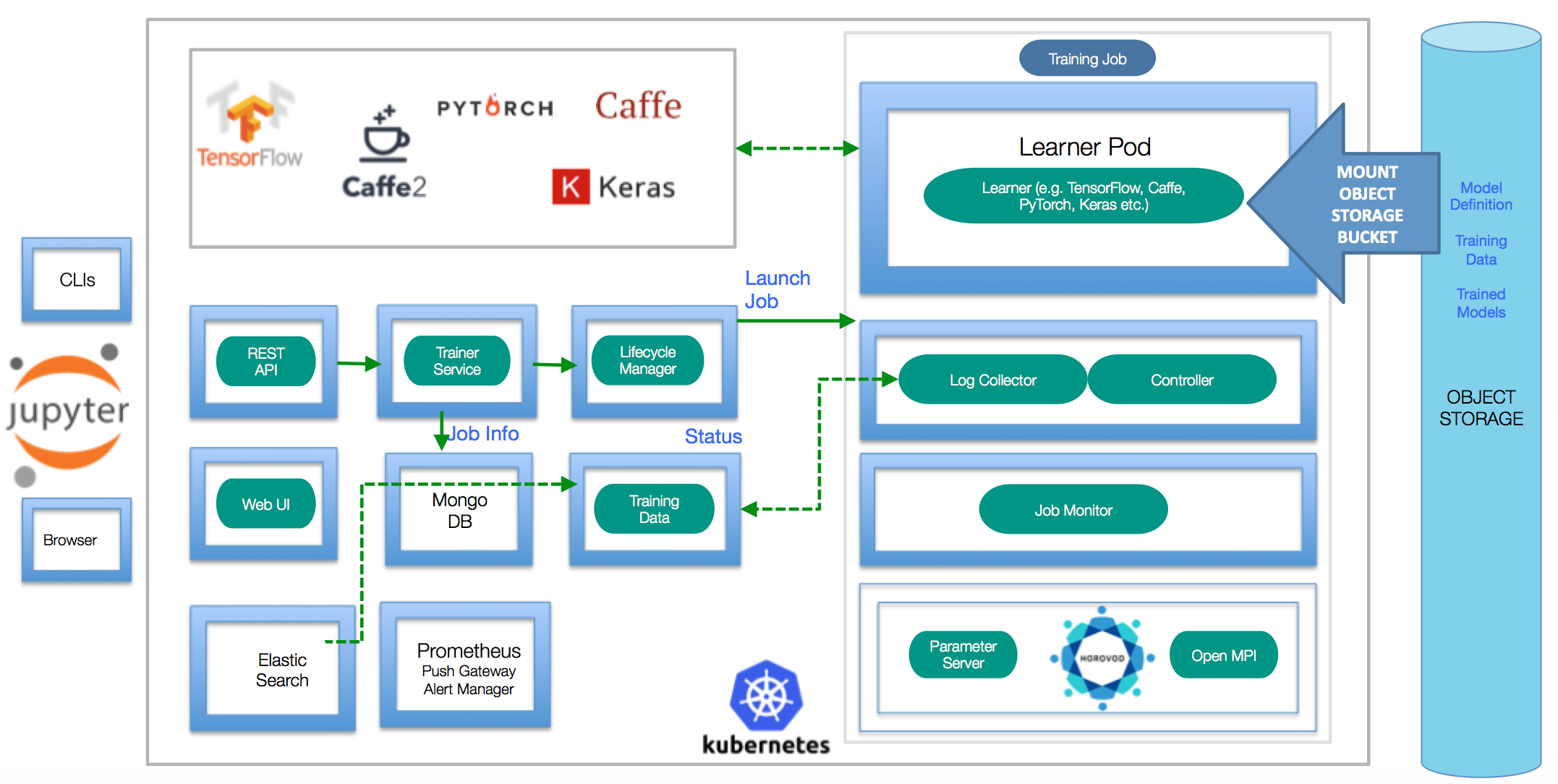
アーキテクチャの詳細については、Design Documentをお読みください。デモ、スライド、担保、ブログ、ウェビナー、およびFFDLに関連するその他の資料を探している場合は、こちらを見つけてください
kubectl :kubernetesコマンドラインインターフェイス(https://kubernetes.io/docs/tasks/tools/install-kubectl/)helm :Kubernetesパッケージマネージャー(https://helm.sh)docker :Dockerコマンドラインインターフェイス(https://www.docker.com/)S3 CLI :オブジェクトストレージを構成するコマンドラインインターフェイスFFDLを既存のKubernetesクラスターにインストールするための複数のインストールパスがあります。以下は、クイックインストールの手順です。より詳細なステップバイステップの指示に従う場合は、詳細なインストールガイドをご覧ください
helm initでティラーを初期化する必要があります。FFDLを適切なKubernetesクラスターにインストールするには、 kubectl正しい名前空間を指していることを確認してから、プラットフォームサービスを展開します。
 export NAMESPACE=default # If your namespace does not exist yet, please create the namespace `kubectl create namespace $NAMESPACE` before running the make commands below
export SHARED_VOLUME_STORAGE_CLASS= " ibmc-file-gold " # Change the storage class to what's available on your Cloud Kubernetes Cluster.

helm install ibmcloud-object-storage-plugin --name ibmcloud-object-storage-plugin --repo https://ibm.github.io/FfDL/helm-charts --set namespace= $NAMESPACE # Configure s3 driver on the cluster
helm install ffdl-helper --name ffdl-helper --repo https://ibm.github.io/FfDL/helm-charts --set namespace= $NAMESPACE ,shared_volume_storage_class= $SHARED_VOLUME_STORAGE_CLASS --wait # Deploy all the helper micro-services for ffdl
helm install ffdl-core --name ffdl-core --repo https://ibm.github.io/FfDL/helm-charts --set namespace= $NAMESPACE ,lcm.shared_volume_storage_class= $SHARED_VOLUME_STORAGE_CLASS --wait # Deploy all the core ffdl services.kubeadm-dindがマシンにインストールされている場合は、これらのコマンドを使用してFFDLプラットフォームを展開します。
 export SHARED_VOLUME_STORAGE_CLASS= " "
export NAMESPACE=default

./bin/s3_driver.sh # Copy the s3 drivers to each of the DIND node
helm install ibmcloud-object-storage-plugin --name ibmcloud-object-storage-plugin --repo https://ibm.github.io/FfDL/helm-charts --set namespace= $NAMESPACE ,cloud=false
helm install ffdl-helper --name ffdl-helper --repo https://ibm.github.io/FfDL/helm-charts --set namespace= $NAMESPACE ,shared_volume_storage_class= $SHARED_VOLUME_STORAGE_CLASS ,localstorage=true --wait
helm install ffdl-core --name ffdl-core --repo https://ibm.github.io/FfDL/helm-charts --set namespace= $NAMESPACE ,lcm.shared_volume_storage_class= $SHARED_VOLUME_STORAGE_CLASS --wait

# Forward the necessary microservices from the DIND cluster to your localhost.
./bin/dind-port-forward.shこのリポジトリに含まれている簡単なトレーニングジョブを送信するには( etc/examplesフォルダーを参照)。
注:public_ipの場合、クラスターのnodeportsにアクセスできるクラスターパブリックIPの1つを置きます。
kubectl get nodes -o wideでクラスターのパブリックIPを確認できます。 IBMクラウドの場合、bx cs workers <cluster_name>でパブリックIPを取得できます。
 export PUBLIC_IP= < Cluster Public IP > # Put down localhost if you are running with Kubeadm-DIND
make test-push-data-s3
make test-job-submitプラットフォームには、シンプルなグラファナ監視ダッシュボードが付属しています。 status Make Targetを実行すると、URLが印刷されます。
詳細については、開発者ガイドを参照してください。
クラスターからFFDLを削除する場合は、次のコマンドを使用してください。
helm delete --purge ffdl-core ffdl-helperクラスターからストレージドライバーを削除する場合は、次のことを実行します。
helm delete --purge ibmcloud-object-storage-plugin Kubeadm-Dindの場合、転送されたポートを殺す必要があります。以下のコマンドは、 kubectlで作成されたすべてのポートを殺すことに注意してください。
kill $( lsof -i | grep kubectl | awk ' {printf $2 " " } ' ) glide install存在しないパスについて不平を言うエラーで失敗した場合(例:「SRCなし、継続できない」)、標準のGOディレクトリレイアウトに従ってください(前提条件セクションを参照)。
クラスターでffdlを削除するには、単に実行してmake undeploy
FFDL CLIを使用してモデルをトレーニングする場合、ディレクトリパスにスラッシュ/最後にないことを確認してください。
あなたの仕事が保留中の段階で立ち往生している場合、 helm install storage-plugin --set dind=true,cloud=falseを使用してhelm install storage-pluginインを再展開することを試みることができます。また、トレーニングジョブマニフェストファイルを再確認して、正しいオブジェクトストレージ資格情報があることを確認してください。
深い学習におけるIBM研究作業に基づいています。
B. Bhattacharjee et al。、「IBM Deep Learning Service」、IN IBM Journal of Research and Development、Vol。 61、いいえ。 4、pp。10:1-10:11、7月〜9月。 1 2017年。https://arxiv.org/abs/1709.05871
スコット・ボーグ、他NIPS'17、2017のML Systemsのワークショップで、ディープラーニングトレーニングジョブのスケーラブルなマルチフレームワークマルチテナントライフサイクル管理。http://learningsys.org/nips17/assets/papers/paper_29.29.pdf





