FfDL
1.0.0

이것을 다른 언어로 읽으십시오.
이 저장소에는 FFDL (Deep Learning for Deep Learning) 플랫폼의 핵심 서비스가 포함되어 있습니다. FFDL은 딥 러닝을위한 운영 체제 "직물"입니다. 다음은 협업 플랫폼입니다.
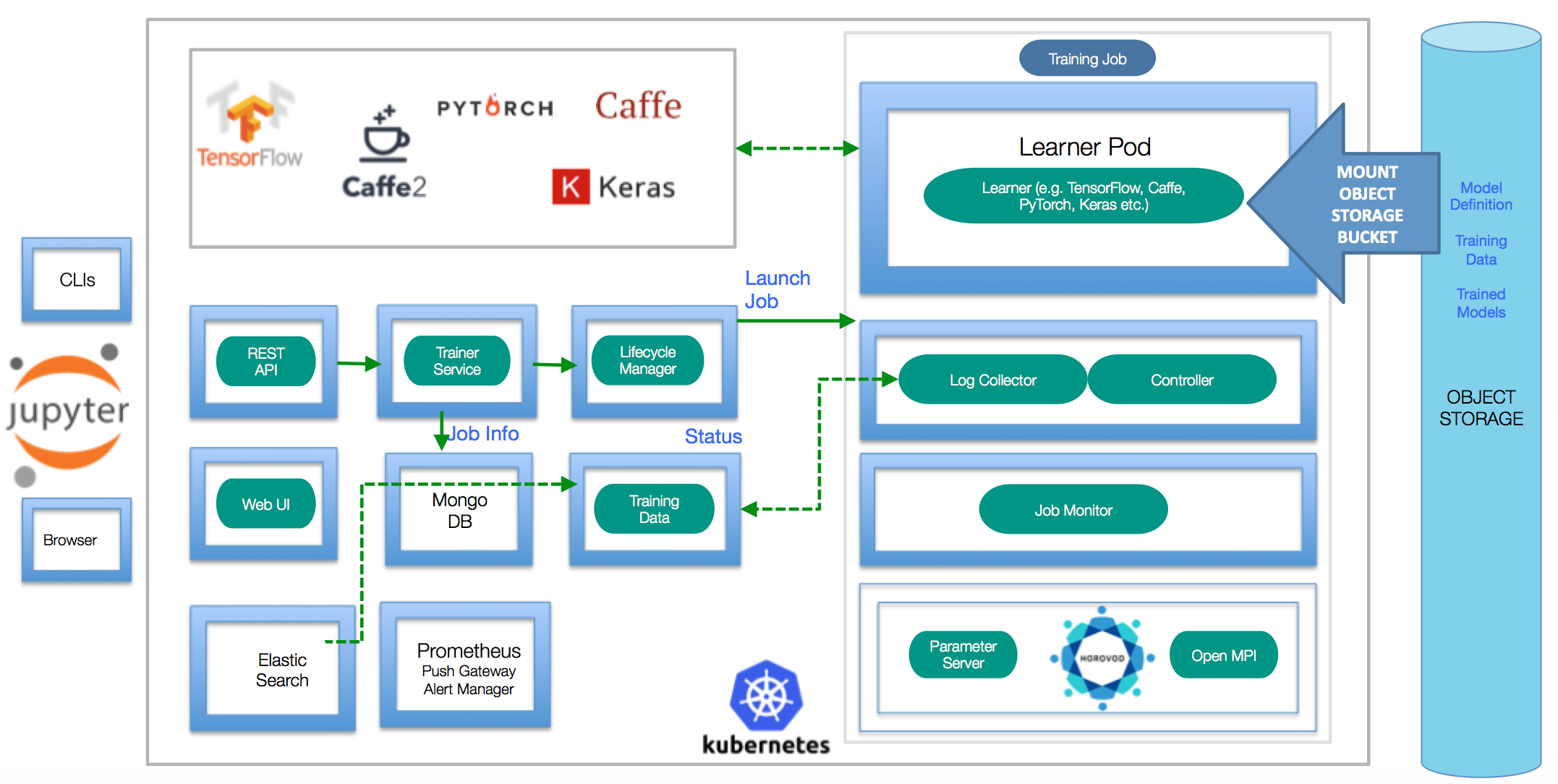
건축 세부 사항에 대한 자세한 내용은 디자인 문서를 읽으십시오. Demos, Slide, Collaterals, Blogs, Webinar 및 FFDL과 관련된 기타 자료를 찾고 있다면 여기에서 찾으십시오.
kubectl : kubernetes 명령 줄 인터페이스 (https://kubernetes.io/docs/tasks/tools/install-kubectl/)helm : Kubernetes 패키지 관리자 (https://helm.sh)docker : Docker Command-Line Interface (https://www.docker.com/)S3 CLI : 객체 스토리지를 구성하기위한 명령 줄 인터페이스기존 Kubernetes 클러스터에 FFDL을 설치하기위한 여러 설치 경로가 있습니다. 다음은 빠른 설치 단계입니다. 더 자세한 단계별 지침을 따르려면 자세한 설치 안내서를 방문하십시오.
helm init 로 경운기를 초기화해야합니다. 올바른 Kubernetes 클러스터에 ffdl을 설치하려면 kubectl 이 올바른 네임 스페이스를 가리키고 플랫폼 서비스를 배포하십시오.
 export NAMESPACE=default # If your namespace does not exist yet, please create the namespace `kubectl create namespace $NAMESPACE` before running the make commands below
export SHARED_VOLUME_STORAGE_CLASS= " ibmc-file-gold " # Change the storage class to what's available on your Cloud Kubernetes Cluster.

helm install ibmcloud-object-storage-plugin --name ibmcloud-object-storage-plugin --repo https://ibm.github.io/FfDL/helm-charts --set namespace= $NAMESPACE # Configure s3 driver on the cluster
helm install ffdl-helper --name ffdl-helper --repo https://ibm.github.io/FfDL/helm-charts --set namespace= $NAMESPACE ,shared_volume_storage_class= $SHARED_VOLUME_STORAGE_CLASS --wait # Deploy all the helper micro-services for ffdl
helm install ffdl-core --name ffdl-core --repo https://ibm.github.io/FfDL/helm-charts --set namespace= $NAMESPACE ,lcm.shared_volume_storage_class= $SHARED_VOLUME_STORAGE_CLASS --wait # Deploy all the core ffdl services.컴퓨터에 Kubeadm-dind가 설치된 경우이 명령을 사용하여 FFDL 플랫폼을 배포하십시오.
 export SHARED_VOLUME_STORAGE_CLASS= " "
export NAMESPACE=default

./bin/s3_driver.sh # Copy the s3 drivers to each of the DIND node
helm install ibmcloud-object-storage-plugin --name ibmcloud-object-storage-plugin --repo https://ibm.github.io/FfDL/helm-charts --set namespace= $NAMESPACE ,cloud=false
helm install ffdl-helper --name ffdl-helper --repo https://ibm.github.io/FfDL/helm-charts --set namespace= $NAMESPACE ,shared_volume_storage_class= $SHARED_VOLUME_STORAGE_CLASS ,localstorage=true --wait
helm install ffdl-core --name ffdl-core --repo https://ibm.github.io/FfDL/helm-charts --set namespace= $NAMESPACE ,lcm.shared_volume_storage_class= $SHARED_VOLUME_STORAGE_CLASS --wait

# Forward the necessary microservices from the DIND cluster to your localhost.
./bin/dind-port-forward.sh 이 Repo에 포함 된 간단한 예제 교육 작업을 제출하려면 ( etc/examples 폴더 참조) :
참고 : public_ip의 경우 클러스터의 NODEPORT에 액세스 할 수있는 클러스터 공개 IP 중 하나를 내려 놓으십시오.
kubectl get nodes -o wide사용하여 클러스터 공개 IP를 확인할 수 있습니다. IBM Cloud의 경우bx cs workers <cluster_name>과 함께 공개 IP를 얻을 수 있습니다.
 export PUBLIC_IP= < Cluster Public IP > # Put down localhost if you are running with Kubeadm-DIND
make test-push-data-s3
make test-job-submit 플랫폼에는 간단한 Grafana 모니터링 대시 보드가 제공됩니다. status 될 대상을 실행할 때 URL이 인쇄됩니다.
자세한 내용은 개발자 안내서를 참조하십시오.
클러스터에서 FFDL을 제거하려면 다음 명령을 사용하시기 만하면됩니다.
helm delete --purge ffdl-core ffdl-helper클러스터에서 스토리지 드라이버를 제거하려면 실행하십시오.
helm delete --purge ibmcloud-object-storage-plugin Kubeadm Dind의 경우 전달 된 포트를 죽여야합니다. 아래 명령은 kubectl 로 생성 된 모든 포트를 죽입니다.
kill $( lsof -i | grep kubectl | awk ' {printf $2 " " } ' ) glide install 존재하지 않는 경로 (예 : "SRC 없이는 계속할 수 없음")에 대해 불평하는 오류가 발생하면 표준 GO 디렉토리 레이아웃을 따라야합니다 (전제 조건 섹션 참조).
클러스터에서 FFDL을 제거하려면 단순히 make undeploy
FFDL CLI를 사용하여 모델을 훈련시킬 때 디렉토리 경로에 슬래시 / 없거나 끝에 없습니다.
작업이 보류 단계에 갇혀 있으면 helm install storage-plugin --set dind=true,cloud=false 의 경우 kubeadm-dind의 경우, kubernetes 클러스터의 helm install storage-plugin set dind = true, cloud = false. 또한 교육 작업 매니페스트 파일을 두 번 확인하여 올바른 객체 저장 자격 증명이 있는지 확인하십시오.
딥 러닝에서 IBM 연구 작업을 기반으로합니다.
B. Bhattacharjee et al., "IBM 딥 러닝 서비스", IBM Journal of Research and Development, Vol. 61, 아니오. 4, pp. 10 : 1-10 : 11, 7 월 -9 월. 2017 년. https://arxiv.org/abs/1709.05871
Scott Boag 등 딥 러닝 교육 작업의 스케일블 멀티 프레임 워크 다중 테넌트 수명주기 관리, NIPS'17, 2017의 ML 시스템 워크숍.





