tarsier
v.0.6.0 - Microsoft OCR Support

?网络交互代理的视觉公用事业?
?主站点• ? Twitter • ?不和谐
如果您尝试使用LLM自动化Web互动,那么您可能会遇到以下问题:
在Reworkd,我们迭代了成千上万个真正的Web任务中的所有这些问题,以为Web代理建立强大的感知系统... Tarsier!在下面的视频中,我们使用Tarsier为简约的GPT-4 Langchain Web代理提供网页感知。
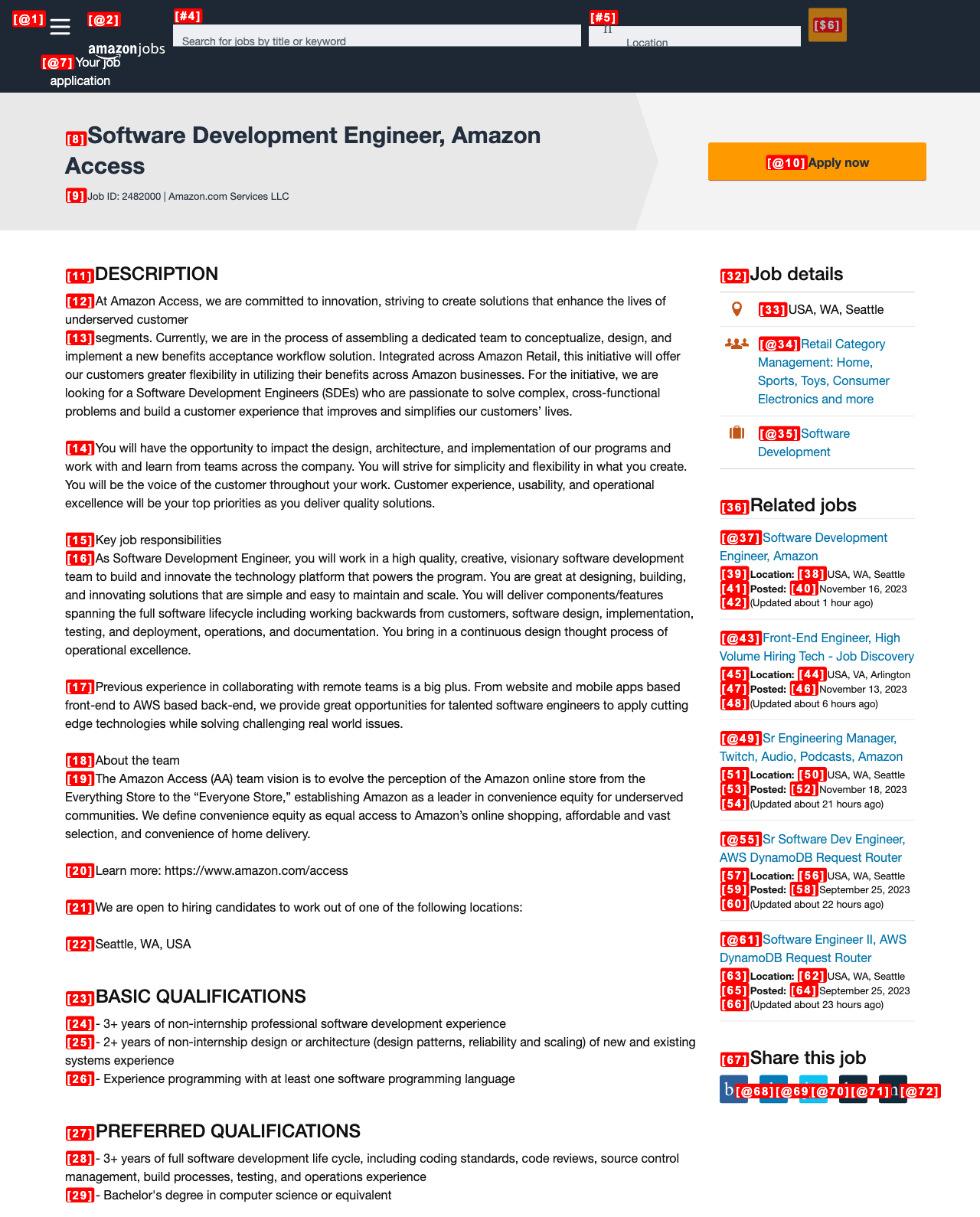
tarsier在视觉上通过括号 + ID EG [23]在页面上可相互作用的元素标记。为此,我们为LLM提供了元素和ID之间的映射,以采取行动(例如, CLICK [23] )。我们将可相互作用的元素定义为页面上可见的按钮,链接或输入字段;如果您通过tag_text_elements=True tarsier也可以标记所有文本元素。
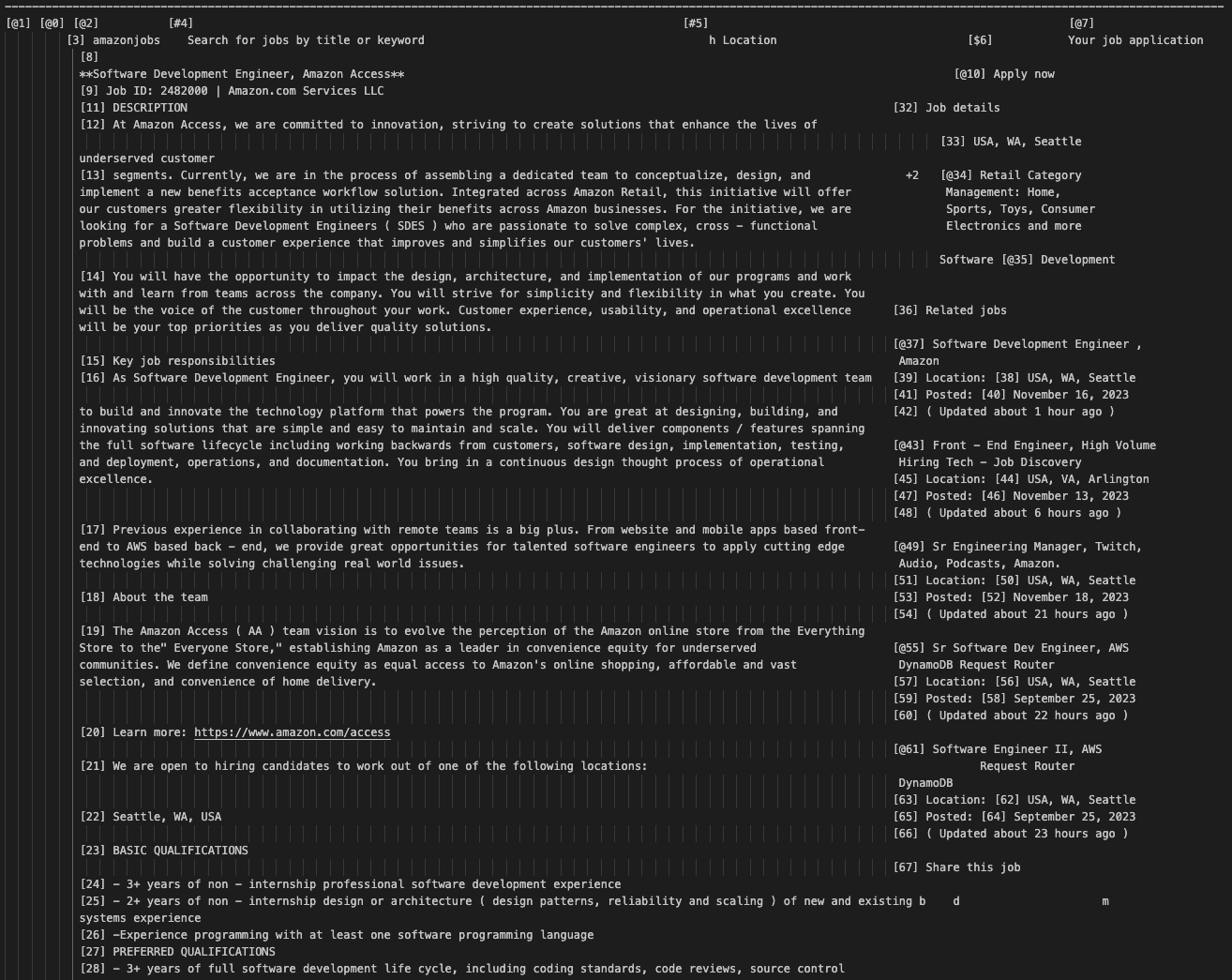
此外,我们已经开发了一种OCR算法,将页面屏幕截图转换为一个空间结构的字符串(几乎像ASCII Art),即使没有视觉也可以理解LLM。由于当前的视觉模型仍然缺乏Web交互任务所需的细粒度表示,因此这很关键。在我们的内部基准测试中,Un-Imodal GPT-4 + Tarsier-Texts击败GPT-4V + Tarsier-Screenshot 10-20%!
| 标记的屏幕截图 | 标记的文本表示 |
|---|---|
 |  |
pip install tarsier使用Tarsier访问我们的食谱以获取代理示例:
我们目前支持2个OCR引擎:Google Vision和Microsoft Azure。要为Google创建服务帐户凭据,请按照此说明进行回答https://stackoverflow.com/a/46290808/1780891
Microsoft Azure的凭据存储为简单的JSON,由API密钥和端点组成
{
  "key" : " <enter_your_api_key> " ,
  "endpoint" : " <enter_your_api_endpoint> "
}
这些值可以在计算机视觉资源的键和端点部分中找到。请参阅https://learn.microsoft.com/en-us/answers/questions/854952/dont-find-find-your-key-and-your-and-your-endpoint上的说明
否则,基本的tarsier用法可能看起来如下:
 import asyncio

from playwright . async_api import async_playwright
from tarsier import Tarsier , GoogleVisionOCRService , MicrosoftAzureOCRService
import json

def load_ocr_credentials ( json_file_path ):
    with open ( json_file_path ) as f :
        credentials = json . load ( f )
    return credentials

async def main ():
    # To create the service account key, follow the instructions on this SO answer https://stackoverflow.com/a/46290808/1780891

    google_cloud_credentials = load_ocr_credentials ( './google_service_acc_key.json' )
    #microsoft_azure_credentials = load_ocr_credentials('./microsoft_azure_credentials.json')

    ocr_service = GoogleVisionOCRService ( google_cloud_credentials )
    #ocr_service = MicrosoftAzureOCRService(microsoft_azure_credentials)

    tarsier = Tarsier ( ocr_service )

    async with async_playwright () as p :
        browser = await p . chromium . launch ( headless = False )
        page = await browser . new_page ()
        await page . goto ( "https://news.ycombinator.com" )

        page_text , tag_to_xpath = await tarsier . page_to_text ( page )

        print ( tag_to_xpath )  # Mapping of tags to x_paths
        print ( page_text )  # My Text representation of the page


if __name__ == '__main__' :
    asyncio . run ( main ())
请记住,Tarsier对不同类型的元素进行不同的标签,以帮助您的LLM确定每个元素上的操作。具体来说:
[#ID] :文本可用字段(例如textarea ,带有文本类型的input )[@ID] :超链接( <a>标签)[$ID] :其他可相互作用的元素(例如button , select )[ID] :纯文本(如果您通过tag_text_elements=True ) 我们提供了一个方便的设置脚本,可以通过Tarsier开发来启动和运行。
./script/setup.sh如果修改Tarsier使用的任何打字稿文件,则需要执行以下命令。这将打字稿编译到JavaScript中,然后可以在Python软件包中使用。
npm run build我们使用pytest进行测试。要运行测试,只需运行:
poetry run pytest .在提交潜在的PR之前,请运行以下格式化您的代码:
./script/format.sh bibtex
@misc{reworkd2023tarsier,
title = {Tarsier},
author = {Rohan Pandey and Adam Watkins and Asim Shrestha and Srijan Subedi},
year = {2023},
howpublished = {GitHub},
url = {https://github.com/reworkd/tarsier}
}







