tarsier
v.0.6.0 - Microsoft OCR Support

- Vision Utilities สำหรับตัวแทนปฏิสัมพันธ์เว็บ?
- ไซต์หลัก • ? Twitter • ? ความไม่ลงรอยกัน
หากคุณได้ลองใช้ LLM เพื่อทำให้การโต้ตอบกับเว็บเป็นไปโดยอัตโนมัติคุณอาจพบคำถามเช่น:
ที่ REWORKD เราวนซ้ำปัญหาเหล่านี้ทั้งหมดในงานเว็บจริงนับหมื่นเพื่อสร้างระบบการรับรู้ที่ทรงพลังสำหรับตัวแทนเว็บ ... Tarsier! ในวิดีโอด้านล่างเราใช้ Tarsier เพื่อให้การรับรู้หน้าเว็บสำหรับตัวแทนเว็บ GPT-4 Langchain ที่เรียบง่าย
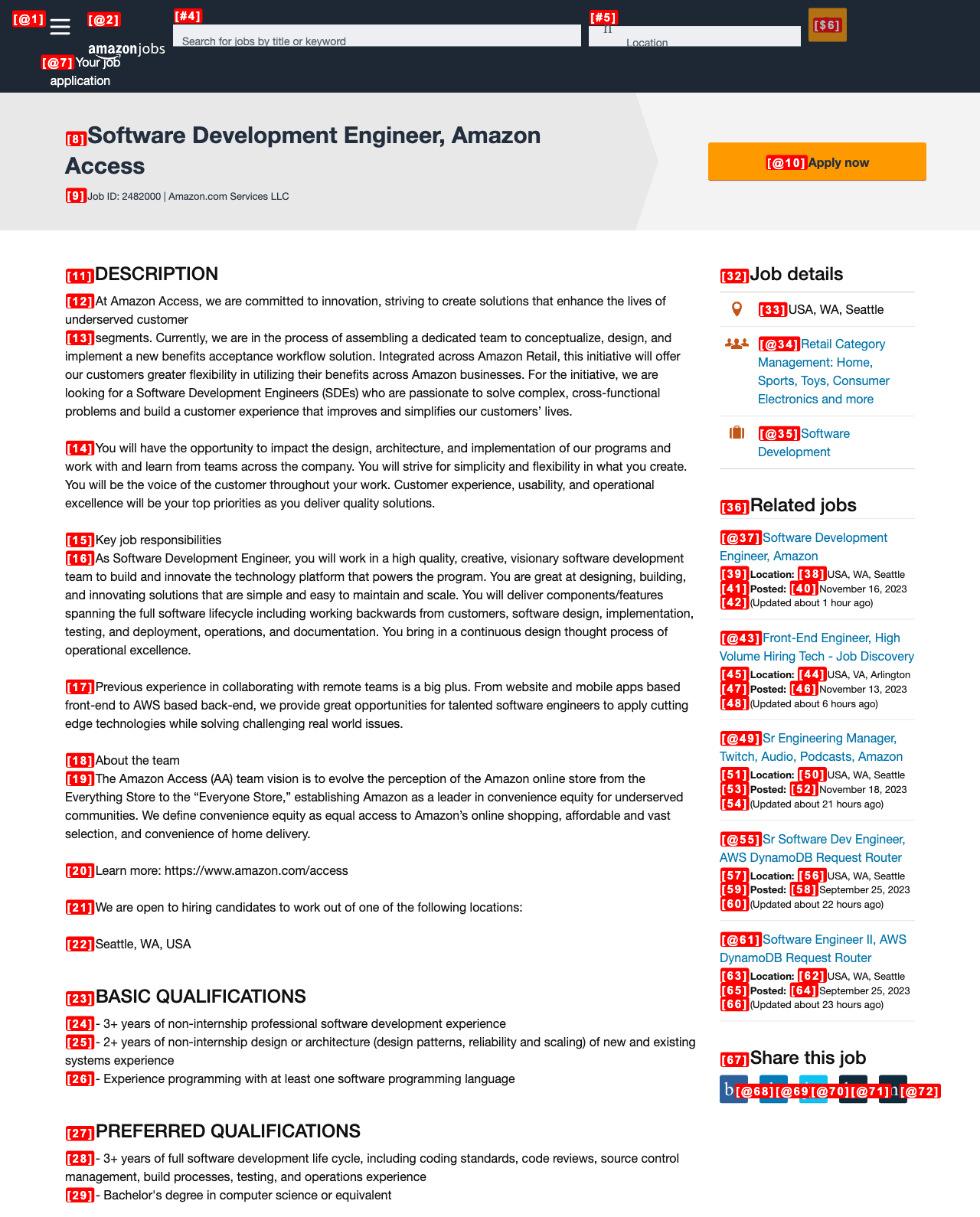
Tarsier ติดแท็กองค์ประกอบที่มีปฏิสัมพันธ์บนหน้าเว็บผ่านวงเล็บ + id id เช่น [23] ในการทำเช่นนี้เราจัดทำแผนที่ระหว่างองค์ประกอบและ ID สำหรับ LLM เพื่อดำเนินการตาม (เช่น CLICK [23] ) เรากำหนดองค์ประกอบที่มีปฏิสัมพันธ์เป็นปุ่มลิงก์หรือฟิลด์อินพุตที่มองเห็นได้ในหน้า Tarsier ยังสามารถติดแท็กองค์ประกอบที่เป็นข้อความทั้งหมดหากคุณผ่าน tag_text_elements=True
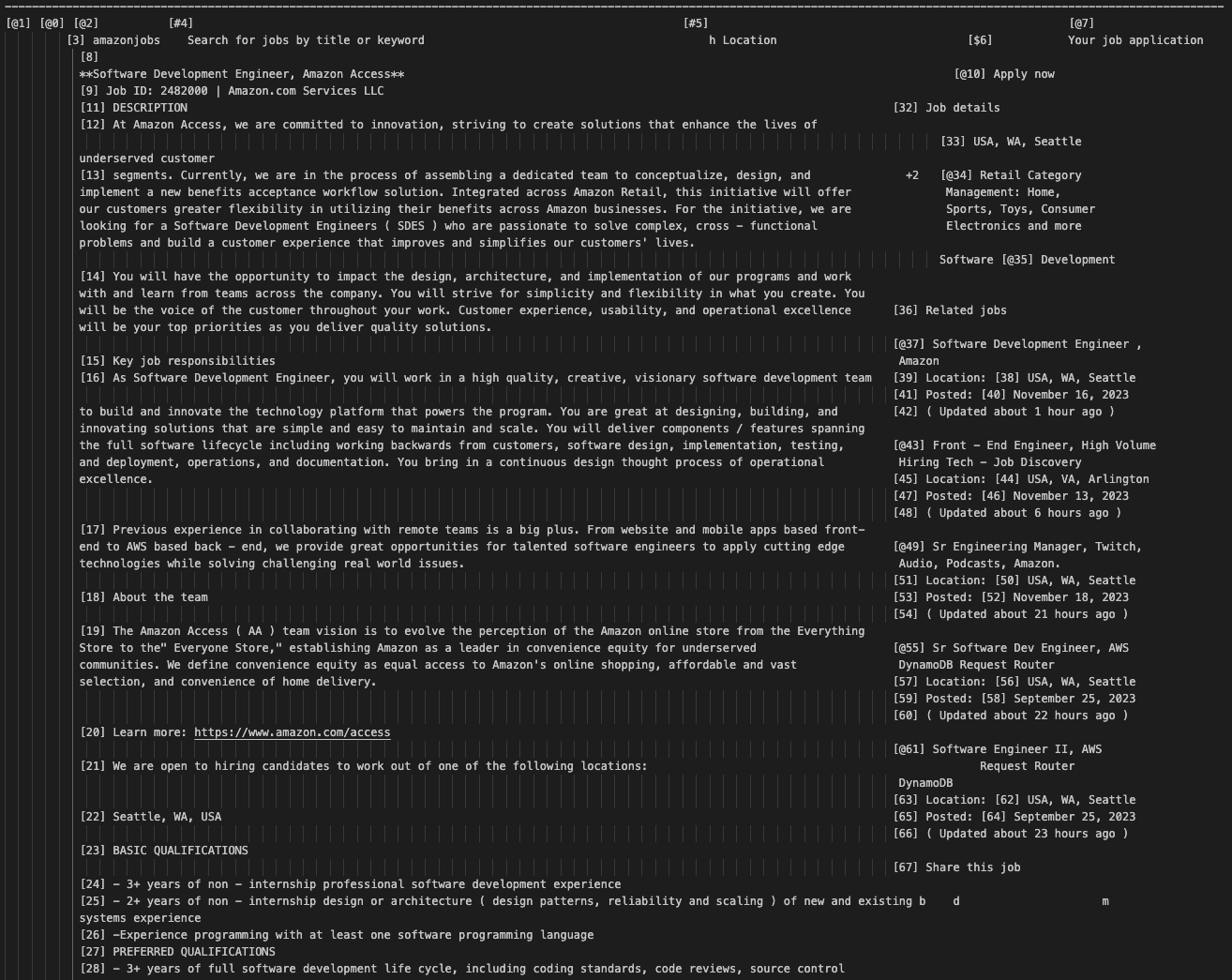
นอกจากนี้เรายังได้พัฒนาอัลกอริทึม OCR เพื่อแปลงภาพหน้าจอหน้าเป็นสตริงที่มีโครงสร้างระหว่างช่องว่าง (เกือบเหมือน ASCII Art) ที่ LLM แม้จะไม่มีการมอง เห็นก็ตาม เนื่องจากโมเดลวิสัยทัศน์ภาษาปัจจุบันยังขาดการเป็นตัวแทนที่จำเป็นสำหรับงานการโต้ตอบเว็บจึงเป็นสิ่งสำคัญ บนเกณฑ์มาตรฐานภายในของเรา unimodal gpt-4 + tarsier-text beats GPT-4V + tarsier-screenshot 10-20%!
| ติดแท็กสกรีนช็อต | การเป็นตัวแทนข้อความที่ติดแท็ก |
|---|---|
 |  |
pip install tarsierเยี่ยมชมตำราของเราสำหรับตัวอย่างตัวแทนโดยใช้ Tarsier:
ขณะนี้เราสนับสนุนเครื่องยนต์ OCR 2 เครื่อง: Google Vision และ Microsoft Azure ในการสร้างข้อมูลรับรองบัญชีบริการสำหรับ Google ให้ทำตามคำแนะนำเกี่ยวกับคำตอบนี้ https://stackoverflow.com/a/46290808/1780891
ข้อมูลประจำตัวสำหรับ Microsoft Azure ถูกเก็บไว้เป็น JSON ง่าย ๆ ซึ่งประกอบด้วยคีย์ API และจุดสิ้นสุด
{
  "key" : " <enter_your_api_key> " ,
  "endpoint" : " <enter_your_api_endpoint> "
}
ค่าเหล่านี้สามารถพบได้ในส่วนคีย์และจุดสิ้นสุดของทรัพยากรการมองเห็นคอมพิวเตอร์ ดูคำแนะนำได้ที่ https://learn.microsoft.com/en-us/answers/questions/854952/dont-find-your-key-and-your-endpoint
มิฉะนั้นการใช้ Tarsier ขั้นพื้นฐานอาจมีลักษณะดังต่อไปนี้:
 import asyncio

from playwright . async_api import async_playwright
from tarsier import Tarsier , GoogleVisionOCRService , MicrosoftAzureOCRService
import json

def load_ocr_credentials ( json_file_path ):
    with open ( json_file_path ) as f :
        credentials = json . load ( f )
    return credentials

async def main ():
    # To create the service account key, follow the instructions on this SO answer https://stackoverflow.com/a/46290808/1780891

    google_cloud_credentials = load_ocr_credentials ( './google_service_acc_key.json' )
    #microsoft_azure_credentials = load_ocr_credentials('./microsoft_azure_credentials.json')

    ocr_service = GoogleVisionOCRService ( google_cloud_credentials )
    #ocr_service = MicrosoftAzureOCRService(microsoft_azure_credentials)

    tarsier = Tarsier ( ocr_service )

    async with async_playwright () as p :
        browser = await p . chromium . launch ( headless = False )
        page = await browser . new_page ()
        await page . goto ( "https://news.ycombinator.com" )

        page_text , tag_to_xpath = await tarsier . page_to_text ( page )

        print ( tag_to_xpath )  # Mapping of tags to x_paths
        print ( page_text )  # My Text representation of the page


if __name__ == '__main__' :
    asyncio . run ( main ())
โปรดทราบว่า Tarsier tags องค์ประกอบประเภทต่าง ๆ แตกต่างกันเพื่อช่วย LLM ของคุณระบุว่าการกระทำที่สามารถทำได้ในแต่ละองค์ประกอบ โดยเฉพาะ:
[#ID] : ฟิลด์ข้อความที่ไม่สามารถตรวจสอบได้ (เช่น textarea , input กับประเภทข้อความ)[@ID] : การเชื่อมโยงหลายมิติ ( <a> แท็ก)[$ID] : องค์ประกอบที่มีปฏิสัมพันธ์อื่น ๆ (เช่น button select )[ID] : ข้อความธรรมดา (ถ้าคุณผ่าน tag_text_elements=True ) เราได้จัดเตรียมสคริปต์การตั้งค่าที่มีประโยชน์เพื่อให้คุณได้รับการพัฒนาด้วย Tarsier Development
./script/setup.shหากคุณแก้ไขไฟล์ TypeScript ใด ๆ ที่ใช้โดย Tarsier คุณจะต้องดำเนินการคำสั่งต่อไปนี้ สิ่งนี้จะรวบรวม typeScript ลงใน JavaScript ซึ่งสามารถนำไปใช้ในแพ็คเกจ Python
npm run buildเราใช้ pytest สำหรับการทดสอบ ในการเรียกใช้การทดสอบเพียงแค่เรียกใช้:
poetry run pytest .ก่อนที่จะส่ง PR ที่มีศักยภาพโปรดเรียกใช้ต่อไปนี้เพื่อจัดรูปแบบรหัสของคุณ:
./script/format.sh bibtex
@misc{reworkd2023tarsier,
title = {Tarsier},
author = {Rohan Pandey and Adam Watkins and Asim Shrestha and Srijan Subedi},
year = {2023},
howpublished = {GitHub},
url = {https://github.com/reworkd/tarsier}
}







