Flexible Chat Box
1.0.0

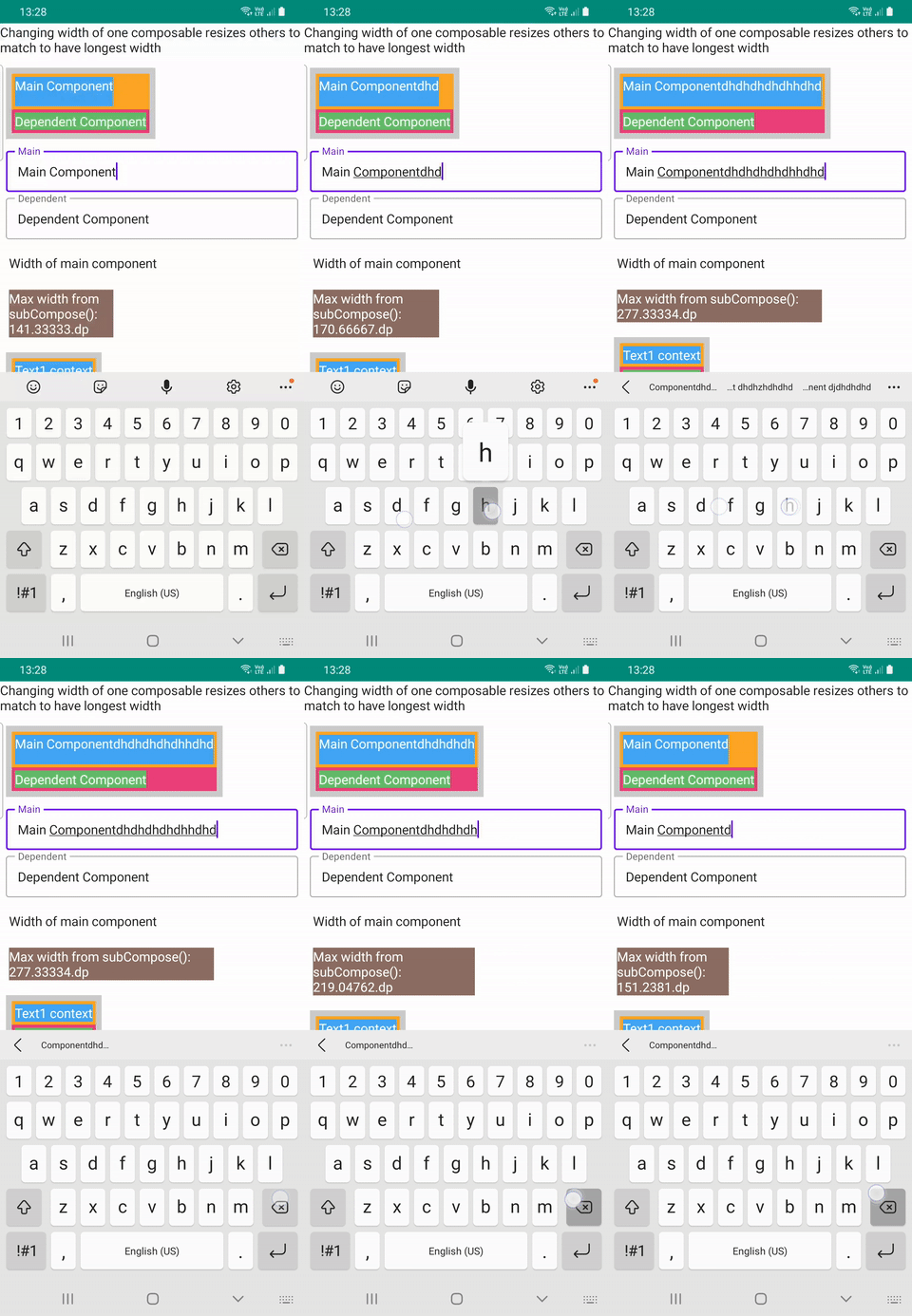
灵活的聊天行, ChatFlexBoxLayout ,基于线条消息的数量,将其元素定位为“邮件”文本,父宽度,消息和消息状态宽度。 SubcomposeColumn是使用子专业人口创建的,该子杂志是根据最长的孩子重新评估其子女的。这对于在位置计算后匹配报价消息和消息长度很有用。这两个组合共同创建了定位孩子的动态消息行,以及位置消息,消息日期和消息状态。
有3个实现文件可以尝试ChatFlexBoxLayout , SubcomposeColumn是DemoFullChat.kt , DemoChatAndWidth.kt和DemoResizableColumn.kt
| 完整的聊天 | 聊天宽度 | 可解析 |
|---|---|---|
 | 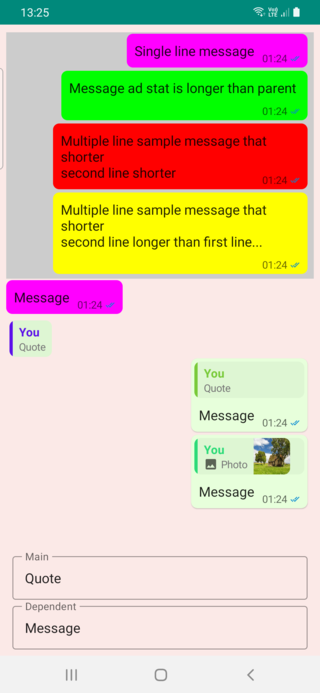 |  |
此布局衡量和位置消息,以及另一个使用消息日期或消息日期 +消息接收状态(例如消息传递应用程序)的容器。
有4个可能的条件来定位消息和统计
 ChatFlexBoxLayout (
    modifier : Modifier = Modifier ,
    text : String ,
    color : Color = Color . Unspecified ,
    fontSize : TextUnit = 16 .sp,
    fontStyle : FontStyle ? = null ,
    fontWeight : FontWeight ? = null ,
    fontFamily : FontFamily ? = null ,
    letterSpacing : TextUnit = TextUnit . Unspecified ,
    textDecoration : TextDecoration ? = null ,
    textAlign : TextAlign ? = null ,
    lineHeight : TextUnit = TextUnit . Unspecified ,
    overflow : TextOverflow = TextOverflow . Clip ,
    softWrap : Boolean = true ,
    maxLines : Int = Int . MAX_VALUE ,
    messageStat : @Composable () -> Unit ,
    onMeasure : (( ChatRowData ) -> Unit ) ? = null
)由于要获得文本长度,需要TextLayout ,因此可以在此组合的内部宽度和其他属性,但可以以与使用Text相同的方式设置Text合并的属性。
onMeasure返回此行的内部布局数据,这就是我在聊天宽度样本中以不同的方式设置颜色的方式。 messageStat是合并的,如果需要,则包含消息文本或状态。
    ChatFlexBoxLayout (
        modifier = Modifier
            .background(color, shape = RoundedCornerShape ( 8 .dp))
            .padding(start = 2 .dp, top = 2 .dp, end = 4 .dp, bottom = 2 .dp),
        text = text,
        messageStat = {
            MessageTimeText (
                modifier = Modifier .wrapContentSize(),
                messageTime = messageTime,
                messageStatus = messageStatus
            )
        },
        onMeasure = { chatRowData ->
            color = when (chatRowData.measuredType) {
                0 -> Color . Yellow
                1 -> Color . Red
                2 -> Color . Green
                else -> Color . Magenta
            }
        }
) ChatFlexBoxLayout的另一个过载需要两个组合物作为参数,可以使用自定义消息组合代替字符串或注释串。
@Composable
fun ChatFlexBoxLayout (
    modifier : Modifier ,
    message : @Composable () -> Unit ,
    messageStat : @Composable () -> Unit = {},
    chatRowData : ChatRowData ,
    onMeasure : (( ChatRowData ) -> Unit ) ? = null
) {
  // ...
}与remember { ChatRowData() }一起使用以提供统计信息并Invoke measureText(chatRowData, it)将文本属性设置为此数据
            val chatRowData = remember { ChatRowData () }

            ChatFlexBoxLayout (
                modifier = Modifier .padding(
                    start = 2 .dp,
                    top = 2 .dp,
                    end = 8 .dp,
                    bottom = 2 .dp
                ),
                message = {
                    Text (
                        modifier = Modifier .padding(horizontal = 6 .dp, vertical = 4 .dp),
                        text = text,
                        fontSize = 16 .sp,
                        onTextLayout = {
                            // ️ THIS IS REQUIRED TO MEASURE Text size and get line count
                            measureText(chatRowData, it)
                        }
                    )
                },
                messageStat = {
                    MessageTimeText (
                        modifier = Modifier .wrapContentSize(),
                        messageTime = messageTime,
                        messageStatus = messageStatus
                    )
                },
                chatRowData = chatRowData
            )
}该布局使用子专辑来查找最长的孩子,然后再生其孩子,并将每个孩子设置为最大宽度。如果您只需要使用直接的2个孩子,则可以使用2个IntSize的超载
 fun SubcomposeColumn (
    modifier : Modifier = Modifier ,
    mainContent : @Composable () -> Unit = {},
    dependentContent : @Composable ( IntSize ) -> Unit
) {
.. .
}
此超载功能适用于任何数量的孩子的布局
@Composable
fun SubcomposeColumn (
    modifier : Modifier = Modifier ,
    content : @Composable () -> Unit = {},
) {

    SubcomposeLayout (modifier = modifier) { constraints ->

        var recompositionIndex = 0

        var placeables : List < Placeable > = subcompose(recompositionIndex ++ , content).map {
            it.measure(constraints)
        }

        val maxSize =
            placeables.fold( IntSize . Zero ) { currentMax : IntSize , placeable : Placeable ->
                IntSize (
                    width = maxOf(currentMax.width, placeable.width),
                    height = currentMax.height + placeable.height
                )
            }

        // Remeasure every element using width of longest item as minWidth of Constraint
        if ( ! placeables.isNullOrEmpty() && placeables.size > 1 ) {
            placeables = subcompose(recompositionIndex, content).map { measurable : Measurable ->
                measurable.measure( Constraints (maxSize.width, constraints.maxWidth))
            }
        }

        layout(maxSize.width, maxSize.height) {
            var yPos = 0
            placeables.forEach { placeable : Placeable ->
                placeable.placeRelative( 0 , yPos)
                yPos + = placeable.height
            }

        }
    }
}






