Flexible Chat Box
1.0.0

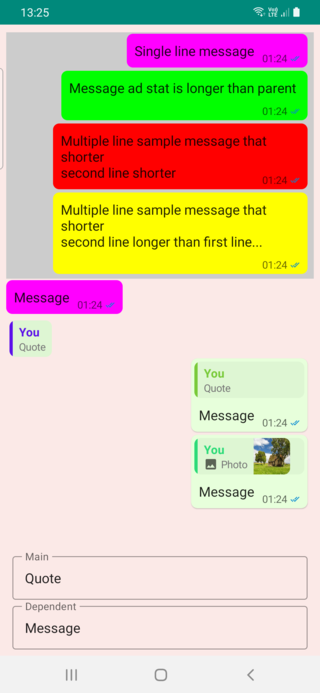
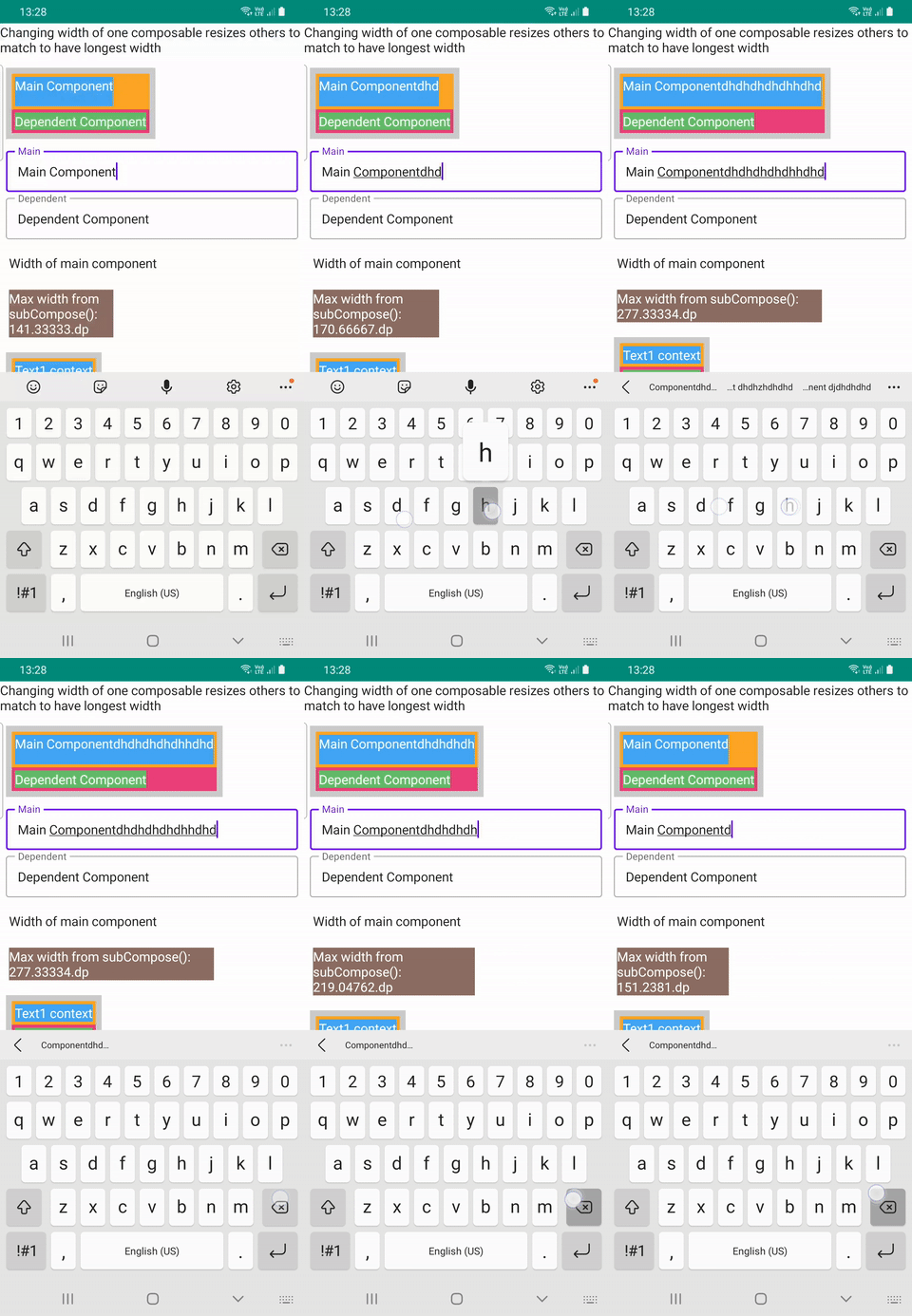
แถวแชทที่ยืดหยุ่น, ChatFlexBoxLayout , ตำแหน่งองค์ประกอบตามจำนวนข้อความข้อความมี, ความกว้างของผู้ปกครอง, ข้อความและความกว้างสถานะข้อความ SubcomposeColumn สร้างขึ้นโดยใช้ subcomposelayout ซึ่งจะทำการปรับปรุงเด็ก ๆ ตามเด็กที่ยาวที่สุด สิ่งนี้มีประโยชน์สำหรับการจับคู่ข้อความใบเสนอราคาและความยาวข้อความหลังจากการคำนวณตำแหน่ง composables ทั้งสองนี้ร่วมกันสร้างแถวข้อความแบบไดนามิกที่วางตำแหน่งเด็กและวางตำแหน่งข้อความวันที่ข้อความและสถานะข้อความ
มี 3 ไฟล์การใช้งานเพื่อลองใช้ ChatFlexBoxLayout และ SubcomposeColumn คือ DemoFullChat.kt , DemoChatAndWidth.kt และ DemoResizableColumn.kt
| แชทเต็มรูปแบบ | ความกว้างแชท | ซึ่งปรับขนาดได้ |
|---|---|---|
 |  |  |
การวัดเค้าโครงนี้และข้อความตำแหน่งและคอนเทนเนอร์อื่นที่ใช้วันที่ข้อความหรือวันที่ข้อความ + ข้อความที่ได้รับสถานะเช่นแอพส่งข้อความ
มี 4 เงื่อนไขที่เป็นไปได้ในการวางตำแหน่งข้อความและสถิติ
 ChatFlexBoxLayout (
    modifier : Modifier = Modifier ,
    text : String ,
    color : Color = Color . Unspecified ,
    fontSize : TextUnit = 16 .sp,
    fontStyle : FontStyle ? = null ,
    fontWeight : FontWeight ? = null ,
    fontFamily : FontFamily ? = null ,
    letterSpacing : TextUnit = TextUnit . Unspecified ,
    textDecoration : TextDecoration ? = null ,
    textAlign : TextAlign ? = null ,
    lineHeight : TextUnit = TextUnit . Unspecified ,
    overflow : TextOverflow = TextOverflow . Clip ,
    softWrap : Boolean = true ,
    maxLines : Int = Int . MAX_VALUE ,
    messageStat : @Composable () -> Unit ,
    onMeasure : (( ChatRowData ) -> Unit ) ? = null
)
เนื่องจากต้องใช้ TextLayout เพื่อให้ได้ความยาวข้อความความกว้างของบรรทัดสุดท้ายและคุณสมบัติอื่น ๆ จึงเป็นภายในของคอมโพสิต แต่คุณสมบัติของการคอมโพสิต Text นี้สามารถตั้งค่าได้เช่นเดียวกับที่ใช้ Text
onMeasure ส่งคืนข้อมูลเค้าโครงภายในของแถวนี้นั่นคือวิธีที่ฉันตั้งค่าสีต่างกันใน ตัวอย่างความกว้างแชท messageStat สามารถคอมโพสิตที่มีข้อความหรือสถานะข้อความหากคุณต้องการ
    ChatFlexBoxLayout (
        modifier = Modifier
            .background(color, shape = RoundedCornerShape ( 8 .dp))
            .padding(start = 2 .dp, top = 2 .dp, end = 4 .dp, bottom = 2 .dp),
        text = text,
        messageStat = {
            MessageTimeText (
                modifier = Modifier .wrapContentSize(),
                messageTime = messageTime,
                messageStatus = messageStatus
            )
        },
        onMeasure = { chatRowData ->
            color = when (chatRowData.measuredType) {
                0 -> Color . Yellow
                1 -> Color . Red
                2 -> Color . Green
                else -> Color . Magenta
            }
        }
    )
การโอเวอร์โหลดของ ChatFlexBoxLayout อีกครั้งใช้สอง composables เป็นอาร์กิวเมนต์ที่สามารถใช้งาน Composable ข้อความ ที่กำหนดเองแทนสตริงหรือ AnnotatedString
@Composable
fun ChatFlexBoxLayout (
    modifier : Modifier ,
    message : @Composable () -> Unit ,
    messageStat : @Composable () -> Unit = {},
    chatRowData : ChatRowData ,
    onMeasure : (( ChatRowData ) -> Unit ) ? = null
) {
  // ...
}
ใช้กับ remember { ChatRowData() } เพื่อให้สถิติและเรียกใช้ measureText(chatRowData, it) เพื่อตั้งค่าคุณสมบัติข้อความให้กับข้อมูลนี้
            val chatRowData = remember { ChatRowData () }

            ChatFlexBoxLayout (
                modifier = Modifier .padding(
                    start = 2 .dp,
                    top = 2 .dp,
                    end = 8 .dp,
                    bottom = 2 .dp
                ),
                message = {
                    Text (
                        modifier = Modifier .padding(horizontal = 6 .dp, vertical = 4 .dp),
                        text = text,
                        fontSize = 16 .sp,
                        onTextLayout = {
                            // ️ THIS IS REQUIRED TO MEASURE Text size and get line count
                            measureText(chatRowData, it)
                        }
                    )
                },
                messageStat = {
                    MessageTimeText (
                        modifier = Modifier .wrapContentSize(),
                        messageTime = messageTime,
                        messageStatus = messageStatus
                    )
                },
                chatRowData = chatRowData
            )
} เค้าโครงนี้ใช้ subcomposelayout เพื่อค้นหาเด็กที่ยาวที่สุดจากนั้นทำการปรับปรุงลูก ๆ และตั้งค่าเด็กทุกคนให้เป็นความกว้างสูงสุด มีจำนวนมากเกินจำนวน 2 รายการหากคุณต้องการใช้เด็กโดยตรง 2 คนเท่านั้น IntSize คุณสามารถใช้
 fun SubcomposeColumn (
    modifier : Modifier = Modifier ,
    mainContent : @Composable () -> Unit = {},
    dependentContent : @Composable ( IntSize ) -> Unit
) {
.. .
}
ฟังก์ชั่นที่โอเวอร์โหลดนี้เหมาะสำหรับการจัดวางกับเด็กจำนวนมาก
@Composable
fun SubcomposeColumn (
    modifier : Modifier = Modifier ,
    content : @Composable () -> Unit = {},
) {

    SubcomposeLayout (modifier = modifier) { constraints ->

        var recompositionIndex = 0

        var placeables : List < Placeable > = subcompose(recompositionIndex ++ , content).map {
            it.measure(constraints)
        }

        val maxSize =
            placeables.fold( IntSize . Zero ) { currentMax : IntSize , placeable : Placeable ->
                IntSize (
                    width = maxOf(currentMax.width, placeable.width),
                    height = currentMax.height + placeable.height
                )
            }

        // Remeasure every element using width of longest item as minWidth of Constraint
        if ( ! placeables.isNullOrEmpty() && placeables.size > 1 ) {
            placeables = subcompose(recompositionIndex, content).map { measurable : Measurable ->
                measurable.measure( Constraints (maxSize.width, constraints.maxWidth))
            }
        }

        layout(maxSize.width, maxSize.height) {
            var yPos = 0
            placeables.forEach { placeable : Placeable ->
                placeable.placeRelative( 0 , yPos)
                yPos + = placeable.height
            }

        }
    }
}






