Flexible Chat Box
1.0.0

Flexible Chat Row, ChatFlexBoxLayout 은 메시지 텍스트가있는 줄 수, 상위 너비, 메시지 및 메시지 상태 너비를 기준으로 요소를 위치시킵니다. SubcomposeColumn 가장 긴 자녀를 기반으로 어린이들을 재시험하는 Subcomposelayout을 사용하여 작성했습니다. 위치 계산 후 견적 메시지 및 메시지 길이를 일치시키는 데 유용합니다. 이 두 개의 작곡가는 함께 어린이를 배치하는 동적 메시지 행을 생성하고 메시지, 메시지 날짜 및 메시지 상태를 위치시킵니다.
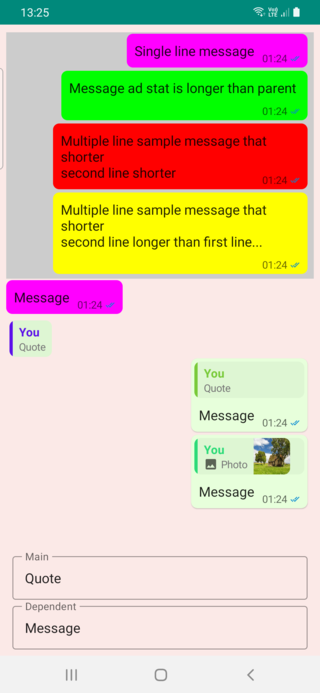
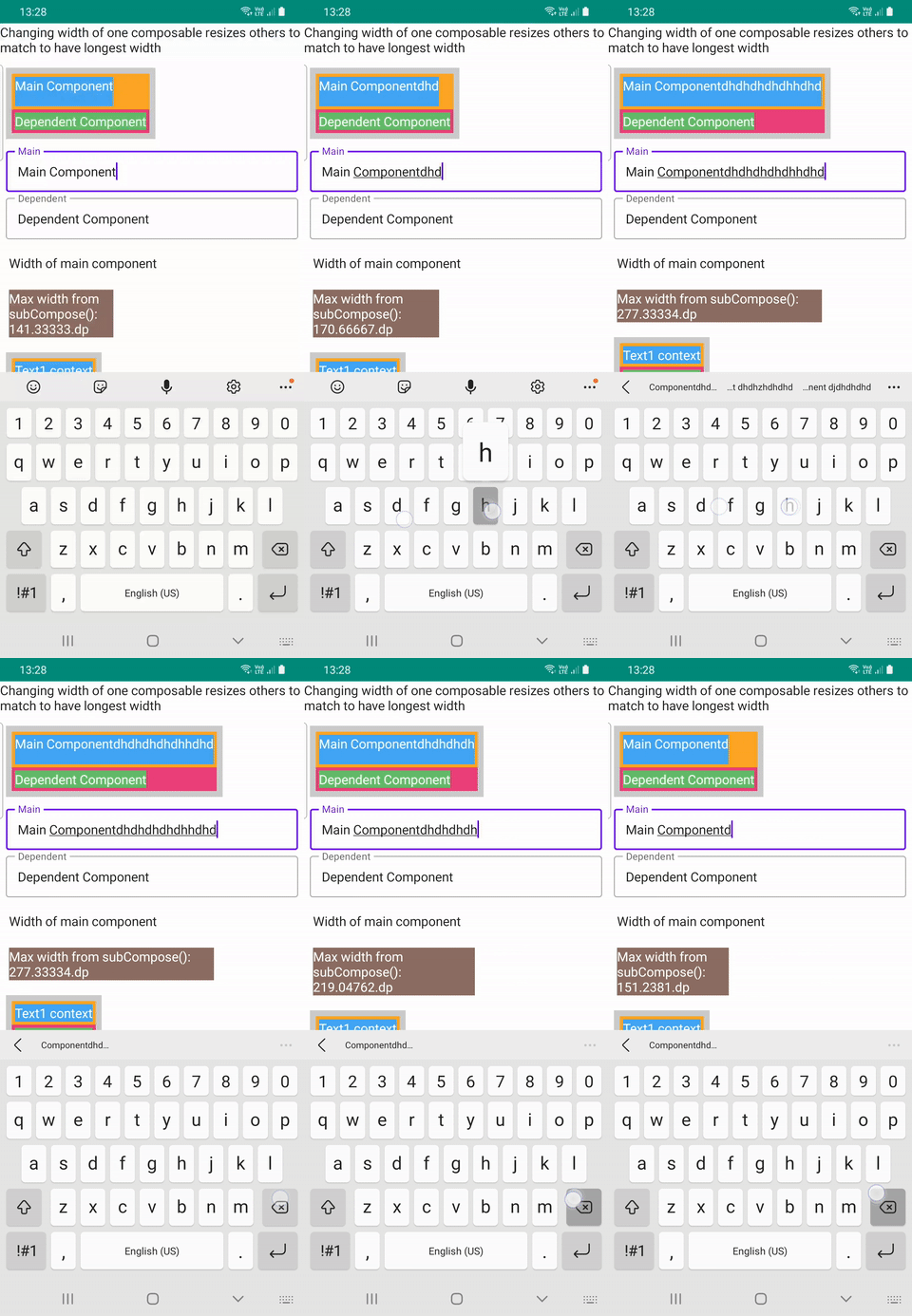
ChatFlexBoxLayout 시도하기위한 3 가지 구현 파일이 있으며, SubcomposeColumn DemoFullChat.kt , DemoChatAndWidth.kt 및 DemoResizableColumn.kt 입니다.
| 전체 채팅 | 채팅 너비 | RESIZAL |
|---|---|---|
 |  |  |
이 레이아웃 측정 및 위치 메시지 및 메시지 날짜 또는 메시지 날짜 + 메시지가 메시징 앱과 같은 상태를 사용하는 다른 컨테이너.
메시지와 통계를 배치 할 4 가지 가능한 조건이 있습니다.
 ChatFlexBoxLayout (
    modifier : Modifier = Modifier ,
    text : String ,
    color : Color = Color . Unspecified ,
    fontSize : TextUnit = 16 .sp,
    fontStyle : FontStyle ? = null ,
    fontWeight : FontWeight ? = null ,
    fontFamily : FontFamily ? = null ,
    letterSpacing : TextUnit = TextUnit . Unspecified ,
    textDecoration : TextDecoration ? = null ,
    textAlign : TextAlign ? = null ,
    lineHeight : TextUnit = TextUnit . Unspecified ,
    overflow : TextOverflow = TextOverflow . Clip ,
    softWrap : Boolean = true ,
    maxLines : Int = Int . MAX_VALUE ,
    messageStat : @Composable () -> Unit ,
    onMeasure : (( ChatRowData ) -> Unit ) ? = null
)
TextLayout 텍스트 길이, 마지막 줄 너비 및 기타 속성을 얻기 위해 필요하기 때문에이 합성 가능하지만 Text Text 사용하여 수행 한 것과 동일하게 설정할 수 있습니다.
onMeasure 이 행의 내부 레이아웃 데이터를 반환합니다. 이것이 채팅 너비 샘플 에서 색상을 다르게 설정하는 방법입니다. messageStat 필요한 경우 메시지 텍스트 또는 상태를 포함하는 Composable입니다.
    ChatFlexBoxLayout (
        modifier = Modifier
            .background(color, shape = RoundedCornerShape ( 8 .dp))
            .padding(start = 2 .dp, top = 2 .dp, end = 4 .dp, bottom = 2 .dp),
        text = text,
        messageStat = {
            MessageTimeText (
                modifier = Modifier .wrapContentSize(),
                messageTime = messageTime,
                messageStatus = messageStatus
            )
        },
        onMeasure = { chatRowData ->
            color = when (chatRowData.measuredType) {
                0 -> Color . Yellow
                1 -> Color . Red
                2 -> Color . Green
                else -> Color . Magenta
            }
        }
    )
ChatFlexBoxLayout 의 또 다른 과부하는 문자열 또는 주석이있는 스트링 대신 사용자 정의 메시지 composable을 사용할 수있는 인수로 두 개의 컴포지브를 가져옵니다.
@Composable
fun ChatFlexBoxLayout (
    modifier : Modifier ,
    message : @Composable () -> Unit ,
    messageStat : @Composable () -> Unit = {},
    chatRowData : ChatRowData ,
    onMeasure : (( ChatRowData ) -> Unit ) ? = null
) {
  // ...
}
remember { ChatRowData() } 사용하여 통계를 제공하고 measureText(chatRowData, it) 호출 하여이 데이터에 텍스트 속성을 설정하십시오.
            val chatRowData = remember { ChatRowData () }

            ChatFlexBoxLayout (
                modifier = Modifier .padding(
                    start = 2 .dp,
                    top = 2 .dp,
                    end = 8 .dp,
                    bottom = 2 .dp
                ),
                message = {
                    Text (
                        modifier = Modifier .padding(horizontal = 6 .dp, vertical = 4 .dp),
                        text = text,
                        fontSize = 16 .sp,
                        onTextLayout = {
                            // ️ THIS IS REQUIRED TO MEASURE Text size and get line count
                            measureText(chatRowData, it)
                        }
                    )
                },
                messageStat = {
                    MessageTimeText (
                        modifier = Modifier .wrapContentSize(),
                        messageTime = messageTime,
                        messageStatus = messageStatus
                    )
                },
                chatRowData = chatRowData
            )
} 이 레이아웃은 Subcomposelayout을 사용하여 가장 긴 자녀를 찾은 다음 어린이를 재조정하고 모든 어린이를 최대 너비로 설정합니다. 이 합성 가능한 2 개의 과부하가 있습니다. 직접 2 명의 어린이 만 사용할 수있는 경우 주 구성 요소의 크기를 IntSize 로 반환 할 수 있습니다.
 fun SubcomposeColumn (
    modifier : Modifier = Modifier ,
    mainContent : @Composable () -> Unit = {},
    dependentContent : @Composable ( IntSize ) -> Unit
) {
.. .
}
이 과부하 된 기능은 여러 어린이와 함께 레이아웃에 적합합니다.
@Composable
fun SubcomposeColumn (
    modifier : Modifier = Modifier ,
    content : @Composable () -> Unit = {},
) {

    SubcomposeLayout (modifier = modifier) { constraints ->

        var recompositionIndex = 0

        var placeables : List < Placeable > = subcompose(recompositionIndex ++ , content).map {
            it.measure(constraints)
        }

        val maxSize =
            placeables.fold( IntSize . Zero ) { currentMax : IntSize , placeable : Placeable ->
                IntSize (
                    width = maxOf(currentMax.width, placeable.width),
                    height = currentMax.height + placeable.height
                )
            }

        // Remeasure every element using width of longest item as minWidth of Constraint
        if ( ! placeables.isNullOrEmpty() && placeables.size > 1 ) {
            placeables = subcompose(recompositionIndex, content).map { measurable : Measurable ->
                measurable.measure( Constraints (maxSize.width, constraints.maxWidth))
            }
        }

        layout(maxSize.width, maxSize.height) {
            var yPos = 0
            placeables.forEach { placeable : Placeable ->
                placeable.placeRelative( 0 , yPos)
                yPos + = placeable.height
            }

        }
    }
}






