data components
Bypass already mounted components

Web应用程序的微小组件结构
感谢所有赞助商的这个项目:
卢卡斯·莫塔(Lucas Motta) |
→赞助我的开源工作
$ npm install data-components --save或者,您可以简单地复制并粘贴居住在dist/
有很多选择可以构建Web应用程序,但是大多数人经常假设您正在使用水疗中心。仅此一项就会添加很多您可能不想要的东西。数据绑定,自定义消息系统和虚拟DOM命名。
有时,您只需要简单的事情即可开始,而不必担心命名惯例和编程范例。这就是这个图书馆的出生方式。
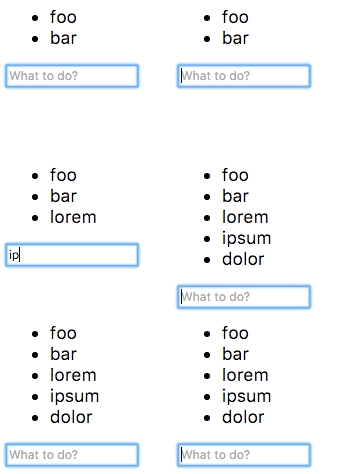
让我们实现最简单的待办事项列表应用程序。
 <!-- Create our todo list element passing some initial values -->
< ul data-component =" todo " data-values =" foo,bar " > </ ul >

<!-- Let's use a input field to read the user input -->
< input data-component =" input " placeholder =" What to do? " >
好的,既然我们已经准备好了,请实现应用程序。
 // Todo component
class Todo {
  constructor ( el , options ) {
    this . el = el ;
    // Read from initial values
    this . todos = options . values . split ( ',' ) ;
    this . render ( ) ;
  }

  // Add items to the list
  add ( todo ) {
    this . todos . push ( todo ) ;
    this . render ( ) ;
  }

  // Render the list to the DOM
  render ( ) {
    this . el . innerHTML = this . todos . map ( todo => `<li> ${ todo } </li>` ) . join ( '' ) ;
  }
}

// User input component
class Input {
  constructor ( el , options , sandbox ) {
    const todo = sandbox . get ( 'todo' ) ;

    // Submit value to "todo" component when hitting the enter key
    el . addEventListener ( 'keydown' , e => {
      if ( e . keyCode === 13 ) {
        todo . add ( el . value ) ;
        el . value = '' ;
        el . focus ( ) ;
      }
    } ) ;
  }
}

// Bootstrap components (UMD build exposes `components()`)
components ( {
  todo : Todo ,
  input : Input
} ) ; 
它仅适用于几行代码?
查看演示页面,以获取一个稍微复杂的示例。
有关项目的工作原理以及如何使用它的更多详细说明,请检查用户指南。
麻省理工学院©Rafael Rinaldi
给我买一个☕








