data components
Bypass already mounted components

โครงสร้างส่วนประกอบเล็ก ๆ สำหรับเว็บแอปพลิเคชัน
ขอบคุณผู้สนับสนุนทุกคนสำหรับโครงการนี้:
Lucas Motta |
→สนับสนุนงานโอเพ่นซอร์สของฉัน
$ npm install data-components --save หรือคุณสามารถคัดลอกและวางเวอร์ชันเดี่ยวที่มีขนาดเล็กซึ่งอาศัยอยู่ภายใต้ dist/
มีตัวเลือกมากมายให้กับสถาปนิกเว็บแอปพลิเคชันที่นั่น แต่ส่วนใหญ่มักจะคิดว่าคุณกำลังทำงานกับสปา เพียงอย่างเดียวจะเพิ่มสิ่งของมากมายที่คุณอาจไม่ต้องการเลย การเชื่อมโยงข้อมูลระบบการส่งข้อความที่กำหนดเองและ DOM เสมือนจริงเพื่อตั้งชื่อไม่กี่
บางครั้งคุณเพียงแค่ต้องการสิ่งที่ง่ายในการเตะสิ่งต่าง ๆ โดยไม่ต้องกังวลเกี่ยวกับการตั้งชื่อการประชุมและกระบวนทัศน์การเขียนโปรแกรม นั่นเป็นวิธีที่ห้องสมุดนี้เกิด
มาใช้แอพรายการสิ่งที่ต้องทำที่ง่ายที่สุด
 <!-- Create our todo list element passing some initial values -->
< ul data-component =" todo " data-values =" foo,bar " > </ ul >

<!-- Let's use a input field to read the user input -->
< input data-component =" input " placeholder =" What to do? " >
ตกลงตอนนี้เรามีมาร์กอัปของเรามาใช้แอปพลิเคชันกันเถอะ
 // Todo component
class Todo {
  constructor ( el , options ) {
    this . el = el ;
    // Read from initial values
    this . todos = options . values . split ( ',' ) ;
    this . render ( ) ;
  }

  // Add items to the list
  add ( todo ) {
    this . todos . push ( todo ) ;
    this . render ( ) ;
  }

  // Render the list to the DOM
  render ( ) {
    this . el . innerHTML = this . todos . map ( todo => `<li> ${ todo } </li>` ) . join ( '' ) ;
  }
}

// User input component
class Input {
  constructor ( el , options , sandbox ) {
    const todo = sandbox . get ( 'todo' ) ;

    // Submit value to "todo" component when hitting the enter key
    el . addEventListener ( 'keydown' , e => {
      if ( e . keyCode === 13 ) {
        todo . add ( el . value ) ;
        el . value = '' ;
        el . focus ( ) ;
      }
    } ) ;
  }
}

// Bootstrap components (UMD build exposes `components()`)
components ( {
  todo : Todo ,
  input : Input
} ) ; 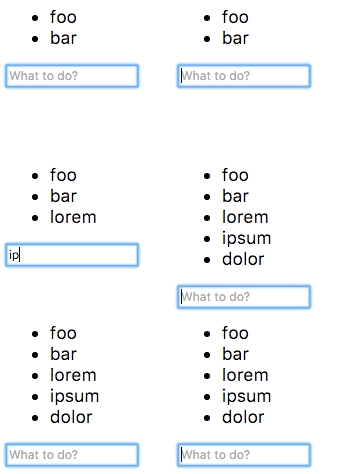
ใช้งานได้กับรหัสเพียงไม่กี่บรรทัด?
ตรวจสอบหน้าตัวอย่างสำหรับตัวอย่างที่ซับซ้อนกว่าเล็กน้อย
สำหรับคำแนะนำโดยละเอียดเพิ่มเติมเกี่ยวกับวิธีการทำงานของโครงการและวิธีการใช้งานโปรดตรวจสอบคู่มือผู้ใช้
MIT © Rafael Rinaldi
ซื้อมาให้ฉัน☕








