data components
Bypass already mounted components

웹 응용 프로그램을위한 작은 구성 요소 구조
이 프로젝트의 모든 후원자에게 감사합니다.
루카스 모타 |
→ 내 오픈 소스 작업을 후원합니다
$ npm install data-components --save 또는 dist/ 아래에 사는 미니스트 독립형 버전을 간단히 복사하여 붙여 넣을 수 있습니다.
웹 응용 프로그램을 건축 할 수있는 많은 옵션이 있지만 대부분은 종종 스파에서 작업하고 있다고 가정합니다. 그것만으로도 전혀 원하지 않는 많은 것들을 추가 할 것입니다. 데이터 바인딩, 사용자 정의 메시징 시스템 및 가상 DOM의 이름을 지정합니다.
때로는 규칙과 프로그래밍 패러다임에 대해 걱정할 필요없이 물건을 시작하는 간단한 것을 필요로합니다. 그것이이 도서관이 태어난 방식입니다.
가장 간단한 TODO 목록 앱을 구현합시다.
 <!-- Create our todo list element passing some initial values -->
< ul data-component =" todo " data-values =" foo,bar " > </ ul >

<!-- Let's use a input field to read the user input -->
< input data-component =" input " placeholder =" What to do? " >
좋아, 이제 우리는 마크 업을 마련 했으므로 응용 프로그램을 구현합시다.
 // Todo component
class Todo {
  constructor ( el , options ) {
    this . el = el ;
    // Read from initial values
    this . todos = options . values . split ( ',' ) ;
    this . render ( ) ;
  }

  // Add items to the list
  add ( todo ) {
    this . todos . push ( todo ) ;
    this . render ( ) ;
  }

  // Render the list to the DOM
  render ( ) {
    this . el . innerHTML = this . todos . map ( todo => `<li> ${ todo } </li>` ) . join ( '' ) ;
  }
}

// User input component
class Input {
  constructor ( el , options , sandbox ) {
    const todo = sandbox . get ( 'todo' ) ;

    // Submit value to "todo" component when hitting the enter key
    el . addEventListener ( 'keydown' , e => {
      if ( e . keyCode === 13 ) {
        todo . add ( el . value ) ;
        el . value = '' ;
        el . focus ( ) ;
      }
    } ) ;
  }
}

// Bootstrap components (UMD build exposes `components()`)
components ( {
  todo : Todo ,
  input : Input
} ) ; 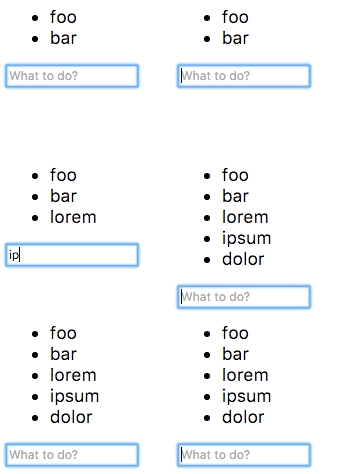
몇 줄의 코드로 작동합니까?
약간 더 복잡한 예는 데모 페이지를 확인하십시오.
프로젝트 작동 방식 및 사용 방법에 대한 자세한 내용은 사용자 안내서를 확인하십시오.
MIT © Rafael Rinaldi
나에게 ☕을 사십시오








