binlex
v1.1.1


 | Binlex-二进制遗传特质Lexer框架如果马尔德夫(Maldevs)认为他们的二进制文件是FUD,那么他们将遇到生存危机。 |
Binlex是一种恶意软件分析师和研究人员的工具,可从二进制文件中提取指令,基本块和功能,并将其组织成基因组,染色体,等位基因对和基因的结构化层次结构。 ?
这种层次分解使Binlex可以通过将其代码结构视为“ DNA指纹”来分析和比较恶意软件的二进制文件,从而使检测模式,相似性和样本之间的变化更加容易。
与依靠纯Python的工具不同,它可以缓慢?,Binlex是为了速度,简单和灵活性而设计的。它的命令行界面可帮助分析师搜索数百或数千个恶意软件样本的模式,节省时间⏳和资源?
对于开发人员, Binlex提供了Rust API和Python绑定,以构建具有最小许可限制的自定义检测工具。 ?
作为针对恶意软件的斗争的一部分, Binlex可以免费使用 - 只是从发布页面下载二进制文件。 ?
Binlex的最新版本提供了以下惊人功能!
| 特征 | 描述 |
|---|---|
| 平台 | - 窗户? -MacOS? - linux? |
| 格式 | - PE - 男子气概 - 精灵 |
| 体系结构 | -AMD64 -i386 -CIL |
| ?多线程 | - 线程安全拆卸器排队 - ?多线程工具可提高效率 |
| 可自定义的性能 | 切换功能打开/关闭以优化您的用例 |
| ? JSON字符串压缩 | 用JSON压缩保存内存 |
| ?相似性哈希 | - ? Minhash -TLSH - ? SHA256 |
| ?功能符号 | - 使用BLPDB , BLELFSYM或BLMACHOSYM或您自己的工具,将功能符号作为标准输入传递给Binlex作为标准输入 |
| ?标记 | 标记容易组织 |
| 通配符 | 非常适合生成Yara规则,现在可以通过niblables解决! |
| API | - ?锈API -Python API |
| ?机器学习功能 | - 标准化功能以保持一致性 - ?功能缩放器实用程序 - ?特质过滤 - ONNX样品培训 - ?样本分类 |
| 虚拟成像 | - 虚拟图像的有效映射缓存 - ?ch与ZFS / BTRF兼容 - 加快重复任务和过滤 - 闪电速度⚡ |
通过缓存虚拟图像, Binlex能够以更好的速度执行,从而使重复运行更快,更有效。
要构建Binlex,您需要生锈。
安装是Linux和MacOS上的直毛。
cargo build --release cd src/bindings/python/
virtualenv -p python3 venv/
source venv/bin/activate
pip install maturin[patchelf]
maturin develop
python
>> import binlex为了构建各种平台的软件包,请使用Makefile 。
make zst   # Make Arch Linux Package
make deb   # Make Debian Package
make wheel # Make Python Wheel结果软件包将在target/目录中。
安装IDA插件很容易安装,只需确保您在IDA的Python环境中安装了Python绑定即可。
现在,将Binlex插件的目录复制到插件目录。
mkdir -p ~ /.idapro/plugins/
cp -r scripts/plugins/ida/binlex/ ~ /.idapro/plugins/打开IDA后,应该向您迎接Binlex欢迎消息。
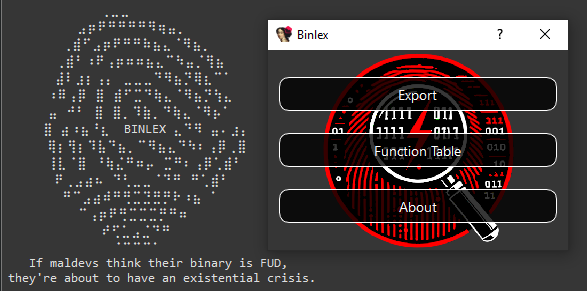
使用IDA插件,您拥有各种功能,可以帮助您进行Yara规则写作和相似性分析。
主菜单:
拆卸器上下文菜单:
复制模式和复制十六进制功能旨在帮助制定Yara规则,并且复制相似性哈希和扫描是为了寻找相似的数据。
要将一个数据库与另一个数据库进行比较,请使用导出功能导出JSON文件,然后单击Compare Functions ,该功能将在完成后填充表。
cargo doc您也可以打开文档。
cargo doc --open在Binlex中,使用遗传启发的术语的层次结构来描述和象征二进制代码的结构和特征。该术语反映了不同抽象与其遗传类比之间的关系:
基因组:表示要分析的每个对象,例如函数或块。它封装了所有信息,包括元数据,染色体和其他属性。
染色体:表示从块或函数提取的核心模式或序列。染色体充当蓝图,用于识别二进制的关键特征,而无需像通配符所示的记忆地址? ,其中一个通配符代表一个基因。
Ellelepair :由两个基因组成的染色体内的单元。等位基因对是染色体的基础,将基因结合到有意义的对。
Gene :最小的遗传信息单位,代表单个数据的ni(半字节)。
这些抽象之间的关系可视化如下:
 Genome (function / block)
 └── Chromosome (pattern / sequence)
      └── AllelePair (two genes / single byte / two nibbles)
           └── Gene (single nibble)
{
  "type" : " block " ,
  "architecture" : " amd64 " ,
  "address" : 6442934577 ,
  "next" : null ,
  "to" : [],
  "edges" : 0 ,
  "prologue" : false ,
  "conditional" : false ,
  "chromosome" : {
    "pattern" : " 4c8b47??498bc0 " ,
    "feature" : [ 4 , 12 , 8 , 11 , 4 , 7 , 4 , 9 , 8 , 11 , 12 , 0 ],
    "entropy" : 2.2516291673878226 ,
    "sha256" : " 1f227bf409b0d9fbc576e747de70139a48e42edec60a18fe1e6efdacb598f551 " ,
    "minhash" : " 09b8b1ad1142924519f601854444c6c904a3063942cda4da445721dd0703f290208f3e32451bf5d52741e381a13f12f9142b5de21828a00b2cf90cf77948aac4138443c60bf77ec31199247042694ebb2e4e14a41369eddc7d9f84351be34bcf61458425383a03a55f80cbad420bb6e638550c15876fd0c6208da7b50816847e62d72b2c13a896f4849aa6a36188be1d4a5333865eab570e3939fab1359cbd16758f36fa290164d0259f83c07333df535b2e38f148298db255ac05612cae04d60bb0dd810a91b80a7df9615381e9dc242969dd052691d044287ac2992f9092fa0a75d970100d48362f62b58f7f1d9ec594babdf52f58180c30f4cfca142e76bf " ,
    "tlsh" : null
  },
  "size" : 7 ,
  "bytes" : " 4c8b4708498bc0 " ,
  "functions" : {},
  "number_of_instructions" : 3 ,
  "entropy" : 2.5216406363433186 ,
  "sha256" : " 84d4485bfd833565fdf41be46c1a499c859f0a5f04c8c99ea9c34404729fd999 " ,
  "minhash" : " 20c995de6a15c8a524fa7e325a6e42b217b636ab03b00812732f877f4739eeee41d7dde92ceac73525e541f9091d8dc928f6425b84a6f44b3f01d17912ec6e8c6f913a760229f685088d2528447e40c768c06d680afe63cb219a1b77a097f679122804dd5a1b9d990aa2579e75f8ef201eeb20d5650da5660efa3a281983a37f28004f9f2a57af8f81728c7d1b02949609c7ad5a30125ff836d8cc3106f2531f306e679a11cabf992556802a3cb2a75a7fe3773e37e3d5ab107a23bf22754aee15a5f41056859b06120f86cb5d39071425855ec90628687741aa0402030d73e04bc60adb0bd2430560442c4309ae258517fc1605438c95485ac4c8621026a1bb " ,
  "tlsh" : null ,
  "contiguous" : true ,
  "attributes" : [
    {
      "type" : " tag " ,
      "value" : " corpus:malware "
    },
    {
      "type" : " tag " ,
      "value" : " malware:lummastealer "
    },
    {
      "entropy" : 6.55061550644311 ,
      "sha256" : " ec1426109420445df8e9799ac21a4c13364dc12229fb16197e428803bece1140 " ,
      "size" : 725696 ,
      "tlsh" : " T17AF48C12AF990595E9BBC23DD1974637FAB2B445232047CF426489BD0E1BBE4B73E381 " ,
      "type" : " file "
    }
  ]
}
给定这个JSON基因组示例。
"4c8b47??498bc0"所描述的"4c"或"8b""4"或"c"使用Binlex API可以突变这些染色体,其等位基因对和基因促进遗传编程。
在这种情况下的遗传编程可以具有多种良好性,包括但不限于:
最简单的入门方法是使用命令行,利用jq等JSON过滤工具。
以下命令拆卸sample.dll ,带有16线程,相关性状是JSON对象,每行1个,并将其管道输送到jq中以进行过滤和美化。
要查看使用Binlex命令行使用-h或--help时可用的选项。
A Binary Pattern Lexer

Version: 2.0.0

Usage: binlex [OPTIONS] --input < INPUT >

Options:
  -i, --input < INPUT >
  -o, --output < OUTPUT >
  -a, --architecture < ARCHITECTURE >      [amd64, i386, cil]
  -c, --config < CONFIG >
  -t, --threads < THREADS >
      --tags < TAGS >
      --minimal
  -d, --debug
      --enable-instructions
      --enable-block-instructions
      --disable-hashing
      --disable-disassembler-sweep
      --disable-heuristics
      --enable-mmap-cache
      --mmap-directory < MMAP_DIRECTORY >
  -h, --help                             Print help
  -V, --version                          Print version

Author: @c3rb3ru5d3d53c
下面提供了使用命令行的简单示例。
binlex -i sample.dll --threads 16 | jq请注意, Binlex将检测您的文件格式,目前支持PE , ELF和MACHO二进制格式。
首次执行Binlex后,它将将配置文件存储在binlex/binlex.toml中的配置目录中。
此Binlex根据您的操作系统找到默认配置目录,如下表所示的配置。
| 操作系统 | 环境变量 | 示例Binlex配置路径 |
|---|---|---|
| Linux | $XDG_CONFIG_HOME或$HOME/.config | /home/alice/.config/binlex/binlex.toml |
| macos | $HOME/Library/Application Support | /Users/Alice/Library/Application Support/binlex/binlex.toml |
| 视窗 | {FOLDERID_RoamingAppData} | C:UsersAliceAppDataRoamingbinlexbinlex.toml |
下面提供了binlex的默认配置名称binlex.toml 。
[ general ]
threads = 16
minimal = false
debug = false

[ formats . file . hashing . sha256 ]
enabled = true

[ formats . file . hashing . tlsh ]
enabled = true
minimum_byte_size = 50
threshold = 200

[ formats . file . hashing . minhash ]
enabled = true
number_of_hashes = 64
shingle_size = 4
maximum_byte_size_enabled = false
maximum_byte_size = 50
seed = 0
threshold = 0.75

[ formats . file . heuristics . features ]
enabled = true

[ formats . file . heuristics . entropy ]
enabled = true

[ instructions ]
enabled = false

[ instructions . hashing . sha256 ]
enabled = true

[ instructions . hashing . tlsh ]
enabled = true
minimum_byte_size = 50
threshold = 200

[ instructions . hashing . minhash ]
enabled = true
number_of_hashes = 64
shingle_size = 4
maximum_byte_size_enabled = false
maximum_byte_size = 50
seed = 0
threshold = 0.75

[ instructions . heuristics . features ]
enabled = true

[ instructions . heuristics . entropy ]
enabled = true

[ blocks ]
enabled = true

[ blocks . instructions ]
enabled = false

[ blocks . hashing . sha256 ]
enabled = true

[ blocks . hashing . tlsh ]
enabled = true
minimum_byte_size = 50
threshold = 200

[ blocks . hashing . minhash ]
enabled = true
number_of_hashes = 64
shingle_size = 4
maximum_byte_size_enabled = false
maximum_byte_size = 50
seed = 0
threshold = 0.75

[ blocks . heuristics . features ]
enabled = true

[ blocks . heuristics . entropy ]
enabled = true

[ functions ]
enabled = true

[ functions . blocks ]
enabled = true

[ functions . hashing . sha256 ]
enabled = true

[ functions . hashing . tlsh ]
enabled = true
minimum_byte_size = 50
threshold = 200

[ functions . hashing . minhash ]
enabled = true
number_of_hashes = 64
shingle_size = 4
maximum_byte_size_enabled = false
maximum_byte_size = 50
seed = 0
threshold = 0.75

[ functions . heuristics . features ]
enabled = true

[ functions . heuristics . entropy ]
enabled = true

[ chromosomes . hashing . sha256 ]
enabled = true

[ chromosomes . hashing . tlsh ]
enabled = true
minimum_byte_size = 50
threshold = 200

[ chromosomes . hashing . minhash ]
enabled = true
number_of_hashes = 64
shingle_size = 4
maximum_byte_size_enabled = false
maximum_byte_size = 50
seed = 0
threshold = 0.75

[ chromosomes . heuristics . features ]
enabled = true

[ chromosomes . heuristics . entropy ]
enabled = true

[ chromosomes . homologues ]
enabled = true
maximum = 4

[ mmap ]
directory = " /tmp/binlex "

[ mmap . cache ]
enabled = false

[ disassembler . sweep ]
enabled = true
如果命令行选项不够,则配置文件提供了所有选项的最精细控制。
如果您想覆盖默认配置文件并指定另一个配置文件,请使用命令行参数。
binlex -c config.toml -i sample.dll运行Binlex时,它会使用配置文件,并在使用相应的命令行参数时覆盖任何设置。
这是制定Yara规则的一般工作流程,我们可以从给定的样本中获得10个独特的通配符Yara十六进制字符串。
binlex -i sample.dll --threads 16 | jq -r ' select(.size >= 16 and .size <= 32 and .chromosome.pattern != null) | .chromosome.pattern ' | sort | uniq | head -10
016b ?? 8b4b ?? 8bc74c6bd858433b4c0b2c0f83c5 ??????
01835404 ???? c6836a0400 ???? 837e04 ??
03c04c8d05 ???????? 4863c8420fb60401460fb64401018942 ?? 85c074 ??
03c38bf0488d140033c9ff15 ???????? 488bd84885c075 ??
03c6488d55 ?? 41ffc58945a ? 41b804000000418bcce8b8fd01 ?? eb ??
03c6488d55 ?? 41ffc58945a ? 41b804000000418bcce8e3fb01 ?? eb ??
03f7488d05 ???????? 4883c310483bd87c ??
03fb4c8bc6498bd7498bcc448d0c7d04000000e89409 ???? 8bd84885f6
03fe448bc6488bd3418bcee8d8e501 ?? 85ed
03fe897c24 ?? 397c24 ?? 0f867301 ????为了进一步,您可以通过blyara工具将其运行以进行快速的Yara签名。
binlex -i sample.dll --threads 16 | jq -r ' select(.size >= 16 and .size <= 32 and .chromosome.pattern != null) | .chromosome.pattern ' | sort | uniq | head -10 | blyara -n example
rule example {
    strings:
        $trait_0 = {016b ?? 8b4b ?? 8bc74c6bd858433b4c0b2c0f83c5 ?????? }
        $trait_1 = {01835404 ???? c6836a0400 ???? 837e04 ?? }
        $trait_2 = {03c04c8d05 ???????? 4863c8420fb60401460fb64401018942 ?? 85c074 ?? }
        $trait_3 = {03c38bf0488d140033c9ff15 ???????? 488bd84885c075 ?? }
        $trait_4 = {03c6488d55 ?? 41ffc58945a ? 41b804000000418bcce8b8fd01 ?? eb ?? }
        $trait_5 = {03c6488d55 ?? 41ffc58945a ? 41b804000000418bcce8e3fb01 ?? eb ?? }
        $trait_6 = {03f7488d05 ???????? 4883c310483bd87c ?? }
        $trait_7 = {03fb4c8bc6498bd7498bcc448d0c7d04000000e89409 ???? 8bd84885f6}
        $trait_8 = {03fe448bc6488bd3418bcee8d8e501 ?? 85ed}
        $trait_9 = {03fe897c24 ?? 397c24 ?? 0f867301 ???? }
    condition:
1 of them为了更好的结果,如果您使用Binlex IDA插件导出了基因组,或者通过其他方式导出了启动函数的启动前缀(例如mw:: ,用于malware的功能,这很常见。
cat dump.json | jq -r ' select(.type == "function" and .size > 32 and (.attributes[] | .type == "symbol" and (.name | startswith("mw::")))) | .blocks[] | select(.size > 32) | .chromosome.pattern ' | blyara -n example要与ghidra一起使用binlex ,请使用脚本目录中的blghidra/blghidra.py脚本。
为了利用Ghidra项目的功能名称和虚拟地址,并将其提供给Binlex ,请使用Ghidra install install Directory中的analyzeHeadless脚本。
./analyzeHeadless
  < project-directory >
  < project-name >
  -process sample.dll
  -noanalysis
  -postscript blghidra.py 2> /dev/null |  grep -P " ^{ " type " | binlex -i sample.dll
请注意, analyzeHeadless邮件向stdout和其他日志输出到stderr ,这与其他命令行实用程序无用。
因此,要收集脚本的输出,必须用2>/dev/null | grep -P "^{"type" 。
为了利用rizin功能检测和功能命名在Binlex中的功能,请使用aflj在项目上运行rizin ,以JSON格式列出功能。
然后将此输出输送到blrizin ,该输出将rizin JSON解析为格式的binlex undestands。
此外,您可以将其与其他工具(例如blpdb结合使用,以解析PDB符号以获取功能地址和名称。
然后,您可以像通常使用jq一样进行任何解析,在此示例中,我们计算Binlex处理的功能,以查看我们是否正在检测到更多功能。
rizin -c ' aaa;aflj; ' -q sample.dll |
  blrizin |
  blpdb -i sample.pdb |
  binlex -i sample.dll |
jq ' select(.type == "function") | .address ' | wc -l注意:目前, blrizin也与使用blrizin的radare2输出兼容。
如果您想进行一些机器学习,则可以获得代表nibbles的功能,而无需像这样的binlex。
binlex -i sample.dll --threads 16 | jq -r -c ' select(.size >= 16 and .size <= 32 and .signature.feature != null)| .signature.feature ' | head -10
[4,9,8,11,12,0,4,1,11,9,0,3,0,0,1,15,0,0,4,5,3,3,12,0,8,5,13,2,4,8,8,11,13,0,4,1,0,15,9,5,12,0,4,8,15,15,2,5]
[4,4,8,11,5,1,4,5,3,3,12,0,3,3,12,0,4,8,8,3,12,1,3,0,4,1,0,15,10,3,12,2]
[4,8,8,3,14,12,4,12,8,11,12,10,4,4,8,9,4,4,2,4,11,2,0,1,4,4,0,15,11,7,12,1,8,10,12,10,14,8,5,11,4,8,8,3,12,4,12,3]
[4,8,8,3,14,12,4,4,8,9,4,4,2,4,4,12,8,11,12,10,4,4,0,15,11,7,12,1,11,2,0,1,3,3,12,9,14,8,0,11,4,8,8,3,12,4,12,3]
[4,0,5,3,4,8,8,3,14,12,15,15,1,5,8,11,12,8,8,11,13,8,15,15,1,5,8,11,12,3,4,8,8,3,12,4,5,11,12,3]
[11,9,2,0,0,3,15,14,7,15,4,8,8,11,8,11,0,4,2,5,4,8,0,15,10,15,12,1,4,8,12,1,14,8,1,8,12,3]
[8,11,0,12,2,5,11,8,2,0,0,3,15,14,7,15,4,8,12,1,14,1,2,0,4,8,8,11,4,8,12,1,14,0,0,8,4,8,15,7,14,1,4,8,8,11,12,2,12,3]
[4,8,8,11,0,5,4,8,8,5,12,0,7,5,12,3,4,8,15,15,2,5]
[4,8,8,11,0,13,3,3,12,0,3,8,8,1,11,0,0,8,0,15,9,5,12,0,12,3]
[4,8,8,11,0,5,4,8,8,5,12,0,7,5,12,3,4,8,15,15,2,5]
如果您想通过将其标准化为0到1浮点值来为您的机器学习模型进行完善,那么binlex binlex可以使用blscaler工具覆盖。
binlex -i sample.dll --threads 16 | jq -r -c ' select(.size >= 16 and .size <= 32 and .signature.feature != null) ' | blscaler --threads 16 | jq -c -r ' .signature.feature ' | head -1
[0.26666666666666666,0.6,0.5333333333333333,0.7333333333333333,0.8,0.0,0.26666666666666666,0.06666666666666667,0.7333333333333333,0.6,0.0,0.2,0.0,0.0,0.06666666666666667,1.0,0.0,0.0,0.26666666666666666,0.3333333333333333,0.2,0.2,0.8,0.0,0.5333333333333333,0.3333333333333333,0.8666666666666667,0.13333333333333333,0.26666666666666666,0.5333333333333333,0.5333333333333333,0.7333333333333333,0.8666666666666667,0.0,0.26666666666666666,0.06666666666666667,0.0,1.0,0.6,0.3333333333333333,0.8,0.0,0.26666666666666666,0.5333333333333333,1.0,1.0,0.13333333333333333,0.3333333333333333]利用FileMapping的强大功能来减少内存使用量,但仍然可以从虚拟图像中获得良好的作用。
 # Install BTRFS
sudo pacman -S btrfs-progs compsize
# Enable the Kernel Module on Boot
echo " btrfs " | sudo tee /etc/modules-load.d/btrfs.conf
# Reboot
reboot
# Create Virtual Image Cache Storage Pool
dd if=/dev/zero of=btrfs.img bs=1M count=2048
# Make it BTRFS
mkfs.btrfs btrfs.img
# Make a Cache Directory in /tmp/
mkdir -p /tmp/binlex/
# Mount the Cache (Multiple Compression Options Available)
sudo mount -o compress=lzo btrfs.img /tmp/binlex/
# Run Binlex
binlex -i sample.dll --threads 16 --enable-file-mapping --file-mapping-directory /tmp/binlex/ --enable-file-mapping-cache
sudo compsize ec1426109420445df8e9799ac21a4c13364dc12229fb16197e428803bece1140
# Virtual Image 6GB vs Stored Size of 192MB
# Processed 1 file, 49156 regular extents (49156 refs), 0 inline.
# Type       Perc     Disk Usage   Uncompressed Referenced
# TOTAL        3%      192M         6.0G         6.0G
# none       100%      384K         384K         384K
# lzo 3% 192M 6.0G 6.0G这可以将其设置为在磁盘上,或者如果/tmp/ Directory映射到RAM。
当映射到RAM时,我们将利用虚拟图像拆卸,但没有额外的RAM惩罚,而重复任务的处理速度几乎是一倍。
由于btrfs在内核中访问了对映射文件的访问,因此我们能够像任何映射的文件一样访问它,但有了压缩的好处。
为了节省自己的时间,如果您选择此选项,请在启动上进行btrfs池的安装,并设置Binlex配置文件,以更喜欢安装的池目录中的虚拟图像缓存。这种方法可确保您不必每次都依赖命令行参数。
Binlex项目的质体专注于安全性,简单性,速度和可扩展性。
其中的一部分为开发人员提供了自己的检测和狩猎逻辑。
目前, Binlex提供了Rust和Python绑定。
生锈的API使开始很容易开始
 use std :: process ;
use binlex :: Config ;
use binlex :: formats :: PE ;
use binlex :: disassemblers :: capstone :: Disassembler ;
use binlex :: controlflow :: Graph ;

// Get Default Configuration
let mut config = Config ( ) ;

// Use 16 Threads for Multi-Threaded Operations
config . general . threads = 16 ;

// Read PE File
let pe = PE . new ( "./sample.dll" , config )
  . unwrap_or_else ( |error| {
    eprintln ! ( "{}" , error ) ;
    process :: exit ( 1 ) ;
  } ) ;

// To check if DotNet PE use pe.is_dotnet()

// Get Memory Mapped File
let mapped_file = pe . image ( )
  . unwrap_or_else ( |error| {
    eprintln ! ( "{}" , error ) ;
    process :: exit ( 1 )
  } ) ;

// Get Mapped File Virtual Image
let image = mapped_file
  . mmap ( )
  . unwrap_or_else ( |error| {
    eprintln ! ( "{}" , error ) ;
    process :: exit ( 1 ) ;
  } ) ;

// Create Disassembler
let disassembler = Disassembler ( pe . architecture ( ) , & image , pe . executable_virtual_address_ranges ( ) , config )
  . unwrap_or_else ( |error| {
    eprintln ! ( "{}" , error ) ;
    process :: exit ( 1 ) ;
  } ) ;

// Create Control Flow Graph
let cfg = Graph ( pe . architecture ( ) , config ) ;

// Disassemble Control Flow
disassembler . disassemble_controlflow ( pe . entrypoint_virtual_addresses ( ) , & mut cfg ) ; use std :: process ;
use binlex :: Config ;
use binlex :: formats :: PE ;
use binlex :: disassemblers :: custom :: cil :: Disassembler ;
use binlex :: controlflow :: Graph ;
// Get Default Configuration
let mut config = Config ( ) ;
// Use 16 Threads for Multi-Threaded Operations
config . general . threads = 16 ;
// Read PE File
let pe = PE . new ( "./sample.exe" , config )
. unwrap_or_else ( |error| {
eprintln ! ( "{}" , error ) ;
process :: exit ( 1 ) ;
} ) ;
// To check if DotNet PE use pe.is_dotnet()
// Get Memory Mapped File
let mapped_file = pe . image ( )
. unwrap_or_else ( |error| {
eprintln ! ( "{}" , error ) ;
process :: exit ( 1 )
} ) ;
// Get Mapped File Virtual Image
let image = mapped_file
. mmap ( )
. unwrap_or_else ( |error| {
eprintln ! ( "{}" , error ) ;
process :: exit ( 1 ) ;
} ) ;
// Create Disassembler
let disassembler = Disassembler ( pe . architecture ( ) , & image , pe . dotnet_metadata_token_virtual_addresses ( ) , pe . dotnet_executable_virtual_address_ranges ( ) , config )
. unwrap_or_else ( |error| {
eprintln ! ( "{}" , error ) ;
process :: exit ( 1 ) ;
} ) ;
// Create Control Flow Graph
let cfg = Graph ( pe . architecture ( ) , config ) ;
// Disassemble Control Flow
disassembler . disassemble_controlflow ( pe . dotnet_entrypoint_virtual_addresses ( ) , & mut cfg ) ; use std :: process ;
use binlex :: Config ;
use binlex :: formats :: ELF ;
use binlex :: disassemblers :: custom :: cil :: Disassembler ;
use binlex :: controlflow :: Graph ;
// Get Default Configuration
let mut config = Config ( ) ;
// Use 16 Threads for Multi-Threaded Operations
config . general . threads = 16 ;
// Read PE File
let elf = ELF . new ( "./sample.exe" , config )
. unwrap_or_else ( |error| {
eprintln ! ( "{}" , error ) ;
process :: exit ( 1 ) ;
} ) ;
// Get Memory Mapped File
let mapped_file = elf . image ( )
. unwrap_or_else ( |error| {
eprintln ! ( "{}" , error ) ;
process :: exit ( 1 )
} ) ;
// Get Mapped File Virtual Image
let image = mapped_file
. mmap ( )
. unwrap_or_else ( |error| {
eprintln ! ( "{}" , error ) ;
process :: exit ( 1 ) ;
} ) ;
// Create Disassembler
let disassembler = Disassembler ( elf . architecture ( ) , & image , elf . executable_virtual_address_ranges ( ) , config )
. unwrap_or_else ( |error| {
eprintln ! ( "{}" , error ) ;
process :: exit ( 1 ) ;
} ) ;
// Create Control Flow Graph
let cfg = Graph ( elf . architecture ( ) , config ) ;
// Disassemble Control Flow
disassembler . disassemble_controlflow ( elf . entrypoint_virtual_addresses ( ) , & mut cfg ) ; use std :: process ;
use binlex :: Config ;
use binlex :: formats :: MACHO ;
use binlex :: disassemblers :: custom :: cil :: Disassembler ;
use binlex :: controlflow :: Graph ;
// Get Default Configuration
let mut config = Config ( ) ;
// Use 16 Threads for Multi-Threaded Operations
config . general . threads = 16 ;
// Read PE File
let macho = MACHO . new ( "./sample.app" , config )
. unwrap_or_else ( |error| {
eprintln ! ( "{}" , error ) ;
process :: exit ( 1 ) ;
} ) ;
// Iterate the MACHO Fat Binary Slices
for index in macho . number_of_slices ( ) {
// Get Memory Mapped File
let mapped_file = macho . image ( index )
. unwrap_or_else ( |error| {
eprintln ! ( "{}" , error ) ;
process :: exit ( 1 )
} ) ;
// Get Mapped File Virtual Image
let image = mapped_file
. mmap ( )
. unwrap_or_else ( |error| {
eprintln ! ( "{}" , error ) ;
process :: exit ( 1 ) ;
} ) ;
// Create Disassembler
let disassembler = Disassembler ( macho . architecture ( index ) , & image , macho . executable_virtual_address_ranges ( index ) , config )
. unwrap_or_else ( |error| {
eprintln ! ( "{}" , error ) ;
process :: exit ( 1 ) ;
} ) ;
// Create Control Flow Graph
let cfg = Graph ( macho . architecture ( index ) , config ) ;
// Disassemble Control Flow
disassembler . disassemble_controlflow ( macho . entrypoints ( index ) , & mut cfg ) ;
} use binlex :: controlflow :: Instruction ;
use binlex :: controlflow :: Block ;
use binlex :: controlflow :: Function ;
for address in cfg . instructions . valid_addresses ( ) {
// Read Instruction from Control Flow
instruction = Instruction ( address , & cfg ) ;
// Print Instruction from Control Flow
instruction . print ( ) ;
}
for address in cfg . blocks . valid_addresses ( ) {
// Read Block from Control Flow
block = Block ( address , & cfg ) ;
// Print Block from Control Flow
block . print ( ) ;
}
for address in cfg . functions . valid_addresses ( ) {
// Read Function from Control Flow
function = Function ( address , & cfg ) ;
// Print Function from Control Flow
function . print ( ) ;
}Binlex Python API现在旨在抽象拆卸器和控制流图。
要拆卸PE内存映射的图像,请使用以下示例。
examples/python/目录中还有更多示例。
 from binlex . formats import PE
from binlex . disassemblers . capstone import Disassembler
from binlex . controlflow import Graph
from binlex import Config

# Get Default Configuration
config = Config ()

# Use 16 Threads for Multi-Threaded Operations
config . general . threads = 16

# Open the PE File
pe = PE ( './sample.exe' , config )

# To check if a DotNet PE use ps.is_dotnet()

# Get the Memory Mapped File
mapped_file = pe . image ()

# Get the Memory Map
image = mapped_file . as_memoryview ()

# Create Disassembler on Mapped PE Image and PE Architecture
disassembler = Disassembler ( pe . architecture (), image , pe . executable_virtual_address_ranges (), config )

# Create the Controlflow Graph
cfg = Graph ( pe . architecture (), config )

# Disassemble the PE Image Entrypoints Recursively
disassembler . disassemble_controlflow ( pe . entrypoint_virtual_addresses (), cfg ) from binlex . formats import PE
from binlex . disassemblers . custom . cil import Disassembler
from binlex . controlflow import Graph
from binlex import Config
# Get Default Configuration
config = Config ()
# Use 16 Threads for Multi-Threaded Operations
config . general . threads = 16
# Open the PE File
pe = PE ( './sample.exe' , config )
# To check if a DotNet PE use ps.is_dotnet()
# Get the Memory Mapped File
mapped_file = pe . image ()
# Get the Memory Map
image = mapped_file . as_memoryview ()
# Create Disassembler on Mapped PE Image and PE Architecture
disassembler = Disassembler ( pe . architecture (), image , pe . dotnet_metadata_token_virtual_addresses (), pe . dotnet_executable_virtual_address_ranges (), config )
# Create the Controlflow Graph
cfg = Graph ( pe . architecture (), config )
# Disassemble the PE Image Entrypoints Recursively
disassembler . disassemble_controlflow ( pe . dotnet_entrypoint_virtual_addresses (), cfg ) from binlex . formats import ELF
from binlex . disassemblers . capstone import Disassembler
from binlex . controlflow import Graph
from binlex import Config
# Get Default Configuration
config = Config ()
# Use 16 Threads for Multi-Threaded Operations
config . general . threads = 16
# Open the ELF File
elf = ELF ( './sample.so' , config )
# Get the Memory Mapped File
mapped_file = pe . image ()
# Get the Memory Map
image = mapped_file . as_memoryview ()
# Create Disassembler on Mapped ELF Image and ELF Architecture
disassembler = Disassembler ( elf . architecture (), image , elf . executable_virtual_address_ranges (), config )
# Create the Controlflow Graph
cfg = Graph ( elf . architecture (), config )
# Disassemble the PE Image Entrypoints Recursively
disassembler . disassemble_controlflow ( elf . entrypoint_virtual_addresses (), cfg ) from binlex . formats import MACHO
from binlex . disassemblers . capstone import Disassembler
from binlex . controlflow import Graph
from binlex import Config
# Get Default Configuration
config = Config ()
# Use 16 Threads for Multi-Threaded Operations
config . general . threads = 16
# Open the ELF File
macho = MACHO ( './sample.app' , config )
# MachO Fat Binary Can Support Multiple Architectures
for index in macho . number_of_slices ():
# Get the Memory Mapped File
mapped_file = macho . image ( index )
# Get the Memory Map
image = mapped_file . as_memoryview ()
# Create Disassembler on Mapped MACHO Image and MACHO Architecture
disassembler = Disassembler ( macho . architecture ( index ), image , macho . executable_virtual_address_ranges ( index ), config )
# Create the Controlflow Graph
cfg = Graph ( macho . architecture ( index ), config )
# Disassemble the MACHO Image Entrypoints Recursively
disassembler . disassemble_controlflow ( macho . entrypoints ( index ), cfg )有时,可能会解析生成的控制流图。
在这种情况下,您可以使用以下技术。
 from binlex . controlflow import Instruction
from binlex . controlflow import Block
from binlex . controlflow import Function

# Iterate Valid Instructions
for address in cfg . instructions . valid_addresses ():
  # Read Instruction from Control Flow
  instruction = Instruction ( address , cfg )
  # Print Instruction from Control Flow
  instruction . print ()

# Iterate Valid Blocks
for address in cfg . blocks . valid_addresses ():
  # Read Block from Control Flow
  block = Block ( address , cfg )
  # Print Block from Control Flow
  block . print ()

# Iterate Valid Functions
for address in cfg . functions . valid_addresses ():
  # Read Function from Control Flow
  function = Function ( address , cfg )
  # Print Function from Control Flow
function . print ()您可以更直接地访问指令,块和功能,而不是解析。
 for instruction in cfg . instructions ():
  instruction . print ()

for block in cfg . blocks ():
  block . print ()

for function in cfg . functions ():
function . print ()也可以迭代函数到块,指令,等位基因对,再到基因。
这代表从最高水平的抽象到最低的抽象。
 for function in cfg . functions ():
    for block in function . blocks ():
        for instruction in block . instructions ():
            for allelepair in instruction . chromosome (). allelepairs ():
                for gene in allelepair . genes ():
print ( gene )您可以在Binlex中使用的最强大的工具之一是使用相似性哈希比较功能,块和说明。
进行这些比较就像调用compare方法一样简单。
 for lhs in lhs_cfg . functions ():
  for rhs in rhs_cfg . functions ():
    similarity = lhs . compare ( rhs )
    similarity . print ()

for lhs in lhs_cfg . blocks ():
  for rhs in rhs_cfg . blocks ():
    similarity = lhs . compare ( rhs )
    similarity . print ()

for lhs in lhs_cfg . instructions ():
  for rhs in rhs_cfg . instructions ():
    similarity = lhs . compare ( rhs )
    similarity . print ()
如果您的配置启用了任何支持的散列算法,则任何支持的相似性哈希算法都将被计算。
尽管它可能具有挑战性,但Binlex支持使用其自己的算法对非连续函数进行相似性分析,以找到最佳的相似性匹配。
必须至少有75%或更多的非连续函数数据的数据来产生相似性哈希。
每个指令,块和功能或基因组都有一个相关的染色体,可以通过API访问。
您可以遵循这些抽象及等位基因对及其各自的基因。
 # Iterate Block Chromosome
chromosome = block . chromosome ()
for allelepair in chromosome . allelepairs ():
  for gene in allelepair . genes ()
    gene . print ()

# Iterate Block Chromosome
chromosome = function . chromosome ()
for allelepair in chromosome . allelepairs ():
  for gene in allelepair . genes ()
    gene . print ()

# Iterate Block Chromosome
chromosome = function . chromosome ()
for allelepair in chromosome . allelepairs ():
  for gene in allelepair . genes ()
gene . print ()如果您想执行遗传编程任务,您还可以突变染色体,小说和基因,并跟踪自己的突变数量。
 chromosome = block . chromosome ()
chromosome . mutate ( 'deadbe?f' )
chromosome . number_of_mutations ()
chromosome . print ()

for allelepair in chromosome . allelepairs ():
  allelepair . mutate ( 'dead' )
  allelepair . number_of_mutations ()
  allelepair . print ()
  for gene in allelepair . genes ():
    gene . mutate ( 'd' )
    gene . number_of_mutations ()
    gene . print ()
这有助于使用您可以使用遗传算法来用于用户酶的遗传算法。
如果您在期刊出版物中使用Binlex ,或者是开源AI模型,请使用以下引用。
 @misc { binlex ,
  author = { c3rb3ru5d3d53c } ,
  title = { binlex: A Binary Genetic Trait Lexer Framework } ,
  year = { 2024 } ,
  note = { Available at url{https://github.com/c3rb3ru5d3d53c/binlex-rs} }
}如果使用Binlex是用于公司,个人目的或生成非开源AI模型的输出的使用,则无需引用。
例如,如果您使用Binlex创建Yara规则,则无需引用。
这确保了Binlex保持相关性,但也确保了允许的公司和个人用途。







