binlex
v1.1.1


 | BINLEX- 이진 유전자 특성 렉서 프레임 워크 Maldevs가 그들의 이진이 FUD라고 생각한다면, 그들은 실존 위기를 겪을 것입니다. |
Binlex는 이진 파일에서 지침 , 기본 블록 및 기능을 추출하여 게놈 , 염색체 , 대립 유전자 쌍 및 유전자 의 구조화 된 계층으로 구성하는 맬웨어 분석가 및 연구원을위한 도구입니다. ??
이 계층 적 고장을 통해 Binlex는 코드 구조를 "DNA 지문"과 같은 "DNA 지문"과 같이 처리하여 맬웨어 바이너리를 분석하고 비교할 수있어 샘플의 패턴, 유사성 및 변형을 더 쉽게 감지 할 수 있습니다.
Binlex는 속도가 느려질 수있는 순수한 파이썬 에 의존하는 도구와 달리 속도, 단순성 및 유연성을 위해 설계되었습니다. 명령 줄 인터페이스 는 분석가가 수백 또는 수천 개의 맬웨어 샘플 의 패턴을 검색하여 시간 과 리소스를 절약 할 수 있도록 도와줍니다.
개발자의 경우 Binlex는 Rust API 및 Python 바인딩을 제공하여 라이센스 제한을 최소화하는 사용자 정의 감지 도구를 구축합니다. ?
맬웨어와의 싸움의 일환으로 Binlex는 무료로 사용할 수 있습니다. 릴리스 페이지에서 Binaries를 다운로드하십시오 . ?
Binlex 의 최신 버전은 다음과 같은 놀라운 기능을 제공합니다!
| 특징 | 설명 |
|---|---|
| 플랫폼 | - 창? -Macos? -Linux? |
| 형식 | -PE - 사나이 - 엘프 |
| 아키텍처 | -AMD64 -I386 - CIL |
| ? 멀티 스레딩 | - 스레드- 안전 분리기 큐잉 -? 최대 효율을위한 다중 스레드 툴링 |
| 사용자 정의 가능한 성능 | 사용 케이스를 최적화하기 위해 기능을 켜고 켜고 토글합니다 |
| ? JSON 문자열 압축 | JSON 압축으로 메모리를 저장하십시오 |
| ? 유사성 해싱 | -? 민 하쉬 -TLSH -? SHA256 |
| ? 기능 기호 | - BLPDB , Blelfsym 또는 Blmachosym 또는 자신의 툴링을 사용하여 표준 입력으로서 Binlex 로 기능 기호를 전달합니다. |
| ? 슬 태깅 | 쉬운 조직을위한 태깅 |
| 와일드 카드 | 야라 규칙을 생성하고 이제는 니블의 해결에 적합합니다! |
| API | -? 녹 API -Python API |
| ? 기계 학습 기능 | - 일관성을위한 정규화 된 기능 -? 특징 스케일러 유틸리티 -? 특성 필터링 -ONNX 샘플 훈련 -? 샘플 분류 |
| 가상 이미징 | - 가상 이미지의 효율적인 매핑 캐시 - ZFS / BTRFS와 호환됩니다 - 반복적 인 작업과 필터링 속도를 높입니다 - 가벼운 속도 ⚡ |
가상 이미지를 캐싱함으로써 Binlex는 더 나은 속도로 수행 할 수 있으므로 반복 실행이 더 빠르고 효율적입니다.
Binlex를 만들려면 녹이 필요합니다.
Linux 및 MacOS에서 설치는 직선적입니다.
cargo build --release cd src/bindings/python/
virtualenv -p python3 venv/
source venv/bin/activate
pip install maturin[patchelf]
maturin develop
python
>> import binlex 다양한 플랫폼 용 패키지를 만들려면 Makefile 사용하십시오.
make zst   # Make Arch Linux Package
make deb   # Make Debian Package
make wheel # Make Python Wheel
결과 패키지는 target/ 디렉토리에 있습니다.
IDA 플러그인을 설치하는 것은 쉽게 설치할 수 있습니다. IDA 용 Python 환경에 Python 바인딩을 설치했는지 확인하십시오.
이제 Binlex 플러그인의 디렉토리를 플러그인 디렉토리로 복사하십시오.
mkdir -p ~ /.idapro/plugins/
cp -r scripts/plugins/ida/binlex/ ~ /.idapro/plugins/
IDA를 열면 Binlex Welcome 메시지를 맞이해야합니다.
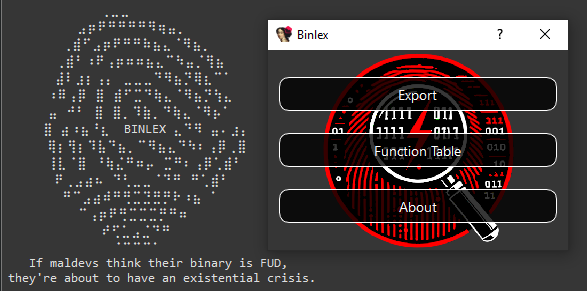
IDA 플러그인을 사용하면 Yara Rule 작성 및 유사성 분석에 도움이되는 다양한 기능이 있습니다.
메인 메뉴 :
Disassembler Context 메뉴 :
카피 패턴 및 사본 16 진수 기능은 Yara 규칙에 도움을주기위한 것이며 유사성 해시 및 스캔은 유사한 데이터를 사냥하기위한 것입니다.
한 데이터베이스를 다른 데이터베이스와 비교하려면 내보내기 기능을 사용하여 JSON 파일을 내보내면 Compare Functions 클릭하면 완료되면 테이블이 채워집니다.
cargo doc문서를 열 수도 있습니다.
cargo doc --openBinlex 에서, 유전자 영감을받은 용어의 계층 구조는 이진 코드의 구조와 특성을 설명하고 상징하는 데 사용됩니다. 이 용어는 다른 추상화와 유전 적 유사성 사이의 관계를 반영합니다.
게놈 : 함수 또는 블록과 같은 분석중인 각 물체를 나타냅니다. 메타 데이터, 염색체 및 기타 속성을 포함한 모든 정보를 캡슐화합니다.
염색체 : 블록 또는 기능에서 추출한 핵심 패턴 또는 서열을 나타냅니다. 염색체는 와일드 카드로 표시된 바와 같이 메모리 주소가없는 이진의 주요 특성을 식별하기위한 청사진 역할을합니다 ? 여기서 단일 와일드 카드는 단일 유전자를 나타냅니다.
대립 유전자 : 두 유전자 로 구성된 염색체 내의 단위. 대립 유전자 쌍은 염색체의 빌딩 블록으로, 유전자를 의미있는 쌍으로 결합합니다.
유전자 : 단일 니블 데이터 (반 바이트)를 나타내는 가장 작은 유전자 정보 단위.
이러한 추상화 사이의 관계는 다음과 같이 시각화 될 수 있습니다.
 Genome (function / block)
 └── Chromosome (pattern / sequence)
      └── AllelePair (two genes / single byte / two nibbles)
           └── Gene (single nibble)
{
  "type" : " block " ,
  "architecture" : " amd64 " ,
  "address" : 6442934577 ,
  "next" : null ,
  "to" : [],
  "edges" : 0 ,
  "prologue" : false ,
  "conditional" : false ,
  "chromosome" : {
    "pattern" : " 4c8b47??498bc0 " ,
    "feature" : [ 4 , 12 , 8 , 11 , 4 , 7 , 4 , 9 , 8 , 11 , 12 , 0 ],
    "entropy" : 2.2516291673878226 ,
    "sha256" : " 1f227bf409b0d9fbc576e747de70139a48e42edec60a18fe1e6efdacb598f551 " ,
    "minhash" : " 09b8b1ad1142924519f601854444c6c904a3063942cda4da445721dd0703f290208f3e32451bf5d52741e381a13f12f9142b5de21828a00b2cf90cf77948aac4138443c60bf77ec31199247042694ebb2e4e14a41369eddc7d9f84351be34bcf61458425383a03a55f80cbad420bb6e638550c15876fd0c6208da7b50816847e62d72b2c13a896f4849aa6a36188be1d4a5333865eab570e3939fab1359cbd16758f36fa290164d0259f83c07333df535b2e38f148298db255ac05612cae04d60bb0dd810a91b80a7df9615381e9dc242969dd052691d044287ac2992f9092fa0a75d970100d48362f62b58f7f1d9ec594babdf52f58180c30f4cfca142e76bf " ,
    "tlsh" : null
  },
  "size" : 7 ,
  "bytes" : " 4c8b4708498bc0 " ,
  "functions" : {},
  "number_of_instructions" : 3 ,
  "entropy" : 2.5216406363433186 ,
  "sha256" : " 84d4485bfd833565fdf41be46c1a499c859f0a5f04c8c99ea9c34404729fd999 " ,
  "minhash" : " 20c995de6a15c8a524fa7e325a6e42b217b636ab03b00812732f877f4739eeee41d7dde92ceac73525e541f9091d8dc928f6425b84a6f44b3f01d17912ec6e8c6f913a760229f685088d2528447e40c768c06d680afe63cb219a1b77a097f679122804dd5a1b9d990aa2579e75f8ef201eeb20d5650da5660efa3a281983a37f28004f9f2a57af8f81728c7d1b02949609c7ad5a30125ff836d8cc3106f2531f306e679a11cabf992556802a3cb2a75a7fe3773e37e3d5ab107a23bf22754aee15a5f41056859b06120f86cb5d39071425855ec90628687741aa0402030d73e04bc60adb0bd2430560442c4309ae258517fc1605438c95485ac4c8621026a1bb " ,
  "tlsh" : null ,
  "contiguous" : true ,
  "attributes" : [
    {
      "type" : " tag " ,
      "value" : " corpus:malware "
    },
    {
      "type" : " tag " ,
      "value" : " malware:lummastealer "
    },
    {
      "entropy" : 6.55061550644311 ,
      "sha256" : " ec1426109420445df8e9799ac21a4c13364dc12229fb16197e428803bece1140 " ,
      "size" : 725696 ,
      "tlsh" : " T17AF48C12AF990595E9BBC23DD1974637FAB2B445232047CF426489BD0E1BBE4B73E381 " ,
      "type" : " file "
    }
  ]
}
이 JSON 게놈의 예를 감안할 때.
"4c8b47??498bc0" 패턴에 의해 설명 된대로."4c" 또는 "8b""4" 또는 "c"Binlex API를 사용하여 유전자 프로그래밍을 용이하게하기 위해 이러한 염색체, 대립 유전자 쌍 및 유전자를 돌연변이 할 수 있습니다.
이러한 맥락에서 유전자 프로그래밍은 다음을 포함하되 이에 국한되지 않는 몇 가지 베니페를 가질 수 있습니다.
시작하는 가장 간단한 방법은 jq 와 같은 JSON 필터링 도구를 활용하는 명령 줄입니다.
다음 명령은 16 스레드가있는 sample.dll 분해 할 수 있으며 관련 특성은 JSON 객체, 한 줄 당 하나이며 필터링 및 미화를 위해 jq 로 배관됩니다.
Binlex 명령 줄 사용 -h 또는 --help 사용할 때 어떤 옵션을 사용할 수 있는지 확인하십시오.
A Binary Pattern Lexer

Version: 2.0.0

Usage: binlex [OPTIONS] --input < INPUT >

Options:
  -i, --input < INPUT >
  -o, --output < OUTPUT >
  -a, --architecture < ARCHITECTURE >      [amd64, i386, cil]
  -c, --config < CONFIG >
  -t, --threads < THREADS >
      --tags < TAGS >
      --minimal
  -d, --debug
      --enable-instructions
      --enable-block-instructions
      --disable-hashing
      --disable-disassembler-sweep
      --disable-heuristics
      --enable-mmap-cache
      --mmap-directory < MMAP_DIRECTORY >
  -h, --help                             Print help
  -V, --version                          Print version

Author: @c3rb3ru5d3d53c
명령 줄을 사용하는 간단한 예는 다음과 같습니다.
binlex -i sample.dll --threads 16 | jq Binlex는 파일 형식 Fort You를 감지하며 현재 PE , ELF 및 MACHO Binary 형식을 지원합니다.
Binlex 를 처음 실행하면 구성 파일이 binlex/binlex.toml 의 구성 디렉토리에 저장됩니다.
이 Binlex는 구성 체계를 기반으로 한 기본 구성 디렉토리를 찾습니다.
| OS | 환경 변수 | 예제 Binlex 구성 경로 |
|---|---|---|
| 리눅스 | $XDG_CONFIG_HOME 또는 $HOME/.config | /home/alice/.config/binlex/binlex.toml |
| 마코스 | $HOME/Library/Application Support | /Users/Alice/Library/Application Support/binlex/binlex.toml |
| 창 | {FOLDERID_RoamingAppData} | C:UsersAliceAppDataRoamingbinlexbinlex.toml |
Binlex 의 기본 구성 이름 binlex.toml 은 다음과 같습니다.
[ general ]
threads = 16
minimal = false
debug = false

[ formats . file . hashing . sha256 ]
enabled = true

[ formats . file . hashing . tlsh ]
enabled = true
minimum_byte_size = 50
threshold = 200

[ formats . file . hashing . minhash ]
enabled = true
number_of_hashes = 64
shingle_size = 4
maximum_byte_size_enabled = false
maximum_byte_size = 50
seed = 0
threshold = 0.75

[ formats . file . heuristics . features ]
enabled = true

[ formats . file . heuristics . entropy ]
enabled = true

[ instructions ]
enabled = false

[ instructions . hashing . sha256 ]
enabled = true

[ instructions . hashing . tlsh ]
enabled = true
minimum_byte_size = 50
threshold = 200

[ instructions . hashing . minhash ]
enabled = true
number_of_hashes = 64
shingle_size = 4
maximum_byte_size_enabled = false
maximum_byte_size = 50
seed = 0
threshold = 0.75

[ instructions . heuristics . features ]
enabled = true

[ instructions . heuristics . entropy ]
enabled = true

[ blocks ]
enabled = true

[ blocks . instructions ]
enabled = false

[ blocks . hashing . sha256 ]
enabled = true

[ blocks . hashing . tlsh ]
enabled = true
minimum_byte_size = 50
threshold = 200

[ blocks . hashing . minhash ]
enabled = true
number_of_hashes = 64
shingle_size = 4
maximum_byte_size_enabled = false
maximum_byte_size = 50
seed = 0
threshold = 0.75

[ blocks . heuristics . features ]
enabled = true

[ blocks . heuristics . entropy ]
enabled = true

[ functions ]
enabled = true

[ functions . blocks ]
enabled = true

[ functions . hashing . sha256 ]
enabled = true

[ functions . hashing . tlsh ]
enabled = true
minimum_byte_size = 50
threshold = 200

[ functions . hashing . minhash ]
enabled = true
number_of_hashes = 64
shingle_size = 4
maximum_byte_size_enabled = false
maximum_byte_size = 50
seed = 0
threshold = 0.75

[ functions . heuristics . features ]
enabled = true

[ functions . heuristics . entropy ]
enabled = true

[ chromosomes . hashing . sha256 ]
enabled = true

[ chromosomes . hashing . tlsh ]
enabled = true
minimum_byte_size = 50
threshold = 200

[ chromosomes . hashing . minhash ]
enabled = true
number_of_hashes = 64
shingle_size = 4
maximum_byte_size_enabled = false
maximum_byte_size = 50
seed = 0
threshold = 0.75

[ chromosomes . heuristics . features ]
enabled = true

[ chromosomes . heuristics . entropy ]
enabled = true

[ chromosomes . homologues ]
enabled = true
maximum = 4

[ mmap ]
directory = " /tmp/binlex "

[ mmap . cache ]
enabled = false

[ disassembler . sweep ]
enabled = true
명령 줄 옵션이 충분하지 않은 경우 구성 파일은 모든 옵션을 가장 세분화하는 제어를 제공합니다.
기본 구성 파일을 재정의하고 다른 구성 파일을 지정하려면 명령 줄 매개 변수를 사용하십시오.
binlex -c config.toml -i sample.dllBinlex를 실행하면 구성 파일을 사용하고 각 명령 줄 매개 변수를 사용하는 경우 모든 설정을 재정의합니다.
다음은 Yara 규칙을 만들기 시작하는 일반적인 워크 플로우입니다. 여기서 우리는 주어진 샘플에서 10 개의 독특한 와일드 카드 yara hex 문자열을 얻습니다.
binlex -i sample.dll --threads 16 | jq -r ' select(.size >= 16 and .size <= 32 and .chromosome.pattern != null) | .chromosome.pattern ' | sort | uniq | head -10
016b ?? 8b4b ?? 8bc74c6bd858433b4c0b2c0f83c5 ??????
01835404 ???? c6836a0400 ???? 837e04 ??
03c04c8d05 ???????? 4863c8420fb60401460fb64401018942 ?? 85c074 ??
03c38bf0488d140033c9ff15 ???????? 488bd84885c075 ??
03c6488d55 ?? 41ffc58945a ? 41b804000000418bcce8b8fd01 ?? eb ??
03c6488d55 ?? 41ffc58945a ? 41b804000000418bcce8e3fb01 ?? eb ??
03f7488d05 ???????? 4883c310483bd87c ??
03fb4c8bc6498bd7498bcc448d0c7d04000000e89409 ???? 8bd84885f6
03fe448bc6488bd3418bcee8d8e501 ?? 85ed
03fe897c24 ?? 397c24 ?? 0f867301 ????
한 단계 더 나아가려면 blyara 도구를 통해 실행하여 빠른 Yara 서명을 만들 수 있습니다.
binlex -i sample.dll --threads 16 | jq -r ' select(.size >= 16 and .size <= 32 and .chromosome.pattern != null) | .chromosome.pattern ' | sort | uniq | head -10 | blyara -n example
rule example {
    strings:
        $trait_0 = {016b ?? 8b4b ?? 8bc74c6bd858433b4c0b2c0f83c5 ?????? }
        $trait_1 = {01835404 ???? c6836a0400 ???? 837e04 ?? }
        $trait_2 = {03c04c8d05 ???????? 4863c8420fb60401460fb64401018942 ?? 85c074 ?? }
        $trait_3 = {03c38bf0488d140033c9ff15 ???????? 488bd84885c075 ?? }
        $trait_4 = {03c6488d55 ?? 41ffc58945a ? 41b804000000418bcce8b8fd01 ?? eb ?? }
        $trait_5 = {03c6488d55 ?? 41ffc58945a ? 41b804000000418bcce8e3fb01 ?? eb ?? }
        $trait_6 = {03f7488d05 ???????? 4883c310483bd87c ?? }
        $trait_7 = {03fb4c8bc6498bd7498bcc448d0c7d04000000e89409 ???? 8bd84885f6}
        $trait_8 = {03fe448bc6488bd3418bcee8d8e501 ?? 85ed}
        $trait_9 = {03fe897c24 ?? 397c24 ?? 0f867301 ???? }
    condition:
        1 of them
Binlex IDA 플러그인을 사용하여 게놈을 내보내거나 다른 방법으로 mw:: , malware 와 같은 기능 시작 접두사를 필터링 할 수 있습니다.
cat dump.json | jq -r ' select(.type == "function" and .size > 32 and (.attributes[] | .type == "symbol" and (.name | startswith("mw::")))) | .blocks[] | select(.size > 32) | .chromosome.pattern ' | blyara -n example Ghidra와 함께 Binlex를 사용하려면 Scripts 디렉토리의 blghidra/blghidra.py 스크립트를 사용하십시오.
Ghidra 프로젝트에서 기능 이름과 가상 주소를 활용하고 BinLex 에 제공하려면 Ghidra 설치 디렉토리의 analyzeHeadless 스크립트를 사용하십시오.
./analyzeHeadless
  < project-directory >
  < project-name >
  -process sample.dll
  -noanalysis
  -postscript blghidra.py 2> /dev/null |  grep -P " ^{ " type " | binlex -i sample.dll
analyzeHeadless 다른 명령 줄 유틸리티와 상호 운용성을 사용하지 않는 stderr 에 stdout 및 기타 로그 출력에 로그 메시지를 인쇄합니다.
따라서 스크립트의 출력을 수집하려면 2>/dev/null | grep -P "^{"type" .
Binlex 에서 Rizin 기능 감지 및 기능 이름 지정의 힘을 활용하려면 aflj 사용하여 프로젝트에서 rizin 실행하여 기능을 JSON 형식으로 나열하십시오.
그런 다음이 출력을 blrizin 에 파이프로, rizin Json을 Binlex의 전제 대역으로 구문 분석합니다.
또한이를 blpdb 와 같은 다른 도구와 PDB 기호를 구문 분석하여 기능 주소와 이름을 얻을 수 있습니다.
그런 다음 일반적으로 jq 사용하는 것처럼 구문 분석을 수행 할 수 있습니다.이 예에서는 Binlex 가 처리 한 기능을 계산하여 더 많은 것을 감지하는지 확인합니다.
rizin -c ' aaa;aflj; ' -q sample.dll |
  blrizin |
  blpdb -i sample.pdb |
  binlex -i sample.dll |
  jq ' select(.type == "function") | .address ' | wc -l
참고 : 현재 blrizin blrizin 사용하는 radare2 의 출력과 호환됩니다.
머신 러닝을하고 싶다면 이와 같이 Binlex의 메모리 주소가없는 Nibbles를 나타내는 기능을 얻을 수 있습니다.
binlex -i sample.dll --threads 16 | jq -r -c ' select(.size >= 16 and .size <= 32 and .signature.feature != null)| .signature.feature ' | head -10
[4,9,8,11,12,0,4,1,11,9,0,3,0,0,1,15,0,0,4,5,3,3,12,0,8,5,13,2,4,8,8,11,13,0,4,1,0,15,9,5,12,0,4,8,15,15,2,5]
[4,4,8,11,5,1,4,5,3,3,12,0,3,3,12,0,4,8,8,3,12,1,3,0,4,1,0,15,10,3,12,2]
[4,8,8,3,14,12,4,12,8,11,12,10,4,4,8,9,4,4,2,4,11,2,0,1,4,4,0,15,11,7,12,1,8,10,12,10,14,8,5,11,4,8,8,3,12,4,12,3]
[4,8,8,3,14,12,4,4,8,9,4,4,2,4,4,12,8,11,12,10,4,4,0,15,11,7,12,1,11,2,0,1,3,3,12,9,14,8,0,11,4,8,8,3,12,4,12,3]
[4,0,5,3,4,8,8,3,14,12,15,15,1,5,8,11,12,8,8,11,13,8,15,15,1,5,8,11,12,3,4,8,8,3,12,4,5,11,12,3]
[11,9,2,0,0,3,15,14,7,15,4,8,8,11,8,11,0,4,2,5,4,8,0,15,10,15,12,1,4,8,12,1,14,8,1,8,12,3]
[8,11,0,12,2,5,11,8,2,0,0,3,15,14,7,15,4,8,12,1,14,1,2,0,4,8,8,11,4,8,12,1,14,0,0,8,4,8,15,7,14,1,4,8,8,11,12,2,12,3]
[4,8,8,11,0,5,4,8,8,5,12,0,7,5,12,3,4,8,15,15,2,5]
[4,8,8,11,0,13,3,3,12,0,3,8,8,1,11,0,0,8,0,15,9,5,12,0,12,3]
[4,8,8,11,0,5,4,8,8,5,12,0,7,5,12,3,4,8,15,15,2,5]
0과 1 float 값 사이에서 정규화하여 기계 학습 모델에 대해 이것을 개선하려면 Binlex는 blscaler 도구로 덮여 있습니다.
binlex -i sample.dll --threads 16 | jq -r -c ' select(.size >= 16 and .size <= 32 and .signature.feature != null) ' | blscaler --threads 16 | jq -c -r ' .signature.feature ' | head -1
[0.26666666666666666,0.6,0.5333333333333333,0.7333333333333333,0.8,0.0,0.26666666666666666,0.06666666666666667,0.7333333333333333,0.6,0.0,0.2,0.0,0.0,0.06666666666666667,1.0,0.0,0.0,0.26666666666666666,0.3333333333333333,0.2,0.2,0.8,0.0,0.5333333333333333,0.3333333333333333,0.8666666666666667,0.13333333333333333,0.26666666666666666,0.5333333333333333,0.5333333333333333,0.7333333333333333,0.8666666666666667,0.0,0.26666666666666666,0.06666666666666667,0.0,1.0,0.6,0.3333333333333333,0.8,0.0,0.26666666666666666,0.5333333333333333,1.0,1.0,0.13333333333333333,0.3333333333333333]메모리 사용량을 줄이고 가상 이미지에서 여전히 베니피트를 줄이기 위해 파일 핑의 강력한 기능을 활용합니다.
 # Install BTRFS
sudo pacman -S btrfs-progs compsize
# Enable the Kernel Module on Boot
echo " btrfs " | sudo tee /etc/modules-load.d/btrfs.conf
# Reboot
reboot
# Create Virtual Image Cache Storage Pool
dd if=/dev/zero of=btrfs.img bs=1M count=2048
# Make it BTRFS
mkfs.btrfs btrfs.img
# Make a Cache Directory in /tmp/
mkdir -p /tmp/binlex/
# Mount the Cache (Multiple Compression Options Available)
sudo mount -o compress=lzo btrfs.img /tmp/binlex/
# Run Binlex
binlex -i sample.dll --threads 16 --enable-file-mapping --file-mapping-directory /tmp/binlex/ --enable-file-mapping-cache
sudo compsize ec1426109420445df8e9799ac21a4c13364dc12229fb16197e428803bece1140
# Virtual Image 6GB vs Stored Size of 192MB
# Processed 1 file, 49156 regular extents (49156 refs), 0 inline.
# Type       Perc     Disk Usage   Uncompressed Referenced
# TOTAL        3%      192M         6.0G         6.0G
# none       100%      384K         384K         384K
# lzo          3%      192M         6.0G         6.0G
이렇게하면 디스크에 있거나 /tmp/ 디렉토리가 RAM에 매핑되도록 설정할 수 있습니다.
RAM에 매핑 될 때, 우리는 가상 이미지 분해를 이용하고 있지만 반복적 인 작업이 처리 속도가 거의 두 배의 추가 RAM 페널티 없이는 없습니다.
btrfs 는 커널에서 매핑 된 파일에 대한 액세스를 초록하므로 맵핑 된 파일과 마찬가지로 압축의 이점으로 액세스 할 수 있습니다.
이 옵션을 선택하면 시간을 절약하려면 btrfs 풀의 마운팅을 부팅에서 발생시키고 Binlex 구성 파일을 장착 된 풀 디렉토리에서 가상 이미지 캐싱을 선호하도록 설정하십시오. 이 접근법은 매번 명령 줄 매개 변수에 의존 할 필요가 없도록합니다.
Binlex 프로젝트의 Philophsy는 보안, 단순성, 속도 및 확장성에 중점을 둡니다.
이 중 일부는 개발자가 자체 탐지 및 사냥 로직을 작성할 수있는 API를 제공하는 것입니다.
현재 Binlex는 녹과 파이썬 바인딩을 모두 제공합니다.
Rust, API는 시작하기 쉽습니다
 use std :: process ;
use binlex :: Config ;
use binlex :: formats :: PE ;
use binlex :: disassemblers :: capstone :: Disassembler ;
use binlex :: controlflow :: Graph ;

// Get Default Configuration
let mut config = Config ( ) ;

// Use 16 Threads for Multi-Threaded Operations
config . general . threads = 16 ;

// Read PE File
let pe = PE . new ( "./sample.dll" , config )
  . unwrap_or_else ( |error| {
    eprintln ! ( "{}" , error ) ;
    process :: exit ( 1 ) ;
  } ) ;

// To check if DotNet PE use pe.is_dotnet()

// Get Memory Mapped File
let mapped_file = pe . image ( )
  . unwrap_or_else ( |error| {
    eprintln ! ( "{}" , error ) ;
    process :: exit ( 1 )
  } ) ;

// Get Mapped File Virtual Image
let image = mapped_file
  . mmap ( )
  . unwrap_or_else ( |error| {
    eprintln ! ( "{}" , error ) ;
    process :: exit ( 1 ) ;
  } ) ;

// Create Disassembler
let disassembler = Disassembler ( pe . architecture ( ) , & image , pe . executable_virtual_address_ranges ( ) , config )
  . unwrap_or_else ( |error| {
    eprintln ! ( "{}" , error ) ;
    process :: exit ( 1 ) ;
  } ) ;

// Create Control Flow Graph
let cfg = Graph ( pe . architecture ( ) , config ) ;

// Disassemble Control Flow
disassembler . disassemble_controlflow ( pe . entrypoint_virtual_addresses ( ) , & mut cfg ) ; use std :: process ;
use binlex :: Config ;
use binlex :: formats :: PE ;
use binlex :: disassemblers :: custom :: cil :: Disassembler ;
use binlex :: controlflow :: Graph ;
// Get Default Configuration
let mut config = Config ( ) ;
// Use 16 Threads for Multi-Threaded Operations
config . general . threads = 16 ;
// Read PE File
let pe = PE . new ( "./sample.exe" , config )
. unwrap_or_else ( |error| {
eprintln ! ( "{}" , error ) ;
process :: exit ( 1 ) ;
} ) ;
// To check if DotNet PE use pe.is_dotnet()
// Get Memory Mapped File
let mapped_file = pe . image ( )
. unwrap_or_else ( |error| {
eprintln ! ( "{}" , error ) ;
process :: exit ( 1 )
} ) ;
// Get Mapped File Virtual Image
let image = mapped_file
. mmap ( )
. unwrap_or_else ( |error| {
eprintln ! ( "{}" , error ) ;
process :: exit ( 1 ) ;
} ) ;
// Create Disassembler
let disassembler = Disassembler ( pe . architecture ( ) , & image , pe . dotnet_metadata_token_virtual_addresses ( ) , pe . dotnet_executable_virtual_address_ranges ( ) , config )
. unwrap_or_else ( |error| {
eprintln ! ( "{}" , error ) ;
process :: exit ( 1 ) ;
} ) ;
// Create Control Flow Graph
let cfg = Graph ( pe . architecture ( ) , config ) ;
// Disassemble Control Flow
disassembler . disassemble_controlflow ( pe . dotnet_entrypoint_virtual_addresses ( ) , & mut cfg ) ; use std :: process ;
use binlex :: Config ;
use binlex :: formats :: ELF ;
use binlex :: disassemblers :: custom :: cil :: Disassembler ;
use binlex :: controlflow :: Graph ;
// Get Default Configuration
let mut config = Config ( ) ;
// Use 16 Threads for Multi-Threaded Operations
config . general . threads = 16 ;
// Read PE File
let elf = ELF . new ( "./sample.exe" , config )
. unwrap_or_else ( |error| {
eprintln ! ( "{}" , error ) ;
process :: exit ( 1 ) ;
} ) ;
// Get Memory Mapped File
let mapped_file = elf . image ( )
. unwrap_or_else ( |error| {
eprintln ! ( "{}" , error ) ;
process :: exit ( 1 )
} ) ;
// Get Mapped File Virtual Image
let image = mapped_file
. mmap ( )
. unwrap_or_else ( |error| {
eprintln ! ( "{}" , error ) ;
process :: exit ( 1 ) ;
} ) ;
// Create Disassembler
let disassembler = Disassembler ( elf . architecture ( ) , & image , elf . executable_virtual_address_ranges ( ) , config )
. unwrap_or_else ( |error| {
eprintln ! ( "{}" , error ) ;
process :: exit ( 1 ) ;
} ) ;
// Create Control Flow Graph
let cfg = Graph ( elf . architecture ( ) , config ) ;
// Disassemble Control Flow
disassembler . disassemble_controlflow ( elf . entrypoint_virtual_addresses ( ) , & mut cfg ) ; use std :: process ;
use binlex :: Config ;
use binlex :: formats :: MACHO ;
use binlex :: disassemblers :: custom :: cil :: Disassembler ;
use binlex :: controlflow :: Graph ;
// Get Default Configuration
let mut config = Config ( ) ;
// Use 16 Threads for Multi-Threaded Operations
config . general . threads = 16 ;
// Read PE File
let macho = MACHO . new ( "./sample.app" , config )
. unwrap_or_else ( |error| {
eprintln ! ( "{}" , error ) ;
process :: exit ( 1 ) ;
} ) ;
// Iterate the MACHO Fat Binary Slices
for index in macho . number_of_slices ( ) {
// Get Memory Mapped File
let mapped_file = macho . image ( index )
. unwrap_or_else ( |error| {
eprintln ! ( "{}" , error ) ;
process :: exit ( 1 )
} ) ;
// Get Mapped File Virtual Image
let image = mapped_file
. mmap ( )
. unwrap_or_else ( |error| {
eprintln ! ( "{}" , error ) ;
process :: exit ( 1 ) ;
} ) ;
// Create Disassembler
let disassembler = Disassembler ( macho . architecture ( index ) , & image , macho . executable_virtual_address_ranges ( index ) , config )
. unwrap_or_else ( |error| {
eprintln ! ( "{}" , error ) ;
process :: exit ( 1 ) ;
} ) ;
// Create Control Flow Graph
let cfg = Graph ( macho . architecture ( index ) , config ) ;
// Disassemble Control Flow
disassembler . disassemble_controlflow ( macho . entrypoints ( index ) , & mut cfg ) ;
} use binlex :: controlflow :: Instruction ;
use binlex :: controlflow :: Block ;
use binlex :: controlflow :: Function ;
for address in cfg . instructions . valid_addresses ( ) {
// Read Instruction from Control Flow
instruction = Instruction ( address , & cfg ) ;
// Print Instruction from Control Flow
instruction . print ( ) ;
}
for address in cfg . blocks . valid_addresses ( ) {
// Read Block from Control Flow
block = Block ( address , & cfg ) ;
// Print Block from Control Flow
block . print ( ) ;
}
for address in cfg . functions . valid_addresses ( ) {
// Read Function from Control Flow
function = Function ( address , & cfg ) ;
// Print Function from Control Flow
function . print ( ) ;
}Binlex Python API는 이제 Disassembler 및 ControlFlow 그래프를 추상화하도록 설계되었습니다.
PE 메모리 매핑 이미지를 분해하려면 다음 예제를 사용하십시오.
examples/python/ 디렉토리에는 더 많은 예가 있습니다.
 from binlex . formats import PE
from binlex . disassemblers . capstone import Disassembler
from binlex . controlflow import Graph
from binlex import Config

# Get Default Configuration
config = Config ()

# Use 16 Threads for Multi-Threaded Operations
config . general . threads = 16

# Open the PE File
pe = PE ( './sample.exe' , config )

# To check if a DotNet PE use ps.is_dotnet()

# Get the Memory Mapped File
mapped_file = pe . image ()

# Get the Memory Map
image = mapped_file . as_memoryview ()

# Create Disassembler on Mapped PE Image and PE Architecture
disassembler = Disassembler ( pe . architecture (), image , pe . executable_virtual_address_ranges (), config )

# Create the Controlflow Graph
cfg = Graph ( pe . architecture (), config )

# Disassemble the PE Image Entrypoints Recursively
disassembler . disassemble_controlflow ( pe . entrypoint_virtual_addresses (), cfg ) from binlex . formats import PE
from binlex . disassemblers . custom . cil import Disassembler
from binlex . controlflow import Graph
from binlex import Config
# Get Default Configuration
config = Config ()
# Use 16 Threads for Multi-Threaded Operations
config . general . threads = 16
# Open the PE File
pe = PE ( './sample.exe' , config )
# To check if a DotNet PE use ps.is_dotnet()
# Get the Memory Mapped File
mapped_file = pe . image ()
# Get the Memory Map
image = mapped_file . as_memoryview ()
# Create Disassembler on Mapped PE Image and PE Architecture
disassembler = Disassembler ( pe . architecture (), image , pe . dotnet_metadata_token_virtual_addresses (), pe . dotnet_executable_virtual_address_ranges (), config )
# Create the Controlflow Graph
cfg = Graph ( pe . architecture (), config )
# Disassemble the PE Image Entrypoints Recursively
disassembler . disassemble_controlflow ( pe . dotnet_entrypoint_virtual_addresses (), cfg ) from binlex . formats import ELF
from binlex . disassemblers . capstone import Disassembler
from binlex . controlflow import Graph
from binlex import Config
# Get Default Configuration
config = Config ()
# Use 16 Threads for Multi-Threaded Operations
config . general . threads = 16
# Open the ELF File
elf = ELF ( './sample.so' , config )
# Get the Memory Mapped File
mapped_file = pe . image ()
# Get the Memory Map
image = mapped_file . as_memoryview ()
# Create Disassembler on Mapped ELF Image and ELF Architecture
disassembler = Disassembler ( elf . architecture (), image , elf . executable_virtual_address_ranges (), config )
# Create the Controlflow Graph
cfg = Graph ( elf . architecture (), config )
# Disassemble the PE Image Entrypoints Recursively
disassembler . disassemble_controlflow ( elf . entrypoint_virtual_addresses (), cfg ) from binlex . formats import MACHO
from binlex . disassemblers . capstone import Disassembler
from binlex . controlflow import Graph
from binlex import Config
# Get Default Configuration
config = Config ()
# Use 16 Threads for Multi-Threaded Operations
config . general . threads = 16
# Open the ELF File
macho = MACHO ( './sample.app' , config )
# MachO Fat Binary Can Support Multiple Architectures
for index in macho . number_of_slices ():
# Get the Memory Mapped File
mapped_file = macho . image ( index )
# Get the Memory Map
image = mapped_file . as_memoryview ()
# Create Disassembler on Mapped MACHO Image and MACHO Architecture
disassembler = Disassembler ( macho . architecture ( index ), image , macho . executable_virtual_address_ranges ( index ), config )
# Create the Controlflow Graph
cfg = Graph ( macho . architecture ( index ), config )
# Disassemble the MACHO Image Entrypoints Recursively
disassembler . disassemble_controlflow ( macho . entrypoints ( index ), cfg )때로는 생성 된 ControlFlow 그래프를 구문 분석하는 것이 어쩌면 어쩌면 어쩌면
이 경우 다음 기술을 사용할 수 있습니다.
 from binlex . controlflow import Instruction
from binlex . controlflow import Block
from binlex . controlflow import Function

# Iterate Valid Instructions
for address in cfg . instructions . valid_addresses ():
  # Read Instruction from Control Flow
  instruction = Instruction ( address , cfg )
  # Print Instruction from Control Flow
  instruction . print ()

# Iterate Valid Blocks
for address in cfg . blocks . valid_addresses ():
  # Read Block from Control Flow
  block = Block ( address , cfg )
  # Print Block from Control Flow
  block . print ()

# Iterate Valid Functions
for address in cfg . functions . valid_addresses ():
  # Read Function from Control Flow
  function = Function ( address , cfg )
  # Print Function from Control Flow
function . print ()구문 분석 대신 지침, 블록 및 기능에보다 직접적으로 액세스 할 수 있습니다.
 for instruction in cfg . instructions ():
  instruction . print ()

for block in cfg . blocks ():
  block . print ()

for function in cfg . functions ():
  function . print ()
기능에서 블록, 지시, 대립 유전자 쌍, 유전자에 이르기까지 반복 할 수도 있습니다.
이것은 최고 수준의 추상화에서 가장 낮은 추상화로가는 것을 나타냅니다.
 for function in cfg . functions ():
    for block in function . blocks ():
        for instruction in block . instructions ():
            for allelepair in instruction . chromosome (). allelepairs ():
                for gene in allelepair . genes ():
print ( gene )Binlex 에서 사용할 수있는 가장 강력한 도구 중 하나는 유사성 해싱을 사용하여 기능, 블록 및 지침을 비교하는 것입니다.
이러한 비교를 수행하는 것은 compare 방법을 호출하는 것만 큼 간단합니다.
 for lhs in lhs_cfg . functions ():
  for rhs in rhs_cfg . functions ():
    similarity = lhs . compare ( rhs )
    similarity . print ()

for lhs in lhs_cfg . blocks ():
  for rhs in rhs_cfg . blocks ():
    similarity = lhs . compare ( rhs )
    similarity . print ()

for lhs in lhs_cfg . instructions ():
  for rhs in rhs_cfg . instructions ():
    similarity = lhs . compare ( rhs )
    similarity . print ()
지원되는 유사성 해싱 알고리즘은 구성으로 활성화되면 계산됩니다.
도전적 일 수 있지만 Binlex는 자체 알고리즘을 사용하여 가장 유사한 기능에 대한 유사성 분석을 수행하여 최고의 유사성 일치를 찾습니다.
유사성 해시를 생성하기 위해서는 비 연속 기능의 데이터의 75% 이상을 해시 할 수 있어야합니다.
각 명령, 블록 및 기능 또는 게놈 에는 API를 통해 접근 할 수있는 관련 염색체가 있습니다.
이러한 추상화를 따라 대립 유전자 쌍과 해당 유전자로 따라갈 수 있습니다.
 # Iterate Block Chromosome
chromosome = block . chromosome ()
for allelepair in chromosome . allelepairs ():
  for gene in allelepair . genes ()
    gene . print ()

# Iterate Block Chromosome
chromosome = function . chromosome ()
for allelepair in chromosome . allelepairs ():
  for gene in allelepair . genes ()
    gene . print ()

# Iterate Block Chromosome
chromosome = function . chromosome ()
for allelepair in chromosome . allelepairs ():
  for gene in allelepair . genes ()
    gene . print ()
유전자 프로그래밍 작업을 수행하려는 경우 염색체, 대립 유전자 및 유전자를 돌연변이 할 수 있으며 자신의 돌연변이 수를 추적 할 수 있습니다.
 chromosome = block . chromosome ()
chromosome . mutate ( 'deadbe?f' )
chromosome . number_of_mutations ()
chromosome . print ()

for allelepair in chromosome . allelepairs ():
  allelepair . mutate ( 'dead' )
  allelepair . number_of_mutations ()
  allelepair . print ()
  for gene in allelepair . genes ():
    gene . mutate ( 'd' )
    gene . number_of_mutations ()
    gene . print ()
이것은 당신이 당신의 usecases에 사용할 수있는 유전자 알고리즘으로 돌연변이를 촉진합니다.
저널 간행물에서 Binlex를 사용하거나 오픈 소스 AI 모델을 사용하는 경우 다음 인용을 사용하십시오.
 @misc { binlex ,
  author = { c3rb3ru5d3d53c } ,
  title = { binlex: A Binary Genetic Trait Lexer Framework } ,
  year = { 2024 } ,
  note = { Available at url{https://github.com/c3rb3ru5d3d53c/binlex-rs} }
}
Binlex 의 사용이 기업, 개인 목적 또는 오픈 소스 AI 모델이 아닌 출력을 생성하는 경우 인용이 필요하지 않습니다.
예를 들어, Binlex를 사용하여 Yara 규칙을 작성하는 경우 인용이 필요하지 않습니다.
이를 통해 Binlex는 관련성을 유지하고 허용되는 회사 및 개인 용도를 보장합니다.







