dart_native
0.7.11

Dartnative是在飞镖和本地API之间进行交流的桥梁。
用更快,更简洁的代码替换低表现的扑通通道。
致命的呼叫任何本机API。它支持同步和异步通道。
不再需要参数的序列化和返回值,例如扑朔迷离的通道。 Dartnative提供了直接的呼叫和语言接口之间的自动对象编组。
DART终结器仅在Flutter 3(飞镖2.17)上方支撑,但是Dartnative可以在Dart Flutter 2.2.0(Dart 2.13.0)及以上使用。
Dartnative支持自动类型转换,因此其桥接代码比Flutter通道更短且更简单。
此包装的设计和愿景:
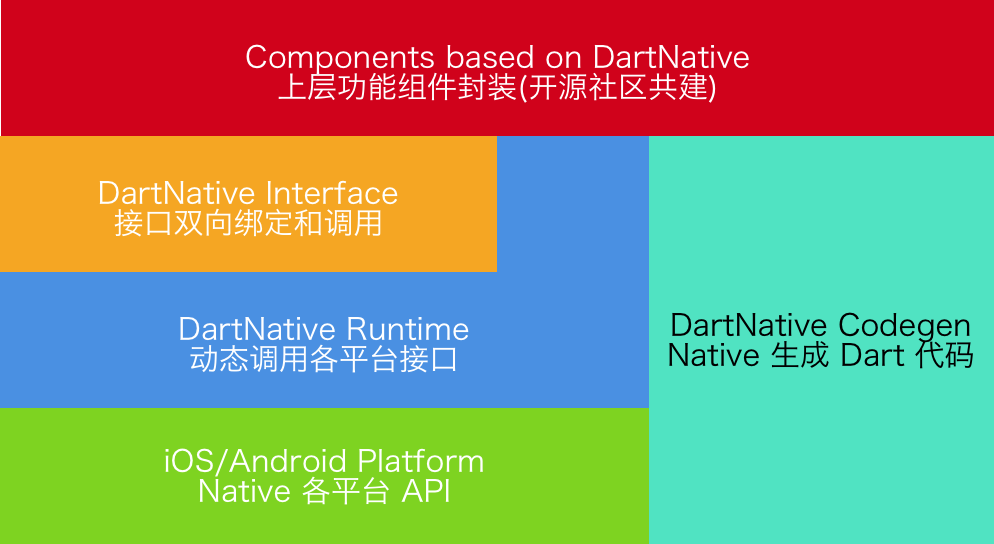
| 坚硬的版本 | 扑打要求 | CodeGen版本 |
|---|---|---|
| 0.4.x -0.7.x | Flutter 2.2.0(飞镖2.13.0) | 2.x |
| 0.3.x | Flutter 1.20.0(飞镖2.9.1) | 1.2.x |
| 0.2.x | Flutter 1.12.13(飞镖2.7) | 1.x |
ios&macos&android
将dart_native添加到依赖项和build_runner中。然后,您可以编写代码。这里有一些例子:
飞镖代码:
 final interface = Interface ( "MyFirstInterface" );
// Example for string type.
String helloWorld () {
    return interface . invokeMethodSync ( 'hello' , args : [ 'world' ]);
}
// Example for num type.
Future < int > sum ( int a, int b) {
    return interface . invokeMethod ( 'sum' , args : [a, b]);
}
相应的Objective-C代码:
 @implementation DNInterfaceDemo

// Register interface name.
InterfaceEntry (MyFirstInterface)

// Register method "hello".
InterfaceMethod(hello, myHello:( NSString *)str) {
    return [ NSString stringWithFormat: @" hello %@ ! " , str];
}

// Register method "sum".
InterfaceMethod (sum, addA:( int32_t )a withB:( int32_t )b) {
    return @(a + b);
}

@end
相应的Java代码:
 // load libdart_native.so
DartNativePlugin . loadSo ();

@ InterfaceEntry ( name = "MyFirstInterface" )
public class InterfaceDemo extends DartNativeInterface {

    @ InterfaceMethod ( name = "hello" )
    public String hello ( String str ) {
        return "hello " + str ;
    }

    @ InterfaceMethod ( name = "sum" )
    public int sum ( int a , int b ) {
        return a + b ;
    }
}
注意:如果您的SO路径是自定义的,则需要特定的路径。
DartNativePlugin . loadSoWithCustomPath ( "xxx/libdart_native.so" );在DART中使用Dartnative之前,首先调用dartNativeInitCustomSoPath() 。它将从渠道获得路径。
飞镖代码:
 interface . setMethodCallHandler ( 'totalCost' ,
        ( double unitCost, int count, List list) async {
    return { 'totalCost: ${ unitCost * count }' : list};
});
相应的Objective-C代码:
[ self invokeMethod: @" totalCost "
         arguments: @[@ 0.123456789 , @ 10 , @[ @" testArray " ]]
            result: ^( id _Nullable result, NSError * _Nullable error) {
    NSLog ( @" %@ " , result);
}];
相应的Java代码:
 invokeMethod ( "totalCost" , new Object []{ 0.123456789 , 10 , Arrays . asList ( "hello" , "world" )},
             new DartNativeResult () {
                @ Override
                public void onResult ( @ Nullable Object result ) {
                    Map retMap = ( Map ) result ;
                    // do something
                }

                @ Override
                public void error ( @ Nullable String errorMessage ) {
                    // do something
                }
              }
); final foo = Bar (); // A custom instance.
unitTest. addFinalizer (() { // register a finalizer callback.
print ( 'The instance of ' foo ' has been destroyed!' ); // When `foo` is destroyed by GC, this line of code will be executed.
});| 镖 | Objective-C | 迅速 | 爪哇 |
|---|---|---|---|
| 无效的 | 零 | 零 | 无效的 |
| 布尔 | 布尔 | 布尔 | 布尔 |
| int | nsinteger | int | int |
| 双倍的 | 双倍的 | 双倍的 | 双倍的 |
| 细绳 | NSString | 细绳 | 细绳 |
| 列表 | nsarray | 大批 | 列表,arraylist |
| 地图 | nsdictionary | 字典 | 地图,哈希图 |
| 放 | NSSET | 放 | 设置,哈希集 |
| 功能 | 堵塞 | 关闭 | 承诺 |
| 指针 | 空白 * | Unsafemutablerawpointer | - |
| 本地人 | NSDATA | 数据 | DirectByteBuffer |
| 本地对象 | nsObject | nsObject | 目的 |
步骤1:将dart_native添加到依赖项和build_runner中。
步骤2:使用 @Dartnative/codgen生成飞镖包装代码,或者手动编写DART代码。
步骤3:使用dart_native_gen生成自动类型转换的代码,并具有以下步骤(3.1-3.3):
3.1用@native注释Dart包装班。
 @native
class RuntimeSon extends RuntimeStub {
  RuntimeSon ([ Class isa]) : super ( Class ( 'RuntimeSon' ));
  RuntimeSon . fromPointer ( Pointer < Void > ptr) : super . fromPointer (ptr);
} 3.2用@nativeRoot注释您自己的条目(例如main() )。
 @nativeRoot
void main () {
  runApp ( App ());
}
3.3运行
flutter packages pub run build_runner build --delete-conflicting-outputs 将文件生成到源目录中。
注意:我们建议先运行clean :
flutter packages pub run build_runner clean步骤4:在3.3中调用<generated-name>.dn.dart 。调用自动化功能。函数名称由pubspec.yaml中的name确定。
 @nativeRoot
void main () {
  // Function name is generated by name in pubspec.yaml.
  runDartNativeExample ();
  runApp ( App ());
}
步骤5:然后您可以编写代码。这里有一些例子:
5.1 iOS:
飞镖代码(生成):
 // new Objective-C object.
RuntimeStub stub = RuntimeStub ();

// Dart function will be converted to Objective-C block.
stub. fooBlock (( NSObject a) {
    print ( 'hello block! ${ a . toString ()}' );
    return 101 ;
});

// support built-in structs.
CGRect rect = stub. fooCGRect ( CGRect ( 4 , 3 , 2 , 1 ));
print (rect);
相应的Objective-C代码:
 typedef int (^BarBlock)( NSObject *a);

@interface RuntimeStub

- ( CGRect ) fooCGRect : ( CGRect ) rect ;
- ( void ) fooBlock : (BarBlock) block ;

@end
更多iOS示例请参见:ios_unit_test.dart
5.2 Android:
飞镖代码(生成):
 // new Java object.
RuntimeStub stub = RuntimeStub ();

// get java list.
List list = stub. getList ([ 1 , 2 , 3 , 4 ]);

// support interface.
stub. setDelegateListener ( DelegateStub ());
相应的Java代码:
 public class RuntimeStub {

    public List < Integer > getList ( List < Integer > list ) {
        List < Integer > returnList = new ArrayList <>();
        returnList . add ( 1 );
        returnList . add ( 2 );
        return returnList ;
    }

    public void setDelegateListener ( SampleDelegate delegate ) {
        delegate . callbackInt ( 1 );
    }
}
更多android示例请参见:android_unit_test.dart
注意:如果您在macOS上使用dart_native,则必须使用use_frameworks!在你的豆荚里。
问:MacOS Archive上未能查找符号(dlsym(rtld_default,initdartapidl):找不到符号)。
答:选择一个解决方案:
use_frameworks!在Podfile中。Dartnative可根据BSD 3条款许可获得。有关更多信息,请参见许可证文件。





