dart_native
0.7.11

Dartnativeは、DARTとネイティブAPIの間で通信する橋として動作します。
低パフォーマンスのフラッターチャネルをより高速で簡潔なコードに置き換えます。
Dartnativeは、ネイティブAPIを動的に呼び出します。同期チャネルと非同期の両方のチャネリングをサポートします。
フラッターチャネルのようなパラメーターと戻り値のシリアル化は不要になります。 Dartnativeは、言語インターフェイス間で直接コールと自動オブジェクトを提供します。
Dart FinalizerはFlutter 3(Dart 2.17)の上でのみサポートされていますが、DartnativeではDart Flutter 2.2.0(Dart 2.13.0)などで利用できます。
Dartnativeは自動型変換をサポートするため、ブリッジングコードはフラッターチャネルよりも短くてシンプルです。
このパッケージのデザインとビジョン:
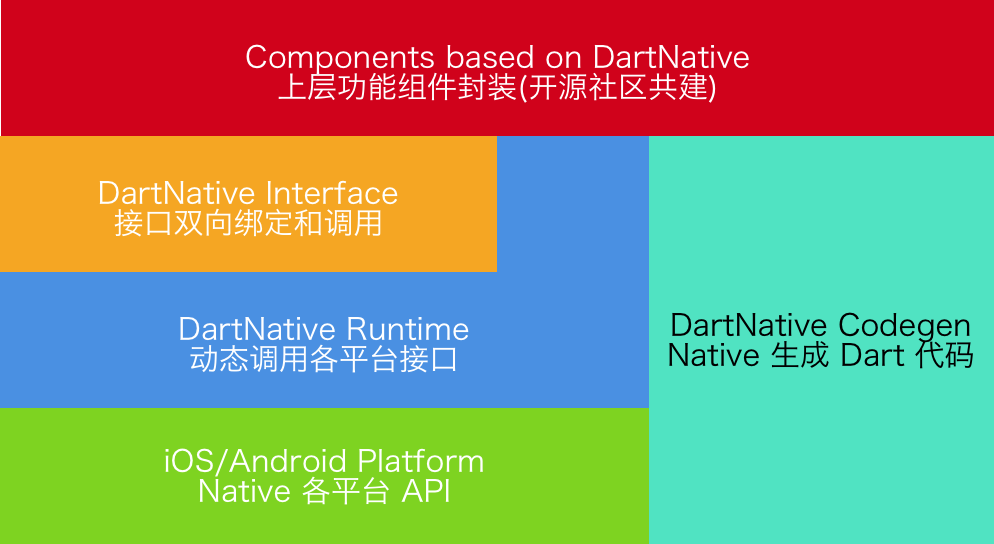
| ダートネイティブバージョン | フラッター要件 | CodeGenバージョン |
|---|---|---|
| 0.4.x -0.7.x | フラッター2.2.0(ダーツ2.13.0) | 2.x |
| 0.3.x | フラッター1.20.0(ダーツ2.9.1) | 1.2.x |
| 0.2.x | フラッター1.12.13(ダーツ2.7) | 1.x |
iOS&MacOS&Android
dart_native依存関係に追加し、 build_runner dev_dependenciesに追加します。その後、コードを書くことができます。ここにいくつかの例があります:
DARTコード:
 final interface = Interface ( "MyFirstInterface" );
// Example for string type.
String helloWorld () {
    return interface . invokeMethodSync ( 'hello' , args : [ 'world' ]);
}
// Example for num type.
Future < int > sum ( int a, int b) {
    return interface . invokeMethod ( 'sum' , args : [a, b]);
}
対応するObjective-Cコード:
 @implementation DNInterfaceDemo

// Register interface name.
InterfaceEntry (MyFirstInterface)

// Register method "hello".
InterfaceMethod(hello, myHello:( NSString *)str) {
    return [ NSString stringWithFormat: @" hello %@ ! " , str];
}

// Register method "sum".
InterfaceMethod (sum, addA:( int32_t )a withB:( int32_t )b) {
    return @(a + b);
}

@end
対応するJavaコード:
 // load libdart_native.so
DartNativePlugin . loadSo ();

@ InterfaceEntry ( name = "MyFirstInterface" )
public class InterfaceDemo extends DartNativeInterface {

    @ InterfaceMethod ( name = "hello" )
    public String hello ( String str ) {
        return "hello " + str ;
    }

    @ InterfaceMethod ( name = "sum" )
    public int sum ( int a , int b ) {
        return a + b ;
    }
}
注:SOパスがカスタムの場合、特定のパスをパスする必要があります。
DartNativePlugin . loadSoWithCustomPath ( "xxx/libdart_native.so" ); DARTでDartnativeを使用する前に、最初にdartNativeInitCustomSoPath()を呼び出します。チャネルからパスが得られます。
DARTコード:
 interface . setMethodCallHandler ( 'totalCost' ,
        ( double unitCost, int count, List list) async {
    return { 'totalCost: ${ unitCost * count }' : list};
});
対応するObjective-Cコード:
[ self invokeMethod: @" totalCost "
         arguments: @[@ 0.123456789 , @ 10 , @[ @" testArray " ]]
            result: ^( id _Nullable result, NSError * _Nullable error) {
    NSLog ( @" %@ " , result);
}];
対応するJavaコード:
 invokeMethod ( "totalCost" , new Object []{ 0.123456789 , 10 , Arrays . asList ( "hello" , "world" )},
             new DartNativeResult () {
                @ Override
                public void onResult ( @ Nullable Object result ) {
                    Map retMap = ( Map ) result ;
                    // do something
                }

                @ Override
                public void error ( @ Nullable String errorMessage ) {
                    // do something
                }
              }
); final foo = Bar (); // A custom instance.
unitTest. addFinalizer (() { // register a finalizer callback.
print ( 'The instance of ' foo ' has been destroyed!' ); // When `foo` is destroyed by GC, this line of code will be executed.
});| ダート | Objective-C | 迅速 | Java |
|---|---|---|---|
| ヌル | nil | nil | ヌル |
| ブール | ブール | ブール | ブール |
| int | nsinteger | int | int |
| ダブル | ダブル | ダブル | ダブル |
| 弦 | nsstring | 弦 | 弦 |
| リスト | nsarray | 配列 | リスト、arrayList |
| 地図 | nsdictionary | 辞書 | 地図、ハッシュマップ |
| セット | nsset | セット | セット、ハッシュセット |
| 関数 | ブロック | 閉鎖 | 約束 |
| ポインター | 空所 * | UNSAFEMUTABLERAWPOINTER | - |
| NativeByte | nsdata | データ | directbytebuffer |
| NativeObject | nsobject | nsobject | 物体 |
ステップ1: dart_native依存関係に追加し、 build_runner dev_dependenciesに追加します。
ステップ2: @dartnative/codegenでDARTラッパーコードを生成するか、DARTコードを手動で書き込みます。
ステップ3:次の手順(3.1-3.3)でdart_native_genを使用して、自動タイプ変換のコードを生成します。
3.1ダートラッパークラスに@nativeと注釈を付けます。
 @native
class RuntimeSon extends RuntimeStub {
  RuntimeSon ([ Class isa]) : super ( Class ( 'RuntimeSon' ));
  RuntimeSon . fromPointer ( Pointer < Void > ptr) : super . fromPointer (ptr);
}
3.2 @nativeRootで独自のエントリ( main()など)に注釈を付けます。
 @nativeRoot
void main () {
  runApp ( App ());
}
3.3実行
flutter packages pub run build_runner build --delete-conflicting-outputs ソースディレクトリにファイルを生成します。
注:最初にcleanを実行することをお勧めします:
flutter packages pub run build_runner cleanステップ4:3.3の<generated-name>.dn.dartで自動生成関数を呼び出します。関数名は、 pubspec.yamlのnameによって決定されます。
 @nativeRoot
void main () {
  // Function name is generated by name in pubspec.yaml.
  runDartNativeExample ();
  runApp ( App ());
}
ステップ5:その後、コードを記述できます。ここにいくつかの例があります:
5.1 iOS:
DARTコード(生成):
 // new Objective-C object.
RuntimeStub stub = RuntimeStub ();

// Dart function will be converted to Objective-C block.
stub. fooBlock (( NSObject a) {
    print ( 'hello block! ${ a . toString ()}' );
    return 101 ;
});

// support built-in structs.
CGRect rect = stub. fooCGRect ( CGRect ( 4 , 3 , 2 , 1 ));
print (rect);
対応するObjective-Cコード:
 typedef int (^BarBlock)( NSObject *a);

@interface RuntimeStub

- ( CGRect ) fooCGRect : ( CGRect ) rect ;
- ( void ) fooBlock : (BarBlock) block ;

@end
その他のiOSの例は、ios_unit_test.dartを参照してください
5.2 Android:
DARTコード(生成):
 // new Java object.
RuntimeStub stub = RuntimeStub ();

// get java list.
List list = stub. getList ([ 1 , 2 , 3 , 4 ]);

// support interface.
stub. setDelegateListener ( DelegateStub ());
対応するJavaコード:
 public class RuntimeStub {

    public List < Integer > getList ( List < Integer > list ) {
        List < Integer > returnList = new ArrayList <>();
        returnList . add ( 1 );
        returnList . add ( 2 );
        return returnList ;
    }

    public void setDelegateListener ( SampleDelegate delegate ) {
        delegate . callbackInt ( 1 );
    }
}
その他のAndroidの例は、android_unit_test.dartを参照してください
注: macosでdart_nativeを使用する場合は、 use_frameworks!あなたのポッドファイルで。
Q:MacOSアーカイブの検索シンボル(dlsym(rtld_default、initdartapidl):シンボルが見つかりません)に失敗しました。
A:1つのソリューションを選択します。
use_frameworks! Podfileで。Dartnativeは、BSD 3-Clauseライセンスの下で利用できます。詳細については、ライセンスファイルを参照してください。





