textlint
v14.4.0

用于文本和降价的可插入术工具。
Textlint类似于Eslint,但它用于自然语言。
访问https://textlint.github.io/。
npm install textlint-rule-xxx 。要快速参观Textlint,请查看我们的入门指南:Squirrel:
您可以使用NPM安装textlint命令:
$ npm install textlint --save-dev
要求:
如果您不确定正在运行哪种版本的节点,则可以在控制台中运行node -v以找出答案。
textlint ,则必须在全球安装每个参考规则。textlint ,则必须在本地安装每个规则。我们建议在本地安装textlint 。
如果您从未使用过node.js和npm,请参阅以下内容:

Textlint没有默认规则!
您可以使用.textlintrc.json配置文件运行textlint。
 # Install textlint and rules into local directory
npm install --save-dev textlint textlint-rule-no-todo
npx textlint --init命令创建.textlintrc.json文件中的文件。
npx textlint --init .textlintrc.json将被创建:
{
    "rules" : {
        "no-todo" : true
    }
}
通过textlint的棉绒文件:
npx textlint ./README.md textlint load .textlintrc.json来自当前目录和lint README.md 。
运行npx textlint -h以获取有关如何使用CLI的信息。
 $ textlint [options] file.md [file|dir|glob*]

Options:
  -h, --help                  Show help.
  -c, --config path::String   Use configuration from this file or sharable config.
  --ignore-path path::String  Specify path to a file containing patterns that describes files to ignore. - default: .textlintignore
  --init                      Create the config file if not existed. - default: false
  --fix                       Automatically fix problems
  --dry-run                   Enable dry-run mode for --fix. Only show result, don't change the file.
  --debug                     Outputs debugging information
  --print-config              Print the config object to stdout
  -v, --version               Outputs the version number.

Using stdin:
  --stdin                     Lint text provided on <STDIN>. - default: false
  --stdin-filename String     Specify filename to process STDIN as

Output:
  -o, --output-file path::String  Enable report to be written to a file.
  -f, --format String         Use a specific output format.

                              Available formatter          : checkstyle, compact, jslint-xml, json, junit, pretty-error, stylish, table, tap, unix

                              Available formatter for --fix: compats, diff, fixed-result, json, stylish - default: stylish
  --no-color                  Disable color in piped output.
  --quiet                     Report errors only. - default: false

Specifying rules and plugins:
  --no-textlintrc             Disable .textlintrc
  --plugin [String]           Set plugin package name
  --rule [String]             Set rule package name
  --preset [String]           Set preset package name and load rules from preset package.
  --rulesdir [path::String]   Use additional rules from this directory

Caching:
  --cache                     Only check changed files - default: false
  --cache-location path::String  Path to the cache file or directory - default: .textlintcache

Experimental:
  --experimental              Enable experimental flag.Some feature use on experimental.
  --rules-base-directory path::String  Set module base directory. textlint load modules(rules/presets/plugins) from the base directory.
在运行TextLint时,您可以使用Glob模式将文件定位为棉绒。确保您将通过引号中传递的所有Glob参数包装。
$ npx textlint " docs/** "有关更多详细信息,请参见CLI文档。
例子:
.textlintrc是通过Azu/RC-Config-Loader加载为JSON,YAML或JS的配置文件。
使用以下参数运行文字线
$ npx textlint --rule no-todo --rule very-nice-rule README.md
等同于在目录中使用.textlintrc.json包含以下JSON的目录中的textlint README.md
{
  "rules" : {
    "no-todo" : true ,
    "very-nice-rule" : true
  }
}您还可以在.textlintrc.json文件中为特定规则配置选项。
{
  "rules" : {
    "no-todo" : false , // disable
    "very-nice-rule" : {
        "key" : " value "
    }
  }
}
例如,在这里,我们将选项(“键”:“ value”)传递给very-nice-rule 。
可以在.textlintrc.json文件中指定选项:如下:
 {
  // Allow to comment in JSON
  "rules" : {
    "<rule-name>" : true | false | object
  }
}
有关更多详细信息,请参见
Textlint插件是一组规则和规则config或自定义解析器。
要启用插件,请将“插件名”放入.textlintrc.json中。
 // `.textlintrc.json`
{
    "plugins" : [
        "plugin-name"
    ] ,
    // overwrite-plugins rules config
    // <plugin>/<rule>
    "rules" : {
        "plugin-name/rule-name" : false
    }
}
请参阅文档/插件
Textlint默认情况下支持Markdown和纯文本。
安装处理器插件并添加新的文件格式支持。
例如,如果您想提起HTML,请使用TextLint-Plugin-HTML作为插件。
npm install textlint-plugin-html --save-dev
将"html"添加到.textlintrc.json
 {
    "plugins": [
        "html"
    ]
}
在.html文件上运行textlint:
textlint index.html
可选支持的文件类型:
有关详细信息,请参见处理器插件列表。
Textlint没有内置的规则,但是有100多个可插入规则:
有关更多详细信息,请参见textlint规则的集合·textlint/textlint Wiki。
如果您创建一个新规则,并将其添加到Wiki :)
一些规则可以使用--fix命令行标志来固定。
$ npx textlint --fix README.md
# As a possible, textlint fix the content. 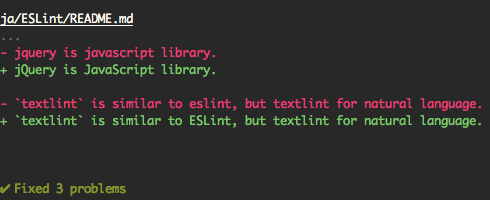
另外,支持干式运行模式。
 $ npx textlint --fix --dry-run --format diff README.md
# show the difference between fixed content and original content.
您可以将其复制并粘贴到读书中。
[ ![ textlint fixable rule ] ( https://img.shields.io/badge/textlint-fixable-green.svg?style=social )] ( https://textlint.github.io/ )使用以下格式:
例如,使用pretty-error Formatter:
$ npx textlint -f pretty-error file.md
@textlint/linter-formatter中的更多详细信息。
您可以将Textlint用作节点模块。
$ npm install textlint --save-dev
最小用法:
 import { createLinter , loadTextlintrc , loadLinterFormatter } from "textlint" ;
const descriptor = await loadTextlintrc ( ) ;
const linter = createLinter ( { descriptor } ) ;
const results = await linter . lintFiles ( [ "*.md" ] ) ;
// textlint has two types formatter sets for linter and fixer
const formatter = await loadLinterFormatter ( { formatterName : "stylish" } ) ;
const output = formatter . format ( results ) ;
console . log ( output ) ;
更多详细信息信息,请阅读以下文档:
@textlint/bernel是textlint的低级API。它对于浏览器或非node.js环境很有用。
 import { TextlintKernel } from "@textlint/kernel" ;
const kernel = new TextlintKernel ( ) ;
const options = {
    filePath : "/path/to/file.md" ,
    ext : ".md" ,
    plugins : [
        {
            pluginId : "markdown" ,
            plugin : require ( "@textlint/textlint-plugin-markdown" )
        }
    ] ,
    rules : [
        {
            ruleId : "no-todo" ,
            rule : require ( "textlint-rule-no-todo" ) . default
        }
    ]
} ;
kernel . lintText ( "TODO: text" , options ) . then ( result => {
    assert . ok ( typeof result . filePath === "string" ) ;
    assert . ok ( result . messages . length === 1 ) ;
} ) ; Textlint具有四个可扩展的点:

请参阅文档/
no-todo规则。<!-- textlint-disable --> ?您可以使用过滤规则,例如Textlint-Filter-lule-comments。
有关更多详细信息,请参阅忽略文本·文本。
有关更多详细信息,请参见集成文档。
该存储库是我们使用Lerna管理的MonorePo。这意味着我们实际上是从同一代码库向NPM发布了多个软件包,包括:
这些模块是textlint的一部分。
| 包裹 | 版本 | 描述 |
|---|---|---|
textlint | textlint命令行工具本身 | |
@textlint/kernel | Textlint主逻辑模块。这是通用的JavaScript。 | |
@textlint/linter-formatter | textlint输出格式 | |
@textlint/fixer-formatter | FIXER的Textlint输出格式 | |
@textlint/textlint-plugin-markdown | 降价支持textlint | |
@textlint/textlint-plugin-text | 纯文本支持Textlint | |
@textlint/ast-tester | Textlint AST的合规性测试 | |
@textlint/markdown-to-ast | Markdown解析器 | |
@textlint/ast-traverse | txtnode traverse库 | |
@textlint/text-to-ast | 纯文本解析器 | |
@textlint/config-loader | 加载.textlintrc配置文件 |
这些模块对于文本规则/插件作者很有用。
| 包裹 | 版本 | 描述 |
|---|---|---|
@textlint/ast-node-types | textlint ast(抽象语法树)类型定义 | |
textlint-tester | Textlint规则测试工具 | |
textlint-scripts | textlint规则NPM Run-Scripts | |
create-textlint-rule | 创建没有构建配置的文本规则 |
这些模块与TextLint有用。
| 包裹 | 版本 | 描述 |
|---|---|---|
gulp-textlint | textlint的Gulp插件 |
这些模块是monorepo中的内部用法。
| 包裹 | 版本 | 描述 |
|---|---|---|
@textlint/feature-flag | 功能标志管理器 |
textlint项目遵循语义版本控制。但是,对于大多数SEMVER项目,Textlint并没有什么不同。
.d.ts )对于错误和功能请求,请创建一个问题。
始终欢迎拉动请求。
有关更多详细信息,请参见贡献指南。
麻省理工学院©Azu
从ESLINT复制一些代码。
 ESLint
Copyright (c) 2013 Nicholas C. Zakas. All rights reserved.
https://github.com/eslint/eslint/blob/master/LICENSE
从Textlint/Media下载。
感谢Eslint。
Textlint网站由Netlify提供支持。





