textlint
v14.4.0

텍스트 및 마크 다운 용 플러그 가능한 라인 도구.
TextLint는 Eslint와 유사하지만 자연어와 함께 사용하기위한 것입니다.
https://textlint.github.io/를 방문하십시오.
npm install textlint-rule-xxx .TextLint의 빠른 여행을 위해, 우리의 시작 가이드 : Squirrel :
npm을 사용하여 textlint 명령을 설치할 수 있습니다.
$ npm install textlint --save-dev
요구 사항 :
실행중인 노드 버전을 확실하지 않은 경우 콘솔에서 node -v 실행하여 알아낼 수 있습니다.
textlint 설치 한 경우 각 참조 규칙을 전 세계적으로 설치해야합니다.textlint 설치 한 경우 각 규칙을 로컬로 설치해야합니다. 로컬로 textlint 설치하는 것이 좋습니다.
node.js 및 npm을 사용한 적이 없다면 다음을 참조하십시오.

TextLint에는 기본 규칙이 없습니다 !!
.textlintrc.json 구성 파일로 textLint를 실행할 수 있습니다.
 # Install textlint and rules into local directory
npm install --save-dev textlint textlint-rule-no-todo
npx textlint --init 명령을 설치된 규칙에서 .textlintrc.json 파일을 만듭니다.
npx textlint --init .textlintrc.json 다음과 같이 만들어집니다.
{
    "rules" : {
        "no-todo" : true
    }
}
텍스트를 통한 보풀 파일 :
npx textlint ./README.md textlint load .textlintrc.json 현재 디렉토리 및 Lint README.md 의
CLI 사용 방법에 대한 정보는 npx textlint -h 실행하십시오.
 $ textlint [options] file.md [file|dir|glob*]

Options:
  -h, --help                  Show help.
  -c, --config path::String   Use configuration from this file or sharable config.
  --ignore-path path::String  Specify path to a file containing patterns that describes files to ignore. - default: .textlintignore
  --init                      Create the config file if not existed. - default: false
  --fix                       Automatically fix problems
  --dry-run                   Enable dry-run mode for --fix. Only show result, don't change the file.
  --debug                     Outputs debugging information
  --print-config              Print the config object to stdout
  -v, --version               Outputs the version number.

Using stdin:
  --stdin                     Lint text provided on <STDIN>. - default: false
  --stdin-filename String     Specify filename to process STDIN as

Output:
  -o, --output-file path::String  Enable report to be written to a file.
  -f, --format String         Use a specific output format.

                              Available formatter          : checkstyle, compact, jslint-xml, json, junit, pretty-error, stylish, table, tap, unix

                              Available formatter for --fix: compats, diff, fixed-result, json, stylish - default: stylish
  --no-color                  Disable color in piped output.
  --quiet                     Report errors only. - default: false

Specifying rules and plugins:
  --no-textlintrc             Disable .textlintrc
  --plugin [String]           Set plugin package name
  --rule [String]             Set rule package name
  --preset [String]           Set preset package name and load rules from preset package.
  --rulesdir [path::String]   Use additional rules from this directory

Caching:
  --cache                     Only check changed files - default: false
  --cache-location path::String  Path to the cache file or directory - default: .textlintcache

Experimental:
  --experimental              Enable experimental flag.Some feature use on experimental.
  --rules-base-directory path::String  Set module base directory. textlint load modules(rules/presets/plugins) from the base directory.
TextLint를 실행할 때는 글로벌 패턴을 사용하여 파일을 보풀로 타겟팅 할 수 있습니다. 인용구로 전달하는 글로벌 매개 변수를 동봉해야합니다.
$ npx textlint " docs/** "자세한 내용은 CLI 문서를 참조하십시오.
예:
.textlintrc AZU/RC-Config-Loader를 통해 JSON, YAML 또는 JS로로드 된 구성 파일입니다.
다음 인수와 함께 TextLint를 실행합니다
$ npx textlint --rule no-todo --rule very-nice-rule README.md
다음 JSON이 포함 된 .textlintrc.json 이있는 디렉토리에서 textlint README.md 실행하는 것과 같습니다.
{
  "rules" : {
    "no-todo" : true ,
    "very-nice-rule" : true
  }
}
.textlintrc.json 파일에서 특정 규칙에 대한 옵션을 구성 할 수도 있습니다.
{
  "rules" : {
    "no-todo" : false , // disable
    "very-nice-rule" : {
        "key" : " value "
    }
  }
}
예를 들어 여기서 옵션 ( "키": "value")을 very-nice-rule 으로 전달합니다.
옵션은 다음과 같이 .textlintrc.json 파일에 지정할 수 있습니다.
 {
  // Allow to comment in JSON
  "rules" : {
    "<rule-name>" : true | false | object
  }
}
자세한 내용은 참조하십시오
TextLint 플러그인은 일련의 규칙과 rulesconfig 또는 customize parser입니다.
플러그인을 활성화하려면 "Plugin-Name"을 .textlintrc.json 에 넣으십시오.
 // `.textlintrc.json`
{
    "plugins" : [
        "plugin-name"
    ] ,
    // overwrite-plugins rules config
    // <plugin>/<rule>
    "rules" : {
        "plugin-name/rule-name" : false
    }
}
Docs/Plugin.md를 참조하십시오
TextLint는 기본적으로 Markdown 및 일반 텍스트를 지원합니다.
프로세서 플러그인을 설치하고 새 파일 형식 지원을 추가하십시오.
예를 들어 HTML을 보려면 TextLint-Plugin-HTML을 플러그인으로 사용하십시오.
npm install textlint-plugin-html --save-dev
.textlintrc.json 에 "html" 추가하십시오
 {
    "plugins": [
        "html"
    ]
}
.html 파일에서 textLint를 실행하십시오.
TextLint Index.html
지원되는 파일 유형 :
자세한 내용은 프로세서 플러그인 목록을 참조하십시오.
TextLint에는 규칙이 내장되어 있지 않지만 100 개 이상의 플러그 가능한 규칙이 있습니다.
자세한 내용은 TextLint Rule · TextLint/TextLint Wiki 모음을 참조하십시오.
새로운 규칙을 만들고 위키에 추가하면 :)
--fix 명령 줄 플래그를 사용하여 일부 규칙을 수정할 수 있습니다.
$ npx textlint --fix README.md
# As a possible, textlint fix the content. 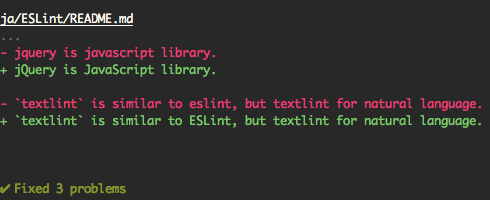
또한 드라이 런 모드를 지원합니다.
 $ npx textlint --fix --dry-run --format diff README.md
# show the difference between fixed content and original content.
readme에 복사하여 붙여 넣을 수 있습니다.
[ ![ textlint fixable rule ] ( https://img.shields.io/badge/textlint-fixable-green.svg?style=social )] ( https://textlint.github.io/ )다음 포맷터를 사용하십시오.
예를 들어, pretty-error 형식을 사용합니다.
$ npx textlint -f pretty-error file.md
@TextLint/Linter-Formatter의 자세한 내용.
TextLint를 노드 모듈로 사용할 수 있습니다.
$ npm install textlint --save-dev
최소 사용 :
 import { createLinter , loadTextlintrc , loadLinterFormatter } from "textlint" ;
const descriptor = await loadTextlintrc ( ) ;
const linter = createLinter ( { descriptor } ) ;
const results = await linter . lintFiles ( [ "*.md" ] ) ;
// textlint has two types formatter sets for linter and fixer
const formatter = await loadLinterFormatter ( { formatterName : "stylish" } ) ;
const output = formatter . format ( results ) ;
console . log ( output ) ;
자세한 내용 정보는 다음 문서를 읽으십시오.
@TextLint/Kernel은 TextLint의 낮은 레벨 API입니다. 브라우저 또는 비 노드 환경에 유용합니다.
 import { TextlintKernel } from "@textlint/kernel" ;
const kernel = new TextlintKernel ( ) ;
const options = {
    filePath : "/path/to/file.md" ,
    ext : ".md" ,
    plugins : [
        {
            pluginId : "markdown" ,
            plugin : require ( "@textlint/textlint-plugin-markdown" )
        }
    ] ,
    rules : [
        {
            ruleId : "no-todo" ,
            rule : require ( "textlint-rule-no-todo" ) . default
        }
    ]
} ;
kernel . lintText ( "TODO: text" , options ) . then ( result => {
    assert . ok ( typeof result . filePath === "string" ) ;
    assert . ok ( result . messages . length === 1 ) ;
} ) ; TextLint에는 4 개의 확장 가능한 점이 있습니다.

문서를 참조하십시오.
no-todo 규칙 작성.<!-- textlint-disable --> 와 같은 주석으로 오류를 억제하는 방법?TextLint-Filter-Rule-Comments와 같은 필터 규칙을 사용할 수 있습니다.
자세한 내용은 텍스트 무시 · TextLint를 참조하십시오.
자세한 내용은 통합 문서를 참조하십시오.
이 저장소는 Lerna를 사용하여 관리하는 Monorepo입니다. 즉, 우리는 실제로 동일한 코드베이스에서 NPM에 여러 패키지를 게시합니다.
이 모듈은 TextLint의 일부입니다.
| 패키지 | 버전 | 설명 |
|---|---|---|
textlint | TextLint 명령 줄 도구 자체 | |
@textlint/kernel | TextLint 메인 로직 모듈. 그것은 보편적 인 JavaScript입니다. | |
@textlint/linter-formatter | TextLint 출력 Formatter | |
@textlint/fixer-formatter | 고정 장치를위한 TextLint 출력 형태 | |
@textlint/textlint-plugin-markdown | TextLint에 대한 Markdown 지원 | |
@textlint/textlint-plugin-text | TextLint에 대한 일반 텍스트 지원 | |
@textlint/ast-tester | TextLint의 AST에 대한 준수 테스트 | |
@textlint/markdown-to-ast | 마크 다운 파서 | |
@textlint/ast-traverse | txtnode 트래버스 라이브러리 | |
@textlint/text-to-ast | 일반 텍스트 파서 | |
@textlint/config-loader | .TextLintrc 구성 파일을로드합니다 |
이 모듈은 TextLint Rule/Plugin 작성자에게 유용합니다.
| 패키지 | 버전 | 설명 |
|---|---|---|
@textlint/ast-node-types | TextLint AST (추상 구문 트리) 유형 정의 | |
textlint-tester | TextLint Rule Testing Tools | |
textlint-scripts | TextLint Rule NPM 런 스크립트 | |
create-textlint-rule | 빌드 구성이없는 상태에서 TextLint 규칙을 만듭니다 |
이 모듈은 TextLint와 유용한 통합입니다.
| 패키지 | 버전 | 설명 |
|---|---|---|
gulp-textlint | TextLint 용 Gulp 플러그인 |
이 모듈은 Monorepo에서 내부 사용입니다.
| 패키지 | 버전 | 설명 |
|---|---|---|
@textlint/feature-flag | 기능 깃발 관리자 |
TextLint Project Semantic 버전을 따릅니다. 그러나 대부분의 Semver 프로젝트에서는 TextLint가 다르지 않습니다.
.d.ts )를 깨뜨릴 수 있습니다.버그 및 기능 요청은 문제를 만듭니다.
풀 요청은 항상 환영합니다.
자세한 내용은 기고 안내서를 참조하십시오.
MIT © AZU
eslint에서 일부 코드를 복사하십시오.
 ESLint
Copyright (c) 2013 Nicholas C. Zakas. All rights reserved.
https://github.com/eslint/eslint/blob/master/LICENSE
TextLint/Media에서 다운로드하십시오.
Eslint에게 감사합니다.
TextLint 웹 사이트는 NetLify에 의해 구동됩니다.





