textlint
v14.4.0

La herramienta de pelusa conectable para Text and Markdown.
TextLint es similar a Eslint, pero es para usar con lenguaje natural.
Visite https://textlint.github.io/.
npm install textlint-rule-xxx .Para un recorrido rápido por TextLint, consulte nuestra Guía de Getting Start: Squirrel:
Puede instalar el comando textlint usando npm:
$ npm install textlint --save-dev
Requisitos :
Si no está seguro de qué versión del nodo está ejecutando, puede ejecutar node -v en su consola para averiguarlo.
textlint a nivel mundial, también debe instalar cada regla de referencia a nivel mundial.textlint localmente, también debe instalar cada regla localmente. Recomendamos instalar textlint localmente.
Si nunca ha usado Node.js y NPM, consulte lo siguiente:

¡TextLint no tiene reglas predeterminadas!
Puede ejecutar TextLint con el archivo de configuración .textlintrc.json .
 # Install textlint and rules into local directory
npm install --save-dev textlint textlint-rule-no-todo
npx textlint --init Crear archivo .textlintrc.json desde las reglas instaladas.
npx textlint --init .textlintrc.json se creará así:
{
    "rules" : {
        "no-todo" : true
    }
}
Archivos de pelusa a través de TextLint:
npx textlint ./README.md textlint Load .textlintrc.json del directorio actual y lint README.md .
Ejecute npx textlint -h para obtener información sobre cómo usar la CLI.
 $ textlint [options] file.md [file|dir|glob*]

Options:
  -h, --help                  Show help.
  -c, --config path::String   Use configuration from this file or sharable config.
  --ignore-path path::String  Specify path to a file containing patterns that describes files to ignore. - default: .textlintignore
  --init                      Create the config file if not existed. - default: false
  --fix                       Automatically fix problems
  --dry-run                   Enable dry-run mode for --fix. Only show result, don't change the file.
  --debug                     Outputs debugging information
  --print-config              Print the config object to stdout
  -v, --version               Outputs the version number.

Using stdin:
  --stdin                     Lint text provided on <STDIN>. - default: false
  --stdin-filename String     Specify filename to process STDIN as

Output:
  -o, --output-file path::String  Enable report to be written to a file.
  -f, --format String         Use a specific output format.

                              Available formatter          : checkstyle, compact, jslint-xml, json, junit, pretty-error, stylish, table, tap, unix

                              Available formatter for --fix: compats, diff, fixed-result, json, stylish - default: stylish
  --no-color                  Disable color in piped output.
  --quiet                     Report errors only. - default: false

Specifying rules and plugins:
  --no-textlintrc             Disable .textlintrc
  --plugin [String]           Set plugin package name
  --rule [String]             Set rule package name
  --preset [String]           Set preset package name and load rules from preset package.
  --rulesdir [path::String]   Use additional rules from this directory

Caching:
  --cache                     Only check changed files - default: false
  --cache-location path::String  Path to the cache file or directory - default: .textlintcache

Experimental:
  --experimental              Enable experimental flag.Some feature use on experimental.
  --rules-base-directory path::String  Set module base directory. textlint load modules(rules/presets/plugins) from the base directory.
Al ejecutar TextLint, puede apuntar a los archivos a la pelusa utilizando los patrones del globo. Asegúrese de adjuntar cualquier parámetro global que pase en citas.
$ npx textlint " docs/** "Para más detalles, consulte la documentación de la CLI.
Ejemplo:
.textlintrc es un archivo de configuración que se carga como JSON, YAML o JS a través de AZU/RC-Config-Loader.
Ejecutar TextLint con los siguientes argumentos
$ npx textlint --rule no-todo --rule very-nice-rule README.md
es equivalente a ejecutar textlint README.md en un directorio con un .textlintrc.json que contiene el siguiente JSON
{
  "rules" : {
    "no-todo" : true ,
    "very-nice-rule" : true
  }
}
También puede configurar opciones para reglas específicas en su archivo .textlintrc.json .
{
  "rules" : {
    "no-todo" : false , // disable
    "very-nice-rule" : {
        "key" : " value "
    }
  }
}
Por ejemplo, aquí pasamos las opciones ("clave": "valor") a very-nice-rule .
Las opciones se pueden especificar en su archivo .textlintrc.json de la siguiente manera:
 {
  // Allow to comment in JSON
  "rules" : {
    "<rule-name>" : true | false | object
  }
}
Para más detalles ver
Un complemento TextLint es un conjunto de reglas y reglas config o personalización de analizador.
Para habilitar el complemento, coloque el "nombre del complemento" en .textlintrc.json .
 // `.textlintrc.json`
{
    "plugins" : [
        "plugin-name"
    ] ,
    // overwrite-plugins rules config
    // <plugin>/<rule>
    "rules" : {
        "plugin-name/rule-name" : false
    }
}
Ver Docs/Plugin.md
TextLint admite Markdown y texto sin formato de forma predeterminada.
Instale el complemento del procesador y agregue el nuevo soporte de formato de archivo.
Por ejemplo, si desea pelear HTML, use TextLint-Plugin-HTML como complemento.
npm install textlint-plugin-html --save-dev
Agregar "html" a .textlintrc.json
 {
    "plugins": [
        "html"
    ]
}
Ejecute TextLint en archivos .html :
textlint index.html
Tipos de archivos compatibles opcionales:
Consulte la lista de complementos del procesador para más detalles.
TextLint no tiene reglas incorporadas, pero hay más de 100 reglas conectables:
Consulte una colección de la regla del mínimo text · TextLint/TextLint wiki para más detalles.
Si crea una nueva regla y la agrega a la wiki :)
Algunas reglas son fijas utilizando el indicador de línea de comandos --fix .
$ npx textlint --fix README.md
# As a possible, textlint fix the content. 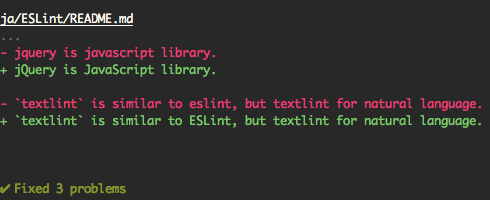
Además, admite el modo de ejecución seca.
 $ npx textlint --fix --dry-run --format diff README.md
# show the difference between fixed content and original content.
Puede copiar y pegar a su lectura.
[ ![ textlint fixable rule ] ( https://img.shields.io/badge/textlint-fixable-green.svg?style=social )] ( https://textlint.github.io/ )Use los siguientes formatorios:
por ejemplo, use formateador pretty-error :
$ npx textlint -f pretty-error file.md
Más detalles en @TextLint/Linter-Formatter.
Puede usar TextLint como módulo de nodo.
$ npm install textlint --save-dev
Uso mínimo:
 import { createLinter , loadTextlintrc , loadLinterFormatter } from "textlint" ;
const descriptor = await loadTextlintrc ( ) ;
const linter = createLinter ( { descriptor } ) ;
const results = await linter . lintFiles ( [ "*.md" ] ) ;
// textlint has two types formatter sets for linter and fixer
const formatter = await loadLinterFormatter ( { formatterName : "stylish" } ) ;
const output = formatter . format ( results ) ;
console . log ( output ) ;
Más información de detalles, lea los siguientes documentos:
@TextLint/Kernel es una API de bajo nivel para TextLint. Es útil para los entornos de navegador o no nodo.js.
 import { TextlintKernel } from "@textlint/kernel" ;
const kernel = new TextlintKernel ( ) ;
const options = {
    filePath : "/path/to/file.md" ,
    ext : ".md" ,
    plugins : [
        {
            pluginId : "markdown" ,
            plugin : require ( "@textlint/textlint-plugin-markdown" )
        }
    ] ,
    rules : [
        {
            ruleId : "no-todo" ,
            rule : require ( "textlint-rule-no-todo" ) . default
        }
    ]
} ;
kernel . lintText ( "TODO: text" , options ) . then ( result => {
    assert . ok ( typeof result . filePath === "string" ) ;
    assert . ok ( result . messages . length === 1 ) ;
} ) ; TextLint tiene cuatro puntos extensibles:

Consulte los documentos/
no-todo .<!-- textlint-disable --> ?Puede usar la regla de filtro como TextLint-Filter-Regla-Comments.
Consulte el texto Ignoring · TextLint para obtener más detalles.
Para más detalles, consulte el documento de integraciones.
Este repositorio es un monorepo que gestionamos usando Lerna. Eso significa que en realidad publicamos varios paquetes a NPM desde la misma base de código, que incluyen:
Estos módulos son partes de TextLint.
| Paquete | Versión | Descripción |
|---|---|---|
textlint | herramienta de línea de comandos textlint en sí misma | |
@textlint/kernel | TextLint Módulo de lógica principal. Es JavaScript universal. | |
@textlint/linter-formatter | formatero de salida de texto textLint | |
@textlint/fixer-formatter | formatero de salida de mínimo textLint para fijador | |
@textlint/textlint-plugin-markdown | Soporte de Markdown para TextLint | |
@textlint/textlint-plugin-text | Soporte de texto sin formato para TextLint | |
@textlint/ast-tester | Pruebas de cumplimiento para ASTLint de TextLint | |
@textlint/markdown-to-ast | analizador | |
@textlint/ast-traverse | Biblioteca Txtnode Traverse | |
@textlint/text-to-ast | Parser de texto sin formato | |
@textlint/config-loader | Cargar el archivo de configuración .TextLinTrc |
Estos módulos son útiles para el autor de la regla/complemento del mínimo text.
| Paquete | Versión | Descripción |
|---|---|---|
@textlint/ast-node-types | TextLint AST (árbol de sintaxis abstracta) Definición de tipo | |
textlint-tester | Herramientas de prueba de reglas de textlint | |
textlint-scripts | textlint regla npm run-scripts | |
create-textlint-rule | Crear regla de mínimo text sin configuración de compilación |
Estos módulos son una integración útil con TextLint.
| Paquete | Versión | Descripción |
|---|---|---|
gulp-textlint | complemento de trago para textlint |
Estos módulos son de uso interno en el monorepo.
| Paquete | Versión | Descripción |
|---|---|---|
@textlint/feature-flag | Manager de bandera de características |
Proyecto TextLint Sigue a la versión semántica. Sin embargo, TextLint no es diferente con la mayoría del proyecto Semver.
.d.ts )Para errores y solicitudes de funciones, cree un problema.
Solicitudes de extracción siempre es bienvenida.
Para más detalles, consulte la guía de contribución.
MIT © Azu
Copie algún código de Eslint.
 ESLint
Copyright (c) 2013 Nicholas C. Zakas. All rights reserved.
https://github.com/eslint/eslint/blob/master/LICENSE
Descargar desde TextLint/Media.
Gracias a Eslint.
El sitio web de TextLint funciona con NetLify.





