ChainedConfigurationDemo
1.0.0

该项目演示了Microsoft为.NET通用主机应用程序的链式配置行为。
在控制台应用中使用Net 6.0和通用主机构建器,并具有“问候”属性,该属性在配置中的每个链条都被覆盖。
这是应用每个链式配置提供商的顺序。最后一个胜利。
有时,了解链式配置以及什么比所需的更大的学习曲线覆盖。
该演示是为了帮助您理解链式配置的顺序。
此演示的Azure配置部分使用Azure应用程序配置访问,目前是一个资源免费的。
如果使用演示的这一部分,则必须在启动演示之前设置Azure订阅和环境。
我使用了“问候”可配置属性,一个带有标签,一个没有标签。如果要使用这些,或仅使用一个或另一个,则需要将它们添加到Azure应用程序配置中。
标记的一个必须根据现有代码匹配“链式配置”。
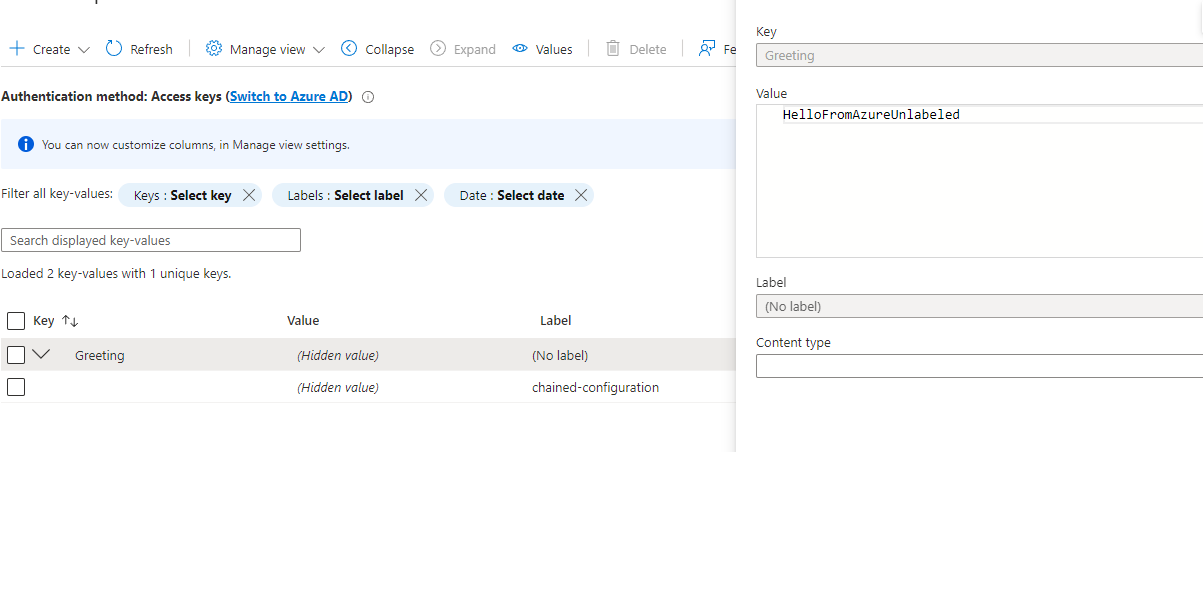
您还必须在Program.cs中的AddAzureAppConfiguration部分取消分配。
需要熟悉命令行。示例基于Windows的Git Bash,但可以轻松地映射到PowerShell或CMD。
这些假设是一个bash终端。转换为您喜欢的终端/PowerShell/CMD窗口的命令。
这些从Azure App Config倒退,覆盖了所有以前的设置,以最低的优先级。
从命令行运行时,请清洁(没有环境变量设置):
随着Program.cs的azureappconfiguration部分。
 ~/source/repos/ChainedConfigurationDemo/pub  master
└─ cd ..; dotnet publish -o pub --nologo --verbosity quiet; cd pub

~/source/repos/ChainedConfigurationDemo/pub  master
└─ ./ChainedConfigurationDemo.exe Greeting=HelloFromArgs
Starting demo...

In the end, the greeting is "HelloFromAzure"

Press Ctrl-C to stop the host and exit.
随着Program.cs的AzureAppConfiguration部分。
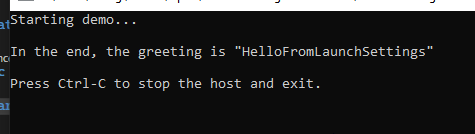
随着Azure发表评论,并且没有Dotnet_environment套装,而不是从Visual Studio的启动设置中启动,

 ~/source/repos/ChainedConfigurationDemo/pub  master
 └─ cd ..; dotnet publish -o pub --nologo --verbosity quiet; cd pub

 ~/source/repos/ChainedConfigurationDemo/pub  master
 └─ ./ChainedConfigurationDemo.exe Greeting=HelloFromArgs
Starting demo...

In the end, the greeting is "HelloFromArgs"

Press Ctrl-C to stop the host and exit.
该应用程序配置为使得如果未设置dotnet_environment或设置为“开发”或“测试”以外的其他东西,则配置构建将属于appsettings.json(如果属性存在于appsettings.json)等等,例如 - 例如,如果dotnet_environment to to to to to to to to to to to to to to to to to to to Production”。
Program.cs的AzureAppConfiguration部分。CS评论 ~/source/repos/ChainedConfigurationDemo/pub master
└─ cd ..; dotnet publish -o pub --nologo --verbosity quiet; cd pub
~/source/repos/ChainedConfigurationDemo/pub master
└─ export DOTNET_ENVIRONMENT=Development
~/source/repos/ChainedConfigurationDemo/pub master
└─ ./ChainedConfigurationDemo.exe
Starting demo...
In the end, the greeting is "HelloFromAppSettings.Development"
Press Ctrl-C to stop the host and exit.
Program.cs的AzureAppConfiguration部分。CS评论 ~/source/repos/ChainedConfigurationDemo/pub master
└─ cd ..; dotnet publish -o pub --nologo --verbosity quiet; cd pub
~/source/repos/ChainedConfigurationDemo/pub master
└─ export DOTNET_ENVIRONMENT=Test
~/source/repos/ChainedConfigurationDemo/pub master
└─ ./ChainedConfigurationDemo.exe
Starting demo...
In the end, the greeting is "HelloFromAppSettings.Test"
Press Ctrl-C to stop the host and exit.
 ~/source/repos/ChainedConfigurationDemo/pub  master
 └─ unset DOTNET_ENVIRONMENT

 ~/source/repos/ChainedConfigurationDemo/pub  master
 └─ ./ChainedConfigurationDemo.exe
Starting demo...

In the end, the greeting is "HelloFromAppSettings"

Press Ctrl-C to stop the host and exit.
使用该应用程序的当前配置,这与生产中的结果相同。
 ~/source/repos/ChainedConfigurationDemo/pub  master
 └─ export Greeting=HelloFromOperatingEnvironment

 ~/source/repos/ChainedConfigurationDemo/pub  master
 └─ ./ChainedConfigurationDemo.exe
Starting demo...

In the end, the greeting is "HelloFromOperatingEnvironment"

Press Ctrl-C to stop the host and exit.
(确保在所有其他情况下在CLI环境中unset Greeting )
对于可选的Azure用例,您将需要
对于#4,此演示使用我的Azure应用程序配置中的只读连接字符串,该字符串从我的本地系统中插入为环境变量。






