ChainedConfigurationDemo
1.0.0

이 프로젝트는 .NET 일반 호스트 앱에 대한 Microsoft의 체인 구성 동작을 보여줍니다.
콘솔 앱에서 Net 6.0 및 Generic Host Builder를 사용하며 구성의 각 체인에 상체 된 "인사말"속성이 있습니다.
이것은 각 체인 구성 제공자가 적용되는 순서입니다. 마지막으로 승리합니다.
때로는 체인 구성을 이해하고 원하는 것보다 더 큰 학습 곡선이 될 수있는 것을 무시합니다.
이 데모는 체인 구성 순서를 이해하는 데 도움이됩니다.
이 데모의 Azure 구성 부분은 현재 하나의 리소스에 무료 인 Azure App 구성 액세스를 사용합니다.
데모 의이 부분을 사용하는 경우 데모를 시작하기 전에 Azure 구독 및 환경을 설정해야합니다.
나는 "인사"구성 가능한 속성을 사용했습니다. 하나는 레이블이 있고 하나는 없었다. 이것들을 사용하려면 하나 또는 다른 하나만 사용하려면 Azure 앱 구성에 추가해야합니다.
라벨이 붙은 사람은 기존 코드에 따라 "체인 체포"와 일치해야합니다.
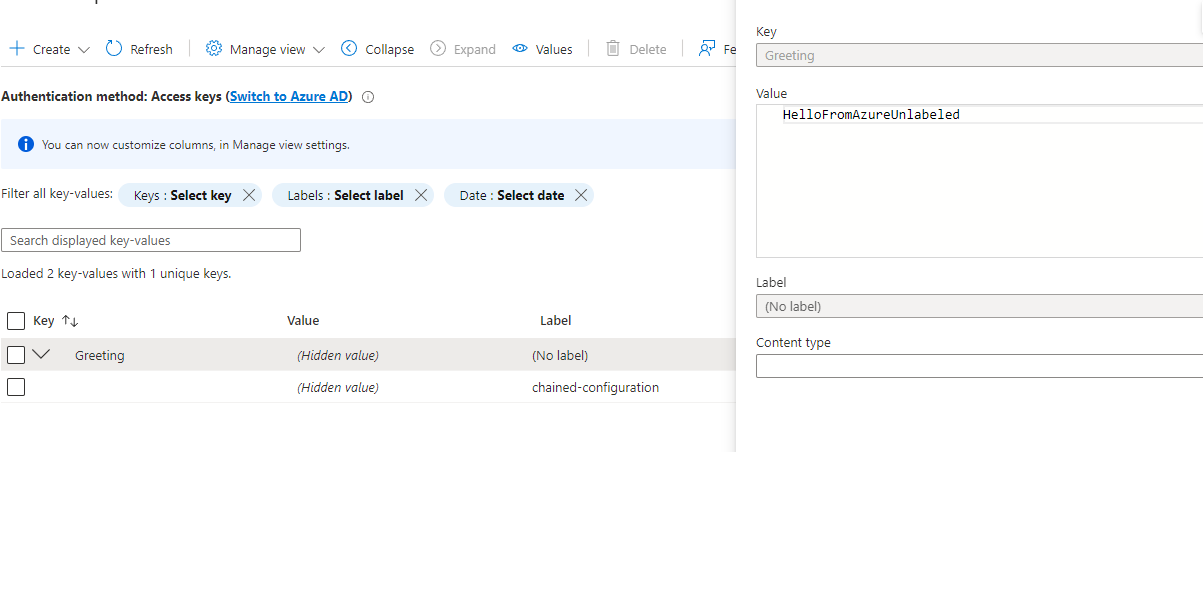
또한 프로그램의 AddAzureAppConfiguration 섹션을 사용해야합니다 Program.cs .
명령 줄에 대한 친숙 함이 필요합니다. 예는 Windows 용 Git Bash를 기반으로하지만 PowerShell 또는 CMD 용으로 쉽게 매핑 할 수 있습니다.
이것들은 bash 터미널을 가정합니다. 좋아하는 터미널/PowerShell/CMD 창에 대한 명령으로 변환하십시오.
이들은 Azure App Config에서 이전의 모든 설정을 무시하는 Azure App Config에서 체인에서 가장 낮은 우선 순위로 거꾸로 작동합니다.
명령 줄에서 실행될 때 청소 (환경 변수가 설정되지 않음) :
AzureAppConfiguration 섹션의 azureappConfiguration 섹션으로 Program.cs 무관심,
 ~/source/repos/ChainedConfigurationDemo/pub  master
└─ cd ..; dotnet publish -o pub --nologo --verbosity quiet; cd pub

~/source/repos/ChainedConfigurationDemo/pub  master
└─ ./ChainedConfigurationDemo.exe Greeting=HelloFromArgs
Starting demo...

In the end, the greeting is "HelloFromAzure"

Press Ctrl-C to stop the host and exit.
AzureAppConfiguration 섹션의 Program.cs 는 Visual Studio 내부에서 Debug에서 앱을 실행했습니다.
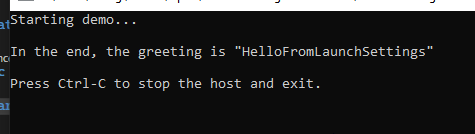
Azure가 댓글을 달고 Dotnet_environment 세트가없고 Visual Studio의 런치 세트에서 시작되지 않았습니다.

 ~/source/repos/ChainedConfigurationDemo/pub  master
 └─ cd ..; dotnet publish -o pub --nologo --verbosity quiet; cd pub

 ~/source/repos/ChainedConfigurationDemo/pub  master
 └─ ./ChainedConfigurationDemo.exe Greeting=HelloFromArgs
Starting demo...

In the end, the greeting is "HelloFromArgs"

Press Ctrl-C to stop the host and exit.
이 앱은 dotnet_environment가 설정되지 않았거나 "개발"또는 "테스트"이외의 다른 것으로 설정되어 있으면 구성 빌딩이 AppSettings.json (속성이 AppSettings.json에 존재하는 경우) 등으로 설정되도록 구성됩니다.
Program.cs 댓글을 달았습니다 ~/source/repos/ChainedConfigurationDemo/pub master
└─ cd ..; dotnet publish -o pub --nologo --verbosity quiet; cd pub
~/source/repos/ChainedConfigurationDemo/pub master
└─ export DOTNET_ENVIRONMENT=Development
~/source/repos/ChainedConfigurationDemo/pub master
└─ ./ChainedConfigurationDemo.exe
Starting demo...
In the end, the greeting is "HelloFromAppSettings.Development"
Press Ctrl-C to stop the host and exit.
Program.cs 댓글을 달았습니다 ~/source/repos/ChainedConfigurationDemo/pub master
└─ cd ..; dotnet publish -o pub --nologo --verbosity quiet; cd pub
~/source/repos/ChainedConfigurationDemo/pub master
└─ export DOTNET_ENVIRONMENT=Test
~/source/repos/ChainedConfigurationDemo/pub master
└─ ./ChainedConfigurationDemo.exe
Starting demo...
In the end, the greeting is "HelloFromAppSettings.Test"
Press Ctrl-C to stop the host and exit.
 ~/source/repos/ChainedConfigurationDemo/pub  master
 └─ unset DOTNET_ENVIRONMENT

 ~/source/repos/ChainedConfigurationDemo/pub  master
 └─ ./ChainedConfigurationDemo.exe
Starting demo...

In the end, the greeting is "HelloFromAppSettings"

Press Ctrl-C to stop the host and exit.
앱의 현재 구성을 사용하면 생산과 동일한 결과입니다.
 ~/source/repos/ChainedConfigurationDemo/pub  master
 └─ export Greeting=HelloFromOperatingEnvironment

 ~/source/repos/ChainedConfigurationDemo/pub  master
 └─ ./ChainedConfigurationDemo.exe
Starting demo...

In the end, the greeting is "HelloFromOperatingEnvironment"

Press Ctrl-C to stop the host and exit.
(다른 모든 경우에 CLI 환경에있는 경우 unset Greeting 해치지 마십시오)
선택적 Azure 사용 사례의 경우 필요합니다
#4의 경우이 데모는 내 Azure App Config의 읽기 전용 연결 문자열을 사용하여 로컬 시스템에서 환경 변수로 가져옵니다.






