ChainedConfigurationDemo
1.0.0

يوضح هذا المشروع سلوك تكوين Microsoft بالسلاسل لتطبيقات المضيف العام .NET.
يستخدم Net 6.0 وباني مضيف عام في تطبيق وحدة التحكم ، مع خاصية "تحية" يتم تجاوزها مع كل سلسلة في التكوين.
هذا هو الترتيب الذي يتم به تطبيق كل مزود تكوين بالسلاسل. آخر واحد يفوز.
في بعض الأحيان فهم التكوين بالسلاسل وما الذي يتجاوز ما يمكن أن يكون منحنى تعليمي أكبر مما هو مطلوب.
هذا العرض التوضيحي هو المساعدة في فهمك لترتيب التكوين بالسلاسل.
يستخدم جزء تكوين Azure من هذا العرض التوضيحي الوصول إلى تكوين تطبيق Azure ، وهو مجاني حاليًا لمورد واحد.
إذا كنت تستخدم هذا الجزء من العرض التوضيحي ، فيجب عليك إعداد اشتراك Azure والبيئة قبل إطلاق العرض التوضيحي.
لقد استخدمت خاصية "تحية" قابلة للتكوين ، واحدة مع ملصق ، واحد بدون. إذا كنت ترغب في استخدام هذه ، أو واحدة فقط أو أخرى ، فستحتاج إلى إضافتها إلى تكوين تطبيق Azure الخاص بك.
يجب على الشخص المسمى مطابقة "التكوين بالسلاسل" لكل الرمز الحالي.
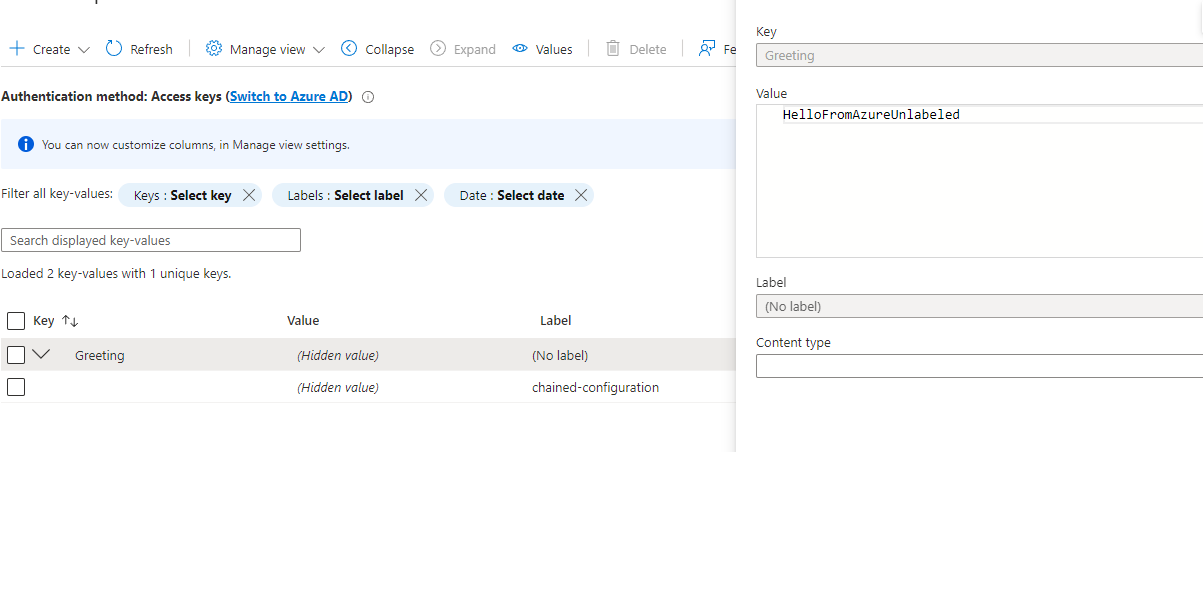
يجب أيضًا إلغاء تحديد قسم AddAzureAppConfiguration في Program.cs .
مطلوب الألفة مع سطر الأوامر. تعتمد الأمثلة على git bash للنوافذ ، ولكن يمكن تعيينها بسهولة من أجل PowerShell أو CMD.
هذه تفترض محطة باش. قم بتحويل أوامر لنافذة Terminal/PowerShell/CMD المفضلة لديك.
هذه تعمل للخلف من تكوين تطبيق Azure ، الذي يتجاوز جميع الإعدادات السابقة ، إلى أدنى أولوية في السلسلة.
عند الركض من سطر الأوامر ، تنظيف (مع عدم وجود متغيرات البيئة):
مع قسم AzureAppConfiguration في Program.cs .
 ~/source/repos/ChainedConfigurationDemo/pub  master
└─ cd ..; dotnet publish -o pub --nologo --verbosity quiet; cd pub

~/source/repos/ChainedConfigurationDemo/pub  master
└─ ./ChainedConfigurationDemo.exe Greeting=HelloFromArgs
Starting demo...

In the end, the greeting is "HelloFromAzure"

Press Ctrl-C to stop the host and exit.
مع قسم AzureAppConfiguration في Program.cs .
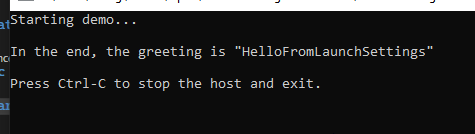
مع علق Azure ، ولم يتم تشغيل أي مجموعة dotnet_environment ، وليس إطلاقها من عمليات إطلاق Visual Studio ،

 ~/source/repos/ChainedConfigurationDemo/pub  master
 └─ cd ..; dotnet publish -o pub --nologo --verbosity quiet; cd pub

 ~/source/repos/ChainedConfigurationDemo/pub  master
 └─ ./ChainedConfigurationDemo.exe Greeting=HelloFromArgs
Starting demo...

In the end, the greeting is "HelloFromArgs"

Press Ctrl-C to stop the host and exit.
تم تكوين هذا التطبيق بحيث إذا لم يتم تعيين DOTNET_ENVIRENMENT ، أو تم تعيينه على شيء آخر غير "التطوير" أو "الاختبار" ، فإن بناء التكوين ينخفض إلى تطبيقات التطبيق
Program.cs علق ~/source/repos/ChainedConfigurationDemo/pub master
└─ cd ..; dotnet publish -o pub --nologo --verbosity quiet; cd pub
~/source/repos/ChainedConfigurationDemo/pub master
└─ export DOTNET_ENVIRONMENT=Development
~/source/repos/ChainedConfigurationDemo/pub master
└─ ./ChainedConfigurationDemo.exe
Starting demo...
In the end, the greeting is "HelloFromAppSettings.Development"
Press Ctrl-C to stop the host and exit.
Program.cs علق ~/source/repos/ChainedConfigurationDemo/pub master
└─ cd ..; dotnet publish -o pub --nologo --verbosity quiet; cd pub
~/source/repos/ChainedConfigurationDemo/pub master
└─ export DOTNET_ENVIRONMENT=Test
~/source/repos/ChainedConfigurationDemo/pub master
└─ ./ChainedConfigurationDemo.exe
Starting demo...
In the end, the greeting is "HelloFromAppSettings.Test"
Press Ctrl-C to stop the host and exit.
 ~/source/repos/ChainedConfigurationDemo/pub  master
 └─ unset DOTNET_ENVIRONMENT

 ~/source/repos/ChainedConfigurationDemo/pub  master
 └─ ./ChainedConfigurationDemo.exe
Starting demo...

In the end, the greeting is "HelloFromAppSettings"

Press Ctrl-C to stop the host and exit.
مع التكوين الحالي للتطبيق ، هذه هي نفس النتيجة في الإنتاج.
 ~/source/repos/ChainedConfigurationDemo/pub  master
 └─ export Greeting=HelloFromOperatingEnvironment

 ~/source/repos/ChainedConfigurationDemo/pub  master
 └─ ./ChainedConfigurationDemo.exe
Starting demo...

In the end, the greeting is "HelloFromOperatingEnvironment"

Press Ctrl-C to stop the host and exit.
(تأكد من unset Greeting إذا كان في بيئة CLI لجميع الحالات الأخرى)
لحالة استخدام Azure الاختيارية ، ستحتاج
بالنسبة إلى #4 ، يستخدم هذا العرض التوضيحي سلسلة الاتصال للقراءة فقط من تكوين تطبيق Azure الخاص بي ، والتي يتم سحبها كمتغير بيئة من نظامي المحلي.






