Epinova.Elasticsearch
v11.8.59: Merge pull request #212 from Epinova

情节CMS和商业的搜索插件
提供了支持.NET 6+的版本。有关详细信息,请联系Kristian Borg。
首先,您需要创建索引。通过嵌入式菜单搜索引擎 - >管理和状态转到管理页面,然后单击Create indices按钮。
这将在您的网站上每种语言创建一个索引。如果您安装了商务插件,还将创建针对目录内容的其他索引。
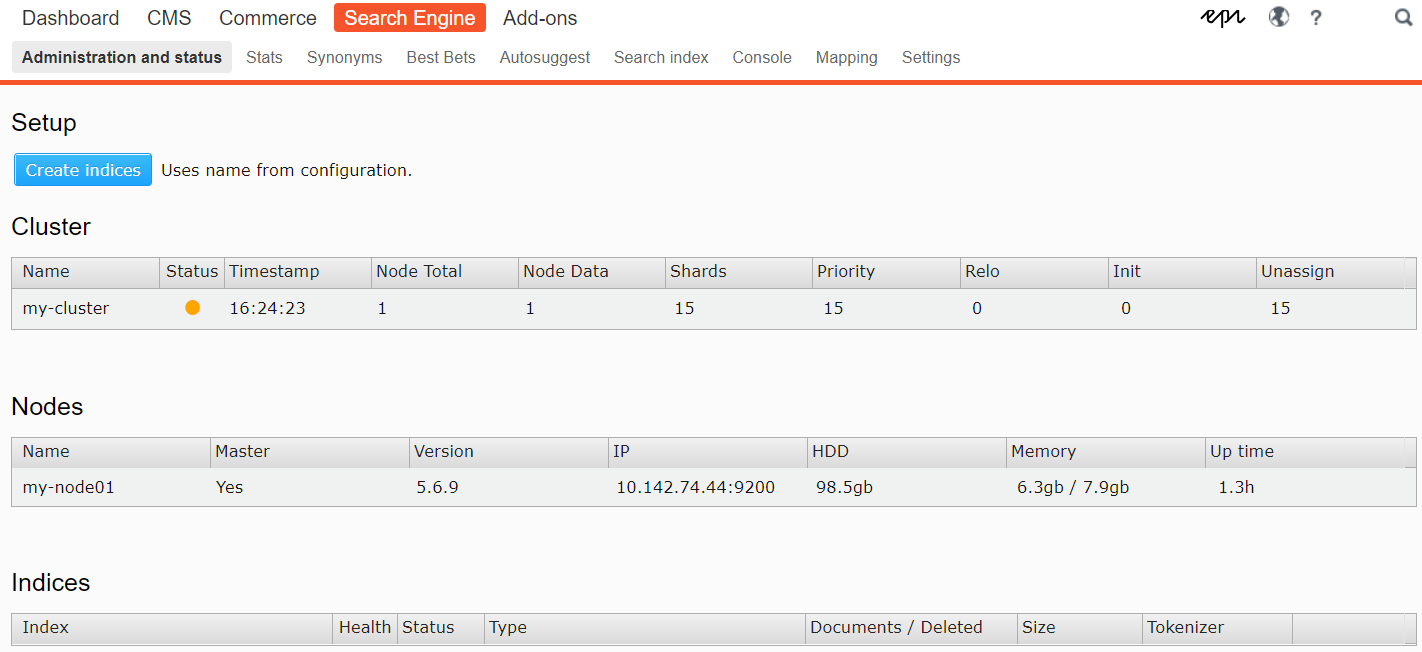
将为您的网站上的每种活动语言创建一个单独的索引。如果以后添加更多语言,则需要重复此过程。
您可以使用singleton Epinova.ElasticSearch.Core.Conventions.Indexing以编程方式配置设置。每个AppDomain仅在一个可初始化的模块或Application_start()中进行一次。
样本配置类:
 public static class SearchConfig
{
    public static void Init ( )
    {
        Epinova . ElasticSearch . Core . Conventions . Indexing . Instance
            . ExcludeType < ErrorPage > ( )
            . ExcludeType < StartPage > ( )
            . ExcludeRoot ( 42 )
            . IncludeFileType ( "pdf" )
            . IncludeFileType ( "docx" )
            . ForType < ArticlePage > ( ) . IncludeProperty ( x => x . Changed )
            . ForType < ArticlePage > ( ) . IncludeField ( x => x . GetFoo ( ) )
            . ForType < ArticlePage > ( ) . IncludeField ( "TenYearsAgo" , x => DateTime . Now . AddYears ( - 10 ) )
            . ForType < ArticlePage > ( ) . EnableSuggestions ( x => x . Title )
            . ForType < TagPage > ( ) . EnableSuggestions ( )
            . ForType < ArticlePage > ( ) . EnableHighlighting ( x => x . MyField )
            . ForType < ArticlePage > ( ) . StemField ( x => x . MyField ) ;
    }
}
解释不同选项:
ExcludeType :这种类型不会被索引。也支持基础类和界面。可以通过ExcludeFromSearchAttribute来装饰您的类型来实现这一目标
ExcludeRoot :这个节点及其子女不会被索引。通常在Episerver Page-Tree中的节点ID。
IncludeFileType :定义应索引的文件类型的扩展名。另请参见配置中的<files>节点。
ForType :特定类型的索引规则的起点。本身没有做任何事情,但可以访问以下选项:
IncludeField :定义要索引的自定义属性。例如一种扩展方法获取外部数据或执行复杂的聚合。
EnableSuggestions :通过Lambda表达式提供此类类型的AutoSuggest数据,或者来自所有属性。
IncludeProperty :与使用[可搜索]装饰属性相同的效果。如果您不控制模型源,则可以使用。
EnableHighlighting :添加要突出显示的其他字段。
StemField :定义应用当前语言分析属性。将始终分析名为MainIntro , MainBody和Description的属性。
该模块试图遵循与Episerver相同的约定,这意味着类型string和XhtmlString的所有属性都将被索引,除非用[Searchable(false)]明确装饰。可以通过使用[Searchable]或上面的约定来装饰其他属性来索引它们。用[Searchable]索引内容ContentArea confetarea。
 SearchResult result = service
   . Search ( "bacon" )
. GetResults ( ) ; SearchResult result = service
. Search < ArticlePage > ( "bacon" )
. GetResults ( ) ; SearchResult result = service
. Search < ArticlePage > ( "bacon" )
. InField ( x => x . MainIntro )
. InField ( x => x . MainBody )
. InField ( x => x . MyCustomMethod ( ) )
. GetResults ( ) ;搜索以短语开头的索引单词:
string [ ] suggestions = service . GetSuggestions ( "baco" ) ;使用默认长度自动(推荐):
 SearchResult result = service
   . Search < ArticlePage > ( "bacon" )
   . Fuzzy ( )
   . GetResults ( ) ;
特定长度:
 SearchResult result = service
   . Search < ArticlePage > ( "bacon" )
   . Fuzzy ( 4 )
. GetResults ( ) ;谨慎使用,因为这不支持诸如Stemming之类的功能。
 SearchResult result = service
   . WildcardSearch < ArticlePage > ( "*bacon*" )
   . GetResults ( ) ;
SearchResult result = service
. WildcardSearch < ArticlePage > ( "me?t" )
. GetResults ( ) ; SearchResult result = service
. SimpleQuerystringSearch < ArticlePage > ( "(bacon | ham) melt -cheese" )
. GetResults ( ) ;有限的运营商:
 SearchResult result = service
   . SimpleQuerystringSearch < ArticlePage > ( " " bacon melt " sandwi*" ,
      defaultOperator : Operator . And ,
      allowedOperators :
         SimpleQuerystringOperators . Prefix |
         SimpleQuerystringOperators . Phrase ) ;
    )
   . GetResults ( ) ;
请参阅https://www.elastic.co/guide/en/elasticsearch/reference/current/querrent/query-dsl-simple-query-query-query-string-query.html有关语法的信息。
使用类型Epinova.ElasticSearch.Core.Models.Properties.GeoPoint的属性,您可以执行基于地理的过滤。
示例模型:
 public class OfficePage : StandardPage
{
    [ Display ]
    public virtual double Lat { get ; set ; }

    [ Display ]
    public virtual double Lon { get ; set ; }

    // Helper property, you could always roll an editor for this
    public GeoPoint Location => new GeoPoint ( Lat , Lon ) ;
} 根据其上左上角和右下角找到方形区域内的点。
 var topLeft = ( 59.9277542 , 10.7190847 ) ;
var bottomRight = ( 59.8881646 , 10.7983952 ) ;

SearchResult result = service
   . Get < OfficePage > ( )
   . FilterGeoBoundingBox ( x => x . Location , , topLeft , bottomRight )
. GetResults ( ) ; 在给定中心点和半径的距离内找到圆内的点。
 var center = ( 59.9277542 , 10.7190847 ) ;
var radius = "10km" ;

SearchResult result = service
   . Get < OfficePage > ( )
   . FilterGeoDistance ( x => x . Location , radius , center )
. GetResults ( ) ; 在多边形的多边形内找到点。例如,多边形可以是城市,国家或其他类型地区的轮廓。
 var polygons = new [ ]
{
    ( 59.9702837 , 10.6149134 ) ,
    ( 59.9459601 , 11.0231964 ) ,
    ( 59.7789455 , 10.604809 )
} ;

SearchResult result = service
   . Get < OfficePage > ( )
   . FilterGeoPolygon ( x => x . Location , polygons )
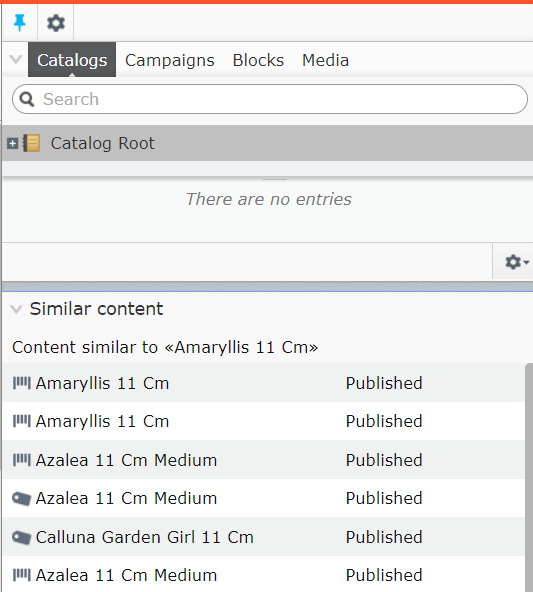
. GetResults ( ) ;查找类似于提供的文档ID的内容
 SearchResult result = service
   . MoreLikeThis ( "42" )
   . GetResults ( ) ;
商业:
 SearchResult result = service
   . MoreLikeThis ( "123__CatalogContent" )
   . GetResults ( ) ;
可选参数:
minimumTermFrequency最小项频率以下是从输入文档中忽略条款的最低频率。默认为1。
maxQueryTerms将选择的最大查询项数。提高此值可以以牺牲查询执行速度为代价。默认为25。
minimumDocFrequency最小文档频率在下面将忽略输入文档的条款。默认为3。
minimumWordLength最小单词长度在此将被忽略。默认为3。
小工具:
如果您不想在全球上排除类型,则只能在查询的背景下进行:
 SearchResult result = service
   . Search < ArticlePage > ( "bacon" )
   . Exclude < SaladPage > ( )
. GetResults ( ) ; 在查询时间中排除节点:
 SearchResult result = service
   . Search < ArticlePage > ( "bacon" )
   . Exclude ( 42 )
   . Exclude ( contentInstance )
   . Exclude ( contentReference )
. GetResults ( ) ;查询使用当前CurrentCulture为默认情况。这可以覆盖:
 SearchResult result = service
   . Search < ArticlePage > ( "bacon" )
   . Language ( CultureInfo . GetCultureInfo ( "en" ) )
. GetResults ( ) ;使用From()和Size()的方法进行分页,或者aliases Skip()和Take() :
 SearchResult result = service
   . Search < CoursePage > ( "foo" )
   . From ( 10 )
   . Size ( 20 )
. GetResults ( ) ; var query = service
. Search < CoursePage > ( "foo" )
. FacetsFor ( x => x . DepartmentID ) ; 方面将是从当前应用的过滤器而不是整个结果创建的。
 var query = service
   . Search < CoursePage > ( "foo" )
. FacetsFor ( x => x . DepartmentID , usePostFilter : false ) ; 一个值:
 string selectedFilter = Request . Querstring [ "filter" ] ;
query = query . Filter ( p => p . DepartmentID , selectedFilter ) ;
一个值,通过扩展方法:
 string selectedFilter = Request . Querstring [ "filter" ] ;
query = query . Filter ( p => p . GetDepartmentID ( ) , selectedFilter ) ;
多个值:
 string [ ] selectedFilters = Request . Querstring [ "filters" ] ;
query = query . Filter ( p => p . DepartmentID , selectedFilters ) ;
使用和操作员在所有过滤器上过滤:
 string [ ] selectedFilters = Request . Querstring [ "filters" ] ;
query = query . Filter ( p => p . DepartmentID , selectedFilters , Operator . And ) ; SearchResult results = query . GetResults ( ) ; foreach ( FacetEntry facet in results . Facets )
{
// facet.Key = name of the property, ie. DepartmentID
// facet.Count = number of unique values for this facet
foreach ( FacetHit hit in facet . Hits )
{
// hit.Key = facet value
// hit.Count = number with this value
}
} 可以将多个过滤器分组以形成更复杂的查询。
在下面的示例中,必须正确进行匹配:
Sizes是"xs"或"xl"
ProductCategory是"pants"
Brand要么是"levis"或"diesel"
 query = query
    . FilterGroup ( group => group
        . Or ( page => page . Sizes ( ) , new [ ] { "xs" , "xl" } )
        . And ( page => page . ProductCategory , "pants" )
        . Or ( page => page . Brand , new [ ] { "levis" , "diesel" } )
) ; 要过滤某些值,请使用FilterMustNot
 var query = service
   . Search < PageData > ( "foo" )
. FilterMustNot ( x => x . Title , "bar" ) ;要过滤当前用户ACL,请使用FilterByACL
 var query = service
   . Search < PageData > ( "foo" )
. FilterByACL ( ) ;默认情况下将使用EPiServer.Security.PrincipalInfo.Current ,但可以在需要时提供自定义的PrincipalInfo 。
要在给定的值范围内搜索,请使用Range函数。
受支持的类型是DateTime , double , decimal和long (包括int , byte等的隐式转换等)
 SearchResult result = service
   . Search ( "bacon" )
   . Range ( x => x . StartPublish , DateTime . Now . Date , DateTime . Now . Date . AddDays ( 2 ) )
   . GetResults ( ) ;
SearchResult result = service
. Search ( "bacon" )
. Range ( x => x . MyNumber , 10 , 20 )
. GetResults ( ) ;不太可能的论点是可选的。
 SearchResult result = service
   . Search ( "bacon" )
   . Range ( x => x . MyNumber , 10 ) // Returns anything above 10
. GetResults ( ) ;要在另一个间隔内搜索一个间隔,您的属性必须是类型Epinova.ElasticSearch.Core.Models.Properties.IntegerRange 。
当前int是唯一受支持的类型。
 SearchResult result = service
   . Search ( "bacon" )
   . Range ( x => x . MyRange , 10 , 20 )
   . GetResults ( ) ;
public class ArticlePage : StandardPage
{
[Display]
public virtual int From { get; set; }
[Display]
public virtual int To { get; set; }
public IntegerRange MyRange => new IntegerRange(From, To);
}
如果属性是类型的IDictionary<string, object>和标记[Searchable] ,则将其索引为Elasticsearch中的object 。
这在您具有动态键值数据的情况下很有用,这些数据必须像PIM系统一样。
标准财产方法:
 public class ProductPage
{
    [Searchable]
    public IDictionary<string, object> Metadata { get; set; }
}
数据本身不会返回,但是您可以查询并制作方面:
 SearchResult result = service
   . Search < ProductPage > ( "bacon" )
   . InField ( x => x . Metadata + ".SomeKey" )
   . FacetsFor ( x => x . Metadata + ".SomeKey" )
   . GetResults ( ) ;
自定义属性:
 public static class SearchConfig
{
    public static void Init ( )
    {
        Epinova . ElasticSearch . Core . Conventions . Indexing . Instance
            . ForType < ProductPage > ( ) . IncludeField ( "Metadata" , x => x . GetPimDataDictionary ( ) ) ;
    }
}
此方法返回数据:
 SearchResult result = service
   . Search < ProductPage > ( "bacon" )
   . GetResults ( ) ;

var hit = result . Hits . First ( ) ;
var dict = hit . Custom [ "Metadata" ] as IDictionary < string , object >可以通过用Boost属性装饰属性来提高属性:
 [ Boost ( 13 ) ]
public string Title { get ; set ; }
…或查询时间:
 SearchResult result = service
   . Search ( "bacon" )
   . Boost ( x => x . MyProp , 3 )
   . GetResults ( ) ;
可以给出一种正或负增长:
 SearchResult result = service
   . Search ( "bacon" )
   . Boost < ArticlePage > ( 2 )
   . GetResults ( ) ;
SearchResult result = service
. Search ( "bacon" )
. Boost ( typeof ( ArticlePage ) , 2 )
. GetResults ( ) ; SearchResult result = service
. Search ( "bacon" )
. Boost < ArticlePage > ( - 3 )
. GetResults ( ) ;您还可以根据其在页面树中的位置来提高命中:
 SearchResult result = service
   . Search ( "bacon" )
   . BoostByAncestor ( new ContentReference ( 42 ) , 2 )
. GetResults ( ) ;通过使用Decay功能,可以根据其值评分日期属性。这样,您可以将较新的文章推广到较旧的文章中。
 SearchResult result = service
   . Search ( "bacon" )
   . Decay ( x => x . StartPublish , TimeSpan . FromDays ( 7 ) )
   . GetResults ( ) ;
每次发生日期间隔(第二参数)时,从分数中减去0.5点。在上面的示例中,7天后,14天后1点等于0.5点,依此类推。
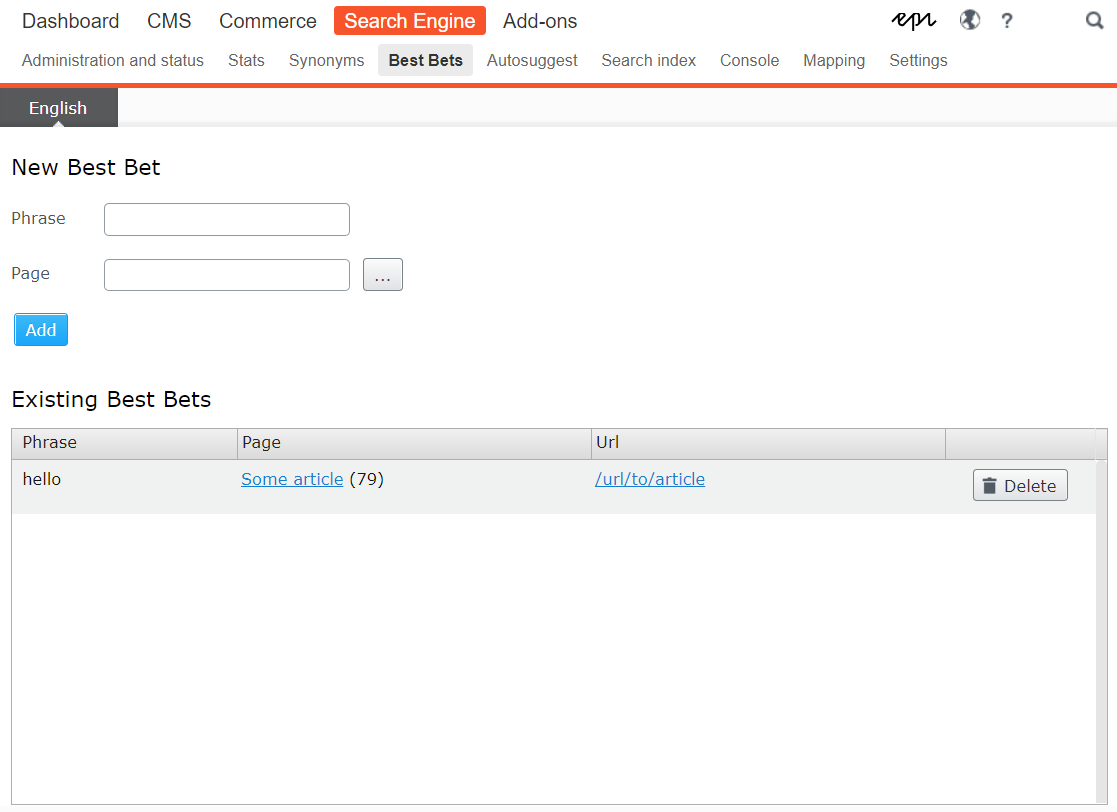
在查询上使用.UseBestBets()以高于正常水平评分所选内容。
 SearchResult result = service
   . Search ( "bacon" )
   . UseBestBets ( )
   . GetResults ( ) ;
最佳选择可以通过嵌入式菜单搜索引擎 - >最佳选择来管理。
可以使用.Track()函数收集简单统计信息。这将跟踪查询该术语的次数以及是否返回任何命中。
 SearchResult result = service
   . Search ( "bacon" )
   . Track ( )
. GetResults ( ) ; 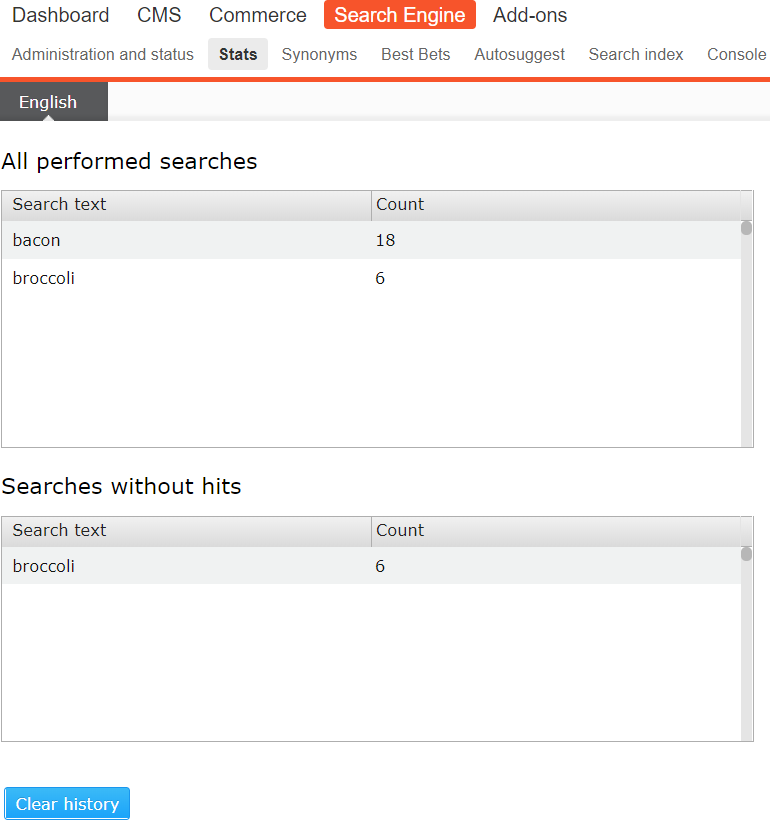
注意:如果您的连接字符串未命名EPiServerDB则必须在trackingConnectionStringName -Configuration中提供其名称,请参见安装
默认情况下,Stemming应用于XhtmlString类型的所有属性,或称为MainIntro或MainBody属性。
该语言基于内容语言。类型string的其他属性可以通过Stem - 属性装饰它们来阻止它们:
 [ Stem ]
public string Title { get ; set ; }要列出某种类型的内容,而无需进行任何评分或分析,请使用Get函数。这可以与SortBy一起用于简单列表。
 SearchResult result = service
   . StartFrom ( somePageLink )
   . Get < ArticlePage > ( )
. GetResults ( ) ;排序通常由Elasticsearch根据每场比赛的分数执行。手动排序仅在评分无关的方案中使用,例如使用前面提到的Get功能时。
 SearchResult result = service
   . Get < ArticlePage > ( )
   . SortBy ( p => p . StartPublish )
   . ThenBy ( p => p . Foo )
   . ThenBy ( p => p . Bar )
. GetResults ( ) ; 当对地理点进行排序时,还有一个强制性的论点。 compareTo 。将将项目与这些坐标进行比较,并将结果距离用作排序值。
对于绝对控制,您可以使用脚本对文档进行排序。请注意,这可能会影响性能。
基于某个时间戳的示例排序:
 var timestamp = new DateTimeOffset ( new DateTime ( 2019 , 1 , 1 ) ) . ToUnixTimeMilliseconds ( ) ;
var script = $ "doc['StartPublish'].date.getMillis() > { timestamp } ? 0 : 1" ;

SearchResult result = service
   . Get < ArticlePage > ( )
   . SortByScript ( script , true , "number" )
   . GetResults ( ) ;
请参阅https://www.elastic.co/guide/en/elasticsearch/painless/current/current/index.html,以进行脚本语法。
包括带状疱疹过滤器,在搜索拼写错误的单词时,可以建议在索引中发现类似的单词。
所发现的任何建议都将包括在搜索结果的DidYouMean属性中:
 SearchResult result = service
   . Search ( "alloi" )
   . GetResults ( ) ;

string [ ] didYouMean = result . DidYouMean ; // [ "alloy", "all" ]任何应作为建议来源的属性都必须标记为[DidYouMeanSource] 。
 public class StandardPage : SitePageData
{
    [ DidYouMeanSource ]
    public virtual XhtmlString MainBody { get ; set ; }
} GetResults()返回的结果不知道Episerver。在情节上下文中使用函数GetContentResults() 。
这将自动应用过滤器FilterAccess , FilterPublished和FilterTemplate 。
 IEnumerable < IContent > content = service
   . Search < CoursePage > ( text )
. GetContentResults ( ) ; 如果在编辑模式下搜索时要使用任何随附的提供商,请转到CMS-> Admin-> config-> contig-> tool设置 - >搜索配置。
勾选提供商并将其拖到列表的顶部。
同义词可以从菜单搜索引擎 - >同义词中管理。
在执行通用操作(例如发布,移动和删除)时,内容将自动重新索引。
要对所有内容进行初始索引,请运行计划的任务«elasticsearch:index cms content»
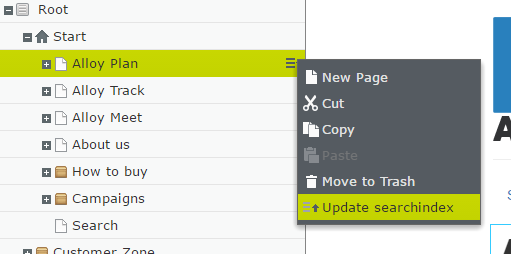
重新索引也可以通过工具 - 菜单手动触发个人内容:
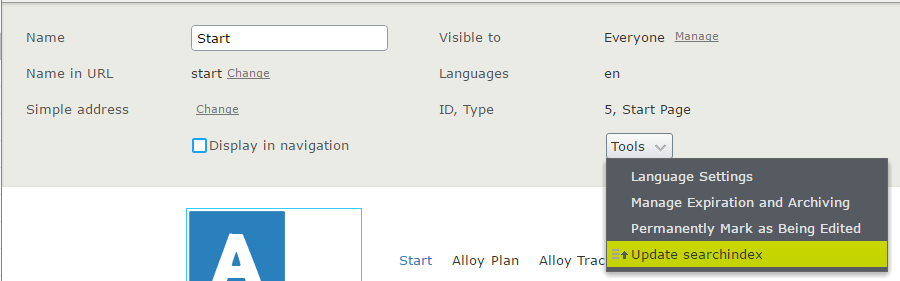
…或通过页面树中的上下文菜单:
GetResults()返回的结果不知道Episerver。在情节贸易贸易上使用函数GetCatalogResults() 。这将自动选择正确的索引,并应用FilterAccess器, FilterPublished和FilterTemplate 。
 IEnumerable < ProductContent > content = service
   . Search < ProductContent > ( text )
. GetCatalogResults ( ) ; 在执行通用操作(例如发布,移动和删除)时,内容将自动重新索引。
要对所有内容进行初始索引,请运行计划的任务«Elasticsearch:Index Commerce Content»
您可以通过菜单搜索引擎 - >管理和状态,可以在普通和三克令牌之间切换(硬编码为最小= 3,max = 3,max = 3,tokens = Digit,char,char,char,char,char,char,char,char)。
使用Highlight()函数从文本中的匹配中获取150个字符的摘录。
 SearchResult result = service
   . Search ( "bacon" )
   . Highlight ( )
. GetContentResults ( ) ;默认情况下,突出显示了名为MainIntro , MainBody , Attachment和Description属性。
默认标记为<mark>
您可以使用以下配置选项自定义此行为:
 Indexing . Instance . ForType < ArticlePage > ( ) . EnableHighlighting ( x => x . MyField ) ;
Indexing . Instance . SetHighlightFragmentSize ( 42 ) ;
Indexing . Instance . SetHighlightTag ( "blink" ) ;结果可以在每个命中的Highlight属性中找到。
使用Bulk函数索引自定义内容。
例子:
 var obj1 = new ComplexType { StringProperty = "this is myobj 1" } ;
var obj2 = new ComplexType { StringProperty = "this is myobj 2" } ;
var obj3 = new ComplexType { StringProperty = "this is myobj 3" } ;

ICoreIndexer indexer = ServiceLocator . Current . GetInstance < ICoreIndexer > ( ) ; // Can also be injected

BulkBatchResult bulk = indexer . Bulk ( new [ ]
{
    new BulkOperation ( obj1 , "no" ) ,
    new BulkOperation ( obj2 , "no" ) ,
    new BulkOperation ( obj3 , "no" )
} ) ;

var results = _service
    . Search < ComplexType > ( "myobj" )
    . InField ( x => x . StringProperty )
. GetCustomResults ( ) ; 如果您喜欢避免碰撞的自定义索引,则必须在索引和搜索时提供此信息:
 var obj1 = new ComplexType { StringProperty = "this is myobj 1" } ;
var obj2 = new ComplexType { StringProperty = "this is myobj 2" } ;
var obj3 = new ComplexType { StringProperty = "this is myobj 3" } ;

ICoreIndexer indexer = ServiceLocator . Current . GetInstance < ICoreIndexer > ( ) ; // Can also be injected

string indexName = "my-uber-custom-name-no" ;

BulkBatchResult bulk = indexer . Bulk ( new [ ]
{
    new BulkOperation ( obj1 , "no" , index : indexName ) ,
    new BulkOperation ( obj2 , "no" , index : indexName ) ,
    new BulkOperation ( obj3 , "no" , index : indexName )
} ) ;


var results = _service
    . UseIndex ( indexName )
    . Search < ComplexType > ( "myobj" )
    . InField ( x => x . StringProperty )
. GetCustomResults ( ) ; epinova.elasticsearch使用标准HttpClient来调用elasticsearch。有时,处理发送的消息是必要的。例如签署云服务请求。
如果您想要几个httpmessagehandlers,我们建议在设置之前将它们链接。
例如:
MessageHandler . Instance . SetMessageHandler ( new AWSHandler ( ) ) ; GetCustomResults返回强烈键入的对象,而不是GetContentResults ,而GetContentResults仅返回ID。
自定义对象不需要Id属性(或BulkOperation CTOR中的相应参数),但是如果您需要控制版本控制和更新/删除,建议这样做。






