Epinova.Elasticsearch
v11.8.59: Merge pull request #212 from Epinova

Episerver CMSおよびCommerceの検索プラグイン
.NET 6+をサポートするバージョンが利用可能です。詳細については、Kristian Borgにお問い合わせください。
まず、インデックスを作成する必要があります。組み込みメニュー検索エンジン - >管理とステータスを介して[管理]ページに移動し、 Create indicesボタンをクリックします。
これにより、サイトに言語ごとに1つのインデックスが作成されます。 Commerce Addonをインストールしている場合、カタログコンテンツの追加インデックスも作成されます。
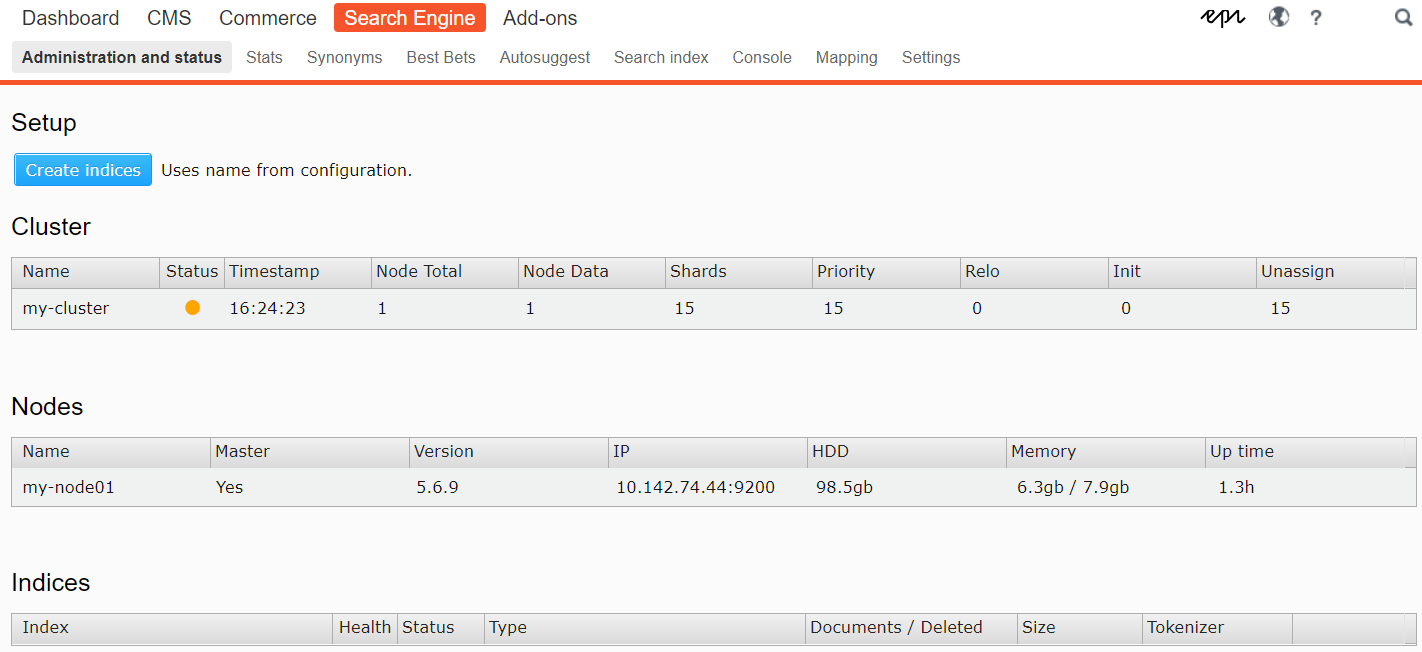
サイト上のアクティブ言語ごとに別のインデックスが作成されます。後で言語を追加する場合は、このプロセスを繰り返す必要があります。
Singleton Epinova.ElasticSearch.Core.Conventions.Indexingでプログラムでセットアップを構成できます。これは、AppDomainごとに1回のみ、通常は初期化可能なモジュールまたはApplication_start()で行います。
サンプル構成クラス:
 public static class SearchConfig
{
    public static void Init ( )
    {
        Epinova . ElasticSearch . Core . Conventions . Indexing . Instance
            . ExcludeType < ErrorPage > ( )
            . ExcludeType < StartPage > ( )
            . ExcludeRoot ( 42 )
            . IncludeFileType ( "pdf" )
            . IncludeFileType ( "docx" )
            . ForType < ArticlePage > ( ) . IncludeProperty ( x => x . Changed )
            . ForType < ArticlePage > ( ) . IncludeField ( x => x . GetFoo ( ) )
            . ForType < ArticlePage > ( ) . IncludeField ( "TenYearsAgo" , x => DateTime . Now . AddYears ( - 10 ) )
            . ForType < ArticlePage > ( ) . EnableSuggestions ( x => x . Title )
            . ForType < TagPage > ( ) . EnableSuggestions ( )
            . ForType < ArticlePage > ( ) . EnableHighlighting ( x => x . MyField )
            . ForType < ArticlePage > ( ) . StemField ( x => x . MyField ) ;
    }
}
さまざまなオプションの説明:
ExcludeType :このタイプはインデックス化されません。基本クラスとインターフェイスもサポートされています。同じことは、 ExcludeFromSearchAttributeでタイプを飾ることで実現できます
ExcludeRoot :このノードとその子供はインデックス化されません。通常、エピソーバーページツリーのノードID。
IncludeFileType :インデックス作成する必要があるファイルタイプの拡張機能を定義します。構成の<files>ノードも参照してください。
ForType :特定のタイプのルールのインデックス作成の開始点。それ自体は何もしませんが、次のオプションへのアクセスを提供します。
IncludeField :インデックス作成するカスタムプロパティを定義します。たとえば、外部データを取得したり、複雑な集約を実行したりする拡張メソッド。
EnableSuggestions :Lambda式を介して、すべてのプロパティまたは選択されたプロパティから、このタイプからAutoSuggestデータを提供します。
IncludeProperty :[検索可能]でプロパティを装飾することと同じ効果。モデルのソースを制御しない場合は、使用できます。
EnableHighlighting :強調表示する追加のフィールドを追加します。
StemField :プロパティを現在の言語で分析する必要があることを定義しています。 MainIntro 、 MainBody 、およびDescriptionという名前のプロパティは、常に分析されます。
モジュールは、Episerverと同じ規則に従うことを試みます。つまり、 [Searchable(false)]で明示的に装飾されていない限り、型文字stringとXhtmlStringのすべてのプロパティがインデックスが付けられます。追加のプロパティは[Searchable]または上記の規則でそれらを装飾することにより、インデックスを付けることができます。 [Searchable]でコンテンツをインデックスするContentAreaを飾ります。
 SearchResult result = service
   . Search ( "bacon" )
. GetResults ( ) ; SearchResult result = service
. Search < ArticlePage > ( "bacon" )
. GetResults ( ) ; SearchResult result = service
. Search < ArticlePage > ( "bacon" )
. InField ( x => x . MainIntro )
. InField ( x => x . MainBody )
. InField ( x => x . MyCustomMethod ( ) )
. GetResults ( ) ;フレーズから始まるインデックス付き単語の検索:
string [ ] suggestions = service . GetSuggestions ( "baco" ) ;デフォルトの長さの自動(推奨):
 SearchResult result = service
   . Search < ArticlePage > ( "bacon" )
   . Fuzzy ( )
   . GetResults ( ) ;
特定の長さで:
 SearchResult result = service
   . Search < ArticlePage > ( "bacon" )
   . Fuzzy ( 4 )
. GetResults ( ) ;これはステムなどの機能をサポートしていないため、注意して使用します。
 SearchResult result = service
   . WildcardSearch < ArticlePage > ( "*bacon*" )
   . GetResults ( ) ;
SearchResult result = service
. WildcardSearch < ArticlePage > ( "me?t" )
. GetResults ( ) ; SearchResult result = service
. SimpleQuerystringSearch < ArticlePage > ( "(bacon | ham) melt -cheese" )
. GetResults ( ) ;限られたオペレーターと:
 SearchResult result = service
   . SimpleQuerystringSearch < ArticlePage > ( " " bacon melt " sandwi*" ,
      defaultOperator : Operator . And ,
      allowedOperators :
         SimpleQuerystringOperators . Prefix |
         SimpleQuerystringOperators . Phrase ) ;
    )
   . GetResults ( ) ;
https://www.elastic.co/guide/en/elasticsearch/reference/current/query-dsl-simple-query-string-string-query.htmlを参照してください。
タイプのプロパティを使用するEpinova.ElasticSearch.Core.Models.Properties.GeoPointを使用すると、ジオベースのフィルタリングを実行できます。
モデルの例:
 public class OfficePage : StandardPage
{
    [ Display ]
    public virtual double Lat { get ; set ; }

    [ Display ]
    public virtual double Lon { get ; set ; }

    // Helper property, you could always roll an editor for this
    public GeoPoint Location => new GeoPoint ( Lat , Lon ) ;
} 左上および右下の角に基づいて正方形の領域内のポイントを見つけます。
 var topLeft = ( 59.9277542 , 10.7190847 ) ;
var bottomRight = ( 59.8881646 , 10.7983952 ) ;

SearchResult result = service
   . Get < OfficePage > ( )
   . FilterGeoBoundingBox ( x => x . Location , , topLeft , bottomRight )
. GetResults ( ) ; 中心点と半径の距離を与えられた円の内側のポイントを見つけます。
 var center = ( 59.9277542 , 10.7190847 ) ;
var radius = "10km" ;

SearchResult result = service
   . Get < OfficePage > ( )
   . FilterGeoDistance ( x => x . Location , radius , center )
. GetResults ( ) ; 任意の量のポイントでポリゴン内のポイントを見つけます。ポリゴンポイントは、たとえば、都市、国、またはその他の種類のエリアの輪郭になります。
 var polygons = new [ ]
{
    ( 59.9702837 , 10.6149134 ) ,
    ( 59.9459601 , 11.0231964 ) ,
    ( 59.7789455 , 10.604809 )
} ;

SearchResult result = service
   . Get < OfficePage > ( )
   . FilterGeoPolygon ( x => x . Location , polygons )
. GetResults ( ) ;提供されているDocument-IDに似たコンテンツを見つけます
 SearchResult result = service
   . MoreLikeThis ( "42" )
   . GetResults ( ) ;
商業:
 SearchResult result = service
   . MoreLikeThis ( "123__CatalogContent" )
   . GetResults ( ) ;
オプションのパラメーター:
minimumTermFrequency入力ドキュメントから用語が無視される最小項頻度。デフォルトは1です。
maxQueryTerms選択されるクエリ項の最大数。この値を増やすと、クエリの実行速度を犠牲にして精度が向上します。デフォルトは25です。
minimumDocFrequency 、入力ドキュメントから用語が無視される最小ドキュメント頻度です。デフォルトは3です。
minimumWordLength以下では、項が無視される最小単語の長さ。デフォルトは3です。
ガジェット:
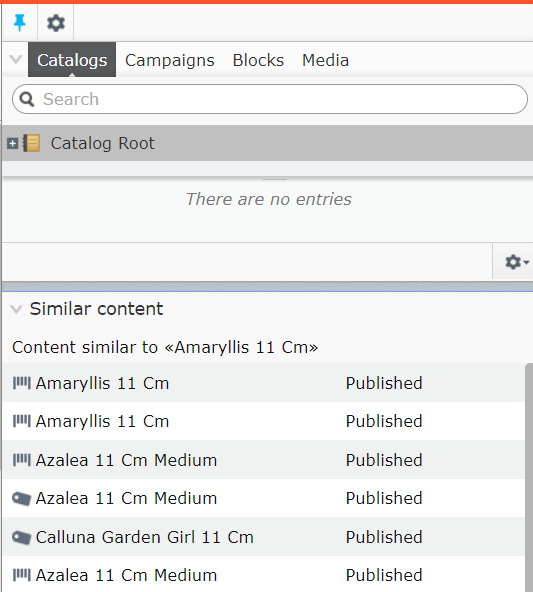
グローバルにタイプを除外したくない場合は、クエリのコンテキストでのみ実行できます。
 SearchResult result = service
   . Search < ArticlePage > ( "bacon" )
   . Exclude < SaladPage > ( )
. GetResults ( ) ; クエリ時にノードを除外します:
 SearchResult result = service
   . Search < ArticlePage > ( "bacon" )
   . Exclude ( 42 )
   . Exclude ( contentInstance )
   . Exclude ( contentReference )
. GetResults ( ) ;クエリは、 CurrentCultureをデフォルトとして使用します。これはオーバーライドできます。
 SearchResult result = service
   . Search < ArticlePage > ( "bacon" )
   . Language ( CultureInfo . GetCultureInfo ( "en" ) )
. GetResults ( ) ;ページネーションのためにFrom()とSize()のメソッドを使用するか、エイリアスSkip()とTake()使用します。
 SearchResult result = service
   . Search < CoursePage > ( "foo" )
   . From ( 10 )
   . Size ( 20 )
. GetResults ( ) ; var query = service
. Search < CoursePage > ( "foo" )
. FacetsFor ( x => x . DepartmentID ) ; ファセットは、結果全体ではなく、現在適用されているフィルターから作成されます。
 var query = service
   . Search < CoursePage > ( "foo" )
. FacetsFor ( x => x . DepartmentID , usePostFilter : false ) ; 1つの値:
 string selectedFilter = Request . Querstring [ "filter" ] ;
query = query . Filter ( p => p . DepartmentID , selectedFilter ) ;
1つの値、拡張方法:
 string selectedFilter = Request . Querstring [ "filter" ] ;
query = query . Filter ( p => p . GetDepartmentID ( ) , selectedFilter ) ;
複数の値:
 string [ ] selectedFilters = Request . Querstring [ "filters" ] ;
query = query . Filter ( p => p . DepartmentID , selectedFilters ) ;
すべてのフィルターでフィルタリングするために使用および演算子:
 string [ ] selectedFilters = Request . Querstring [ "filters" ] ;
query = query . Filter ( p => p . DepartmentID , selectedFilters , Operator . And ) ; SearchResult results = query . GetResults ( ) ; foreach ( FacetEntry facet in results . Facets )
{
// facet.Key = name of the property, ie. DepartmentID
// facet.Count = number of unique values for this facet
foreach ( FacetHit hit in facet . Hits )
{
// hit.Key = facet value
// hit.Count = number with this value
}
} 複数のフィルターをグループ化して、より複雑なクエリを形成できます。
以下の例では、一致するために以下が真実でなければなりません。
Sizesは"xs"または"xl"のいずれかですProductCategoryは"pants"ですBrandは"levis"または"diesel"のいずれかです
 query = query
    . FilterGroup ( group => group
        . Or ( page => page . Sizes ( ) , new [ ] { "xs" , "xl" } )
        . And ( page => page . ProductCategory , "pants" )
        . Or ( page => page . Brand , new [ ] { "levis" , "diesel" } )
) ; 特定の値を除去するには、 FilterMustNotを使用します
 var query = service
   . Search < PageData > ( "foo" )
. FilterMustNot ( x => x . Title , "bar" ) ;現在のユーザーACLをフィルタリングするには、 FilterByACLを使用します
 var query = service
   . Search < PageData > ( "foo" )
. FilterByACL ( ) ; EPiServer.Security.PrincipalInfo.Currentデフォルトで使用されますが、必要に応じてカスタムのPrincipalInfoを提供できます。
特定の値の範囲内で検索するには、 Range関数を使用します。
サポートされているタイプは、 DateTime 、 double 、 decimal 、およびlong ( int 、 byteなどの暗黙的な変換を含む)です。
 SearchResult result = service
   . Search ( "bacon" )
   . Range ( x => x . StartPublish , DateTime . Now . Date , DateTime . Now . Date . AddDays ( 2 ) )
   . GetResults ( ) ;
SearchResult result = service
. Search ( "bacon" )
. Range ( x => x . MyNumber , 10 , 20 )
. GetResults ( ) ;より少ない引数はオプションです。
 SearchResult result = service
   . Search ( "bacon" )
   . Range ( x => x . MyNumber , 10 ) // Returns anything above 10
. GetResults ( ) ;別の間隔内の間隔を検索するには、あなたのプロパティはEpinova.ElasticSearch.Core.Models.Properties.IntegerRangeのタイプでなければなりません。
現在、 int唯一のサポートされているタイプです。
 SearchResult result = service
   . Search ( "bacon" )
   . Range ( x => x . MyRange , 10 , 20 )
   . GetResults ( ) ;
public class ArticlePage : StandardPage
{
[Display]
public virtual int From { get; set; }
[Display]
public virtual int To { get; set; }
public IntegerRange MyRange => new IntegerRange(From, To);
}
プロパティがタイプIDictionary<string, object>でマークされた[Searchable]の場合、ElasticSearchのobjectとしてインデックス化されます。
これは、PIM-Systemsのように、インデックス付けする必要がある動的なキー価値データがあるシナリオで役立ちます。
標準プロパティアプローチ:
 public class ProductPage
{
    [Searchable]
    public IDictionary<string, object> Metadata { get; set; }
}
データ自体は返されませんが、照会してファセットを作成できます。
 SearchResult result = service
   . Search < ProductPage > ( "bacon" )
   . InField ( x => x . Metadata + ".SomeKey" )
   . FacetsFor ( x => x . Metadata + ".SomeKey" )
   . GetResults ( ) ;
カスタムプロパティ:
 public static class SearchConfig
{
    public static void Init ( )
    {
        Epinova . ElasticSearch . Core . Conventions . Indexing . Instance
            . ForType < ProductPage > ( ) . IncludeField ( "Metadata" , x => x . GetPimDataDictionary ( ) ) ;
    }
}
このアプローチはデータを返します。
 SearchResult result = service
   . Search < ProductPage > ( "bacon" )
   . GetResults ( ) ;

var hit = result . Hits . First ( ) ;
var dict = hit . Custom [ "Metadata" ] as IDictionary < string , object >プロパティは、 Boost属性でそれらを装飾することでブーストできます。
 [ Boost ( 13 ) ]
public string Title { get ; set ; }
…またはクエリ時に:
 SearchResult result = service
   . Search ( "bacon" )
   . Boost ( x => x . MyProp , 3 )
   . GetResults ( ) ;
タイプには、正または負のブーストを与えることができます。
 SearchResult result = service
   . Search ( "bacon" )
   . Boost < ArticlePage > ( 2 )
   . GetResults ( ) ;
SearchResult result = service
. Search ( "bacon" )
. Boost ( typeof ( ArticlePage ) , 2 )
. GetResults ( ) ; SearchResult result = service
. Search ( "bacon" )
. Boost < ArticlePage > ( - 3 )
. GetResults ( ) ;また、ページツリーの場所に応じてヒットをブーストすることもできます。
 SearchResult result = service
   . Search ( "bacon" )
   . BoostByAncestor ( new ContentReference ( 42 ) , 2 )
   . GetResults ( ) ;
日付プロパティは、 Decay関数を使用して、値に応じてより低くスコアを付けることができます。これにより、古い記事よりも新しい記事を宣伝できます。
 SearchResult result = service
   . Search ( "bacon" )
   . Decay ( x => x . StartPublish , TimeSpan . FromDays ( 7 ) )
   . GetResults ( ) ;
日付間隔(2番目の引数)が発生するたびに、スコアから0.5ポイントが差し引かれます。上記の例では、7日後に0.5ポイントが減算され、14日後1ポイントなどが差し引かれます。
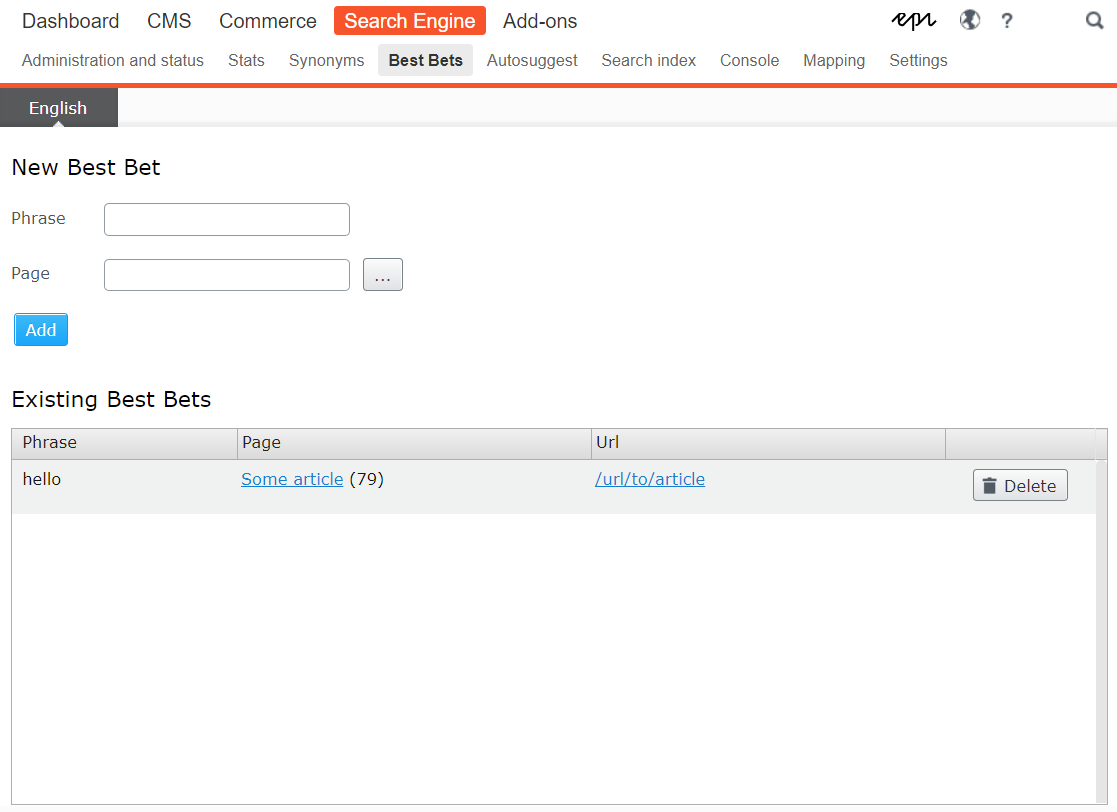
クエリで.UseBestBets()を使用して、選択したコンテンツを通常よりも高いスコアを獲得します。
 SearchResult result = service
   . Search ( "bacon" )
   . UseBestBets ( )
   . GetResults ( ) ;
埋め込まれたメニュー検索エンジン - >最良の賭けを介して、最良の賭けを管理できます。
.Track()関数を使用して、単純な統計を収集できます。これにより、用語が照会された回数と、ヒットを返したかどうかが追跡されます。
 SearchResult result = service
   . Search ( "bacon" )
   . Track ( )
. GetResults ( ) ; 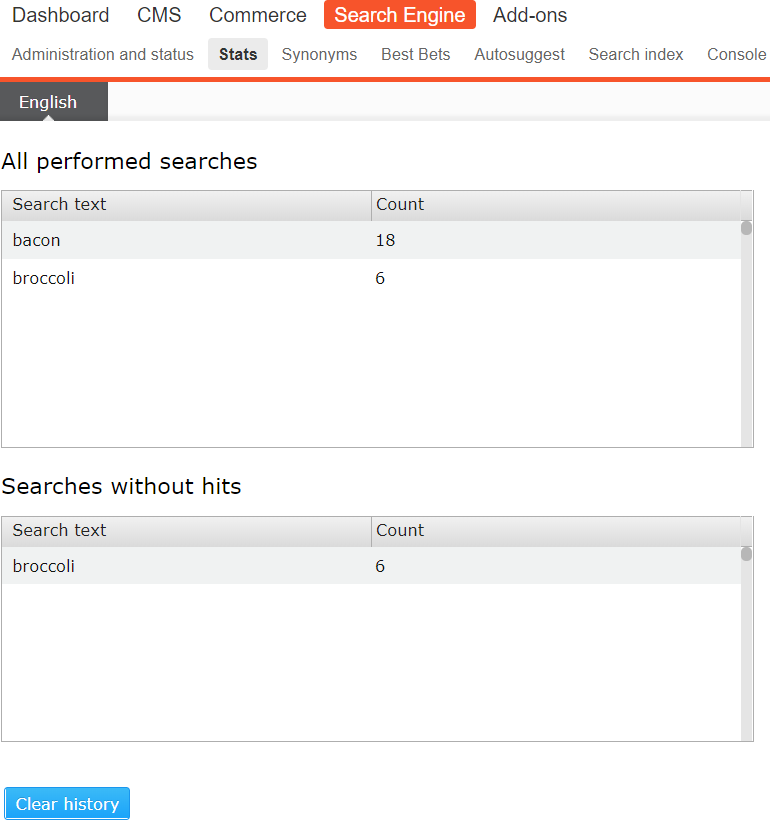
注:接続文字列に名前が付けられていない場合は、 EPiServerDB trackingConnectionStringNameする必要があります。
ステムは、デフォルトでは、 XhtmlStringタイプのすべてのプロパティ、またはMainIntroまたはMainBodyという名前のプロパティに適用されます。
言語はコンテンツ言語に基づいています。型文字stringの他のプロパティは、 Stemアトリブでそれらを飾ることによって抑制されます。
 [ Stem ]
public string Title { get ; set ; }スコアリングや分析なしで特定のタイプのコンテンツをリストするには、 Get機能を使用します。これは、簡単なリストのためにSortByと組み合わせて使用できます。
 SearchResult result = service
   . StartFrom ( somePageLink )
   . Get < ArticlePage > ( )
. GetResults ( ) ;ソートは通常、各マッチのスコアに基づいてElasticSearchによって実行されます。手動ソートは、スコアリングが関連性がないシナリオでのみ使用する必要があります。たとえば、前述のGet機能を使用する場合。
 SearchResult result = service
   . Get < ArticlePage > ( )
   . SortBy ( p => p . StartPublish )
   . ThenBy ( p => p . Foo )
   . ThenBy ( p => p . Bar )
. GetResults ( ) ; GeoPointでソートするとき、もう1つの必須の引数があります。 compareTo 。アイテムはこれらの座標と比較され、結果の距離はソート値として使用されます。
絶対的な制御のために、スクリプトを使用してドキュメントを並べ替えることができます。これはパフォーマンスに影響する可能性があることに注意してください。
特定のタイムスタンプに基づいた例:並べ替え:
 var timestamp = new DateTimeOffset ( new DateTime ( 2019 , 1 , 1 ) ) . ToUnixTimeMilliseconds ( ) ;
var script = $ "doc['StartPublish'].date.getMillis() > { timestamp } ? 0 : 1" ;

SearchResult result = service
   . Get < ArticlePage > ( )
   . SortByScript ( script , true , "number" )
   . GetResults ( ) ;
Scripting Syntaxについては、https://www.elastic.co/guide/en/Elasticsearch/painless/current/index.htmlを参照してください。
スペルミスのある単語を検索するときに、インデックスに見られる同様の単語を示唆できる鉄片フィルターが含まれています。
見つかった提案は、検索結果のDidYouMean財産に含まれます。
 SearchResult result = service
   . Search ( "alloi" )
   . GetResults ( ) ;

string [ ] didYouMean = result . DidYouMean ; // [ "alloy", "all" ]
提案のソースとして機能する必要があるプロパティは、 [DidYouMeanSource]でマークする必要があります。
 public class StandardPage : SitePageData
{
    [ DidYouMeanSource ]
    public virtual XhtmlString MainBody { get ; set ; }
} GetResults()によって返された結果は、Episerverの知識を持っていません。エピソーバーのコンテキストで関数GetContentResults()を使用します。
これにより、フィルターFilterAccess 、 FilterPublished 、 FilterTemplate自動的に適用されます。
 IEnumerable < IContent > content = service
   . Search < CoursePage > ( text )
. GetContentResults ( ) ; 編集モードで検索するときに含まれるプロバイダーのいずれかを使用する場合は、CMS-> admin-> config-> tool Settings->検索構成に移動します。
プロバイダーをチェックして、リストの一番上にドラッグします。
同義語は、メニュー検索エンジン - > synonymsから管理できます。
公開、移動、削除などの一般的な操作を実行すると、コンテンツが自動的に再インド化されます。
すべてのコンテンツの初期インデックス作成を行うには、スケジュールされたタスクを実行します«ElasticSearch:インデックスCMSコンテンツ»
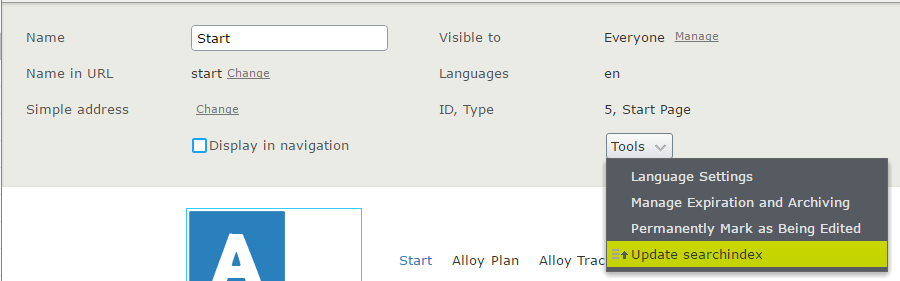
再インデックスは、Tools-Menuを介して個々のコンテンツで手動でトリガーすることもできます。
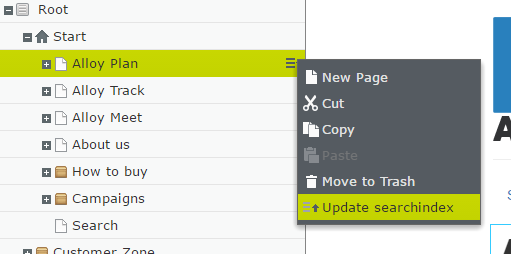
…またはページツリーのコンテキストメニューを介して:
GetResults()によって返された結果は、Episerverの知識を持っていません。 Episerver Commerceコンテキストで関数GetCatalogResults()を使用します。これにより、正しいインデックスが自動的に選択され、 FilterAccess 、 FilterPublished 、 FilterTemplateが適用されます。
 IEnumerable < ProductContent > content = service
   . Search < ProductContent > ( text )
. GetCatalogResults ( ) ; 公開、移動、削除などの一般的な操作を実行すると、コンテンツが自動的に再インド化されます。
すべてのコンテンツの初期インデックス作成を行うには、スケジュールされたタスクを実行します«ElasticSearch:Index Commerceコンテンツ»
メニュー検索エンジン - >管理とステータスを介して、通常とトリグラムのトークナイザー(min = 3、max = 3、max = 3、tokens = digit、char、char、char、char、char、char、char、char、char、char、char、char、char、char、char、char、char、char、char、char)を切り替えることができます。
Highlight()関数を使用して、テキストで一致が発生した場所から150文字の抜粋を取得します。
 SearchResult result = service
   . Search ( "bacon" )
   . Highlight ( )
   . GetContentResults ( ) ;
ハイライトは、 MainIntro 、 MainBody 、 Attachment 、 Descriptionという名前のプロパティでデフォルトで有効になっています。
デフォルトマーカーは<mark>です
次の構成オプションでこの動作をカスタマイズできます。
 Indexing . Instance . ForType < ArticlePage > ( ) . EnableHighlighting ( x => x . MyField ) ;
Indexing . Instance . SetHighlightFragmentSize ( 42 ) ;
Indexing . Instance . SetHighlightTag ( "blink" ) ;結果は、各ヒットのHighlightプロパティに記載されています。
Bulk関数を使用して、カスタムコンテンツのインデックスを付けます。
例:
 var obj1 = new ComplexType { StringProperty = "this is myobj 1" } ;
var obj2 = new ComplexType { StringProperty = "this is myobj 2" } ;
var obj3 = new ComplexType { StringProperty = "this is myobj 3" } ;

ICoreIndexer indexer = ServiceLocator . Current . GetInstance < ICoreIndexer > ( ) ; // Can also be injected

BulkBatchResult bulk = indexer . Bulk ( new [ ]
{
    new BulkOperation ( obj1 , "no" ) ,
    new BulkOperation ( obj2 , "no" ) ,
    new BulkOperation ( obj3 , "no" )
} ) ;

var results = _service
    . Search < ComplexType > ( "myobj" )
    . InField ( x => x . StringProperty )
. GetCustomResults ( ) ; EG衝突を回避するためにカスタムインデックスを好む場合は、これをインデックス作成と検索時に提供する必要があります。
 var obj1 = new ComplexType { StringProperty = "this is myobj 1" } ;
var obj2 = new ComplexType { StringProperty = "this is myobj 2" } ;
var obj3 = new ComplexType { StringProperty = "this is myobj 3" } ;

ICoreIndexer indexer = ServiceLocator . Current . GetInstance < ICoreIndexer > ( ) ; // Can also be injected

string indexName = "my-uber-custom-name-no" ;

BulkBatchResult bulk = indexer . Bulk ( new [ ]
{
    new BulkOperation ( obj1 , "no" , index : indexName ) ,
    new BulkOperation ( obj2 , "no" , index : indexName ) ,
    new BulkOperation ( obj3 , "no" , index : indexName )
} ) ;


var results = _service
    . UseIndex ( indexName )
    . Search < ComplexType > ( "myobj" )
    . InField ( x => x . StringProperty )
. GetCustomResults ( ) ; epinova.elasticsearchは、標準のHttpClientを使用してelasticsearchを呼び出します。異なる方法で送信されるメッセージを処理するのはネッカサリーである場合があります。たとえば、クラウドサービスのリクエストに署名します。
いくつかのhttpmessagehandlersが必要な場合は、設定前にチェーンを作成することをお勧めします。
例えば:
MessageHandler . Instance . SetMessageHandler ( new AWSHandler ( ) ) ; GetCustomResults 、IDのみを返すだけでなく、 GetContentResultsとは対照的に、強く型付けされたオブジェクトを返します。
カスタムオブジェクトには、 Idプロパティ(またはBulkOperation CTORの対応する引数)は必要ありませんが、これはバージョンの更新/削除を制御する場合に推奨されます。






