yolor
1.0.0

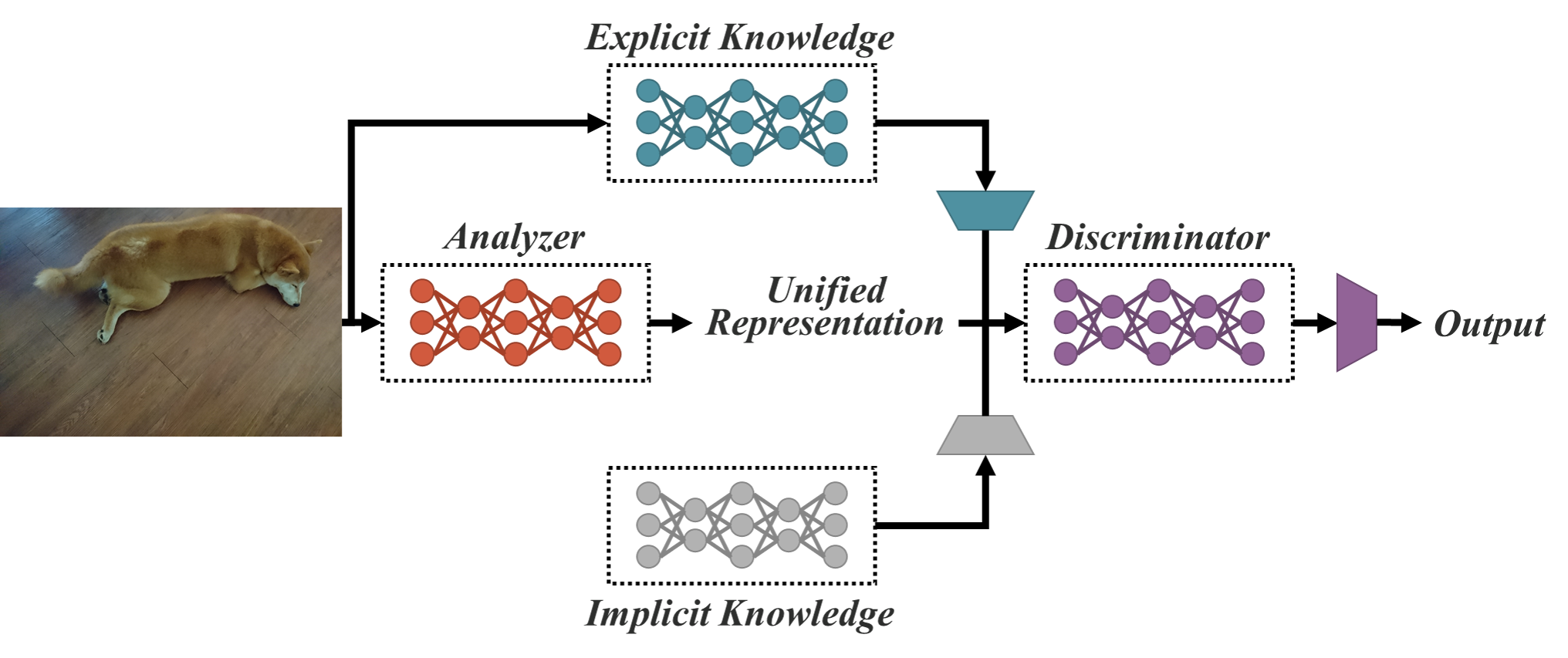
การใช้งานกระดาษ - คุณเรียนรู้เพียงหนึ่งเดียวเท่านั้น: เครือข่ายแบบครบวงจรสำหรับงานหลายงาน
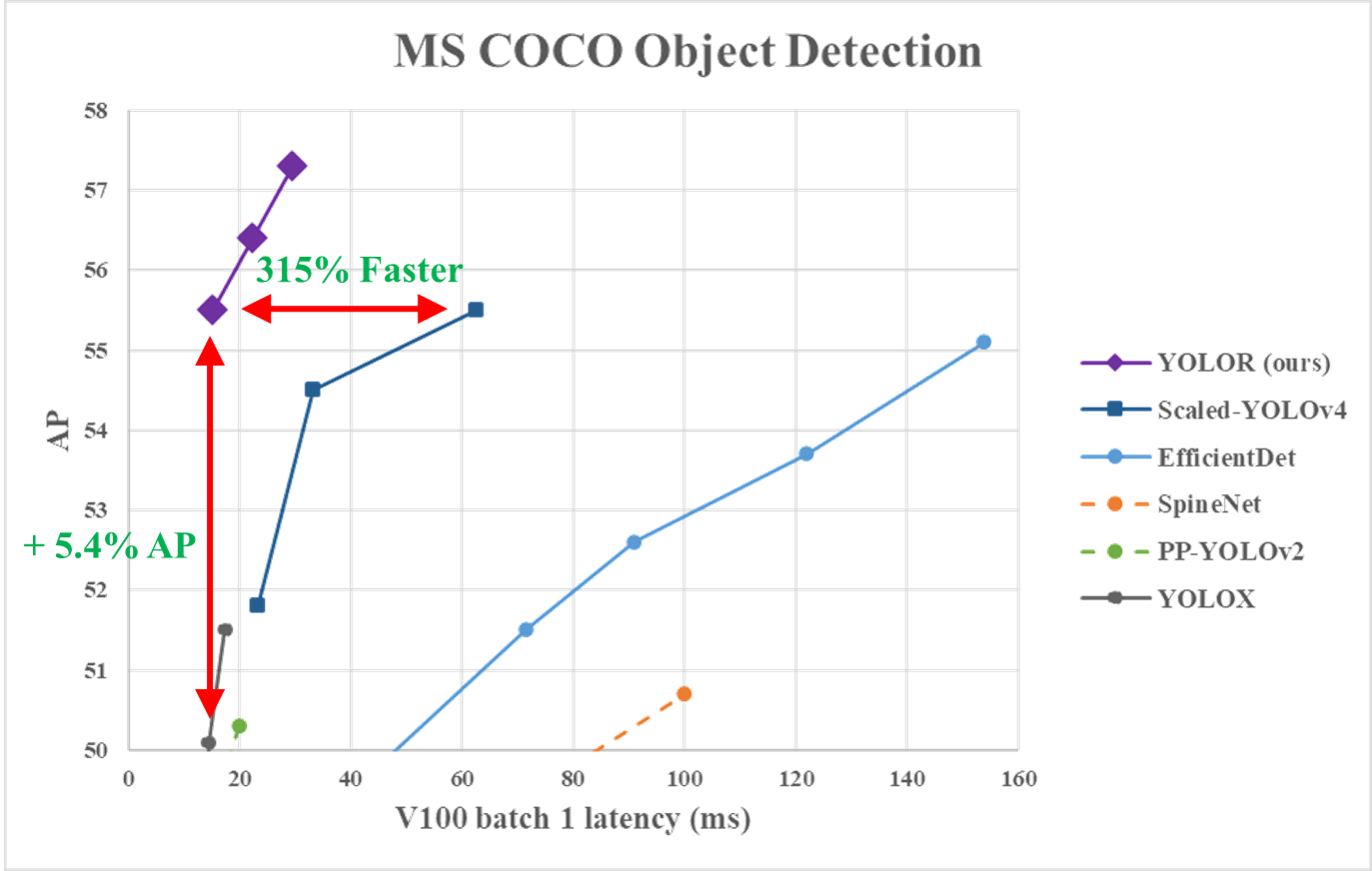
เพื่อให้ได้ผลลัพธ์บนตารางโปรดใช้สาขานี้
| แบบอย่าง | ขนาดทดสอบ | การทดสอบ AP | การทดสอบ AP 50 | การทดสอบ AP 75 | ปริมาณงาน Batch1 | การอนุมาน BATCH32 |
|---|---|---|---|---|---|---|
| ไข่แดง-CSP | 640 | 52.8% | 71.2% | 57.6% | 106 fps | 3.2 มิลลิวินาที |
| โยลอร์ -CSP-X | 640 | 54.8% | 73.1% | 59.7% | 87 fps | 5.5 มิลลิวินาที |
| โยลอร์-P6 | 1280 | 55.7% | 73.3% | 61.0% | 76 fps | 8.3 ms |
| โยลอร์-W6 | 1280 | 56.9% | 74.4% | 62.2% | 66 fps | 10.7 ms |
| โยลอร์-e6 | 1280 | 57.6% | 75.2% | 63.0% | 45 fps | 17.1 ms |
| โยลอร์ -D6 | 1280 | 58.2% | 75.8% | 63.8% | 34 fps | 21.8 ms |
| YOLOV4-P5 | 896 | 51.8% | 70.3% | 56.6% | 41 fps (เก่า) | - |
| YOLOV4-P6 | 1280 | 54.5% | 72.6% | 59.8% | 30 fps (เก่า) | - |
| YOLOV4-P7 | ค.ศ. 1536 | 55.5% | 73.4% | 60.8% | 16 fps (เก่า) | - |
| แบบอย่าง | ขนาดทดสอบ | AP Val | AP 50 VAL | AP 75 VAL | ap s val | ap m val | ap l val | น้ำหนัก |
|---|---|---|---|---|---|---|---|---|
| YOLOV4-CSP | 640 | 49.1% | 67.7% | 53.8% | 32.1% | 54.4% | 63.2% | - |
| ไข่แดง-CSP | 640 | 49.2% | 67.6% | 53.7% | 32.9% | 54.4% | 63.0% | น้ำหนัก |
| Yolor-CSP * | 640 | 50.0% | 68.7% | 54.3% | 34.2% | 55.1% | 64.3% | น้ำหนัก |
| YOLOV4-CSP-X | 640 | 50.9% | 69.3% | 55.4% | 35.3% | 55.8% | 64.8% | - |
| โยลอร์ -CSP-X | 640 | 51.1% | 69.6% | 55.7% | 35.7% | 56.0% | 65.2% | น้ำหนัก |
| YOLOR-CSP-X * | 640 | 51.5% | 69.9% | 56.1% | 35.8% | 56.8% | 66.1% | น้ำหนัก |
กำลังพัฒนา ...
| แบบอย่าง | ขนาดทดสอบ | การทดสอบ AP | การทดสอบ AP 50 | การทดสอบ AP 75 | การทดสอบ AP S | การทดสอบ ap m | การทดสอบ AP L |
|---|---|---|---|---|---|---|---|
| ไข่แดง-CSP | 640 | 51.1% | 69.6% | 55.7% | 31.7% | 55.3% | 64.7% |
| โยลอร์ -CSP-X | 640 | 53.0% | 71.4% | 57.9% | 33.7% | 57.1% | 66.8% |
รถไฟตั้งแต่เริ่มต้น 300 ยุค ...
| แบบอย่าง | ข้อมูล | ขนาดทดสอบ | ap |
|---|---|---|---|
| ไข่แดง-CSP | วิวัฒนาการ | 640 | 48.0% |
| ไข่แดง-CSP | กลยุทธ์ | 640 | 50.0% |
| ไข่แดง-CSP | กลยุทธ์ + simota | 640 | 51.1% |
| โยลอร์ -CSP-X | กลยุทธ์ | 640 | 51.5% |
| โยลอร์ -CSP-X | กลยุทธ์ + simota | 640 | 53.0% |
สภาพแวดล้อม Docker (แนะนำ)
 # create the docker container, you can change the share memory size if you have more.
nvidia-docker run --name yolor -it -v your_coco_path/:/coco/ -v your_code_path/:/yolor --shm-size=64g nvcr.io/nvidia/pytorch:20.11-py3

# apt install required packages
apt update
apt install -y zip htop screen libgl1-mesa-glx

# pip install required packages
pip install seaborn thop

# install mish-cuda if you want to use mish activation
# https://github.com/thomasbrandon/mish-cuda
# https://github.com/JunnYu/mish-cuda
cd /
git clone https://github.com/JunnYu/mish-cuda
cd mish-cuda
python setup.py build install

# install pytorch_wavelets if you want to use dwt down-sampling module
# https://github.com/fbcotter/pytorch_wavelets
cd /
git clone https://github.com/fbcotter/pytorch_wavelets
cd pytorch_wavelets
pip install .

# go to code folder
cd /yolor
สภาพแวดล้อม colab
 git clone https://github.com/WongKinYiu/yolor
cd yolor

# pip install required packages
pip install -qr requirements.txt

# install mish-cuda if you want to use mish activation
# https://github.com/thomasbrandon/mish-cuda
# https://github.com/JunnYu/mish-cuda
git clone https://github.com/JunnYu/mish-cuda
cd mish-cuda
python setup.py build install
cd ..

# install pytorch_wavelets if you want to use dwt down-sampling module
# https://github.com/fbcotter/pytorch_wavelets
git clone https://github.com/fbcotter/pytorch_wavelets
cd pytorch_wavelets
pip install .
cd ..
เตรียมชุดข้อมูล Coco
 cd /yolor
bash scripts/get_coco.sh
เตรียมน้ำหนักที่ได้รับการฝึกฝนมาก่อน
 cd /yolor
bash scripts/get_pretrain.sh
yolor_p6.pt
python test.py --data data/coco.yaml --img 1280 --batch 32 --conf 0.001 --iou 0.65 --device 0 --cfg cfg/yolor_p6.cfg --weights yolor_p6.pt --name yolor_p6_val
คุณจะได้รับผลลัพธ์:
 Average Precision  (AP) @[ IoU=0.50:0.95 | area=   all | maxDets=100 ] = 0.52510
 Average Precision  (AP) @[ IoU=0.50      | area=   all | maxDets=100 ] = 0.70718
 Average Precision  (AP) @[ IoU=0.75      | area=   all | maxDets=100 ] = 0.57520
 Average Precision  (AP) @[ IoU=0.50:0.95 | area= small | maxDets=100 ] = 0.37058
 Average Precision  (AP) @[ IoU=0.50:0.95 | area=medium | maxDets=100 ] = 0.56878
 Average Precision  (AP) @[ IoU=0.50:0.95 | area= large | maxDets=100 ] = 0.66102
 Average Recall     (AR) @[ IoU=0.50:0.95 | area=   all | maxDets=  1 ] = 0.39181
 Average Recall     (AR) @[ IoU=0.50:0.95 | area=   all | maxDets= 10 ] = 0.65229
 Average Recall     (AR) @[ IoU=0.50:0.95 | area=   all | maxDets=100 ] = 0.71441
 Average Recall     (AR) @[ IoU=0.50:0.95 | area= small | maxDets=100 ] = 0.57755
 Average Recall     (AR) @[ IoU=0.50:0.95 | area=medium | maxDets=100 ] = 0.75337
 Average Recall     (AR) @[ IoU=0.50:0.95 | area= large | maxDets=100 ] = 0.84013
การฝึกอบรม GPU เดี่ยว:
python train.py --batch-size 8 --img 1280 1280 --data coco.yaml --cfg cfg/yolor_p6.cfg --weights '' --device 0 --name yolor_p6 --hyp hyp.scratch.1280.yaml --epochs 300
การฝึกอบรม GPU หลายครั้ง:
python -m torch.distributed.launch --nproc_per_node 2 --master_port 9527 train.py --batch-size 16 --img 1280 1280 --data coco.yaml --cfg cfg/yolor_p6.cfg --weights '' --device 0,1 --sync-bn --name yolor_p6 --hyp hyp.scratch.1280.yaml --epochs 300
ตารางการฝึกอบรมในกระดาษ:
 python -m torch.distributed.launch --nproc_per_node 8 --master_port 9527 train.py --batch-size 64 --img 1280 1280 --data data/coco.yaml --cfg cfg/yolor_p6.cfg --weights '' --device 0,1,2,3,4,5,6,7 --sync-bn --name yolor_p6 --hyp hyp.scratch.1280.yaml --epochs 300
python -m torch.distributed.launch --nproc_per_node 8 --master_port 9527 tune.py --batch-size 64 --img 1280 1280 --data data/coco.yaml --cfg cfg/yolor_p6.cfg --weights 'runs/train/yolor_p6/weights/last_298.pt' --device 0,1,2,3,4,5,6,7 --sync-bn --name yolor_p6-tune --hyp hyp.finetune.1280.yaml --epochs 450
python -m torch.distributed.launch --nproc_per_node 8 --master_port 9527 train.py --batch-size 64 --img 1280 1280 --data data/coco.yaml --cfg cfg/yolor_p6.cfg --weights 'runs/train/yolor_p6-tune/weights/epoch_424.pt' --device 0,1,2,3,4,5,6,7 --sync-bn --name yolor_p6-fine --hyp hyp.finetune.1280.yaml --epochs 450
yolor_p6.pt
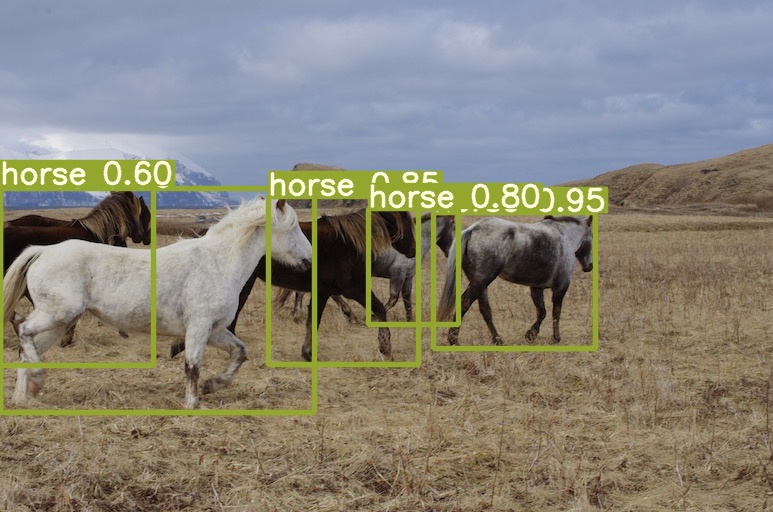
python detect.py --source inference/images/horses.jpg --cfg cfg/yolor_p6.cfg --weights yolor_p6.pt --conf 0.25 --img-size 1280 --device 0
คุณจะได้รับผลลัพธ์:
 @article{wang2023you,
  title={You Only Learn One Representation: Unified Network for Multiple Tasks},
  author={Wang, Chien-Yao and Yeh, I-Hau and Liao, Hong-Yuan Mark},
  journal={Journal of Information Science and Engineering},
  year={2023}
}








